La Suite Meet's feature list promises end-to-end encryption as coming soon, and its docs are the media server's docs
Open source video conferencing app powered by LiveKit. Built with Django and React.
At a glance
- What is it?
- An MIT video conferencing app on a Django and React stack, deployed as the French government's platform, whose compose file hardcodes development object-store credentials and rewrites the bucket's cross-origin policy on every start, and whose Makefile opens with a warning not to use it in CI.
- Who is it for?
- This is unusually well-run open-source infrastructure with an unusually thin front page. The repository carries encrypted secrets, a reproducible build, a reusable licence layout, translations and dependency automation, none of which the readme mentions.
- Can I use it commercially?
- Yes. MIT is a permissive licence: you can use, modify and sell software built on it, as long as you keep its copyright and licence notices.
- Is it still maintained?
- Yes. The repository received new commits within the last day.
- What is it written in?
- Mainly Python, according to GitHub's language statistics.
Answers come from the project's GitHub data, last synced on November 15, 2026, and from our analysis. They are not legal advice.
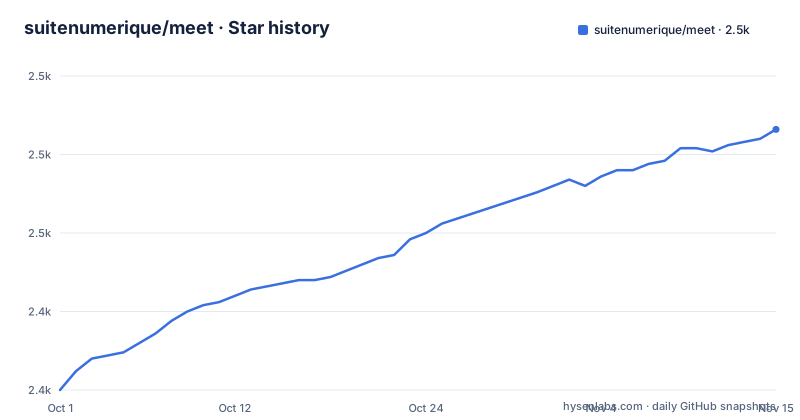
Star history
- suitenumerique/meet2,483 ★ · +83
| Repository | 2026-10-01 | 2026-11-15 |
|---|---|---|
| suitenumerique/meet | 2.4k | 2.5k |
83 Stars in the last 45 days, measured from the daily GitHub snapshot. Compare with other projects
Editorial analysis
End-to-end encryption is on the feature list as coming soon
Read the feature list as a status report rather than a brochure.
Ten items. One is marked as coming soon, and it is end-to-end encryption. One is marked as currently in beta, meeting transcription with summaries. One claims stability in meetings of more than a hundred participants, two claim non-persistent secure chat and access control, one is meeting recording, one is telephony integration, one is a customisable frontend, and then five are capabilities inherited from the media server: speaker detection, simulcast, end-to-end optimisations, selective subscription, and two modern video codecs.
So the security story in the list is: chat is non-persistent and secure, authentication and access control exist, and encryption end to end is on the way. For a product rolled out to a national public service, that ordering is the first thing a reviewer will notice, and the page does not soften it.
The note further down is consistent. It says some advanced features, naming recording and transcription as examples, lack detailed documentation, and that guides are being written. So two of the shipped features are also undocumented.
One more detail about that list. Of the five inherited capabilities, one is described as end-to-end optimisations, which is not the same thing as end-to-end encryption and sits eleven lines above it in the same list. On a page read quickly, those two lines blur together.
The documentation section says the project's docs do not exist yet
There is a heading called Docs, and it is the most honest paragraph in the readme.
It says the project is currently working on both technical and user documentation, that in the meantime many of the essential aspects are already well covered by the media server's documentation and its self-hosting guide, and that readers should stay tuned for updates.
That is a candid statement that the product's manual is the dependency's manual. For a project deployed to every public servant in a country, and self-hosted by at least two other governments according to the instances table below it, that is a large gap, and it is not a criticism of the maintainers so much as an accurate measurement of where the project is.
It also has a practical consequence for anyone evaluating it. The questions you would want the project's own documentation to answer, such as what the access model looks like, how recordings are stored, what the retention policy is, and what happens to a meeting when the object store is down, are all answered, if at all, by a document written for people deploying the media server without this application on top.
The table of contents on the page promises six sections. Three of them, Get started, Docs and Self-host, are where the substance would be, and one of those three is the paragraph above.
Six public instances, three of them governments, one reset every month
The known-instances table is the most useful thing in the readme and it is buried under a heading that invites pull requests to add more.
Six deployments are listed. Two are French government instances, both described as being for public agents working for different administrations, and both requiring the national single-sign-on to log in or sign up. One is a free and open demo open to everyone, with the caveat that its content and accounts are reset after one month. The remaining three are commercial: a company offering services around this suite of applications, a French hosting company selling a sovereign video conferencing product built on it, and a European sovereign business workspace.
That table is a genuine de-risking signal. Six organisations running the same software, two of them national, and one of them explicitly disposable so you can try it without asking anyone's permission.
It also tells you something about the audience. The public instances are government or French, and the commercial ones are all sovereignty-branded, which is the same pitch the readme leads with. The one entry that is genuinely open to anyone is also the one that resets itself, so nobody is running an open instance you can rely on for a pilot.
The table is introduced as incomplete, which is the right thing to say about a list like this.
The compose file ships default object-store credentials and rewrites bucket policy on every start
The development compose file is where this project's engineering shows, and where its sharpest edge is.
The object storage service is a single-node S3-compatible server run with a fixed access key and a fixed secret key written directly in the file, along with a fixed default bucket name for media storage. Its port is published bound to loopback, which is the correct mitigation for hardcoded credentials in a development file, and the values are obviously not meant to leave it.
The interesting part is the second service that exists only to fix the first one. A separate container runs a command-line client, waits for the object store's health check to pass, and then rewrites the bucket's cross-origin policy to allow the frontend's development origin with a small set of methods and all request headers, exposing one response header. Because the storage server denies cross-origin requests by default, the compose file has to mutate bucket policy on every start, and it does it with a container that is deleted when it finishes.
    healthcheck:
      test: [ "CMD", "/garage", "health" ]
      interval: 1s
      timeout: 20s
      retries: 300
The health check it waits on is aggressive: a sub-second interval, a twenty-second timeout, and three hundred retries. That is a five-minute window with a one-second poll, and the dependency carries a restart flag, so a cold start spends up to five minutes at one request per second before the bucket policy is applied and uploads work.
The image set mixes a moving tag, a five-year-old major version and build-time upgrades
Look at the image tags in the development compose file next to each other and they tell three different stories.
The database is on a specific major version, sixteen. The object storage server is pinned to a specific version, and the command-line client used to configure it is pinned to another specific version, which is the right practice. The mail catcher is on a moving tag, which means a fresh pull can give you a different image than yesterday.
And the cache and queue service is on version five, which is a long way behind where that project is now. For a development file that is defensible, since it only affects local work, but it does mean the version a contributor runs is not the version the project targets, and it is one line to change.
The build file is more interesting, because it is deliberate. The base image is upgraded at build time, with a comment saying it is to install security updates. That is a reasonable instinct and it has a consequence worth naming: two builds on the same commit, on different days, produce different system packages, so the image is not reproducible from the repository alone.
Everything else in the build is more careful. The dependency manager is copied from a pinned image at a specific version rather than downloaded, and the dependency install is locked twice, once without the project and once with it.
A build stage exists only to replace duplicated files with symlinks
The container build has three base images and one stage whose only job is making the final image smaller.
A Python image on Alpine is the base. One stage builds the backend and installs dependencies with a resolver copied from a pinned image and Python downloads disabled so the same interpreter is used in both stages. A second stage builds the mail service on a Node image. And a third stage, named for collecting static links, installs three system libraries for text rendering, file type detection and duplicate finding, runs the framework's static asset collection with a deliberately dummy signing key so the real secret is not needed at build time, and then runs a duplicate-file finder in symlink mode to replace repeated files with links.
That last step is the interesting one and it is commented as such. On an application image with hundreds of megabytes of collected static assets, deduplicating identical files by symlinking them is a real saving, and doing it at build time in a dedicated stage means the running image carries the result rather than the tool.
The dummy signing key is the other detail worth copying. Static asset collection refuses to run without a configured secret, so rather than requiring a real one in the build environment, the build passes a placeholder and the real value is supplied at run time. Two small decisions that together keep secrets out of the build without breaking the build.
The Makefile opens by forbidding its own use in CI, and explains why
The development Makefile starts with a banner, repeated on every line for emphasis, saying it is only for development and should not be used for continuous integration, production or anything else.
The reason is in the file. The docker user is derived by running the host's identity command twice to get the numeric user and group identifiers, and those are passed into the compose wrapper on every invocation. That is how a developer's files end up owned by them inside the container rather than by root. It also means the makefile's behaviour depends on who runs it, which is exactly the property a CI system cannot have.
So the banner is not fussiness. It is an accurate description of the file's scope.
Underneath it is a set of house rules for anyone editing the file, five numbered points, and they are unusually specific. Variables go in one section. Every new rule goes in a per-service section. Rules are sorted alphabetically. When a rule has multiple prerequisites, duplicate the rule name to add a help string and write one prerequisite per line, with the stated reason being readability and diffs.
That last convention is the one most projects would benefit from copying. One prerequisite per line turns a dependency list into a reviewable diff instead of a reflowed one.
The rest of the repository is quietly thorough in the same way: encrypted secrets, a reusable licence layout with a licences directory, translations, a public-interest software registry entry, an upgrade guide, a spell checker configuration, a commit message linter, and automated dependency updates.
Editorial conclusion
This is unusually well-run open-source infrastructure with an unusually thin front page. The repository carries encrypted secrets, a reproducible build, a reusable licence layout, translations and dependency automation, none of which the readme mentions. Two things to check before trusting it. End-to-end encryption is on the roadmap rather than shipped, and for a government conferencing product that is the first question a security reviewer will ask. And the project's own documentation is, by its own statement, the media server's documentation.
Frequently asked questions
What is La Suite Meet?
An MIT-licensed, fully self-hostable video conferencing application built on the LiveKit media server, with a Django backend and a React frontend. It runs in the browser with no installation, and since January 2026 it has been the platform behind the French government's Visio service for public servants.
Does La Suite Meet support end-to-end encryption?
Not yet: the feature list marks end-to-end encryption as coming soon. What it claims today is non-persistent secure chat, authentication and access control, plus a set of media-server capabilities including speaker detection, simulcast and selective subscription.
How do I self-host La Suite Meet?
Kubernetes is used for the production instance and Docker Compose is supported, and the community has contributed other methods including Nix and YunoHost. Detailed instructions are in the installation document inside the repository rather than on the readme.
Where is the documentation for La Suite Meet?
The readme says the project is still writing both technical and user documentation and points to the media server's documentation and self-hosting guide in the meantime. A separate note adds that recording and transcription lack detailed guides.
Which public La Suite Meet instances are listed?
Six: two French government deployments that require the national single sign-on, a free open demo whose content and accounts reset after one month, and three commercial offerings sold as sovereign or privacy-focused workspaces.
Official sources
Add this badge to your README
If you maintain this project, the badge below links readers to this analysis and shows its maintenance status from the daily GitHub snapshot. Paste the markdown into your README; add ?metric=license or ?metric=stars to the image URL for a different field.

[](https://hysenlabs.com/projects/suitenumerique-meet)Star history chart for your README
[](https://hysenlabs.com/projects/suitenumerique-meet)Was this useful?