Zui: a desktop front end for SuperDB, with the search box kept out of the way
Zui is a powerful desktop application for exploring and working with data. The official front-end to the Zed lake.
At a glance
- What is it?
- Zui is an Electron desktop application for exploring and working with data, and the official front end to the SuperDB lake, where a local server instance holds your data in pools and SuperSQL queries it. The interesting design choices are on the query side, with named queries, pinnable fragments and right-click pivoting, and the app runs against a server on your own machine rather than a remote service.
- Who is it for?
- Zui suits an analyst who has data on their own machine, whether JSON, NDJSON, Parquet or CSV, and wants to explore it with a query language and a GUI rather than a pipeline, because the local SuperDB server instance keeps the data on the machine and the app supplies the interactive layer over it.
- Can I use it commercially?
- Check first. The repository uses a licence we do not classify automatically, so read its LICENSE file before any commercial use.
- Is it still maintained?
- Yes. The repository last received commits 77 days ago.
- What is it written in?
- Mainly TypeScript, according to GitHub's language statistics.
Answers come from the project's GitHub data, last synced on November 7, 2026, and from our analysis. They are not legal advice.
Star history
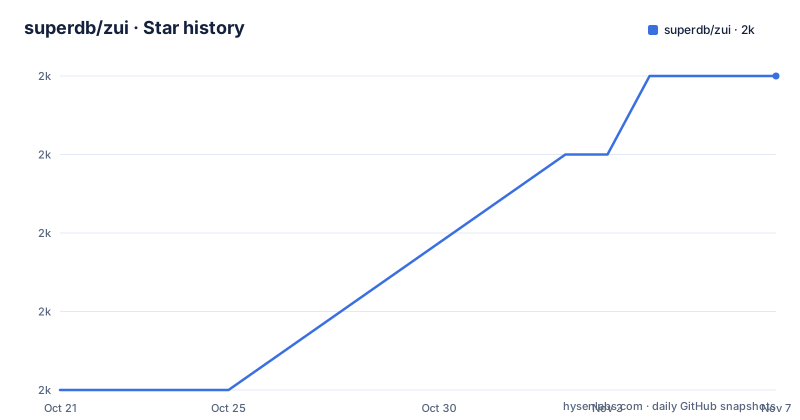
- superdb/zui1,982 ★ · +4
| Repository | 2026-10-21 | 2026-11-07 |
|---|---|---|
| superdb/zui | 2k | 2k |
4 Stars in the last 17 days, measured from the daily GitHub snapshot. Compare with other projects
Editorial analysis
A local server behind the window
The application's pitch is short: the desktop app for exploring your data.
The architecture explains why that phrase works. Behind this app runs a local server instance where you can load your data into pools and use SuperSQL to search, analyze and transform it.
That is the design decision that matters, and it cuts both ways. Because the server is local, the data does not have to leave the machine, which is the reason Zui appears in workflows dealing with security logs, change data capture from a legacy database and nested JSON exports that are not convenient to upload anywhere. Because the server is local, the app is a client for a database you run, not a hosted query service, and a colleague without the same setup sees nothing.
The data model underneath is what the README calls Super-Structured Data, and the surrounding components are described as the storage layer, the type system, the query language and the CLI tooling, all of which the README says SuperDB offers to the data community.
The list of things the README says you can use it for gives the shape of the intended work: explore deeply nested JSON objects, view Parquet and Arrow IPC stream files, clean up CSV files by adding type information, search heterogeneous NDJSON logs, transform data from a legacy database's CDC logs, and investigate Zeek security logs.
Those are not generic data analysis tasks. They are the awkward formats that fall between tools, and a tool that handles them natively has a reason to exist.
Ingest is drag and drop, and the schema arrives with the data
The highlights list starts with the part of the workflow that happens before any query.
There is drag-and-drop data ingest, and automatic detection of common data formats. Schema inference happens during ingest.
Schema inference during ingest is the part with the most leverage, and it is worth understanding why. The type system is one of the four components the README credits SuperDB with, and the storage layer sits underneath it. When a file arrives, the app works out what shape it is rather than asking you to declare it.
That is what makes the CSV cleanup case work. Adding type information to a CSV is described as a use for the tool, and the mechanism is inference rather than declaration: the app reads the file, works out the types, and the type information becomes part of the stored data.
Automatic format detection is the other half. The formats named in the use cases span NDJSON, Parquet, Arrow IPC stream files and CSV, and the topic list adds csv, json and zng. The topic list also includes the type-system and data-wrangling tags, which is a fair summary of what the ingest layer is for.
The result is a workflow where the friction moves to the query stage rather than the loading stage. That is a deliberate trade: inferring types on ingest costs some control over the schema, and a team with strong opinions about a particular column's type may find that harder to express than in a tool that asks for a schema up front.
Pinnable query fragments and named queries with history
The query features are the most distinctive part of the highlights, and they are the reason to use a desktop client rather than a command line.
There are named queries with version history, and query session history to keep track of your work. There are pinnable query fragments to keep your search box uncluttered. And there are right-click menus for pivoting and filtering.
The pinnable fragments feature addresses a problem every query tool eventually has. A SuperSQL query is long, and the interesting part of it is often a filter or a field list that you want to reuse across many queries. Pinning a fragment means the fragment lives outside the query text, and the search box shows only what is specific to this particular question.
Named queries with version history addresses a different problem. In an analysis session you iterate on a query, and the version you showed a colleague three weeks ago is not the version in the box now. Storing named queries with their history turns the query into a reviewable artefact rather than a scratchpad.
The right-click menus for pivoting and filtering are the data-visualisation bridge. The highlights also promise beautiful result views for nested or tabular data, and the topic list includes data-viz, table-view and keyword-search.
Together these are the features that make it a desktop application rather than a viewer. The trade is that each of them is a layer over the query language, and a team that wants the full expressiveness of SuperSQL will end up writing queries in a text box anyway, with the fragments and the history as conveniences around them.
A monorepo, and three packages you can use on their own
The repository is a monorepo managed with nx, and it includes several packages on which the app depends, which may also be used as standalone tools.
Three are named. superdb-types is the JavaScript library for the data types returned from a server, so it is the type surface the app and anything scripting against the lake share. superdb-node-client is the JavaScript library for Node.js, which is the programmatic way to reach the same server from a script. And player is the end-to-end testing framework for the desktop app.
The packages list is a small one, and the reason it exists is worth noting. The types package and the node client together are the seam between the GUI and the data. A team that wants to script queries against a SuperDB lake, or to type the results in an editor, needs those two, and the README is explicit that they are usable on their own.
The build scripts in the root package.json show how the monorepo is wired. The build-deps script runs nx run-many with a build target over superdb-types and superdb-node-client, and it is invoked from postinstall, so those two packages are built automatically when you install. The build script runs nx run-many over all packages, and start runs nx start on the superdb-desktop app.
The test script excludes app-player and skips the nx cache, and there are two separate end-to-end scripts, e2e and e2e:ci, both setting NODE_ENV=production, with the ci variant using nx ci. The distinction between the two is what tells you the project runs the end-to-end suite in two modes, a local one and a pipeline one.
The toolchain is yarn 4.12.0 with a .yarnrc.yml and a .yarn/ directory, nx 16.10.0 for orchestration, Jest for unit tests with both jsdom and node environments, swc for the TypeScript transform, and Prettier for formatting.
Getting it running from a checkout
The README's guidance for users is to download the app for your operating system from the download page, and to refer to the installation guide and the release notes for more information. The download link points at brimdata.io/download, and the documentation lives at zui.brimdata.io.
That is the path for someone who wants to use the tool. The repository is the path for someone who wants to work on it, and the contributing guide lives at apps/superdb-desktop/CONTRIBUTING.md.
For development, the root package.json gives the entry point.
yarn startThat maps to nx start superdb-desktop, and it depends on the two dependency packages having been built first, which the postinstall hook handles by running build-deps.
A full build of every package is a single command.
yarn buildAnd the unit tests run through the nx runner across all packages except the end-to-end player, with the nx cache skipped so a run reflects the current tree rather than a previous result.
yarn testThe directory layout explains the split between apps and packages. The workspaces field covers packages/* and apps/*, and the repository root has apps/, packages/, tools/, an nx.json, and a .yarn/ directory for the yarn 4 setup, with a .node-version file and .prettierrc and .prettierignore for formatting.
The primary language is TypeScript, and the app is an Electron application, which the topic list confirms with the electron-app tag.
Two names, one project, and a licence to check
There is an inconsistency in this repository's own naming, and anyone picking the project up should be aware of it.
The repository description calls Zui a powerful desktop application for exploring and working with data, and the official front-end to the Zed lake. The README header, however, reads SuperDB Desktop, with the line The Official Front-End to the SuperDB, and the links in that section point at superdb.org rather than the older names. The topic list carries both sets, with zui, zed, zng and zq alongside super-structured-data. The download page is still on brimdata.io and the docs are at zui.brimdata.io.
The reasonable reading is a rename in progress, from a Zed lineage to a SuperDB one, with the infrastructure URLs lagging. What that means in practice is that the release notes and the documentation site are the places to check which naming a given build follows, rather than the README alone.
The licence has the same kind of ambiguity. The overall licence is listed as a custom one that GitHub cannot classify, with a pointer to the LICENSE file, while the root package.json says MIT. For a user of the application that is unlikely to matter much. For a team that intends to use the published packages, superdb-types or superdb-node-client, in a commercial product, the file in the repository is the authority.
The release history adds a third thing to check. The tags listed are v1.18.0 from 2024-09-23, v1.17.0 from 2024-07-17 and v1.8.0 from 2024-06-23, and the last push was on 2026-08-22. So the tagged releases and the current tree are far apart, and the app you download and the code in the repository are likely at different points in the rename.
Editorial conclusion
Zui suits an analyst who has data on their own machine, whether JSON, NDJSON, Parquet or CSV, and wants to explore it with a query language and a GUI rather than a pipeline, because the local SuperDB server instance keeps the data on the machine and the app supplies the interactive layer over it. It is the wrong tool if your data lives behind a hosted service and needs to be queried from a browser on another machine, since the app is the front end to a local server rather than a hosted query endpoint. Before you rely on it, read the installation guide and the release notes, and note the naming situation, since the repository description refers to the Zed lake while the README now presents the project as SuperDB Desktop, so the download page and the docs will tell you which lineage the current build follows.
Frequently asked questions
What is Zui and what does it do?
It is a desktop application for exploring and working with data, presented as the official front end to the SuperDB lake, where a local server instance holds your data in pools and SuperSQL is used to search, analyze and transform it.
How do I install Zui?
Download the build for your operating system from the download page, then consult the installation guide and the release notes for more information. The desktop app is the primary route and the repository is for working on the source.
Does Zui send my data to a server?
No. Behind the app runs a local server instance where you load your data into pools, and the README describes the tool as a way to explore data that stays on your machine, with a flat screen simulator being the only development convenience.
What are the standalone packages in the Zui monorepo?
superdb-types, the JavaScript library for the data types returned from a server, superdb-node-client, the JavaScript library for Node.js, and player, the end-to-end testing framework for the desktop app. The README says they may also be used as standalone tools.
What query features does Zui provide?
Named queries with version history, query session history, pinnable query fragments to keep the search box uncluttered, and right-click menus for pivoting and filtering, alongside result views for nested or tabular data.
Official sources
Add this badge to your README
If you maintain this project, the badge below links readers to this analysis and shows its maintenance status from the daily GitHub snapshot. Paste the markdown into your README; add ?metric=license or ?metric=stars to the image URL for a different field.

[](https://hysenlabs.com/projects/superdb-zui)Star history chart for your README
[](https://hysenlabs.com/projects/superdb-zui)Was this useful?