Loopany, a control plane that refuses to boot on an empty database
Run your company in loops, Loop Anything
At a glance
- What is it?
- Loopany schedules recurring agent loops while keeping execution on your own machine: the server does scheduling, storage, authentication, and notifications, and a daemon on your machine runs your coding agent. The parts worth reading closely are the failure modes the project chooses deliberately, especially a boot gate that exits rather than start against an accidental empty database.
- Who is it for?
- Loopany fits a team that already runs coding agents locally and wants scheduled loops with a shared dashboard instead of a terminal, and it is a reasonable base to self-host because the database tier is a single variable. Check four things before you rely on it.
- Can I use it commercially?
- Check first. The repository uses a licence we do not classify automatically, so read its LICENSE file before any commercial use.
- Is it still maintained?
- Yes. The repository last received commits 90 days ago.
- What is it written in?
- Mainly TypeScript, according to GitHub's language statistics.
Answers come from the project's GitHub data, last synced on November 15, 2026, and from our analysis. They are not legal advice.
Star history
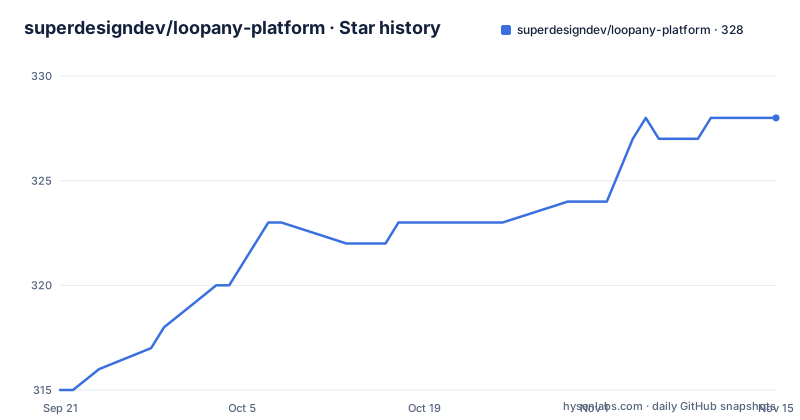
- superdesigndev/loopany-platform328 ★ · +13
| Repository | 2026-09-21 | 2026-11-15 |
|---|---|---|
| superdesigndev/loopany-platform | 315 | 328 |
13 Stars in the last 55 days, measured from the daily GitHub snapshot. Compare with other projects
Editorial analysis
The server refuses to boot rather than start empty
The Dockerfile header explains a boot gate, and it is the most considered thing in the repository.
There are two database tiers, chosen by whether DATABASE_URL is set. Set, and the server runs stateless against your own Postgres with the driver pointed at a pooler. Unset, and it runs an embedded file-backed pglite Postgres. Without either, prestart refuses to boot and exits 1, and the comment says why: so a lost DATABASE_URL secret cannot silently start an empty ephemeral database.
That is a failure mode most self-hosted services get wrong. A deploy that loses one secret still comes up, looks healthy, and quietly writes to a database nobody is reading. Here the container simply does not start, which is louder and easier to alert on.
The same reasoning shows up in the build. GIT_SHA and BUILT_AT are baked in as build arguments and surfaced at /api/health for the deploy smoke check and for drift visibility. The defaults are empty strings rather than required arguments, so a local docker build still works, and the health route reports unknown instead of guessing.
The image also keeps python3, make, and g++ in the final layer for a transitive native dependency, with a comment noting that postgres-js and pglite are pure JavaScript.
Development needs no config and the built server needs two values
The same binary behaves differently depending on how you run it, and the documentation is explicit about which is which.
The local development path is four commands:
git clone https://github.com/superdesigndev/loopany-platform
cd loopany-platform
pnpm install
pnpm dev            # http://127.0.0.1:3000
That is described as a fully working server out of the box: auth is off and the app runs open, the database is embedded pglite under the data directory, and artifact bytes are held in memory.
The built server is where the gate applies. pnpm start, Docker, and Fly all require LOOPANY_DB=pglite as an explicit opt-in before they will use the embedded tier. The development default and the production default are not the same value, and the reason is on the previous section.
Running open in development is convenient and worth stating plainly as a risk rather than a feature: auth off means any process that can reach the port can create loops and read the dashboard.
Two database URLs because migrations cannot use a pooler
The environment example explains a Postgres deployment detail that costs people an afternoon.
There are two variables and they are not interchangeable. DATABASE_URL should point at the transaction pooler on port 6543, and the driver forces prepare:false so it works through pgBouncer. DIRECT_DATABASE_URL should point at the direct session URL on port 5432, and only migrations use it.
The reason given is that DDL and the advisory lock must not travel through the pooler. Migrations take a session advisory lock, and that lock has to mean something on one connection rather than being handed between pooled ones.
Both URLs are also required to carry sslmode=require, which matters for a managed provider such as Supabase and for any remote Postgres, not only for that one vendor.
The artifact blob store follows the same pattern, with Cloudflare R2 and S3-compatible storage named as options. Development holds artifact bytes in memory, which is the tier worth understanding: a restart in development loses synced artifacts, and the object store is what makes them durable.
A tilde in the data directory creates a literal folder
One line in the environment example describes a mistake in enough detail to save you from making it.
LOOPANY_DATA_DIR must be an absolute path, because the code does not expand a tilde. The default is the home directory path, and the comment warns that leaving a tilde uncommented in the file would create a directory literally named with a tilde inside the current working directory rather than inside your home folder.
That is a shell expansion that the application never performs, so it is invisible until you look for your data in the wrong place. On Fly's pglite tier the same variable is the volume mount, which means a relative or tilde path there is not a stray folder but a volume that is not where the process thinks it is.
The variable also carries a second role. It is the server-side file state directory and it hosts the embedded pglite data directory, and the comment notes it is ignored entirely by the hosted Postgres tier. So a value that looks important locally has no effect in production, which is the opposite confusion.
Two deployment files sit at the root, fly.toml and fly.prod.toml, so the two tiers are configured in two places rather than one.
The daemon rewrites the loop that defines it
The self-improving feature is the one to read twice, because a loop that edits its own definition is a different kind of automation from a cron entry.
Evolve passes are described as periodic, and they review run history, sharpen the brief, distil state, refine the generative dashboard, tighten the contract, lower the trigger cost, and fold mechanical steps into scripts. In other words the loop gets a better specification over time rather than just accumulating output.
The feature list frames the contrast as the easy five percent versus the rest. Most coding agents can already run on a cron, and that part is the timer. What a bare loop lacks is stated as durable state and logs so it never redoes work, a verifier so there is evidence rather than impressions, and a contract and boundary that decide whether you can walk away from it.
There is a deterministic pre-stage in front of the agent for that reason. Cheap mechanical work runs first as an optional workflow body, and if it fails the run falls back to the agent with the failure as context, rather than failing the loop.
pnpm 8.15 is pinned while TypeScript asks for 6
The root package.json pins the package manager and the runtime, and both are enforced rather than suggested. packageManager is [email protected], so corepack enable picks up that exact version, and engines asks for Node 22 or newer. The Docker image matches with node:22-slim and its own corepack enable.
The development dependencies pull the other way. TypeScript is requested at ^6.0.3 and the Node types at ^25.9.3, which are current generation toolchains sitting on an older package manager. The combination works, and the frozen lockfile in the image keeps it reproducible, but the pins were clearly chosen at different moments.
The workspace scripts are thin wrappers. dev, build, start, and typecheck all filter down to the server package, typecheck runs recursively across packages, and test is the one that runs two suites in sequence, the server tests followed by the daemon tests.
The package itself is marked private at version 0.1.0, and the repository has no GitHub releases. What ships to npm is the daemon, as @crewlet/loopany, which is why the server side is something you run from a clone or from the image rather than install.
Setup is a snippet you paste into the agent
The onboarding flow hands the setup work to the tool you were trying to schedule.
Three steps. Sign in to the web app, where a new workspace opens a guided setup that is skippable at any point and re-openable from the dashboard. Create a loop, and the New loop dialog produces a connect snippet containing a server URL and a one-time connect-key. Then paste the whole snippet into your local coding agent, which connects the machine and builds the loop with you.
There is no CLI-based account binding in that path. The agent is the configuration surface, which is consistent with the whole design but means the first run depends on the agent being configured well enough to follow a snippet.
The daemon itself is a compact command surface, reachable through npx @crewlet/loopany: up and up --foreground to start polling detached or in front, status and down, log for a survey of recent runs with --transcript for the full text, new and edit for loop definitions as JSON config, and @latest update to upgrade the daemon in place.
The quickstart also says the blunt thing about deployment: for now you need at least one machine you control to run loops.
Editorial conclusion
Loopany fits a team that already runs coding agents locally and wants scheduled loops with a shared dashboard instead of a terminal, and it is a reasonable base to self-host because the database tier is a single variable. Check four things before you rely on it. That you accept an early-stage daemon running with high permissions on a machine holding your credentials, as the project states plainly. Whether your artifacts need to survive a restart, since development keeps them in memory. Which Postgres URL each setting expects, because the pooler and the direct session URL are not interchangeable. And that you have at least one always-on machine, because the server alone schedules nothing.
Frequently asked questions
What is Loop AI software, and how does loopany fit?
Loopany is a scheduling control plane for recurring agent work. The server schedules, stores, authenticates, and notifies but never runs an LLM or executes your code, and execution happens on your own machine through the @crewlet/loopany daemon talking to your local coding agent.
What is looping in software, as loopany defines it?
A loop can stay open, as a monitor or digest that runs indefinitely, or closed, meaning it completes itself when the goal is met. Loops run on cron or one-shot schedules, and the project says what a raw cron loop lacks: durable state and logs, a verifier, and a contract that decides whether you can walk away.
What is a loop in AI when used with loopany?
A recurring task you describe once, from a daily health check to a weekly research digest to a closed goal such as following up until something is fixed. Optional deterministic work runs before the agent as a pre-stage, and a pre-stage failure falls back to the agent with context.
Official sources
Add this badge to your README
If you maintain this project, the badge below links readers to this analysis and shows its maintenance status from the daily GitHub snapshot. Paste the markdown into your README; add ?metric=license or ?metric=stars to the image URL for a different field.

[](https://hysenlabs.com/projects/superdesigndev-loopany-platform)Star history chart for your README
[](https://hysenlabs.com/projects/superdesigndev-loopany-platform)Was this useful?