SuperNG6's Docker qBittorrent image: user mapping and one environment variable to get right
Docker-qBittorrent-Enhanced-Edition
At a glance
- What is it?
- This repository builds a Docker image around qBittorrent Enhanced Edition for NAS hardware, with a two-stage Alpine compile, PUID and PGID mapping, and a web port that has to agree with the published port. It is a packaging project, and most of its behaviour lives in environment variables and one shell script.
- Who is it for?
- Adopt this image if you run qBittorrent on a Synology, QNAP or similar NAS and want the Enhanced Edition build with an arm64 or armhf binary, pre-configured and with a bundled tracker list. Do not adopt it if you need a clear licence to redistribute the image, since the repository records no licence identifier, or if your users cannot reach the bundled tracker list.
- Can I use it commercially?
- Not without permission. GitHub finds no licence file in the repository, and without a licence all rights are reserved by default: you may read the code but not reuse it. Check the README, or ask the authors, before using it.
- Is it still maintained?
- Yes. The repository last received commits 34 days ago.
- What is it written in?
- Mainly Python, according to GitHub's language statistics.
Answers come from the project's GitHub data, last synced on November 7, 2026, and from our analysis. They are not legal advice.
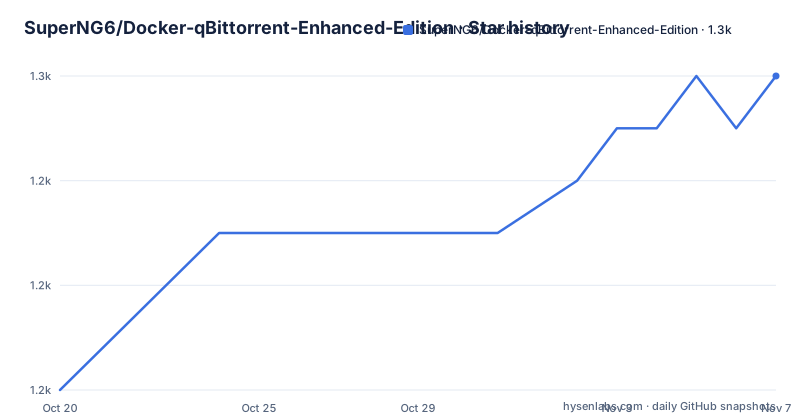
Star history
- SuperNG6/Docker-qBittorrent-Enhanced-Edition1,250 ★ · +6
| Repository | 2026-10-20 | 2026-11-07 |
|---|---|---|
| SuperNG6/Docker-qBittorrent-Enhanced-Edition | 1.2k | 1.3k |
6 Stars in the last 18 days, measured from the daily GitHub snapshot. Compare with other projects
Editorial analysis
A packaging project around a prebuilt qBittorrent binary
The repository does not build qBittorrent from source. It downloads a static build of qBittorrent Enhanced Edition and places it in an image, and the README lists the properties of that image rather than the features of the client. The stated advantages are full architecture coverage for `x86-64`, `arm64` and `armhf`, a statically compiled `qbittorrentee`, usermapping so the process runs with your own account permissions, a plain image with no extra services bundled, the `Asia/Shanghai` timezone by default, a configuration that blocks clients known to abuse peers, an optimized `conf` file that reduces manual setup, Chinese as the default language, about 400 trackers built in for use when GitHub is unreachable, automatic reporting to all tracker servers, and support for setting a custom username and password.
Two of those deserve scrutiny rather than acceptance. The usermapping claim is the one NAS operators care about most, because a torrent client writing files as root inside a container creates ownership problems on the share. The second is the claim that the image blocks clients that abuse peers. That is a behaviour of qBittorrent Enhanced Edition rather than of the packaging layer, and the README credits the upstream project for it.
The image is published to Docker Hub as `superng6/qbittorrentee`, and the README also points at a separate project of the same author's, `SuperNG6/docker-qbittorrent`, described as a Chinese-optimised edition of Docker qBittorrent.
The two-stage build fetches a binary through a shell script
The Dockerfile is short and does the work in a builder stage and a runtime stage. The builder pulls a custom Alpine base, copies in `install.sh` and the `ReleaseTag` file, installs `ca-certificates`, `curl` and `jq`, and then runs the install script.
FROM superng6/alpine:3.22 AS builder
LABEL maintainer="SuperNG6"

WORKDIR /qbittorrent

COPY install.sh /qbittorrent/
COPY ReleaseTag /qbittorrent/

RUN apk add --no-cache ca-certificates curl jq
The runtime stage is the same Alpine base. It sets the three environment defaults, copies the `root/` directory from the build context over the filesystem, copies the downloaded `qbittorrent-nox` binary into `/usr/local/bin`, adds `python3` for the search plugin support, and declares the two volumes and the exposed ports.
ENV TZ=Asia/Shanghai \
    WEBUIPORT=8080 \
    ENABLE_DOWNLOADS_PERM_FIX=true

VOLUME /downloads /config
EXPOSE 8080 6881 6881/udp
The build depends on network access at image build time, and the presence of `curl` and `jq` in the builder confirms the script downloads and parses something rather than only copying files. The `ReleaseTag` file carries the version that gets fetched, and the repository also contains a `build.sh` and a `docker-compose.yml` alongside the `Dockerfile` and `install.sh`.
Two ways to start the container, and the environment values that differ
The README gives a `docker create` form with an explicit container name, environment variables, published ports, two volumes and a restart policy:
docker create  \
    --name=qbittorrentee  \
    -e WEBUIPORT=8080  \
    -e PUID=1026 \
    -e PGID=100 \
    -e TZ=Asia/Shanghai \
    -e ENABLE_DOWNLOADS_PERM_FIX=true \
    -p 6881:6881  \
    -p 6881:6881/udp  \
    -p 8080:8080  \
    -v /配置文件位置:/config  \
    -v /下载位置:/downloads  \
    --restart unless-stopped  \
    superng6/qbittorrentee:latest
The compose file carries the same values with relative host paths:
version: "3"
services:
  qbittorrentee:
    image: superng6/qbittorrentee
    container_name: qbittorrentee
    environment:
      - PUID=1026
      - PGID=100
      - TZ=Asia/Shanghai
      - WEBUIPORT=8080
      - ENABLE_DOWNLOADS_PERM_FIX=true
    volumes:
      - ./qbittorrentee/config:/config
      - ./qbittorrentee/downloads:/downloads
    ports:
      - 6881:6881
      - 6881:6881/udp
      - 8080:8080
    restart: unless-stopped
The PUID and PGID values in both examples are placeholders. The README explains how to get real ones: connect to the NAS over SSH as the user you want the process to run as, and run `id 你的用户id` to read the UID and GID, then enter those numbers in the environment. The Synology section also asks you to adjust permissions on the root of the config folder and the root of the download folder, removing the management permission and leaving only write and read.
On the web port, the README is insistent that the value must be consistent: the `-p 8080:8080` mapping, the container port and the `WEBUIPORT` variable all have to agree, otherwise the interface cannot be reached.
ENABLE_DOWNLOADS_PERM_FIX and the s6-overlay retreat
The permission fix is controlled by a single variable, `ENABLE_DOWNLOADS_PERM_FIX`, which the Dockerfile sets to `true` by default. The changelog entry for 2025/03/11 states that when the value is `=true` the `/downloads` folder has its permissions fixed, and when it is `=false` that step is skipped. An earlier entry, dated 2025/02/18, says the image now runs `chown` on `/config` and `/downloads` by default, to avoid read and write problems for users who are not familiar with the setup.
The same 2025/02/18 entry records a retreat: s6-overlay was rolled back from V3 to V2, with the reason given as "V3 is too complicated". The 2024/09/10 entry says the opposite direction, that s6-overlay V3 was introduced, and it also records the addition of a healthcheck script, credited to a contributor. The presence of both directions in the history tells you the init layer has been swapped more than once, which matters when you are debugging a container that will not start.
The password story is documented in two places and the two do not agree. The 2024/09/10 changelog introduces four password environment variables: `WEB_PASSWORD` for the plain password, `WEB_PASSWORD_FILE` pointing at a secrets file, and `WEB_PBKDF2_PASSWORD` and `WEB_PBKDF2_PASSWORD_FILE` for the hashed variants. The variable table in the README says the default user is `admin` and that the default password is randomly generated, so you check the container log on first start. The Synology section instead says the default credentials are `admin` and `adminadmin`. Treat the generated password as the real one and change it either way.
Disabling the web protections to reach the interface from outside
When the web port on the host differs from the port inside the container, the README tells you to turn off three protections in the configuration file. It states that the default configuration already has them disabled, and that you should close them manually if they are on. The three settings are:
WebUI\CSRFProtection=false
WebUI\ClickjackingProtection=false
WebUI\HostHeaderValidation=false
This is worth reading carefully rather than pasting blindly. CSRF protection, clickjacking protection and host header validation are the three checks that stop a web page you visit from driving your torrent client, and they are the checks that matter most when the client is reachable from a browser on another network. The stated reason for turning them off is a mismatch between the port you publish and the port the client expects, and the README says the image ships with them already off.
The honest framing is that this image is tuned for a NAS on a home network where the web interface is trusted, not for an interface exposed to the internet. A published port on a public address with the host header check disabled is a different security posture from the one the client offers by default.
The bundled tracker list and the search plugin layout
Two features come from files rather than from the client. The first is the tracker list: the changelog for 2020/01/12 says that alongside automatic tracker updates, more than 400 trackers are built in and enabled by default, so they can be used when the connection to GitHub is a problem. The README credits the `ngosang/trackerslist` project. The 2020/01/06 entry adds that the tracker list is downloaded and updated automatically, and that the configuration was modified to reduce manual settings. The `curl` and `jq` packages in the builder stage are consistent with fetching and parsing a list at build time.
The second is the search plugin layout. The README documents it under the heading for search, telling you to open the view and the search engine settings. Some plugins from `plugins.qbittorrent.org` are included in the image. A fresh installation enables only the plugins that ship with the client plus one Chinese-language search plugin, and the rest are enabled from the plugin list in the interface. Some plugin sites need to be reachable directly.
The Jackett path is documented with a specific requirement: the Jackett plugin needs a `jackett.json` file placed at `config/qBittorrent/data/nova3/engines`, and the plugin needs the API key of a Jackett service. The README notes that a Docker-based Jackett can be run for this, naming `linuxserver/jackett` as an example. The `python3` package in the runtime image is there for the plugin support.
No licence identifier, and a changelog that documents the trade-offs
The repository records no licence for the packaging work, so the terms that apply to the image you build or redistribute are not stated in the files provided. The components it assembles carry their own terms, but that is a separate question from the terms of this repository. If you intend to publish a derivative image internally, that gap has to be resolved by asking the author, not by inference from the presence of a `LICENSE` file elsewhere in the ecosystem.
Maintenance, by the repository's own record, is active: the last push was on 2026-10-05, and the release tags follow the client version, with 5.2.4.10 published on 2026-10-05, 5.2.3.10 on 2026-07-19 and 5.2.1.10 on 2026-05-31. The version numbers track qBittorrent Enhanced Edition releases, so an upgrade means pulling a new image rather than reconfiguring the container. The changelog also shows the base image being updated repeatedly, most recently on 2025/08/17 alongside the addition of `curl`, which is a signal that this image is maintained on a build cadence rather than a one-off snapshot.
The pattern across the history is worth noting for expectations. The image follows upstream client releases closely, occasionally rewinds its own infrastructure choices, and keeps shipping on arm hardware, where a self-compiled client would be a recurring burden for a NAS owner.
Editorial conclusion
Adopt this image if you run qBittorrent on a Synology, QNAP or similar NAS and want the Enhanced Edition build with an arm64 or armhf binary, pre-configured and with a bundled tracker list. Do not adopt it if you need a clear licence to redistribute the image, since the repository records no licence identifier, or if your users cannot reach the bundled tracker list. Before the first run, confirm that the WEBUIPORT value, the published port and the container port all carry the same number, and set PUID and PGID to the values your own `id` command prints, not the example values in the compose file.
Frequently asked questions
How do I set the user and group for the SuperNG6 qBittorrent container?
Log in over SSH as the account you want the process to use and run `id 你的用户id` to read the UID and GID, then pass them as the `PUID` and `PGID` environment variables. The README gives 1026 and 100 in the examples, but those are placeholders from the author's own setup.
Why can I not reach the web interface after starting the container?
The README states that the published port, the container port and the `WEBUIPORT` environment variable must all carry the same number, otherwise the interface cannot be reached. It also notes that when the host and container ports differ, three web protections have to be turned off in the configuration file.
What does ENABLE_DOWNLOADS_PERM_FIX do in the qBittorrent image?
When it is `=true`, the changelog for 2025/03/11 says the permissions of the `/downloads` folder are repaired; when it is `=false` that step is skipped. The variable defaults to `true` in the Dockerfile.
Which CPU architectures does the image support?
The README's architecture table lists `x86-64`, `arm64` and `armhf`, all published under the `latest` tag, and the project states that it supports Synology and QNAP style NAS platforms on those architectures.
Official sources
Add this badge to your README
If you maintain this project, the badge below links readers to this analysis and shows its maintenance status from the daily GitHub snapshot. Paste the markdown into your README; add ?metric=license or ?metric=stars to the image URL for a different field.

[](https://hysenlabs.com/projects/superng6-docker-qbittorrent-enhanced-edition)Star history chart for your README
[](https://hysenlabs.com/projects/superng6-docker-qbittorrent-enhanced-edition)Was this useful?