MonitoRSS: a self-hosted feed bot that turns RSS into Discord channels
MonitoRSS RSS bot (formerly known as Discord.RSS) with customizable feeds. https://monitorss.xyz
At a glance
- What is it?
- MonitoRSS, formerly Discord.RSS, is a self-hostable service that fetches RSS feeds and posts them into Discord channels, and its v7 rewrite is a multi-service architecture with MongoDB, Postgres, Redis, RabbitMQ and a Discord REST listener. It suits a community that wants its own feed reader inside Discord, and the migration from v6 is a real data move rather than a config change.
- Who is it for?
- MonitoRSS fits a Discord community that wants feeds delivered into channels under its own control, since self hosting means the fetch behaviour, the filters and the retention are yours rather than a hosted service's. Skip it if you only need one feed in one channel, since the public instance at monitorss.xyz is free and the deployment here is substantial, and expect real work if you are coming from v6, because the migration involves a separate repository and a data move.
- Can I use it commercially?
- Yes. MIT is a permissive licence: you can use, modify and sell software built on it, as long as you keep its copyright and licence notices.
- Is it still maintained?
- Yes. The repository last received commits 7 days ago.
- What is it written in?
- Mainly TypeScript, according to GitHub's language statistics.
Answers come from the project's GitHub data, last synced on November 7, 2026, and from our analysis. They are not legal advice.
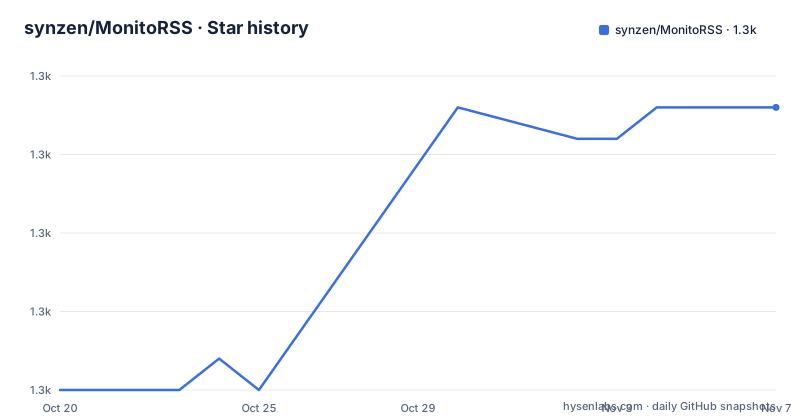
Star history
- synzen/MonitoRSS1,299 ★ · +9
| Repository | 2026-10-20 | 2026-11-07 |
|---|---|---|
| synzen/MonitoRSS | 1.3k | 1.3k |
9 Stars in the last 18 days, measured from the daily GitHub snapshot. Compare with other projects
Editorial analysis
What the service does, and the v7 shape
MonitoRSS is an RSS bot, formerly known as Discord.RSS, and it delivers highly customized news feeds to Discord.
The word customised is the one to hold on to. This is not a feed reader that dumps every item into a channel. The project's history is in its name change, and the v7 release history shows the scale of what is here: 7.2.0 in February 2026, 7.3.0 in May, 7.4.0 in July.
The v7 architecture is visible in the repository root, and it is a polyglot one. There are five npm workspaces, `packages/contracts`, `packages/logger`, `services/backend-api`, `services/bot-presence`, `services/discord-rest-listener`, `services/feed-requests`, `services/user-feeds-next` and an `e2e` workspace. The services are separate deployable units, not directories of one application.
The compose file names them, and each has a clear job. `bot-presence-service` and `feed-requests-service` and `discord-rest-listener-service` are the application services, each pulling its own image from GitHub Container Registry with the version tag substituted, and each running a Node entry point. Alongside them sit the stateful dependencies, `mongo`, `feed-requests-redis-cache`, `rabbitmq-broker` and `feed-requests-postgres-db`.
So the pieces are a bot presence service that keeps the Discord bot's status visible, a feed requests service that does the fetching, a Discord REST listener that consumes Discord events over HTTP rather than a gateway, a user feeds service that owns the per-user subscriptions, and a backend API that the control panel talks to. The RabbitMQ broker sits between them, and Redis caches feed requests, and MongoDB holds the subscription data while Postgres holds request history and delivery logs.
That is a lot of infrastructure, and it is the honest cost of a service that has to poll many feeds on behalf of many users on a schedule, deliver to Discord, and survive both of those.
Self hosting, and the two notes about losing data
Docker is required to easily coordinate and run multiple services at once, and the documentation carries two notes that are worth reading before you start rather than after.
The first is about Docker itself. General knowledge of how Docker, Docker volumes, and docker compose works is highly recommended to avoid accidental data loss. That is an unusual thing to put in a setup guide, and it is there because the stateful services are volumes, and a mistaken `docker compose down -v` or a rebuild without the volumes will take the subscriptions with it.
The second is about the database, and it is the more surprising one. Request history and delivery logs stored in PostgreSQL are not meant to be persistent forever, and they may be removed when PostgreSQL versions are upgraded.
That tells you something about how the data is divided. The durable part, the feed subscriptions themselves, lives in MongoDB, and the Postgres database holds operational history, the record of what was requested and what was delivered, which is the part you can live without and the part that would be expensive to keep forever.
The `.env.example` file confirms the split with `BACKEND_API_MONGODB_URI=mongodb://mongo:27017/rss` and a separate Postgres service, and it also shows the retention knobs. `USER_FEEDS_DELIVERY_RECORD_PERSISTENCE_MONTHS=1` and `USER_FEEDS_ARTICLE_PERSISTENCE_MONTHS=12`, so delivery records are kept a month and articles a year. Those are the knobs to turn down if the volume is a problem.
The setup sequence is long and mostly about credentials, and the steps are numbered. Install Docker Engine and Docker Compose. Clone the main branch. Create a Discord application through the developer portal. Copy `.env.example` to `.env` and fill in the values: the MongoDB URI if you have your own instance, the bot token, the client ID and the client secret, a random 64-character session secret, a random 16-character session salt, and the OAuth2 redirect URI, which is `http://localhost:8000/api/v1/discord/callback-v2`.
One of those steps has a piece of etiquette in it that is easy to miss. You add your email at the end of `FEED_REQUESTS_FEED_REQUEST_DEFAULT_USER_AGENT` for feed hosts to be able to contact you if you violate their usage policies, with the example `MonitoRSS [Self-Hosted]/1.0 [email protected]`. A self-hosted fetcher is the fetcher's own problem, and identifying yourself is the difference between a service that gets blocked and one that gets an email.
The control panel, the domain, and the optional integrations
Once the containers are up, the control panel is reached at http://localhost:8000, and the documentation's next section is about giving it a domain.
The domain steps are three. Set up the domain to point at the server running the control panel on localhost. Update all references to `http://localhost:8000` in the `.env` to the new domain. And add `{DOMAIN_HERE}/api/v1/discord/callback-v2` to the list of redirect URIs in the Discord application, replacing the placeholder with the domain you set.
That third step is the one that catches people, and it is the same step again in the Reddit setup. The OAuth2 redirect URI has to be registered with Discord and with Reddit, and the domain in the panel and the domain registered with the provider have to be the same string.
Email notifications are optional and exist for a specific purpose: to notify you when feeds are disabled for various reasons such as permission errors and request errors. The three SMTP variables are the host, the username and the password, and you also need exactly one of two sender settings, with the configuration validation failing on boot if SMTP is configured without one of them.
The recommended one is `BACKEND_API_SMTP_FROM_DOMAIN`, a sending domain only, for example mydomain.com, because MonitoRSS sends from distinct per-purpose addresses on that domain, such as `[email protected]` for feed and connection alerts and `[email protected]` for email verification. The alternative is `BACKEND_API_SMTP_FROM`, a full RFC 5322 sender, used verbatim for every outbound email, and the documentation says to use it only if your SMTP provider restricts you to a single fixed sender address. It takes precedence over the domain setting.
The Reddit integration is the same shape as the Discord one. Create a Reddit application as a web app, add the callback URI, then set `BACKEND_API_REDDIT_REDIRECT_URI`, `BACKEND_API_REDDIT_CLIENT_ID` and `BACKEND_API_REDDIT_CLIENT_SECRET`. There is also `BACKEND_API_ENCRYPTION_KEY_HEX`, a random 64-digit hexadecimal string, and the documentation links an online generator for one.
The Reddit path is there because Reddit restricts anonymous access to its API, so a bot that fetches on behalf of a user needs the user's own authorisation. That is why it is per-user and why it needs its own application registration rather than sharing one.
Updating, and what a major version costs
Releases follow semantic versioning and are published on the Releases page, and the update procedure is five steps with a strong emphasis on the backup.
Back up your MongoDB data as a precaution, with the note that regular backups are a good idea regardless. Then stop the containers with `docker compose rm --stop -f`. Set your desired version in the `.env` file by updating `MONITORSS_VERSION`, with the example `MONITORSS_VERSION=7` for version 7. Pull the latest images with `docker compose pull`. And start the containers with `docker compose up -d`.
The version variable is a single number in the environment file and the compose file substitutes it into every image tag, which is why updating is a pull rather than a rebuild. The compose file also notes that to update to a specific version you add `MONITORSS_VERSION` to your `.env.prod` file, for example `MONITORSS_VERSION=7.0.1`, and that for major version updates, such as 7 to 8, you should run `git pull` first to get the latest docker-compose changes.
That last detail is the important one and it separates a patch from a major. A patch is an image pull. A major version may change the application and the Docker compose files, and the compose file itself lives in the repository, so it has to be updated alongside the images. The documentation is explicit that breaking changes to either the application and the Docker compose files may happen between major versions, and to check the Releases page for instructions on upgrading major versions.
That is the pattern for a service that stores user data in a volume and talks to external APIs, where a major version is a migration, and the Releases page is the only place the migration steps live.
The migration from v6 is called out separately, and it is a genuine move rather than an upgrade. If you have been using MonitoRSS v6, which was the repo at github.com/synzen/MonitoRSS-Clone, the instructions are to migrate off that repo to use the latest changes, and it is recommended that you do not delete your v6 files until you have confirmed that all your feeds are working as expected post-migration. You follow the self host instructions, being sure to clone the main repo, since the clone repo is no longer used or maintained, you set `BACKEND_API_MONGODB_URI` in your `.env` to your MongoDB URI, and then run `docker compose --parallel 1 up -d --build`.
The service layout, and how the e2e suite is organised
The repository root shows the operational surface, and there are a few files worth understanding.
There are separate compose files for the base configuration, `docker-compose.base.yml`, which every service extends, and then `docker-compose.yml` for production, `docker-compose.dev.yml` for development and `docker-compose.e2e.yml` for the end to end environment. The extends pattern is why the service definitions in the production file are short, they are mostly an image tag and a command on top of a shared base.
The infrastructure has its own configuration files at the root, `redis.conf` and `elasticmq.conf`, the latter being the configuration for a RabbitMQ-compatible queue broker run in ElasticMQ. And there is `rs-initiate.js`, which is a script for initialising Redis, probably a sentinel or a stream setup.
The end to end tests have their own workspace and their own runner, and the scripts are worth reading because they show how the team runs them. `e2e` runs `tsx e2e/scripts/run-e2e.ts`, `e2e:doctor` runs the same with `--doctor`, which sounds like a diagnostic mode that checks the environment before running, and then there are two project-specific variants, `e2e:paddle` with `--project=e2e-paddle` and `e2e:web` with `--project=e2e-web`.
So the test suite is split by project, and the project names hint at what is being covered. There is a `bot.code-workspace` at the root, which is a VS Code workspace file for the bot service, and `dev.ps1`, a PowerShell script for the development loop on Windows, which is a small detail that says who develops this and on what.
The `skills-lock.json` file is another recent addition, and it points at the same trend visible elsewhere in the ecosystem, where a repository carries instructions for coding agents.
The root package.json is a workspace root with no application code of its own. The build script runs the build for the contracts and logger packages, and everything else delegates to a workspace. The e2e workspace holds the test runner, and there is no test script at the root, which means the individual services carry their own.
Editorial conclusion
MonitoRSS fits a Discord community that wants feeds delivered into channels under its own control, since self hosting means the fetch behaviour, the filters and the retention are yours rather than a hosted service's. Skip it if you only need one feed in one channel, since the public instance at monitorss.xyz is free and the deployment here is substantial, and expect real work if you are coming from v6, because the migration involves a separate repository and a data move. Before you deploy, read the two notes about Docker volumes and about PostgreSQL data not being persistent forever, since both affect what you can lose. The last push was on 2026-10-13 with version 7.4.0 released on 2026-07-05.
Frequently asked questions
What does MonitoRSS do?
It delivers highly customized news feeds to Discord, fetching RSS on a schedule and posting items into channels, with per-user feed management, email notifications on feed failures and optional Reddit authorisation.
How do I self host MonitoRSS?
Install Docker Engine and Docker Compose, clone the main branch, create a Discord application, copy `.env.example` to `.env` and fill in the bot token, client ID, client secret, session secret and salt plus the OAuth2 redirect URI, then run `docker compose up -d` and open the control panel at http://localhost:8000.
Which data stores does MonitoRSS use and which is not persistent forever?
MongoDB holds the feed subscriptions, while request history and delivery logs live in PostgreSQL and are not meant to be persistent forever, and they may be removed when PostgreSQL versions are upgraded. Delivery records are kept for one month and articles for twelve by default.
How do I update a self hosted MonitoRSS?
Back up MongoDB, stop the containers with `docker compose rm --stop -f`, set MONITORSS_VERSION in the `.env` file, pull the images with `docker compose pull` and start again with `docker compose up -d`. For a major version, run `git pull` first to get the latest compose changes and check the Releases page.
Can I use MonitoRSS without hosting it myself?
Yes, the publicly hosted instance is free at monitorss.xyz. Self hosting is only needed if you want your own instance and control over the data, and the project is MIT licensed with the last push on 2026-10-13.
Official sources
Add this badge to your README
If you maintain this project, the badge below links readers to this analysis and shows its maintenance status from the daily GitHub snapshot. Paste the markdown into your README; add ?metric=license or ?metric=stars to the image URL for a different field.

[](https://hysenlabs.com/projects/synzen-monitorss)Star history chart for your README
[](https://hysenlabs.com/projects/synzen-monitorss)Was this useful?