GPT-Load: one AccessKey in front of every AI channel you own
A self-hosted AI gateway for multi-channel, multi-credential setups, unifying API keys and subscription accounts with scheduling, failover, request logs and usage tracking.
At a glance
- What is it?
- GPT-Load is a self-hosted Go gateway that puts OpenAI, Anthropic and Gemini clients behind a single base URL and AccessKey, with weighted scheduling, cooldown and blacklisting behind it. The 2.0 line is still release candidates, and the OAuth callback ports are fixed, so read the deployment details before you plan around it.
- Who is it for?
- Adopt GPT-Load if you hold several provider keys or subscription accounts and want one place to rotate them, watch traffic and cut over without redeploying clients. Hold off if you cannot accept a release candidate line as your production build, if the three fixed OAuth callback ports collide with something already on your host, or if you have no way to back up `encryption.key` alongside the database.
- Can I use it commercially?
- Yes. MIT is a permissive licence: you can use, modify and sell software built on it, as long as you keep its copyright and licence notices.
- Is it still maintained?
- Yes. The repository received new commits within the last day.
- What is it written in?
- Mainly Go, according to GitHub's language statistics.
Answers come from the project's GitHub data, last synced on November 13, 2026, and from our analysis. They are not legal advice.
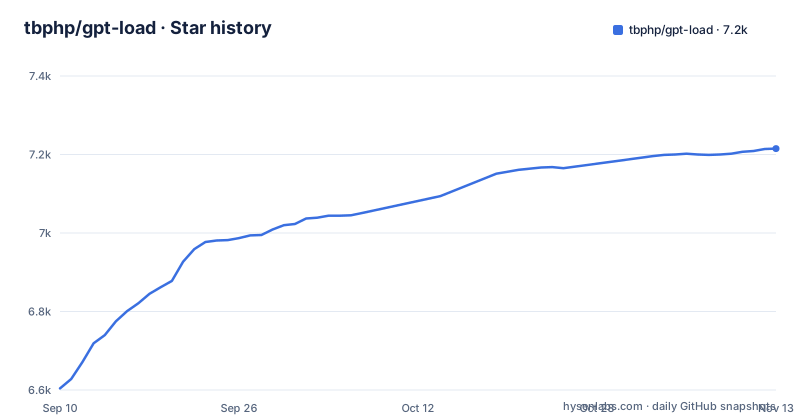
Star history
- tbphp/gpt-load7,215 ★ · +611
| Repository | 2026-09-10 | 2026-11-13 |
|---|---|---|
| tbphp/gpt-load | 6.6k | 7.2k |
611 Stars in the last 64 days, measured from the daily GitHub snapshot. Compare with other projects
Editorial analysis
One AccessKey sits in front of Codex, Claude, Antigravity and Grok channels
The design decision that shapes everything else is that your application is configured with one base URL and one AccessKey, and nothing else. Everything behind that pair, which upstream service, which account, which model and which routing policy, is configured in the management UI rather than in your code. The channels are not all the same shape. Codex, Claude, Antigravity and Grok channels go through an OAuth flow or an import of credentials, while plain API-key channels take keys directly, and both kinds share the same credential store, the same scheduler and the same health handling. On the client side the promise is that your code keeps speaking its native dialect: OpenAI, Anthropic or Gemini request formats pass through untouched, so a switch of provider behind the gateway is invisible to the code that calls it. That is the difference from a hosted relay, which is one more vendor in the chain rather than a component you run and inspect.
The jump from 1.x to 2.0 is a fresh install, not a migration
The first warning in the quick start is the one most people should read twice: 2.0 cannot open, import, or migrate 1.x data in place. There is no in-place upgrade path. Starting on 2.0 from scratch needs Docker and Docker Compose, and the repository copy plus a Compose start is all of it:
git clone --depth 1 https://github.com/tbphp/gpt-load.git
cd gpt-load

cp .env.example .env
docker compose up -d
After that the service answers on port 3001, and the first start writes a management key you read out of the data directory:
docker compose exec gpt-load sh -c 'cat /app/data/auth.key'Configuration then takes three steps: add a channel, create a group that names the channel and its runtime policy, then create an AccessKey that fixes which groups and client protocols your application may use. The AccessKey is what your code sees, and the group is where scheduling lives, so a group change can alter routing without touching a single client. If you are running 1.x today, read the README's Moving from 1.x section before you plan the switch. The releases make the same point from the other side: the three most recent tags are v2.0.0-rc.59 on 2026-11-01, v2.0.0-rc.58 on 2026-10-29 and v2.0.0-rc.57 on 2026-10-28, so the 2.0 line is release candidates rather than a settled major version, with the last push to the default branch on 2026-11-02. The published container tag is `ghcr.io/tbphp/gpt-load:2`, a floating major tag, which means a pull can hand you a different build than the one you tested.
OAuth callbacks arrive on three ports you do not get to choose
The Codex, Claude and Antigravity OAuth clients use fixed callback ports, and Compose publishes 1455, 54545 and 51121 for them. The address those ports bind to comes from `OAUTH_CALLBACK_BIND_ADDRESS`, falling back to `HOST`, which defaults to `127.0.0.1`. Set `HOST=0.0.0.0` and the same three ports are published on every host interface. Because the ports are fixed by the upstream clients, only one default instance can do this on a given host, and a second copy needs different host addresses or a different machine. That is a real constraint for anyone running a gateway per environment on one box. It also means the choice between loopback and all interfaces is not only about your own API: the OAuth callback listeners ride along on the same switch unless `OAUTH_CALLBACK_BIND_ADDRESS` is set, so a host exposed to the network exposes three more inbound ports. The main service port is separately controllable through `BIND_ADDRESS` and `PORT`, both defaulting to the loopback address on 3001.
Losing encryption.key leaves every stored credential unreadable
Credentials are encrypted locally, and the encryption key lives in a file next to the data. `.env.example` sets `AUTH_KEY` and `ENCRYPTION_KEY` empty by default, which means generated `auth.key` and `encryption.key` files inside `DATA_DIR`, and it says plainly to back up `encryption.key` with the database: losing it makes credentials unreadable. That sentence carries more weight than it looks. The database holds the channel definitions, the keys, the routing rules and the request logs, and the encryption key is what makes the credentials column meaningful. A database backup without the key is a backup of metadata. A key without the database is nothing at all. The data lives in a named volume, `gpt-load-data`, mounted at `/app/data`, so it survives container replacement, and the storage layer accepts SQLite, MySQL or PostgreSQL through `DATABASE_DSN`, which falls back to `${DATA_DIR}/gpt-load.db` when left empty. Plan the backup as a pair of files, not a single dump.
Weights, cooldown, blacklisting and session affinity are the failover story
What separates this gateway from a static round-robin list is the set of knobs available on a group: multi-credential scheduling, configurable weights, retries, cooldown, blacklisting, and session affinity. Weights decide how traffic divides across keys you consider equivalent. Cooldown takes a failing credential out of rotation for a while instead of retrying it on every request. Blacklisting is the harsher version, and session affinity keeps a conversation pinned to the credential that started it, which matters when an upstream caches or rate limits per account. Retry counts matter most on subscription accounts, where a hard rate limit looks like a failure but is really a quota boundary. The management UI exposes health, routes, logs, usage and cost estimates for each channel, so you can see which credential absorbed what.
HOST is the switch that changes what your firewall sees
Client IP handling is the other place where a default quietly becomes a decision. `CLIENT_IP_HEADER` is empty by default, which means the connection IP is used; the examples given are `X-Forwarded-For` and `CF-Connecting-IP`, and invalid or missing values fall back. `TRUSTED_PROXIES` is an optional comma-separated list of proxy IPs or CIDRs. Empty means the selected header is trusted directly, which assumes your proxy overwrites or sanitizes it. With a list, only matching peers may supply the header, and `X-Forwarded-For` is scanned right to left for the first untrusted address, or the leftmost when everything is trusted. Every one of those lines says restart after changes. Behind a reverse proxy this is the difference between accurate request logs and logs your clients could have written themselves. Set the header and the proxy list together, then confirm the address the console shows matches the client you expect.
Building from source pulls in Node, pnpm and a Go toolchain
The Compose file pulls a published image, so the toolchain only matters if you want your own binary, and it is worth knowing what that costs. The Dockerfile has three stages. A Node stage on `node:24.18.0-alpine3.24` enables corepack, installs `[email protected]` globally, and builds the web console, which is then copied into the Go stage as `internal/webui/dist`. A Go stage on `golang:1.27.3-alpine3.24` sets `CGO_ENABLED=0`, downloads modules, and builds a static binary with the version stamped through ldflags. The runtime stage is `alpine:3.24.1` with a pinned `libcrypto3`, a non-login user at uid 10001, and the working directory at `/app`. Because the console is a compiled asset inside the binary, there is no separate front end to deploy and no CDN in the request path. Two build inputs are worth flagging: `go.mod` requires Go 1.27.3, and it embeds `CLIProxyAPI/v8` including a `gptload-embedded` module, so the upstream proxy is vendored rather than called.
A native service path sits next to the Compose file, and a voice relay is opt-in
The repository root carries more than the container story. `main.go`, `runtime.go` and `service_cli.go` sit beside `service_manager_windows.go`, `service_nonwindows.go`, `service_wait.go` and their tests, so the binary has a first-class service mode and a Windows-specific manager, not only a container entry point. That matters for teams whose change windows forbid containers. There is also `docker-compose.voice.yml`, a separate overlay for voice relay rather than direct media, and `.env.example` notes that Codex voice defaults to direct media, with a choice of Off, Direct or Relay. The proxy variables at startup are `HTTP_PROXY`, `HTTPS_PROXY` and `NO_PROXY`, all commented out, and they apply at boot only, like the client IP settings. Timing is spelled out in the same file: `READ_TIMEOUT=60`, `IDLE_TIMEOUT=120`, `GRACEFUL_SHUTDOWN_TIMEOUT=10` seconds, and `CONTAINER_STOP_GRACE_PERIOD=15s`, which is longer than the shutdown timeout on purpose. The health check probes `/health` every 30 seconds with a 10 second timeout, three retries and a 40 second start period.
Editorial conclusion
Adopt GPT-Load if you hold several provider keys or subscription accounts and want one place to rotate them, watch traffic and cut over without redeploying clients. Hold off if you cannot accept a release candidate line as your production build, if the three fixed OAuth callback ports collide with something already on your host, or if you have no way to back up `encryption.key` alongside the database. Before you start, read what `HOST=0.0.0.0` publishes that the default does not, and confirm that losing `encryption.key` is a state your operators can recover from.
Frequently asked questions
Can GPT-Load migrate my 1.x data to 2.0?
No. The quick start warns that 2.0 cannot open, import, or migrate 1.x data in place, so read the README's Moving from 1.x section before you switch.
Which databases can GPT-Load use?
SQLite, MySQL or PostgreSQL. `DATABASE_DSN` is empty in `.env.example`, which makes the service fall back to `${DATA_DIR}/gpt-load.db`, a SQLite file.
Where do I get the management key for GPT-Load?
The first start generates one. You read it with `docker compose exec gpt-load sh -c 'cat /app/data/auth.key'`, or you set `AUTH_KEY` in `.env` before starting.
What happens if I lose encryption.key?
Stored credentials become unreadable, so the file has to be backed up together with the database. Both keys are generated into `DATA_DIR` when `AUTH_KEY` and `ENCRYPTION_KEY` are left empty.
Does GPT-Load listen on the network by default?
No. `HOST` defaults to `127.0.0.1`, so the service stays on loopback. Setting `HOST=0.0.0.0` also publishes the OAuth callback ports 1455, 54545 and 51121 on every interface.
Official sources
Where developers are discussing it
Posts on Hacker News, dev.to and Lobsters that link to this repository, found by our scan of those communities. 0 in the last 30 days; newest first.
- Show HN: GPT-Load – A self-hosted AI gateway with reversible redactionHacker News · Oct 13, 2026 · 1 points · 1 comments
Add this badge to your README
If you maintain this project, the badge below links readers to this analysis and shows its maintenance status from the daily GitHub snapshot. Paste the markdown into your README; add ?metric=license or ?metric=stars to the image URL for a different field.

[](https://hysenlabs.com/projects/tbphp-gpt-load)Star history chart for your README
[](https://hysenlabs.com/projects/tbphp-gpt-load)Was this useful?