TensorFlowASR: Conformer, ContextNet and DeepSpeech2 on TensorFlow 2.19, and the install traps around them
:zap: TensorFlowASR: Almost State-of-the-art Automatic Speech Recognition in Tensorflow 2. Supported languages that can use characters or subwords
At a glance
- What is it?
- TensorSpeech/TensorFlowASR is a Python toolkit for training and serving speech recognition models on TensorFlow 2. This piece covers its model families, uv-based install, TPU and Docker paths, and the version pins that decide whether it runs on your machine.
- Who is it for?
- Choose TensorFlowASR if you want to train or fine-tune Conformer, ContextNet, RNN Transducer, DeepSpeech2 or Jasper models in TensorFlow and export them to TFLite. Avoid it if you need a PyTorch stack, Windows support, or a prebuilt model you can download in one step.
- Can I use it commercially?
- Yes. Apache-2.0 is a permissive licence: you can use, modify and sell software built on it, as long as you keep its copyright and licence notices.
- Is it still maintained?
- Yes. The repository last received commits 11 days ago.
- What is it written in?
- Mainly Python, according to GitHub's language statistics.
Answers come from the project's GitHub data, last synced on November 25, 2026, and from our analysis. They are not legal advice.
Star history
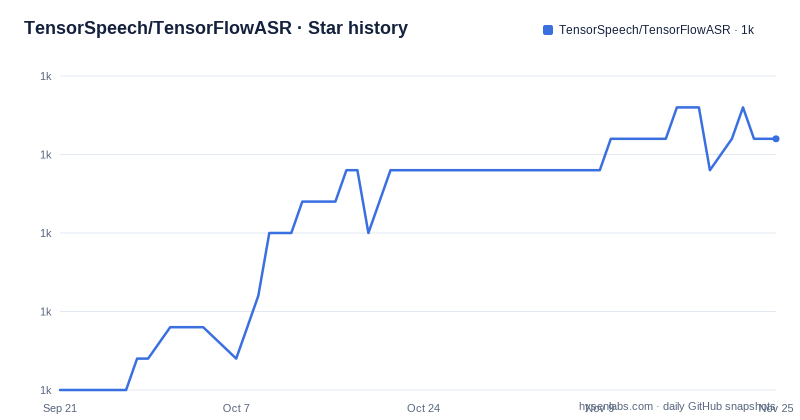
- TensorSpeech/TensorFlowASR1,018 ★ · +8
| Repository | 2026-09-21 | 2026-11-25 |
|---|---|---|
| TensorSpeech/TensorFlowASR | 1k | 1k |
8 Stars in the last 65 days, measured from the daily GitHub snapshot. Compare with other projects
Editorial analysis
Python 3.13 is advertised in the README but excluded by pyproject.toml
The first thing to check is the interpreter. The README says TensorFlowASR uses uv as its package manager and requires Python 3.12 or 3.13. The packaging file says something narrower. In pyproject.toml, `requires-python` is `>=3.12,<3.13`, which admits only the 3.12 series, even though the classifiers list both Python 3.12 and Python 3.13. The two statements cannot both be satisfied on 3.13.
The consequence is a resolution failure, not a runtime surprise. If you create a 3.13 environment and run the sync, a resolver that honours `requires-python` will refuse the project. The safe choice from the evidence is 3.12. The classifiers also include `Operating System :: POSIX :: Linux`, which tells you which platform the authors target. Nothing in the packaging metadata claims Windows support, so plan on Linux, and on a Mac only for the CPU path described next. If your team standardises on a newer interpreter, you will need a separate 3.12 environment for this project, and uv can manage that alongside your other projects without touching them.
The uv extras decide whether you get CPU, CUDA or dev tooling
Installation is a clone followed by a sync, and the extra you pick is the only switch between hardware targets:
git clone https://github.com/TensorSpeech/TensorFlowASR.git
cd TensorFlowASR
uv sync                 # CPU / Apple Silicon
uv sync --extra cuda    # NVIDIA GPU
uv sync --extra dev     # add the development tooling
A plain `uv sync` installs `tensorflow` and `tensorflow-text`, which is all that CPU and Apple Silicon need. The `cuda` extra swaps in `tensorflow[and-cuda]` for NVIDIA GPUs, and `dev` adds `pytest`, `ruff`, `pre-commit` and plotting and export tooling. Commands then run inside the environment with `uv run`, for example `uv run pytest` or `uv run tensorflow_asr --help`.
A comment in pyproject.toml explains a related constraint: `tensorflow-metal` only publishes macosx_12_0_arm64 wheels, so any requirement for it needs an environment marker, because uv resolves a universal lock that must also be satisfiable on Windows. The practical meaning is that platform-specific accelerators are fenced off by markers and extras, not installed by default.
Cloud TPU is deliberately not an extra, and every later sync undoes it
TPU setup is a two-step script, not a flag:
uv sync && ./scripts/install_tpu.shThe reason is a packaging collision. The `tensorflow-tpu` package ships its own `tensorflow` distribution, while `tensorflow` is already a base dependency. An extra that added it would install both, and resolving it for Linux yields `tensorflow==2.19.1` alongside `tensorflow-tpu==2.19.1`, with whichever lands last winning. So the script uninstalls the stock build first and then installs the TPU one.
The cost sits in the final sentence of that instruction: re-run the script after any later `uv sync`, because a sync puts the stock `tensorflow` back. If you change an extra or update the lock on a TPU machine and forget this, you end up on the stock build without any error message. A note in the README says this matches the earlier `setup.sh tpu` behaviour, which uninstalled `tensorflow` and force-installed `tensorflow-tpu` over it.
Training needs a git clone, because custom decoders and RNNT loss come from other authors
Installing from a package index is not enough for training and testing. The README tells you to use `git clone` so that packages from other authors, named as `ctc_decoders` and `rnnt_loss`, can be installed. That is why the project is presented as a repository to clone and sync, not as a library you add to an existing environment.
The container route shows what the extra build step looks like. The Dockerfile starts from `tensorflow/tensorflow:2.19.0-gpu`, copies in uv version 0.11, installs system packages such as `libsndfile-dev`, `cmake` and `build-essential`, runs `uv sync --frozen --extra cuda`, and then runs `./scripts/install_rnnt_loss.sh` when the build argument `install_rnnt_loss` is true. With `using_gpu` true it sets `CUDA_HOME=/usr/local/cuda` first; otherwise the image falls back to what it labels pure TensorFlow. The compose file requests the nvidia runtime, exposes port 6006, and mounts the repository at /app. The command is:
docker-compose up -dThat compose file assumes an NVIDIA GPU, so it is not a CPU shortcut. The service also publishes port 6006 and sets ipc to host, so the container is set up as a long-lived workstation with the source mounted in, rather than a minimal image for serving. If you only want to transcribe audio with an exported model, a plain uv sync on the CPU path is the lighter route.
Two loss families: transducer models trained with RNNT loss, CTC models trained with CTC loss
The supported models split cleanly by training objective. Transducer models are end-to-end models trained with RNNT loss, and the currently supported ones are Conformer, ContextNet and Streaming Transducer. CTC models are end-to-end models trained with CTC loss, and the supported ones are DeepSpeech2 and Jasper. Each is tied to a paper reference and an example folder under examples/models, for instance transducer/conformer, transducer/contextnet, transducer/rnnt, ctc/deepspeech2 and ctc/jasper.
The list also names a Streaming Conformer and a plain RNN Transducer. This matters when you pick an architecture, because the loss decides which extra pieces you need. The RNNT loss is the component the Dockerfile builds separately, with a pure TensorFlow fallback, while CTC models lean on the `ctc_decoders` package for decoding. Decoding itself covers greedy and beam search for CTC and Transducer models, including the ALSD++ transducer beam search, with details in docs/decoders.md. The training tutorial also notes that Keras builtin training uses an infinite dataset, which avoids a last partial batch.
The practical limit is that the architectures are fixed to what the repository ships. If you want a different encoder, you edit the example and package code yourself, and the transducer and CTC families do not share a training script, so switching from Conformer to DeepSpeech2 means moving to a different example folder with its own configuration. Training and testing walk-throughs are in docs/tutorials/training.md and docs/tutorials/testing.md.
Serving: ASRInference, a shared ASREngine and TFLite as an audio-to-text function
For inference, `ASRInference` transcribes one stream, from either a checkpoint or an exported tflite model, in one pass or streaming chunk by chunk. All sessions on one model share a single `ASREngine`, which loads the model once and decodes many sessions per call. The stated example is a server with one session per websocket. Runnable scripts live in examples/inferences, including a live microphone one, and the dependency list carries `sounddevice` for that purpose.
TFLite conversion is the deployment path. After conversion the model behaves like a function that goes directly from an audio signal to text and tokens, and the description says conversion reduces memory and computation. The steps are in docs/tutorials/tflite.md.
What you do not get is a downloaded checkpoint list. The Pretrained Models section sends you to the results folder inside each example, such as the sentencepiece results README under the conformer example. If you need a model today, you read those folders or train your own on the corpora named in the project, which include LibriSpeech at 970 hours, Common Voice at 1932 hours and the Vietnamese set Vivos at 15 hours.
Pinned dependencies and a release stream that jumped from 3.0.0 to 3.1.1 in 2026
The dependency list is pinned tightly. `tensorflow~=2.19.0` and `tensorflow-text~=2.19.0` fix the TensorFlow minor version, `keras>=3.15.0` carries a comment linking a keras issue, and others are compatible-release pins: `librosa~=0.10.1`, `sentencepiece~=0.2.0`, `SoundFile~=0.12.1`, `datasets~=3.5.1` and `jiwer~=3.0.3`. Pairing this project with another package that wants a different TensorFlow or NumPy-era library will therefore fail at resolution.
On timing, v3.0.0 was published on 2025-06-11, then v3.1.0 and v3.1.1 both on 2026-09-24, a few hours apart. The last push was 2026-10-30, so the repository is current, and the version in pyproject.toml is 3.1.1. The description's own wording is "almost state-of-the-art", and the author is Huy Le Nguyen. The license is Apache-2.0. Languages are handled with characters or subwords, and the project ships tooling for English and Vietnamese corpora.
The repository layout backs up the training focus. Beyond the tensorflow_asr package it holds docs, examples, scripts, tests, a Dockerfile, a docker-compose.yml, a terraform directory and a CHANGELOG.md. The features extraction, augmentations and decoders each have their own README or docs page, so the preprocessing and decoding choices that affect word error rate are documented separately from the model code. If you plan to change a model, start in the example folder for that architecture, since that is where the configs and result notes sit.
Editorial conclusion
Choose TensorFlowASR if you want to train or fine-tune Conformer, ContextNet, RNN Transducer, DeepSpeech2 or Jasper models in TensorFlow and export them to TFLite. Avoid it if you need a PyTorch stack, Windows support, or a prebuilt model you can download in one step. Before you start, settle the Python version question, because the README and pyproject.toml disagree about 3.13.
Frequently asked questions
What is TensorFlow used for in TensorFlowASR?
TensorFlowASR uses TensorFlow 2 to implement speech recognition architectures such as DeepSpeech2, Jasper, RNN Transducer, ContextNet and Conformer. The models can be converted to TFLite to reduce memory and computation.
TensorFlow vs PyTorch: which does TensorFlowASR use?
TensorFlowASR is built on TensorFlow. Its pyproject.toml pins tensorflow~=2.19.0, tensorflow-text~=2.19.0 and keras>=3.15.0, and PyTorch is not among the listed dependencies.
Is TensorFlow replaced by PyTorch in TensorFlowASR?
Not in this project. TensorFlowASR released v3.1.0 and v3.1.1 on 2026-09-24 and still depends on TensorFlow 2.19, with its last push on 2026-10-30.
Official sources
Add this badge to your README
If you maintain this project, the badge below links readers to this analysis and shows its maintenance status from the daily GitHub snapshot. Paste the markdown into your README; add ?metric=license or ?metric=stars to the image URL for a different field.

[](https://hysenlabs.com/projects/tensorspeech-tensorflowasr)Star history chart for your README
[](https://hysenlabs.com/projects/tensorspeech-tensorflowasr)Was this useful?