The first thing in this researcher's readme is a banner for a different repository
A python program that turns an LLM, running on Ollama, into an automated researcher, which will with a single query determine focus areas to investigate, do websearches and scrape content from various relevant websites and do research for you all on its own! And more, not limited to but including saving the findings for you!
At a glance
- What is it?
- Automated-AI-Web-Researcher-Ollama drives a locally hosted model through a loop: break a query into five prioritised focus areas, search and scrape for each, write everything into a text file with its sources, then invent new areas and go round again until you stop it. The readme is competent about all of that. What it leads with, before describing its own program at all, is an advertisement for a successor repository with two claims nobody can check from here.
- Who is it for?
- This fits someone who wants a research trail they can read afterwards, in a plain text file with source URLs attached, generated by a model running on their own machine rather than a hosted one. Two things to check first.
- Can I use it commercially?
- Yes. MIT is a permissive licence: you can use, modify and sell software built on it, as long as you keep its copyright and licence notices.
- Is it still maintained?
- Yes. The repository last received commits 83 days ago.
- What is it written in?
- Mainly Python, according to GitHub's language statistics.
Answers come from the project's GitHub data, last synced on November 24, 2026, and from our analysis. They are not legal advice.
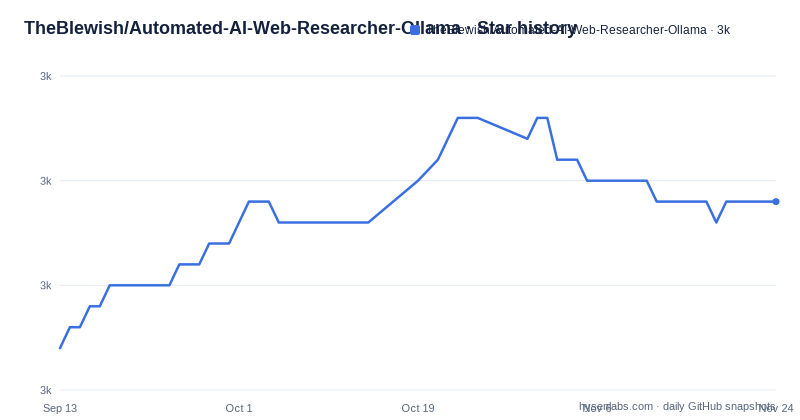
Star history
- TheBlewish/Automated-AI-Web-Researcher-Ollama3,019 ★ · +7
| Repository | 2026-09-13 | 2026-11-24 |
|---|---|---|
| TheBlewish/Automated-AI-Web-Researcher-Ollama | 3k | 3k |
7 Stars in the last 72 days, measured from the daily GitHub snapshot. Compare with other projects
Editorial analysis
The readme opens with an advertisement, not a description
Read the top of this file and the first thing you find is not about this program.
It is a banner in capitals announcing a successor program in a different repository, telling you the new one has a codebase twenty times larger, telling you it is hallucination proof, telling you it searches academic articles instead of the internet, and telling you it has now been released, with three exclamation marks and a link. The project's own description begins four lines further down.
Neither of those two claims can be checked from here. A codebase twenty times larger would be visible if you cloned both. Whether something is hallucination proof is not a property you can measure at all, and a research tool that reads the web and summarises what it found is exactly the kind of program where that word does the most work.
So the shape of the file is worth naming. The author's own product gets one paragraph; a different repository gets a shouted headline with an unverifiable guarantee in it.
What the description itself says is more modest and more interesting: that this is a research assistant using locally run models to break a query into focus areas, investigate each one systematically by searching and scraping, and compile what it found.
The recommended models and the shipped config disagree
The installation section tells you to pick a model with a large context window, and names two specific ones, both of which have a 128k context in their names.
Then it shows you the configuration block you are meant to edit:
LLM_CONFIG_OLLAMA = {
    "llm_type": "ollama",
    "base_url": "http://localhost:11434",  # default Ollama server URL
    "model_name": "custom-phi3-32k-Q4_K_M",  # Replace with your Ollama model name
    "temperature": 0.7,
    "top_p": 0.9,
    "n_ctx": 55000,
    "stop": ["User:", "\n\n"]
The example names a 32k model and sets `n_ctx` to 55,000, while recommending two 128k models. The README asks you to replace the model name and permits changing `n_ctx`; verify the chosen model’s actual limit and your memory budget. A context setting below the model maximum is not inherently wrong.
For a program whose whole loop is accumulating scraped pages and reasoning over them, the context window is the constraint that decides whether it works, and the configured context is a trade-off between available context and resource use, and behavior at the limit should be tested.
One more small thing in that block: it is a Python dictionary presented under a shell fence, and the key holding the model name carries a comment telling you what to replace. So the file teaches you the setting and mis-sets it at the same time.
You submit with CTRL+D and steer with single letters
The interaction model is unusual and worth reading twice.
To start a session you type an at-sign followed by your query and press the end-of-file key combination to submit, not the enter key. The example given is a question about when the global population is projected to start declining.
During the run, you steer with a single letter, again submitted with the same key. One letter shows status. One shows the current focus area. One quits.
And one does something more interesting than the others. Pause asks the model to review everything collected so far and judge whether it can already answer your original query with that content. It then waits for you to reply with one of two letters: continue, or terminate. Terminating from a pause produces the same summary as quitting outright.
So the loop is interruptible at a semantic boundary rather than a mechanical one. You are not asking it to pause; you are asking it whether it is done, and then deciding whether to believe it.
After a run, the model produces a summary and drops into a conversation where you can ask follow-up questions about what it found.
The artifact is a text file, and it is the point
Everything the run finds is written to a session text file in the program's own directory, and the file lists what goes in it: all the retrieved content, the source URLs for all of it, the focus areas that were investigated, and the generated summary.
That ordering is deliberate and worth noticing. The scraped content and its URLs come first in the description, the summary last, and the summary is the part a model wrote about the other three.
So the program gives you two different things with very different reliability. The file is what the scraper retrieved, with links you can follow. The summary is a local model's reading of that file. The readme's own framing supports this: it calls the distinguishing feature not the summary but the maintained, documented research trail.
It also means the loop's output survives independently of the session. Close the program, reopen the file, and you have the evidence. That is unusual for a tool in this category and it is the main reason to use one.
Windows support lives on a branch, not on main
The installation section opens with a routing instruction that tells you the main branch is not the whole program.
To run this on Windows you are told to follow the instructions on a separate feature branch. For Linux and macOS you use the main branch and the steps that follow.
So the repository you clone depends on your operating system, and the Windows path is a branch that will eventually merge or will not. Nothing in the file says when, and nothing says how far behind it is.
The requirements file corroborates the split without explaining it. One of its thirteen entries is a console library gated by an environment marker so that it installs only on Windows, which is the only conditional requirement in the entire list. Everything else installs everywhere.
That combination is a fair reading of how the project grew: cross platform support was added on a branch, and the one dependency that is genuinely platform specific was added to the shared file behind a marker, while the install instructions still route you to the branch.
Three dependencies the Ollama path never touches
The requirements file has thirteen entries and three of them are for model providers this program does not use on the documented path.
There is a local inference binding for running quantised models locally. There is a client library for one hosted model provider with a version floor. And there is a client library for another hosted model provider with a version floor.
The entire documented setup is: run a local model server on its default port, point the configuration at it, name your model. On that path, all three of those packages are dead weight, and one of them is a full inference engine competing with the server you just installed.
What that tells you is that the program has, or had, paths to hosted providers and to a second local runtime, and that the dependencies were never pruned when the readme narrowed to one. It is a small thing, and it is the kind of small thing that matters more than it looks if you install this on a machine where a heavyweight local inference binding is unwelcome.
The rest of the list is well chosen and specific: a search library, an HTML parser, a content extraction library, two for reading single keypresses, a colour library, a progress bar, and the HTTP client.
Eleven loose files, a hyphenated entry point, and no tests
The tree has eleven Python files at the top level and nothing else but a gitignore, a licence and the readme.
There is a research manager, a web scraper, a wrapper around the model, two separate parsers for model output, a search module, and a configuration file. The entry point is the one with a hyphen in its name, which means it cannot be imported by name from another module.
There is no package directory, no test directory, and no test configuration of any kind. For a program whose output is a large pile of text assembled by a model, that is worth noting: the part you would most want to check, whether the scraper found what the search results pointed at, has nothing in the way of tests.
Two things suggest the code is at least partly organised despite the flat layout. One file is named for the self improving search mechanism that the feature list advertises, and one of the two parsers is named for strategic analysis rather than for the model response it consumes, which suggests the priorities assigned to focus areas are extracted separately from the rest of the model's output.
Editorial conclusion
This fits someone who wants a research trail they can read afterwards, in a plain text file with source URLs attached, generated by a model running on their own machine rather than a hosted one. Two things to check first. Read the output rather than the summary, because the file is the part that is verifiable and the summary is a model's account of the file. And look at the context window before you pick a model, because the readme recommends two long-context models while the configuration it ships you sets a context length less than half of what those models offer, and choose a context size supported by your model and hardware; a smaller configured context is a resource trade-off, not necessarily an error.
Frequently asked questions
What exactly does an AI researcher do?
In this repository's terms, it plans before it searches. You give a query, the model turns it into five focus areas with priorities, and for each one in order it formulates search queries, searches, picks the relevant pages, scrapes them and writes the content and its source URLs into a session file. After the first pass it generates new focus areas from what it found and repeats.
Who developed Ollama AI?
The readme does not say, and does not need to. It treats the model server as an external prerequisite you install yourself and then point a configuration file at, including its default local address and port.
Does Automated-AI-Web-Researcher-Ollama need a hosted model?
Not on the documented path. The setup is to run a local model server and name a model you have already pulled into it. The requirements file nevertheless installs client libraries for two hosted providers and a local inference binding, so the package pulls in more than the documented setup uses.
How do I stop the research?
You submit a single letter with the end-of-file key. Quit stops it and produces a summary of everything collected so far. Pause is different: it asks the model to review the collected content and say whether it can already answer your query, then waits for you to choose continue or quit, with quit producing the same summary.
Where do the research findings go?
Into a session text file in the program's own directory, containing all retrieved content, the source URLs, the focus areas investigated and the generated summary. After that the model enters a conversation mode where you can ask it follow-up questions about what it found.
Official sources
Add this badge to your README
If you maintain this project, the badge below links readers to this analysis and shows its maintenance status from the daily GitHub snapshot. Paste the markdown into your README; add ?metric=license or ?metric=stars to the image URL for a different field.

[](https://hysenlabs.com/projects/theblewish-automated-ai-web-researcher-ollama)Star history chart for your README
[](https://hysenlabs.com/projects/theblewish-automated-ai-web-researcher-ollama)Was this useful?