Chatbot: Vercel's Next.js template, and the build that migrates your database first
A full-featured, hackable Next.js AI chatbot built by Vercel
At a glance
- What is it?
- Chatbot is a free open-source Next.js template that wires the AI SDK to the Vercel AI Gateway, Neon Postgres, Vercel Blob and Auth.js, and its package.json is where the interesting decisions sit, from a build script that applies migrations to a package marked private with no releases.
- Who is it for?
- Use Chatbot if you want a working chat product surface in an afternoon and you are deploying to Vercel, because the OIDC path to the AI Gateway and the Neon and Blob services are wired for that platform. Do not adopt it as a dependency, since the package is marked private and has no published releases, and be deliberate about the build script, which runs your migrations before it compiles.
- Can I use it commercially?
- Check first. The repository uses a licence we do not classify automatically, so read its LICENSE file before any commercial use.
- Is it still maintained?
- Yes. The repository last received commits 12 days ago.
- What is it written in?
- Mainly TypeScript, according to GitHub's language statistics.
Answers come from the project's GitHub data, last synced on November 15, 2026, and from our analysis. They are not legal advice.
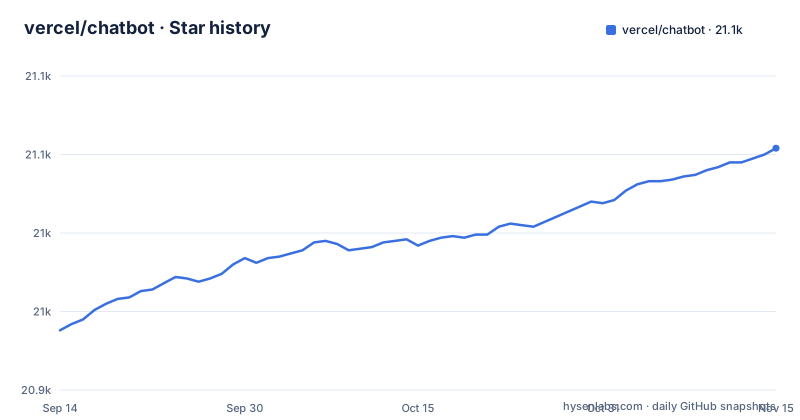
Star history
- vercel/chatbot21,054 ★ · +116
| Repository | 2026-09-14 | 2026-11-15 |
|---|---|---|
| vercel/chatbot | 20.9k | 21.1k |
116 Stars in the last 62 days, measured from the daily GitHub snapshot. Compare with other projects
Editorial analysis
The build script runs your migrations before it compiles
One line in package.json decides how deploys behave. The build script is `tsx lib/db/migrate && next build`, so every production build applies database changes first and compiles second. That is convenient until you notice what it means. Any build that can reach a database changes that database, including a preview deployment pointed at a shared Postgres URL, and the migration runs as part of the build rather than as a reviewed step you can decline. The local setup section has the same effect, since the quickstart asks for `pnpm db:migrate` before `pnpm dev`, described on the page as setting up the database or applying the latest changes. If your team separates schema changes from releases, this template assumes you have already made that compromise, and the scripts around it, db:generate, db:push, db:pull, db:check, db:up and db:studio, are there if you want to take the schema back under your own control.
Gateway authentication changes shape depending on where you run it
The same code path authenticates two different ways, and the page is explicit about which is which. On Vercel deployments, gateway authentication is handled automatically through OIDC tokens, so there is no key to manage. On non-Vercel deployments, you have to supply an AI Gateway API key through the AI_GATEWAY_API_KEY environment variable in .env.local. That is the single largest difference between running this template on its home platform and running it anywhere else. The rest of the environment comes from .env.example, which lists AUTH_SECRET with a link to a secret generator and the note to use openssl rand -base64 32, plus BLOB_READ_WRITE_TOKEN, POSTGRES_URL and REDIS_URL. Vercel Environment Variables are recommended, though a .env file is stated to be sufficient, and there is a warning not to commit it because it would expose access to the AI and authentication provider accounts.
Two provider lists on the same page disagree about Google
The feature section says the AI SDK supports OpenAI, Anthropic, Google, xAI and other model providers through the AI Gateway. A few lines later, the model providers section says the included models are Mistral, Moonshot, DeepSeek, OpenAI and xAI. Google appears in the first list and not the second, and the two lists are not the same kind of statement: the first describes what the AI SDK can reach through the gateway, the second describes what is configured in this template. Models are configured in lib/ai/models.ts with per-model provider routing, so that file is the authority. The consequence is practical for anyone copying the page into a plan: if you read the feature list and assume a Google model is already wired up, check lib/ai/models.ts first, and Anthropic is named as a supported provider in one sentence while the included model list points somewhere else. The page also notes you can switch to direct providers such as OpenAI, Anthropic or Cohere with a few lines of code.
The package is private with no releases, so 3.1.0 is the only version signal
There is no changelog file in the repository root, no GitHub releases, and the package.json version is 3.1.0 with private set to true. Private means the template is not published to a registry, so there is no `npm install chatbot` path and no way to take an upgrade by bumping a version. What you have instead is a repository whose last push was 2026-07-08, and a fork you control. The practical consequence is that template drift is invisible: you cannot diff your copy against a newer one, you cannot see what a security fix in a dependency changed, and a bug report against upstream carries no version history to anchor it. The dependency style is uneven too, with ai pinned at 7.0.15 and @ai-sdk/react at 4.0.16 exactly while @ai-sdk/provider floats on ^4.0.2, so the AI SDK packages here do not share one version line.
Local setup is a three step Vercel CLI routine ending at localhost:3000
The documented path to a running local copy uses the Vercel CLI before it uses the package manager. You install the CLI with `npm i -g vercel`, run `vercel link` to link the local instance with your Vercel and GitHub accounts, which creates a .vercel directory, and then run `vercel env pull` to download your environment variables. After that the project runs on its own tooling:
pnpm install
pnpm db:migrate # Setup database or apply latest database changes
pnpm dev
Two details matter here. The `vercel link` step is what ties your local directory to a Vercel project, and the .vercel directory it creates is the thing that remembers that link, so a local checkout is not independent of a Vercel project even when you only intend to run it locally. And `vercel env pull` is the documented route for values, while the page also says a .env file is all that is necessary, so the CLI steps are convenience rather than a hard requirement.
Drizzle-kit gets seven scripts, which is more than one way to change a schema
The database story is Drizzle ORM with drizzle-kit underneath, and the script block is longer than the rest. You get db:generate through drizzle-kit generate, db:migrate through npx tsx lib/db/migrate.ts, db:studio, db:push, db:pull, db:check and db:up, and the build hook calls the migration file directly rather than through the kit. Two of those routes lead to a different outcome for your repository: the generate and migrate pair is the one that leaves files behind, while push and pull are direct routes between your models and the database. Choosing by habit rather than by intent is how a schema ends up applied in one environment and missing its migration file in the repository. drizzle.config.ts sits at the root as the configuration both routes read, and drizzle-orm is the runtime dependency, so there is one place to look when a migration and the code disagree.
Guardrails are Ultracite over Biome, Husky, and Playwright for the tests
The quality tooling is layered and worth naming precisely. `pnpm check` runs ultracite check and `pnpm fix` runs ultracite fix, so the lint and format entry points are a wrapper rather than the engine, and the configuration that decides the rules is biome.jsonc at the root. `pnpm prepare` runs husky, and a .husky directory is present, so a git hook is installed when dependencies are installed. Tests are Playwright end to end: the test script is `export PLAYWRIGHT=True && pnpm exec playwright test`, with playwright.config.ts at the root. There is no separate unit test script in the block, which means the suite you can run from this package is the browser one, and it needs Playwright browsers present locally. The editor and agent config files around it, .cursor/ and .vscode/, ship with the template too.
Editorial conclusion
Use Chatbot if you want a working chat product surface in an afternoon and you are deploying to Vercel, because the OIDC path to the AI Gateway and the Neon and Blob services are wired for that platform. Do not adopt it as a dependency, since the package is marked private and has no published releases, and be deliberate about the build script, which runs your migrations before it compiles. Before you fork it, read .env.example against what you actually need, since REDIS_URL ships there without a named consumer on the project page, decide whether Google is wired up or not, since the two provider lists disagree, and check the pinned ai and @ai-sdk/react versions against whatever the AI SDK docs say for your target date.
Frequently asked questions
how to install chatbot
Install the Vercel CLI with `npm i -g vercel`, run `vercel link` to link the local instance with your Vercel and GitHub accounts, which creates a .vercel directory, then run `vercel env pull` to download environment variables. Finish with `pnpm install`, `pnpm db:migrate` and `pnpm dev`, and the template serves on localhost:3000.
how to use chatbot
A hosted demo is at chatbot.ai-sdk.dev/demo and the documentation at chatbot.ai-sdk.dev/docs. Models are configured in lib/ai/models.ts with per-model provider routing through the Vercel AI Gateway, with Mistral, Moonshot, DeepSeek, OpenAI and xAI among the included models, and you can also deploy your own copy to Vercel with one click from the project template.
how to use chatbot app
The app needs the variables defined in .env.example, which are AUTH_SECRET, AI_GATEWAY_API_KEY, BLOB_READ_WRITE_TOKEN, POSTGRES_URL and REDIS_URL. Vercel Environment Variables are recommended, but a .env file is stated to be sufficient, and the page warns never to commit it because it exposes access to your AI and authentication provider accounts.
Official sources
Add this badge to your README
If you maintain this project, the badge below links readers to this analysis and shows its maintenance status from the daily GitHub snapshot. Paste the markdown into your README; add ?metric=license or ?metric=stars to the image URL for a different field.

[](https://hysenlabs.com/projects/vercel-chatbot)Star history chart for your README
[](https://hysenlabs.com/projects/vercel-chatbot)Was this useful?