AerialViews: an Apple-style video screensaver for Google TV and Shield
A screensaver for Android TV devices including Google TV, Nvidia Shield, and Fire TV. Inspired by Apple TV's video screensaver.
At a glance
- What is it?
- AerialViews is a Kotlin screensaver app for Android TV, Google TV, Nvidia Shield and Fire TV devices that plays over 250 aerial videos plus media from your own sources, with corner overlays for clock, metadata and custom messages, and an API for pushing messages to the screen. Its real obstacle is not the app but the platform, since recent Google TV firmware has no user interface for setting a third party screensaver.
- Who is it for?
- AerialViews suits an owner of a Google TV, Shield or Fire TV box who wants the Apple-style video screensaver and the ability to push text such as a home automation status onto the screen over the local network. It is the wrong tool if your television has no route to install a third party screensaver, and on Fire OS 8.1 and above the README states it will not work at all.
- Can I use it commercially?
- Check first. The repository uses a licence we do not classify automatically, so read its LICENSE file before any commercial use.
- Is it still maintained?
- Yes. The repository last received commits 2 days ago.
- What is it written in?
- Mainly Kotlin, according to GitHub's language statistics.
Answers come from the project's GitHub data, last synced on November 6, 2026, and from our analysis. They are not legal advice.
Star history
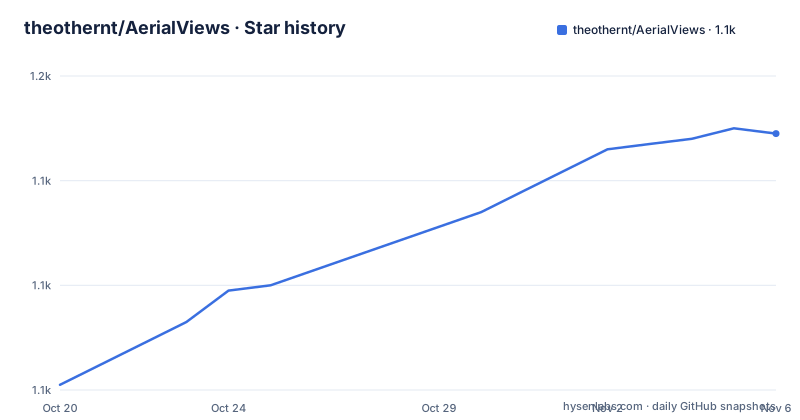
- theothernt/AerialViews1,149 ★ · +48
| Repository | 2026-10-20 | 2026-11-06 |
|---|---|---|
| theothernt/AerialViews | 1.1k | 1.1k |
48 Stars in the last 17 days, measured from the daily GitHub snapshot. Compare with other projects
Editorial analysis
A screensaver that plays video, and the platform problem behind it
AerialViews is a screensaver for Android and Google TV devices and phones, including Nvidia Shield, Fire TV and Google TV Streamer, inspired by Apple TV's video screensaver.
The interesting part of this project is not the playback, it is the second paragraph of the README, which is a warning rather than a feature list. Since 2023, nearly all devices that ship with Google TV, running Android TV 12 or later, have no user-interface to change the screensaver to a 3rd party one.
The affected devices are listed. Chromecast with Google TV and the Google TV Streamer, recent MECOOL devices, recent TCL, Philips and Sony televisions, onn. Google TV devices excluding the 2021 model, and Fire TV, where the README says it will not work with Fire OS 8.1 and above.
So the project is a normal Android app that happens to want to be the system screensaver, and the platform has closed the door on that. The workaround, which the README documents step by step, is to enable developer mode and USB debugging on the television, find its IP address, connect with ADB, and run two commands, one setting Aerial Views as the default screensaver and one setting how long before the screensaver starts.
The instructions differ slightly per device. On Google TV it is Settings, System, About, or Settings, Device Preferences, About, then Build selected several times until the developer message appears, then Developer options, then USB debugging. On Fire TV it is Settings, My Fire TV, About, and the device name highlighted with the action button pressed seven times.
There is also a third-party alternative named in the README, the TDUK Screensaver Manager app, for users who would rather not go through ADB themselves.
The media sources, and where the videos come from
The content is the reason people install this, and the README is specific about it. There are 4K Dolby Vision HDR videos if the television supports it, and over 250 videos from Apple, Amazon, Jetson Creative and Robin Fourcade.
Alongside the built-in catalogue the app can show media from your own sources. USB storage, an Immich server, a Nextcloud Memories server, Samba, WebDAV, or custom feeds. That list covers the ways people actually keep photos and videos, which is the difference between a screensaver that only ever shows the same Apple footage and one that shows your own holiday pictures.
For offline and local playback the README points to three curated download lists, with the counts given. Apple has 114 videos, Jetson Creative has 20 community videos, and Robin Fourcade has 18 community videos, all hosted at aerial-videos.netlify.app.
The distinction between the built-in catalogue and the downloadable lists is not fully spelled out, and the split between Apple, Amazon, Jetson Creative and Robin Fourcade in the feature count is worth noting. Whatever the case, the practical point for a user is that the offline lists are a fixed set of curated videos with known counts, which is a small and finite collection, while the USB and server sources are where the personal content comes from.
The app is distributed on the Google Play Store as com.neilturner.aerialviews and on the Amazon Appstore, with a badge claiming 10k+ downloads on the Amazon listing, and the APK is also on the GitHub releases page for manual installation.
Overlays, burn-in avoidance and the message API
The overlay system is the feature that makes this more than a video loop, and it comes in two distinct kinds.
The first is decorative. You can place overlays in the corners of the screen, such as metadata from videos and photos including location or date taken, a clock, the music currently playing, the date, or a countdown timer.
The second is a network service. There is a message overlay API, and you can send custom messages to display on your TV from any device on your network, for example from Home Assistant. The example given, Home Assistant, tells you the audience: this is a way to get a notification onto a television in a room that has no other display.
The anti burn-in feature is the detail that shows the author has used this on a modern panel. The position of the overlays can be alternated to avoid burn-in on QD and OLED TVs. Panels of that type do not have the pixel shifting that a plasma had, so a static clock in a corner is a real hazard, and moving it is the only mitigation available without the display doing it for you.
Playback options are also more than a single loop. There are many playlist options to limit media length or to loop certain videos, the D-Pad or a swipe on phones and tablets can skip media, skip songs, change speed, seek and pause, and there is refresh rate switching for 24fps, 30fps, 50fps and 60fps content.
The refresh rate switching is worth a note. A screensaver that plays a 24fps clip on a 60Hz panel judders, and on a 120Hz panel it judders differently. Switching the display refresh to match the source frame rate is the kind of detail that separates a screensaver people keep from one they turn off.
Getting the app onto a device that will not ask for it
The installation options are two, and they are the standard pair for an Android TV app.
From the Google Play Store or the Amazon Appstore, both under the package name com.neilturner.aerialviews, or by downloading the APK from the GitHub releases page and installing it manually.
The second path is the interesting one for a sideloading community, and it comes with a precondition: the app has to be the default screensaver, and on a current Google TV device you cannot set that from the user interface. The manual procedure is the developer mode route described earlier, and the README asks the reader to work through it with expandable step-by-step sections.
There is one more platform-specific step worth naming. On a TCL TV with Google TV, the Auto Launch permission has to be allowed so that Aerial Views can be launched from the background when the screensaver starts. Without it, the README says the screensaver cannot be started at all, either automatically or manually through the Screensaver menu shortcut.
That is a small sentence in a long README and it is the kind of detail that turns a ten minute install into an afternoon. The permission has a name that suggests it belongs to the app, but the requirement is that the operating system is allowed to start the app in the background, and some vendors gate that behind their own permission UI.
The minimum API level is 23, per the API badge, and the app is listed in the topics with a media3-exoplayer and exoplayer2 lineage, which tells you the playback is built on the modern AndroidX media stack rather than on the older ExoPlayer.
An Android project with benchmark and profile modules
The repository layout shows a project built with the modern Android toolchain rather than as a script-driven app.
There is an app/ directory for the application module, a baselineprofile/ directory, a microbenchmark/ directory, and a projectivyapi/ directory, along with build.gradle.kts, settings.gradle.kts, gradle.properties and the Gradle wrappers.
The baselineprofile and microbenchmark directories are the interesting ones. A baseline profile is the mechanism Android uses to tell the runtime which code paths matter at startup, and shipping one is how a modern app improves cold start on a television, where the device is often low-powered and the screensaver has to appear promptly after the picture goes dark. The microbenchmark module is the Macrobenchmark counterpart, used to measure that startup on a real device.
The projectivyapi directory is where the Gradle dependency verification lives, which is a supply chain control: it pins the checksums of the dependencies the build is allowed to fetch.
The primary language is Kotlin, and the topic list names android-tv, chromecast, google-tv, nvidia-shield and exoplayer2 alongside media3-exoplayer. The mixture of a chromecast topic and a google-tv topic reflects the reality described in the README, since the same app runs on both a Chromecast with Google TV and on a Shield.
The licence is the one the README badge calls GPL v3, and the repository has an AGENTS.md at the root.
Translations through Lokalise, and the maintenance rhythm
The project is maintained by one person with a Ko-fi link in the README, and the contribution process says so plainly. Whether it is a bug fix, a new feature, or improving translations, you are asked to open an issue or submit a pull request, and you are asked to get in contact before submitting pull requests.
That request is unusual and it is worth explaining why. A screensaver app that installs on televisions is not a codebase where a well-meaning patch lands cleanly. The ADB setup, the Auto Launch permission quirk, the TCL-specific behaviour, the overlay positioning logic for burn-in avoidance, and the refresh rate switching are all tightly coupled to specific device behaviour, and a pull request that changes the wrong one of those produces a broken screensaver on hardware the author has and the contributor does not.
Translations are handled through the Lokalise platform, and the README asks for help translating menu text and video descriptions. The distinction between menu text and video descriptions is worth noting, because the second is content, and a translation of a video description is a translation of prose the author wrote rather than of an interface string.
The release history is steady. The tags are 1.8.5 from 2026-10-02, 1.8.4 from 2026-07-31 and 1.8.3 from 2026-07-01, with the last push on 2026-10-13. Patch releases on that cadence, across a set of devices that each behave differently, is what continuous deployment to a Play Store listing looks like from the repository side.
Editorial conclusion
AerialViews suits an owner of a Google TV, Shield or Fire TV box who wants the Apple-style video screensaver and the ability to push text such as a home automation status onto the screen over the local network. It is the wrong tool if your television has no route to install a third party screensaver, and on Fire OS 8.1 and above the README states it will not work at all. Before you install it, read the section on setting Aerial Views as the default screensaver, because on most current Google TV devices that setup needs developer mode and ADB commands, and check the offline video list for the curated sources you would rather play than the built-in catalogue.
Frequently asked questions
What is AerialViews and what does it do?
It is a screensaver app for Android TV, Google TV, Nvidia Shield, Fire TV and phones, inspired by Apple TV's video screensaver. It plays 4K Dolby Vision video, shows corner overlays such as a clock and media metadata, and can display messages pushed from another device on the network.
Can I set AerialViews as the default screensaver on my Google TV device?
It can be done manually, but not from the normal user interface on most current Google TV hardware. The README says that since 2023 nearly all Google TV devices running Android TV 12 or later have no UI for setting a third party screensaver, so you need developer mode, USB debugging and two ADB commands.
Which media sources can AerialViews play?
USB storage, an Immich server, a Nextcloud Memories server, Samba, WebDAV and custom feeds, on top of a built-in catalogue of over 250 videos from Apple, Amazon, Jetson Creative and Robin Fourcade.
What is the message overlay API in AerialViews?
It lets you send custom messages to appear on your TV from any device on your network, for example from Home Assistant. Overlays can be placed in the corners of the screen and their position alternates to avoid burn-in on QD and OLED panels.
Does AerialViews work on Fire TV?
It works on Fire TV, but the README notes that it will not work with Fire OS 8.1 and above, and Fire TV is also among the devices since 2023 shipping without a user interface for selecting a third party screensaver.
Official sources
Add this badge to your README
If you maintain this project, the badge below links readers to this analysis and shows its maintenance status from the daily GitHub snapshot. Paste the markdown into your README; add ?metric=license or ?metric=stars to the image URL for a different field.

[](https://hysenlabs.com/projects/theothernt-aerialviews)Star history chart for your README
[](https://hysenlabs.com/projects/theothernt-aerialviews)Was this useful?