Auto Synced Translated Dubs: the subtitle file is the only clock, and two-pass synthesis is the default
Automatically translates the text of a video based on a subtitle file, and then uses AI voice services to create a new dubbed & translated audio track where the speech is synced using the subtitle's timings.
At a glance
- What is it?
- A Python pipeline that translates an SRT file, synthesises speech for each line, forces every clip to the length the subtitle implies, and rebuilds the audio track at the original time points. Timing quality is inherited entirely from the subtitle file, the default path calls the speech API twice per line, and the final YouTube upload depends on a channel feature you have to ask for.
- Who is it for?
- Use this if you already have human-made subtitles and want other language audio tracks that line up with them, and you are willing to tune the configuration rather than accept the defaults. Four things decide whether it works.
- Can I use it commercially?
- Yes, with strict conditions. AGPL-3.0 is a network copyleft licence: if people use a modified version over a network, for example as a hosted service, you must offer them its source code under the same licence.
- Is it still maintained?
- Activity is slowing. The repository last received commits 6 months ago.
- What is it written in?
- Mainly Python, according to GitHub's language statistics.
Answers come from the project's GitHub data, last synced on November 21, 2026, and from our analysis. They are not legal advice.
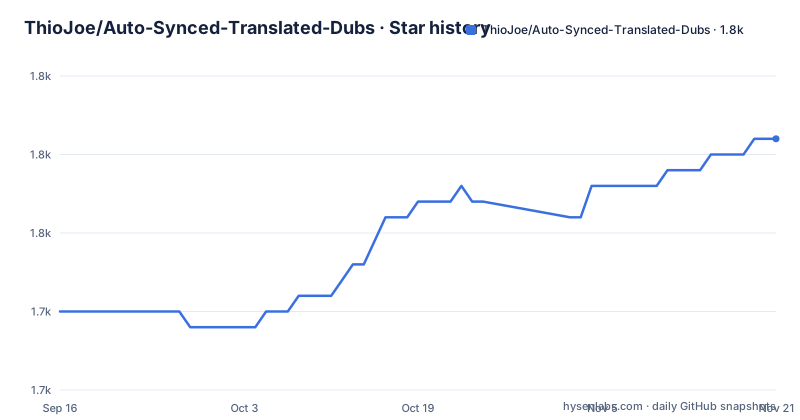
Star history
- ThioJoe/Auto-Synced-Translated-Dubs1,756 ★ · +11
| Repository | 2026-09-16 | 2026-11-21 |
|---|---|---|
| ThioJoe/Auto-Synced-Translated-Dubs | 1.7k | 1.8k |
11 Stars in the last 66 days, measured from the daily GitHub snapshot. Compare with other projects
Editorial analysis
The subtitle file is the only clock in the system
The pipeline never listens to the original audio. It reads a subtitle file and treats each line's start and end as the length of the speech that belongs there, then calculates the correct duration of every spoken clip from that timing. Text is translated into new SRT files, text-to-speech clips are generated from the translated text, and each clip is stretched or shrunk until it is exactly as long as the original speech. The audio track is then assembled by inserting each clip at its time point, which is why the output stays in sync. Everything downstream inherits the quality of that clock: no measurement is made of how long the speaker actually talked, only of how long the subtitle line claims to be.
Two-pass synthesis is the default, and Azure skips it altogether
Stretching a clip is the fallback, not the default. The second pass is on by default and works like this: the first pass synthesises each clip and measures how long it came out against the duration the subtitle asked for, then the second pass calls the API again for that same clip at a speaking speed calculated from the first result. The stated benefit is slightly better audio, since a clip rendered at the right speed does not have to be time-stretched afterwards. The cost is one extra API round trip per subtitle line. Azure users skip the whole step, because that service can be given the desired duration before synthesis rather than after it. That is the single biggest structural difference between the two supported speech backends.
Three config files, and each one owns a different decision
Configuration is split by concern. cloud_service_settings.ini holds the credentials and endpoints for Google Cloud, Microsoft Azure and DeepL, so the file that decides which vendor you talk to is separate from the rest. config.ini decides behaviour: whether to skip translation entirely, output formats, sample rate, and whether to use two-pass voice synthesis. batch.ini decides the run: the top SETTINGS section carries the path to the original video file, which is used to get the correct audio length, and the path to the original subtitle file, while a variable called enabled_languages lists the languages to translate and synthesise in one pass, with the numbers corresponding to the numbered LANGUAGE sections in the same file. Voice presets therefore travel with a run rather than with the installation.
One speaker, and the gaps in your subtitles have to survive
Two constraints are stated in the notes rather than enforced by the code. The first is about the subtitle file itself: the pipeline works best with subtitles that do not remove the gaps between sentences and lines, because those gaps are what tell the timing calculation where one utterance ends and the next begins. The second is speaker count. The process assumes a single speaker, and the suggested workaround is to split the audio by producing separate SRT files per speaker and generating a separate track for each, which moves the work to the person preparing the subtitles. Neither constraint is checked at startup, so a subtitle file that violates them produces output that is quietly wrong rather than an error.
TrackAdder makes a file upload-ready, but the YouTube feature has to be granted
The dubbing stage and the publishing stage are separate scripts, and the gap between them is where the plan can fail. TrackAdder.py takes the generated language tracks and an mp4 and labels them so the file is ready to upload, with an option to merge a sound effects track into each language track. What it cannot do is make the upload work. The documentation states that the multiple audio tracks feature is only available to a limited number of channels, that you will most likely need to contact YouTube creator support to request access, and that there is no guarantee it will be granted. TrackAdder also needs ffmpeg, and its settings live in a User Settings block at the top of the file rather than in any of the ini files.
The repository holds two parallel routes to the same result
Seven auxiliary scripts sit beside main.py, and they split by whether they call YouTube. The local ones do the work on your machine: TrackAdder.py for the audio tracks, TitleTranslator.py to translate a video title and description into every language enabled in batch.ini, and TranscriptTranslator.py for plain transcript text. The YouTube-backed ones push the result to the platform: TitleDescriptionUpdater.py updates localized titles and descriptions through the API, SubtitleTrackRemover.py removes a specific audio track, TranscriptAutoSyncUploader.py uploads a transcript and lets YouTube do the syncing, including several pre-translated transcripts when the language is supported, and YouTube_Synced_Translations_Downloader.py asks YouTube to translate captions and then downloads the synced subtitle file YouTube produced. In other words, the last script hands the timing problem back to YouTube, which is the same job done in the opposite direction.
ffmpeg is required, rubberband is optional, and the author prefers ffmpeg
ffmpeg is the one hard external requirement, and it does more than mux: it is the tool that stretches audio to fit a subtitle line. rubberband is offered as an alternative for that one job, through the pyrubberband package in the requirements, and it needs no installation at all because the binaries are dropped next to main.py: rubberband.exe, rubberband-r3.exe and sndfile.dll on Windows, or rubberband and rubberband-r3 on macOS, taken from the Rubber Band Library v3.3.0 command line utility. The author's own verdict is stated plainly, having found that ffmpeg works better, with the option left in place for anyone who prefers it. The Windows download link in that paragraph is also written with a doubled opening parenthesis, which is the kind of thing to check before clicking it.
Fourteen dependencies, one floor, and a Python version nobody tested
requirements.txt lists fourteen entries and thirteen of them carry no version at all: google-cloud-texttospeech, google_api_python_client, google_auth_oauthlib, pydub, pyrubberband, ffprobe-python, azure-cognitiveservices-speech, langcodes, language_data, numpy, deepl, regex and aiohttp. The single constraint in the file is soundfile at 0.12.1 or newer. So a fresh install resolves whatever the three speech and translation clients, the audio stack and numpy have become by the day you run it. The interpreter is equally unpinned in practice: the setup step says the project was written using Python 3.9 and that it will probably work with earlier versions too, which is a statement about what was used rather than a tested floor. Everything arrives with `pip install -r requirements.txt`, and the run itself is one command.
Editorial conclusion
Use this if you already have human-made subtitles and want other language audio tracks that line up with them, and you are willing to tune the configuration rather than accept the defaults. Four things decide whether it works. Check your subtitles first, because the sync comes entirely from the line timings and the project states plainly that it works best with subtitles that keep the gaps between sentences, and it assumes a single speaker. Decide between one pass and two, since two API calls per line is the default and only Azure skips it. Choose your providers deliberately, because the project's own recommendation is Azure for speech at up to 48KHz against Google's 24KHz, and Google or DeepL for translation. And if the plan ends at YouTube, contact creator support first, because the multiple audio track feature is limited to some channels and there is no guarantee it will be granted.
Frequently asked questions
What does Auto Synced Translated Dubs need before it can run?
ffmpeg has to be installed, the requirements have to be installed with pip install -r requirements.txt, and you need API access for at least one of Google Cloud, Microsoft Azure or DeepL with the values set in cloud_service_settings.ini. You also need a human-made SRT file for the source video, since the subtitle timings drive the whole sync.
Does this project turn on or off YouTube's automatic dubbing?
No. Nothing here controls a player setting or a channel setting. The repository is a local pipeline that reads a subtitle file, synthesises speech and rebuilds an audio track, and the only YouTube-facing parts are scripts that edit a video's metadata, upload transcripts or download YouTube's own synced captions.
Which speech service should Auto Synced Translated Dubs use, and why?
The project's own recommendation is Azure for text to speech, because the voices are newer and the sample rate goes up to 48KHz against 24KHz with Google, and Azure also lets you set the desired duration before synthesis so the second pass is unnecessary. For text translation it points at Google Cloud as faster, cheaper and covering more languages, with DeepL as an alternative.
How many languages can Auto Synced Translated Dubs handle in one run?
As many as you define. Language and voice presets live as numbered sections in batch.ini, and an enabled_languages variable lists the numbers to process, so each preset can carry its own preferred voice. TitleTranslator.py then translates a title and description into every language enabled in that file.
What are the limits of Auto Synced Translated Dubs on subtitle files?
It works best with subtitles that keep the gaps between sentences and lines, and the process assumes a single speaker. For several speakers the suggested route is to produce a separate SRT file per speaker and generate a separate track for each, which moves the work into subtitle preparation.
Official sources
Add this badge to your README
If you maintain this project, the badge below links readers to this analysis and shows its maintenance status from the daily GitHub snapshot. Paste the markdown into your README; add ?metric=license or ?metric=stars to the image URL for a different field.

[](https://hysenlabs.com/projects/thiojoe-auto-synced-translated-dubs)Star history chart for your README
[](https://hysenlabs.com/projects/thiojoe-auto-synced-translated-dubs)Was this useful?