django-tailwind: Tailwind CSS setup for Django
Django + Tailwind CSS = 💚
At a glance
- What is it?
- django-tailwind adds an opinionated Tailwind CSS setup to Django through a generated theme app and management commands. It suits developers who want template integration and a combined development command, with or without Node.js.
- Who is it for?
- Django teams that want Tailwind integrated through templates and management commands should adopt django-tailwind after checking their Python and Django versions. Projects that require a custom Tailwind pipeline or older framework versions are better served by a separate build setup.
- Can I use it commercially?
- Yes. MIT is a permissive licence: you can use, modify and sell software built on it, as long as you keep its copyright and licence notices.
- Is it still maintained?
- Yes. The repository last received commits 7 days ago.
- What is it written in?
- Mainly Python, according to GitHub's language statistics.
Answers come from the project's GitHub data, last synced on November 7, 2026, and from our analysis. They are not legal advice.
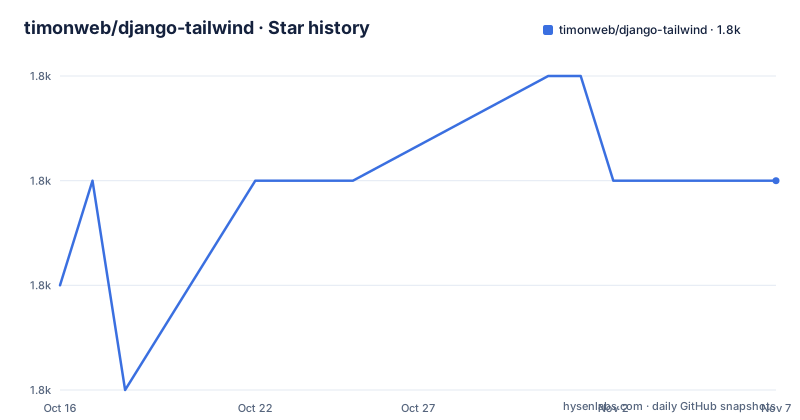
Star history
- timonweb/django-tailwind1,757 ★ · +1
| Repository | 2026-10-16 | 2026-11-07 |
|---|---|---|
| timonweb/django-tailwind | 1.8k | 1.8k |
1 Stars in the last 22 days, measured from the daily GitHub snapshot. Compare with other projects
Editorial analysis
Why django-tailwind creates a theme app
django-tailwind solves the setup problem created when a Django project adopts Tailwind CSS. A Django application still needs a place to hold stylesheet sources, generated CSS, and Tailwind configuration, while its templates need a stable way to request the resulting stylesheet. The package handles that coordination by generating a Django app, named `theme` by default, and integrating it with Django's application registry.
The target audience is Django developers who want Tailwind without designing every integration detail themselves. The package is opinionated, which means it supplies a particular directory and command structure rather than acting as a general-purpose adapter for arbitrary asset pipelines. That reduces initial configuration work, but it also makes django-tailwind less suitable when a project already has a strict frontend build system with nonstandard source locations.
Version 4.6.0 of the Python package supports Tailwind CSS v4.x. Its declared requirements are Python 3.11 or newer and Django 5.2 or newer. Those floors matter during adoption because an older Django project cannot update the package without also changing its runtime framework. The repository metadata also classifies Django Tailwind for Django 5.2, 6.0, and 6.1, although the README states the broader requirement as Django 5.2 or newer.
The generated theme app is not merely a placeholder. `TAILWIND_APP_NAME` ties the project configuration to the generated app, while `tailwind` remains in `INSTALLED_APPS`. Templates then use the package's template tags to include the CSS output. This keeps Django templates involved in stylesheet delivery rather than requiring every page to hard-code a static asset path.
The init, install, and dev command path
The documented workflow separates project generation from dependency installation. `python manage.py tailwind init` creates the theme app and its files. `python manage.py tailwind install` then installs the Tailwind CSS dependencies for the selected mode. Finally, `python manage.py tailwind dev` starts the Django and Tailwind development processes together.
Under the package metadata, the core dependency on `pytailwindcss>=0.3.1` connects the Django package to the Python-side Tailwind tooling. The repository does not expose enough implementation detail here to describe the complete internal process graph, so it would be misleading to invent watcher modules or build outputs. The documented behavior is nevertheless clear: CSS hot reloading is supported, and development can cover CSS, configuration files, and Django templates.
Automatic browser page reload is configured separately. The `reload` optional dependency is `django-browser-reload`, which means django-tailwind does not make every browser refresh path part of the minimal installation. The development extras also include `honcho` and `cookiecutter`. Cookiecutter is required by `tailwind init`, so installing only the core package is insufficient for that generation command even though the README describes the core package as enough for production use.
The combined `dev` command has a practical benefit: it removes the need to start and coordinate separate Django and Tailwind processes during routine development. It does not remove the need to understand which files feed the stylesheet or whether optional reload behavior has been configured. The generated app and management commands remain visible parts of the project layout, which is useful for debugging but also creates configuration that the project owns after initialization.
Installing django-tailwind and generating the theme app
The README recommends the development extras because they cover app generation, process coordination, and browser reload support. Install that form inside the environment used for the Django project:
pip install 'django-tailwind[cookiecutter,honcho,reload]'After installation, add `tailwind` to `INSTALLED_APPS` in `settings.py`. The core form shown below is the documented setting required before generating the theme app.
INSTALLED_APPS = [
    # ...
    "tailwind",
]
Generate the app with the management command. The documentation uses `theme` as the generated app name and configures the project with the same key.
python manage.py tailwind initOnce the app exists, add it alongside `tailwind` and set `TAILWIND_APP_NAME`:
INSTALLED_APPS = [
    # ...
    "tailwind",
    "theme",
]

TAILWIND_APP_NAME = "theme"
Install the Tailwind CSS dependencies next:
python manage.py tailwind installThese steps rely on an existing Django project because every command is invoked through `manage.py`. The README does not document the command for creating a new Django project itself.
Starting Django and Tailwind for the first template
Start the combined development workflow from the Django project directory:
python manage.py tailwind devThe command runs both development servers, as stated by the README. The reader should verify that Django starts and that Tailwind reports a working development build before editing the page.
For template use, the documented sequence is to load `tailwind_tags`, render the `tailwind_css` tag, and apply Tailwind utility classes to an element. The README's example gives the heading the classes `text-4xl font-bold text-blue-600`. Those classes belong in a Django template, not in `settings.py`.
The package supports CSS imports and nesting out of the box according to the README. It also offers an optional DaisyUI integration and a management command for installing Tailwind CSS plugins. DaisyUI should therefore be treated as an explicit setup choice rather than an automatic part of every generated project.
The package advertises Tailwind CSS v4.x support. That is meaningful for source scanning and configuration expectations because v4 differs from earlier Tailwind release families. The README does not show the generated stylesheet file, its exact extension, or the production build command. Consequently, a team should not select it on the assumption that its development command is also the documented production deployment procedure.
Standalone binary mode versus npm mode
The most consequential choice occurs during setup: standalone binary mode or npm-based installation. Standalone mode works without Node.js, while npm mode requires Node.js 22 or newer. Python 3.11 or newer and Django 5.2 or newer are required regardless of this choice.
Standalone mode is the clearer option for teams whose deployment or development environment does not want a Node.js toolchain. The package can obtain and invoke the Tailwind side through its own tooling without adding Node.js to the host requirements. That reduces one class of runtime dependency, but it also means the project is relying on the standalone binary path maintained by the Tailwind tooling ecosystem.
Npm mode is closer to a conventional JavaScript package workflow because Node.js and npm are required. Teams that already standardize on Node.js may prefer that visibility, especially when they need to reason about npm-installed frontend dependencies. The README does not document how switching modes affects existing files, whether migration is automatic, or whether switching back requires cleanup, so mode selection deserves care before a shared project begins using it.
This decision also affects who owns frontend troubleshooting. In npm mode, Node.js installation and npm behavior are part of the diagnostic path. In standalone mode, developers need to investigate the standalone binary and its compatibility instead. Neither mode removes the need to understand Tailwind configuration.
Where django-tailwind is the wrong tool
The clearest wrong-tool case is an existing project whose CSS toolchain has requirements that this package does not document. The README does not describe arbitrary input paths, replacement compilers, integration with a pre-existing Sass or JavaScript pipeline, or production asset deployment. A team that needs those guarantees should inspect the generated files and documentation before replacing its current process.
Version requirements create another hard boundary. Python versions below 3.11 and Django versions below 5.2 fall outside the documented support range. A mature Django project may have application code or third-party packages that constrain those upgrades. In that case, adding django-tailwind is an application-level framework upgrade rather than an isolated CSS installation.
Another limitation is development versus production clarity. The README explicitly documents `python manage.py tailwind dev`, but it does not give a production build command or deployment example in its installation section. Automatic browser reload is optional, and the extra packages used during development do not by themselves establish how production CSS should be generated and served.
Django templates are central to the integration, which is also a boundary. A separate frontend application, a design system pipeline, or a site that serves templates outside Django does not automatically benefit from the `{% tailwind_css %}` integration. The package is most closely aligned with server-rendered Django templates that need utility classes.
Manual Tailwind setup as the practical alternative
A real alternative is to run the Tailwind CLI directly as part of a separate frontend build and serve its generated stylesheet through Django's static-file mechanism or another asset service. This approach leaves directory names, watcher processes, npm dependencies, and deployment commands under the project's control. It can fit an established monorepo or an existing asset pipeline without adding `tailwind` and a generated app to `INSTALLED_APPS`.
django-tailwind changes that approach by generating the theme app, supplying template tags, and offering `tailwind init`, `tailwind install`, and `tailwind dev`. Those commands give a conventional Django developer one documented entry point and avoid manually coordinating the Django and Tailwind development servers. Standalone mode also removes the need for Node.js.
The tradeoff is control. Direct CLI integration exposes the frontend build more directly and can be adapted to unusual asset requirements. django-tailwind provides a coherent project structure, but adopting it means accepting an opinionated setup. The deciding question is not whether Tailwind is present in either case, but whether the Django management-command workflow and generated theme app fit the build system the team intends to maintain.
Maintenance, upgrades, and the MIT license
The repository is not archived, and its last push was on 2026-10-15. That is recent project activity, although the repository has no GitHub releases, so the release history cannot be evaluated through GitHub release entries. `CHANGELOG.md` and the documentation are the relevant places for upgrade details.
The package version in `pyproject.toml` is 4.6.0. Upgrading may involve more than replacing one Python package because django-tailwind declares framework and tooling dependencies, and npm mode also places Node.js 22 or newer in the path. The README does not document an automated migration command, so teams should compare generated project files and the changelog before changing an established setup.
The repository identifies the MIT license and includes a `LICENSE` file. Teams need to read that file for the applicable permissions and notice requirements. This article does not provide legal advice or treat the MIT identifier as a guarantee about third-party Tailwind, Node.js, Django, or optional dependency licensing.
The repository layout includes tests, `tox.ini`, dependency groups, an example project, and separate `theme` and `theme_standalone` example directories. Based on that layout, maintenance work can involve the Python package, documentation, both installation modes, and integration with the example application rather than the Python wrapper alone.
Editorial conclusion
Django teams that want Tailwind integrated through templates and management commands should adopt django-tailwind after checking their Python and Django versions. Projects that require a custom Tailwind pipeline or older framework versions are better served by a separate build setup. The first evaluation should verify that `python manage.py tailwind dev` compiles CSS and serves the generated `{% tailwind_css %}` output in the intended development environment.
Frequently asked questions
Does django-tailwind require Node.js?
Node.js is required only for npm-based installation, where the documented minimum is Node.js 22. Standalone binary mode works without Node.js.
What are the Python and Django requirements for django-tailwind?
django-tailwind requires Python 3.11 or newer and Django 5.2 or newer. Python 3.11 is also declared in `pyproject.toml`.
How do I start Django and Tailwind together?
After initialization and dependency installation, run `python manage.py tailwind dev`. The README states that this command starts both the Django and Tailwind development servers.
Official sources
Add this badge to your README
If you maintain this project, the badge below links readers to this analysis and shows its maintenance status from the daily GitHub snapshot. Paste the markdown into your README; add ?metric=license or ?metric=stars to the image URL for a different field.

[](https://hysenlabs.com/projects/timonweb-django-tailwind)Star history chart for your README
[](https://hysenlabs.com/projects/timonweb-django-tailwind)Was this useful?