ImRAD GUI Builder for Dear ImGui C++ Applications
ImRAD is a GUI builder for the ImGui library
At a glance
- What is it?
- ImRAD is a desktop GUI builder for the Dear ImGui library that generates editable C++ code for Windows, Linux, macOS, and Android. Its main distinction is continuous modification of generated interfaces, including bindings, event handlers, and user-authored code.
- Who is it for?
- ImRAD fits C++ developers who want a visual Dear ImGui workflow without treating generated code as disposable output. It is a poor fit for projects that require absolute positioning, a non-C++ target, or a builder with documented headless generation.
- Can I use it commercially?
- Yes, with conditions. GPL-3.0 is a copyleft licence: if you distribute software that includes it, you must release that software's source code under the same licence. Running it internally without distributing it does not trigger that obligation.
- Is it still maintained?
- Yes. The repository last received commits 135 days ago.
- What is it written in?
- Mainly C++, according to GitHub's language statistics.
Answers come from the project's GitHub data, last synced on October 23, 2026, and from our analysis. They are not legal advice.
Star history
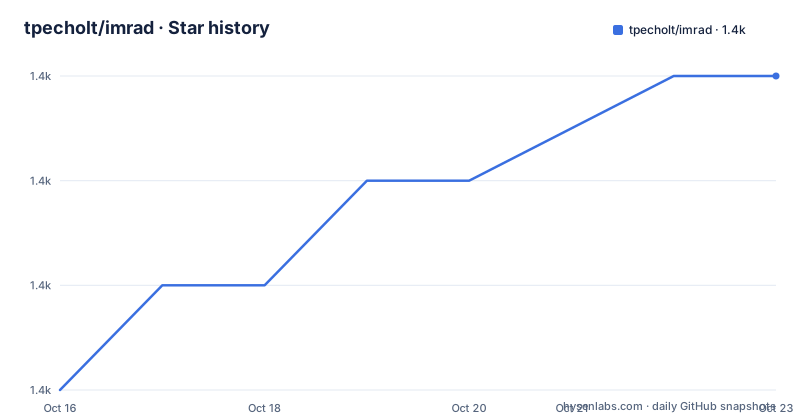
- tpecholt/imrad1,400 ★ · +3
| Repository | 2026-10-16 | 2026-10-23 |
|---|---|---|
| tpecholt/imrad | 1.4k | 1.4k |
3 Stars in the last 7 days, measured from the daily GitHub snapshot. Compare with other projects
Editorial analysis
Why ImRAD Exists for Dear ImGui Development
ImRAD addresses a specific Dear ImGui problem: Dear ImGui is an immediate mode GUI library, so interface structure and widget state are expressed through C++ code at draw time. Building a large interface directly in that code can work, but repeatedly changing window composition, bindings, and event behavior can become difficult to inspect visually. ImRAD provides a desktop builder that generates and parses C++ while retaining a code-oriented result.
The project is aimed at C++ developers using the Dear ImGui library. Its generated code is intended for Windows, Linux, macOS, and Android, while the builder itself runs on Windows, Linux, and macOS. This distinction matters for mobile work. Android is supported through an activity template and related files rather than by making the ImRAD application itself an Android GUI editor.
The important design choice is continuity. ImRAD does not present generated C++ as a sealed export. It uses comment markers around generated regions, preserves code placed around those regions, and supports custom widgets and event handlers. A developer can therefore add calculations, callbacks, or external widget calls without immediately discarding the visual design. The README specifically describes this as “continuous modification of the generated UI.”
The ImRAD Edit, Parse, and Generate Loop
The repository description gives the central mechanism directly: ImRAD generates and parses C++ code. Based on the documented toolbar and properties areas, the workflow starts with a window or widget selected in the builder, followed by property, binding, layout, and event configuration. Code Preview provides a quick view, while the full generated output is saved in `.h` and `.cpp` files.
Layout is generated through Dear ImGui operations such as `SameLine`, `Spacing`, and `NextColumn`, rather than absolute screen coordinates. Parent-child relationships and child ordering are preserved because containers such as `Table` depend on that ordering. ImRAD also offers relative positioning from a selected parent corner, which is useful when a widget must behave as an overlay.
Box layout is an added layer over Dear ImGui. The documented controls can stretch sizeable widgets horizontally or vertically and insert spacers for alignment. A Table Layout Helper provides an alternative using an invisible table for horizontal layouts. These are useful abstractions for dialog-style interfaces, although they do not change Dear ImGui’s immediate mode execution model.
The generated class includes an accompanying `imrad.h`. The README states that this header contains both interface and implementation, and that `IMRAD_H_IMPLEMENTATION` must be defined before including it in the main source file when the implementation is needed. Generated formatting uses `ImRad::Format`. With C++20, it delegates to `std::format` by default. Defining `IMRAD_WITH_FMT` selects `fmt`, while neither option leaves ImRAD using its simpler internal formatter, which skips formatting flags.
Bindings and Events in ImRAD-Generated C++
Property binding is the feature that connects ImRAD’s visual model to Dear ImGui’s state model. A checkbox, text input, combo, table, or similar widget may need a value when it is drawn. ImRAD can bind properties to class variables managed through the Class wizard or the binding dialog. The README gives examples such as `{name}=`, `{expr}`, and `{vars[$index].first}`.
The table example exposes how expressions become part of generated C++. The documented `rowCount` binding uses `vars.size()` and generates a loop over table rows. One-way and two-way bindings are supported for most properties, subject to the capability of the individual widget property. This is a constraint worth checking during design. A binding expression can be syntactically accepted by the builder while still requiring an application-level decision about ownership, lifetime, and type compatibility.
Event generation covers button clicks, window appearance, and text input character filtering, among other documented event kinds. Modal dialogs receive generated support such as `OpenPopup` and a callback when the dialog closes. Event handlers provide a place for application code that should remain separate from the generated section. The approach reduces the need to hand-edit the builder’s output for routine interactions, but it does not eliminate C++ responsibility. Event callbacks still need access to the right application state and must remain compatible with the generated class structure.
The binding dialog also supports custom expressions, which can make generated code easier to adapt to existing data models. That flexibility increases the need for code review after generation, especially when expressions refer to arrays or indexed members.
Installing ImRAD and Creating a First Interface
The repository documentation does not provide a complete installation tutorial with exact download, build, package-manager, or launch commands. The repository contains `CMakeLists.txt`, `cmake/`, `src/`, `template/`, and platform-related entries, so it is a C++ source repository rather than a documented one-command installer. The README links to the project’s repository and identifies Windows, Linux, and macOS as supported builder platforms.
A first real use should begin with an existing Dear ImGui application and a small interface requirement, such as a settings dialog with a checkbox, a text input, a button, and one event handler. Open that project in ImRAD, create the window, add the widgets in parent-child order, configure the relevant properties, and assign class variables through the Class wizard or binding dialog. Use Code Preview to check the generated result before saving.
After saving, inspect the `.h` and `.cpp` files. Confirm that the generated declarations match the application’s existing namespace and class structure, and confirm that the implementation definition is configured according to the README:
#define IMRAD_H_IMPLEMENTATIONThe README does not document a separate setup command for this macro, nor does it state whether ImRAD must be invoked from the command line or through a desktop menu. The first integration should therefore be validated through the generated files and the application’s existing Dear ImGui build process. The repository’s `template/` directory is documented as containing templates for generic `main.cpp` and Android files, including `MainActivity.java`, `AndroidManifest.xml`, `main.cpp`, and `CMakeLists.txt`.
Platform Features and External Dependency Boundaries
ImRAD covers several window forms rather than limiting the project to ordinary editor windows. Floating windows, popups, and modal popups are backend independent. `MainWindow` adds GLFW integration and generates calls that synchronize the Dear ImGui window with an operating system window, including title bar and resizability settings. `Activity` is an undecorated window that fills the viewport, is intended mainly for Android, and can show only one activity at a time.
The widget range includes `Text`, `Checkbox`, `Combo`, `Button`, `Slider`, and `ColorEdit`, as well as `Child`, `Table`, `CollapsingHeader`, `TreeNode`, and `TabBar`. The README also lists `Splitter`, `DockSpace`, `MenuBar`, context menus, and `CustomWidget`. `CustomWidget` is the documented escape hatch for calling external widget code from the generated interface.
The generated project is not dependency-free in practice. The README says it depends only on Dear ImGui and `imrad.h` in the general case, but then identifies feature-specific dependencies. `MainWindow` and `Image` require additional libraries such as GLFW and STB and must be enabled with `IMRAD_WITH_LOAD_TEXTURE`. Zipped assets require zlib through `IMRAD_WITH_MINIZIP`. Translated strings require gettext or libintl through `IMRAD_WITH_GETTEXT`. The `fmt` alternative is selected with `IMRAD_WITH_FMT`. A platform requirement can therefore become a build-system requirement after generation.
Limitations of ImRAD’s Generated Code Workflow
The clearest limitation is that ImRAD is tied to Dear ImGui and C++ generation. It is not a general visual editor for arbitrary UI toolkits, and the documented output is `.h` and `.cpp` code. Applications built around another rendering model, another language, or a declarative UI framework would need a different tool.
There is also a design boundary around positioning. The default layout uses Dear ImGui layout commands and preserves hierarchy rather than expressing every element as absolute coordinates. Relative positioning is available, but the README does not claim arbitrary screen-space placement. Projects that require exact fixed coordinates across multiple rendering backends should verify the generated layout behavior before committing to the workflow.
The builder’s visual model does not remove the need to understand C++ state management. Bindings refer to variables, expressions, and arrays. The documentation gives useful examples, but it does not define every type conversion, lifetime rule, or ownership policy for application objects. Likewise, event handlers are generated as code paths, not as a replacement for application architecture.
The README does not document a rollback command, a headless generation mode, or a complete compatibility matrix for every Dear ImGui release. Those omissions matter for adoption. A team that expects automated generation in continuous integration would need to inspect the repository and executable behavior before assuming that the builder can run without a graphical session.
Alternatives to ImRAD and the GPL-3.0 Question
The closest alternative in approach is hand-writing the Dear ImGui interface in C++. That workflow gives the developer direct control over every draw call, layout operation, binding, and event handler. Its cost is that structural changes remain code changes, and visual inspection depends on compiling and running the application rather than editing a visual window tree.
A different alternative is using a runtime immediate mode GUI framework that does not require a separate builder, or using a retained mode UI framework whose scene graph is serialized as data or markup. These approaches differ from ImRAD because they do not generate and parse C++ around Dear ImGui widgets. They may fit a project that prioritizes framework conventions, data-driven UI, or a language other than C++ more closely.
ImRAD is distributed under `GPL-3.0`. That license can affect how the project’s source and generated or linked components are distributed, but this article does not provide legal advice. Teams should have their own counsel review the license and the way generated code, `imrad.h`, and linked libraries are packaged. The repository is not archived, and the last push was on 2026-06-11. The recent release history includes `imrad-0.9.1` on 2026-01-07, `imrad-0.9` on 2025-12-29, and `imrad-0.8` on 2024-09-28. Upgrading may require reviewing `CHANGELOG.md`, regenerating interfaces, and checking changed generated code because the project is designed around reparsing and continuous modification.
Editorial conclusion
ImRAD fits C++ developers who want a visual Dear ImGui workflow without treating generated code as disposable output. It is a poor fit for projects that require absolute positioning, a non-C++ target, or a builder with documented headless generation. Before adoption, verify that the selected platform template, required ImRAD features, and external dependencies such as GLFW, STB, zlib, gettext, `fmt`, or C++20 formatting match the application. The project is not archived, and its last push was on 2026-06-11, while the most recent listed release is `imrad-0.9.1` from 2026-01-07.
Frequently asked questions
What is ImRAD used for?
ImRAD is a GUI builder for the Dear ImGui library. It generates and parses C++ code for interfaces, including layouts, property bindings, event handlers, windows, and widgets.
Which platforms does ImRAD support?
The README states that ImRAD runs on Windows, Linux, and macOS. Generated code is documented as running on Windows, Linux, macOS, and Android.
Can I modify generated ImRAD code later?
Yes. ImRAD supports continued modification of generated interfaces, and the generated code is delimited by comment markers so user code can be placed around it. Event handlers and `CustomWidget` are also documented extension points.
Official sources
Add this badge to your README
If you maintain this project, the badge below links readers to this analysis and shows its maintenance status from the daily GitHub snapshot. Paste the markdown into your README; add ?metric=license or ?metric=stars to the image URL for a different field.

[](https://hysenlabs.com/projects/tpecholt-imrad)Star history chart for your README
[](https://hysenlabs.com/projects/tpecholt-imrad)Was this useful?