vision-is-all-you-need indexes whole PDF pages instead of chunks
Serverless Modal + FastAPI + React + ColPali + Qdrant + GPT4o Vision RAG (V-RAG) Demo
At a glance
- What is it?
- Softlandia-Ltd/vision-is-all-you-need is a Modal hosted demo of V-RAG, where ColPali embeds rendered PDF pages as vectors, Qdrant stores them, and GPT4o answers a query from the closest page images. The index is in memory and almost every dependency is pinned exactly.
- Who is it for?
- Fit for a demo of the page-as-document idea, and for anyone deciding whether chunking is the bottleneck in their own retrieval pipeline, since the eight step description is short enough to reason about end to end. Not fit as an ingestion service: the vector database is in memory, indexing cost scales with the size of the PDF and the GPU you get, and torch is unpinned in the requirements file, so two installs are not guaranteed to resolve to the same stack.
- Can I use it commercially?
- Yes. MIT is a permissive licence: you can use, modify and sell software built on it, as long as you keep its copyright and licence notices.
- Is it still maintained?
- Yes. The repository last received commits 66 days ago.
- What is it written in?
- Mainly TypeScript, according to GitHub's language statistics.
Answers come from the project's GitHub data, last synced on November 15, 2026, and from our analysis. They are not legal advice.
Star history
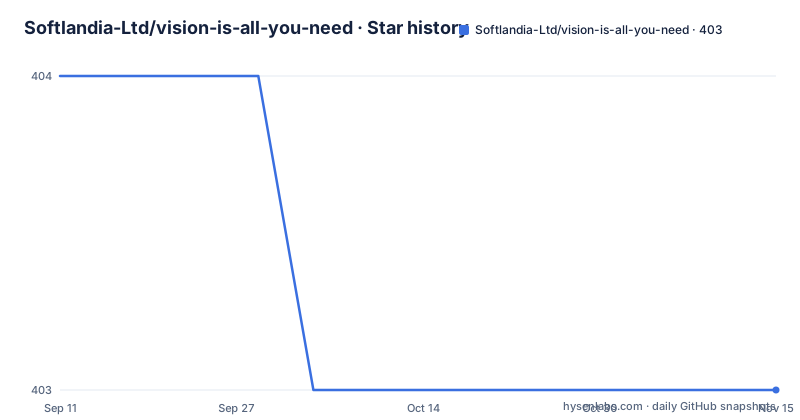
- Softlandia-Ltd/vision-is-all-you-need403 ★ · -1
| Repository | 2026-09-11 | 2026-11-15 |
|---|---|---|
| Softlandia-Ltd/vision-is-all-you-need | 404 | 403 |
-1 Stars in the last 65 days, measured from the daily GitHub snapshot. Compare with other projects
Editorial analysis
The page is the unit, so there is no chunker
The claim is a removal rather than an addition. A conventional retrieval pipeline slices a document into chunks and embeds the text. V-RAG embeds pages directly: a vision language model turns a rendered page image into a vector, which means the chunking step does not exist at all and the awkward questions that come with it, such as where to cut and what to do about a table split across a boundary, are not answered but skipped.
There is a dependency hiding in that idea, and the README names it. The page images could be anything, but the current demo uses PDF files because the underlying model has been trained on PDF files. So the pipeline is general in shape and specific in training, which is the trade a demo makes openly.
The rendering step is small: `pypdfium` converts PDF pages to images. The requirements file pins `pypdfium2` at 4.30.0, so the conversion is a library call rather than an external converter, and the whole ingestion side is Python with no system dependency to install.
Eight steps, and two of them end up at OpenAI
The architecture is written out as a numbered list, and it is worth following because the same model does two different jobs.
The first three steps are ingestion. Pages are converted to images, those images are passed through a vision language model to produce embeddings, and ColPali is the VLM used here. The embeddings go into a database, with QDrant as the vector store.
Steps four through six are retrieval. The user passes a query, the query goes through the same VLM to get an embedding, and that embedding searches the store for similar ones. So the query is embedded as an image in the model's own space rather than as text in a text model, which is what makes an image similarity search the right operation.
Step seven is where a second model appears. The user query and the images of the best matches are sent to a model that can understand images, and the demo uses GPT4o or GPT4o-mini. Step eight is that model generating the response. The page images never become text on the way to the answer, which is the whole point of the design.
The index lives in memory and a restart empties it
Using the demo goes through the FastAPI documentation page. You open the URL Modal gives you and append `/docs`, click the `POST /collections` endpoint, press Try it out, upload a PDF file and press Execute. That call indexes the file, and searching happens through the `POST /search` endpoint, which sends the page images and the query to the OpenAI API and returns the response.
Two details come with that. The collection is an in-memory vector database, so the index exists for as long as the process does. Anything ingested under `modal serve` is gone on restart, which is fine for a demo and wrong for anything else. And indexing takes time that depends on the size of the PDF and on the GPU available in Modal, which the README names as an A10G in the current demo.
The streaming dependency `sse-starlette` at 2.1.3 is pinned in the requirements file, which suggests responses are streamed rather than returned in one piece, although the visible walkthrough describes the endpoint as returning the response.
Four commands from a clean machine, two credentials first
Running it locally is four steps, after the credentials are in place.
Two secrets are needed. An OpenAI API key comes from the platform account keys page, and a Hugging Face account is required because the embedding model is pulled from the Hub. The README is specific that you must be logged in with `transformers-cli login`, and both values go in the dotenv file:
OPENAI_API_KEY=
HF_TOKEN=
Then the run steps:
pip install modal
modal setup
modal serve \main.py
with Python 3.11 or higher installed first. `modal setup` is the one-time authentication against Modal, and `modal serve` is the development mode: the code runs in Modal's environment and a URL is printed, which is the same URL the `/docs` walkthrough tells you to open.
The two credentials are asymmetric in an instructive way. The OpenAI key is only needed for the answering step, while the Hugging Face token gates the model weights, so a Hugging Face account is unavoidable even for someone who only wants to see the retrieval behave.
Two commands carry a Windows path separator
The run command and the deploy command are written with a backslash between the command and the file:
modal serve \main.pymodal deploy .\main.pyOn macOS and Linux a backslash is not a path separator, so those two lines are Windows shaped in a repository whose frontend instructions say to install Node.js and run a Vite dev server, which reads as cross platform. Copying either line verbatim on a Mac or a Linux box fails on the path rather than on anything to do with Modal.
Everything else in both flows is unremarkable and worth repeating for accuracy: the deploy path builds the frontend first, so the order is not interchangeable.
Everything is pinned except torch and transformers
The requirements file is mostly exact pins, which makes the environment reproducible in a way most demos are not. `pydantic` 2.9.1, `qdrant-client` 1.11.1, `pypdfium2` 4.30.0, `fastapi[standard]` 0.114.0, `python-dotenv` 1.0.1, `colpali_engine` 0.3.1, `openai` 1.44.1, `opencv_python_headless` 4.10.0.84, `tqdm` 4.66.5, `sse-starlette` 2.1.3, `vidore_benchmark` 4.0.1 and `einops` 0.8.0 are all fixed.
Two entries are not. `transformers` is a floor rather than a pin, `>=4.45.0`, and `torch` carries no version at all. Those two are also the two that decide whether a ColPali model loads at all, so the reproducibility the rest of the file buys is partial.
The less obvious entries explain the method. `vidore_benchmark` is the retrieval evaluation library that ColPali-style models are measured with, and `einops` is there for the tensor reshaping that image token grids need. `opencv_python_headless` brings image handling without a GUI stack, which is the right choice for a container.
The frontend is a separate app with two env files
The React side lives in `frontend/` and is built separately from the Python service, which is why the repository's primary language is TypeScript rather than Python.
For local development you install Node.js, `cd frontend`, modify your `.env.development` file to add `VITE_BACKEND_URL`, run `npm install` and then `npm run dev`. That starts the frontend on `http://localhost:5173`, with the backend URL pointing at whatever `modal serve` printed.
Deployment reverses the order, and the order matters. First set `VITE_BACKEND_URL` for production in the `.env.production` file in the frontend directory. Then run `npm run build`, which creates a `dist` folder holding the frontend bundle. Only then run the Modal deploy command, so the service is pointed at a bundle that already exists.
There is no note about hosting the built bundle separately, no reverse proxy configuration and no authentication on either endpoint in the visible text, which is consistent with a demo whose collection lives in memory.
Editorial conclusion
Fit for a demo of the page-as-document idea, and for anyone deciding whether chunking is the bottleneck in their own retrieval pipeline, since the eight step description is short enough to reason about end to end. Not fit as an ingestion service: the vector database is in memory, indexing cost scales with the size of the PDF and the GPU you get, and torch is unpinned in the requirements file, so two installs are not guaranteed to resolve to the same stack. Before adapting it, decide how you will persist the collection and how you will replace the two paths in the README that assume a Windows directory separator.
Frequently asked questions
What is the V-RAG architecture in vision-is-all-you-need?
It embeds whole document pages as vectors with a vision language model instead of chunking text. PDF pages are rendered to images with pypdfium, ColPali turns those images into embeddings, Qdrant stores them, the query is embedded by the same model, and the closest page images plus the query go to GPT4o or GPT4o-mini to produce the answer.
How do I run the vision-is-all-you-need V-RAG demo?
Install Python 3.11 or higher, get an OpenAI API key, and have a Hugging Face account you have logged into with transformers-cli login. Put OPENAI_API_KEY and HF_TOKEN in the dotenv file, then install modal, run modal setup, and start the service. A hosted frontend for the same backend is at the Modal URL.
Does the V-RAG vector index survive a restart?
Not as the demo is documented. The POST /collections endpoint indexes an uploaded PDF into an in-memory vector database, and POST /search queries it. Indexing time depends on the size of the PDF and on the GPU Modal provides, which the README names as an A10G in the current setup.
Official sources
Add this badge to your README
If you maintain this project, the badge below links readers to this analysis and shows its maintenance status from the daily GitHub snapshot. Paste the markdown into your README; add ?metric=license or ?metric=stars to the image URL for a different field.

[](https://hysenlabs.com/projects/softlandia-ltd-vision-is-all-you-need)Star history chart for your README
[](https://hysenlabs.com/projects/softlandia-ltd-vision-is-all-you-need)Was this useful?