HyperView: backtesting TradingView strategies in Python with Pine-like fills
HyperView is a terminal-first TradingView strategy lab for downloading market data, backtesting Python strategies with Pine-like behavior, and optimizing SL/TP parameters.
At a glance
- What is it?
- HyperView is a CLI-first toolkit that downloads TradingView market data over the websocket, backtests Python strategies with next-bar-open entries and intrabar stop-loss path simulation, and optimises the stop and take-profit parameters with Optuna, exporting the best values back into Pine scripts. It is MIT licensed, the version is 0.1.0, and the last push was on 2026-08-18.
- Who is it for?
- HyperView fits a quant who writes Pine on TradingView and wants to test the same idea locally with reproducible artefacts, since the fill assumptions are stated rather than left implicit, and who is willing to accept candle-level data. It does not fit someone who needs tick-level replay or intraday high-frequency validation, which the project rules out explicitly.
- Can I use it commercially?
- Yes. MIT is a permissive licence: you can use, modify and sell software built on it, as long as you keep its copyright and licence notices.
- Is it still maintained?
- Yes. The repository last received commits 82 days ago.
- What is it written in?
- Mainly Python, according to GitHub's language statistics.
Answers come from the project's GitHub data, last synced on November 7, 2026, and from our analysis. They are not legal advice.
Star history
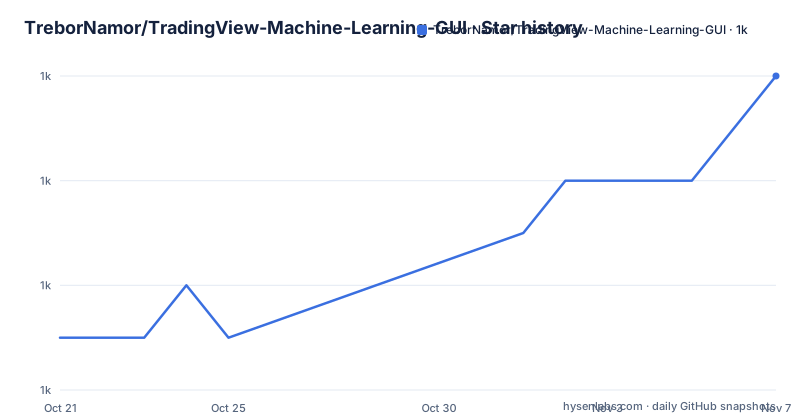
- TreborNamor/TradingView-Machine-Learning-GUI1,020 ★ · +5
| Repository | 2026-10-21 | 2026-11-07 |
|---|---|---|
| TreborNamor/TradingView-Machine-Learning-GUI | 1k | 1k |
5 Stars in the last 17 days, measured from the daily GitHub snapshot. Compare with other projects
Editorial analysis
The mismatch between Pine and a local script is the problem being solved
HyperView is a CLI-first toolkit for downloading TradingView market data, backtesting Python strategies with Pine-like execution behavior, and optimizing parameters in a repeatable workflow, and the pain points section explains why that exists.
Manual optimization on TradingView charts is slow, hard to reproduce, and difficult to audit. Results often diverge between Pine and local scripts because fill assumptions differ. Data, presets and reports are scattered across CSVs, notebooks and ad-hoc scripts. And multi-strategy and multi-pair research takes too long without a standardized pipeline.
The divergence point is the interesting one. A Pine strategy and a local Python implementation can disagree because of fill assumptions, data differences or differences in the translated logic. Relevant assumptions include fill price, stop timing and the ordering within a bar where both stop and target could be hit. A backtester that guesses differently from the platform produces numbers that do not mean what the reader thinks they mean, and the entire premise here is that the local backtester should use the same assumptions.
The answer is a unified CLI workflow, `download -> signal -> backtest -> optimize -> export artifacts`, and a backtester with a TradingView-like execution model built on next-bar-open entries and intrabar SL/TP path simulation.
The key features list is what the pipeline delivers: historical download from the TradingView websocket, a Python strategy framework with TA-Lib, backtesting with mathematically correct portfolio aggregation from combined equity curves, SL/TP optimization via Optuna with the TPE sampler and top preset persistence, two-stage Pine optimization plus batch optimization for multiple strategy files, and structured artefacts in `data/`, `results/`, `strategies/raw/` and `strategies/optimized/`.
The project is MIT licensed, the version is 0.1.0, and the last push was on 2026-08-18 with no GitHub releases.
The CLI is the product, and it has three names
The canonical CLI command is now `tradingview-backtest`, and the backwards-compatible aliases `tvbacktest`, `hyperview` and `python -m hyperview` still work, which is a detail that says something about the project's history.
The repository is a fork, and the readme has a section on improvements over the original fork source that is unusually specific about what changed. The CLI standardisation task unified the command entry around `tradingview-backtest` while keeping the aliases, with the stated goal of reducing team friction across local terminal and AI CLI usage. The other tasks added optimised Pine export with best parameters injected into the defaults, compact filename metrics, `np/dd/pf/tc`, for fast scanning, per-run metadata headers in exported Pine snapshots, a batch runner to optimise multiple Pine files from `strategies/raw/`, matrix execution for symbols and timeframes, and leaderboard outputs for aggregating top results.
The artefact contract task standardised the directory layout, and that is the part worth adopting even if you do not use the tool. The directories are `strategies/raw/`, `strategies/optimized/`, `results/optimizations/<symbol>/<timeframe>/` and `data/`, with the goal of deterministic outputs for commit, push and audit, and easier collaboration.
The three install routes are the standard modern ones and are all documented with the same command. `uvx` runs it directly from GitHub with no long-lived install, and from PyPI once published. `pipx` installs it globally, npm style. And `pip` is the universal fallback. There are also bootstrap scripts in the repository for Windows cmd, PowerShell and Linux and macOS, and a Vietnamese version of the readme.
The verification baseline before serious runs is three commands, and the second and third of them are the ones that tell you the install actually works:
python -m unittest discover -s tests -v
python -m hyperview --help
python -m hyperview list-strategies
The backtester is bar-based, and the project is clear about that limit
The FAQ section answers the questions that decide whether this tool is usable for a given strategy, and three of the answers are about limits.
HyperView does not support tick data. It is candle and timeframe based, with `1m`, `5m`, `15m`, `1h` and so on, not a tick-by-tick data stream. And `1m` is not equivalent to tick data, since `1m` is still aggregated OHLCV bar data rather than raw market ticks. The consequence is stated directly: it cannot be used for tick-level or HFT validation, because the backtester uses bar-level and intrabar-path assumptions rather than full tick replay.
That is the single most important thing to know before using the optimiser. An intrabar path simulation is a model: given a bar with an open, high, low and close, the backtester has to decide whether the stop or the target was reached first, and it decides using an assumption about the path. The project describes its intrabar path as an approximation of TradingView’s fill behavior, not a guarantee of identical results. It remains an assumption rather than a record of actual tick-by-tick execution; compare representative cases against the platform and include fees and slippage before relying on a result.
The other two limits are about data. You can use HyperView without a TradingView Pro account, but data depth is typically lower for anonymous or non-authenticated sessions, often around 5,000 bars, while authenticated paid sessions can reach higher limits of up to around 40,000 bars depending on account and session availability. And no TradingView API key is needed, because the downloader uses the TradingView websocket and session mechanics with optional local browser session credentials.
The optional Firefox requirement is the mechanism for that, and it is worth understanding. Firefox is optional and is there for authenticated TradingView session reuse for higher historical bar limits, which means reusing a session you already have in a local browser rather than creating a new one.
The dependency set supports the picture. TA-Lib for indicators, with 20 wrapped indicators plus direct TA-Lib access, Optuna for the optimiser, pandas and numpy for the data, `websocket-client` for the download, `rich` for the CLI tables, panels and progress UI, and `beautifulsoup4` and `requests` for the parts of the site that need scraping. Python 3.11 or newer is required.
The optimisation is over stop and take-profit, and the output goes back into Pine
The optimisation workflow is the part that closes the loop with TradingView, and it is worth describing concretely.
The backtest command takes the stop loss and take profit values directly, for example `tradingview-backtest backtest --sl 3.23 --tp 13.06 --mode long`, and the download command fetches the data for specific pairs and a timeframe, for example `tradingview-backtest download-data --pairs NASDAQ:NFLX NASDAQ:AAPL --timeframe 1h --session extended`. You can also define the pairs in `config.json` and download multiple timeframes at once.
The optimisation then sweeps those values with Optuna using the TPE sampler, with the top presets persisted so the best configuration survives the run. The two-stage Pine optimisation is the interesting part: the first stage works on the Python strategy, and the second writes the optimised parameters back into the Pine script's defaults, which is what the export task describes as optimised Pine export with best params injected into defaults.
That is a coherent design for the workflow the project targets. A trader writes an idea in Pine, ports it to Python, sweeps the parameters locally where the loop is fast, and then ships the tuned values back to the Pine script where the strategy actually runs. The per-run metadata headers in the exported Pine snapshots and the compact filename metrics exist to make that a traceable process rather than a copy and paste.
The portability layer is a plain directory in the repository, `strategy/`, and it ships as a second package in the wheel alongside `hyperview`, which tells you the strategy code is meant to be editable by the user rather than hard-coded into the tool.
The configuration is validated by a JSON schema, `config.schema.json`, next to `config.json`, which is the right way to make a configuration file self-documenting and to fail early on a typo in a symbol name rather than halfway through a backtest.
Where HyperView is the wrong tool
The first case is a strategy that needs tick or order-book data. The project rules it out itself, and it is the case where the intrabar assumption would do real damage. A strategy whose edge lives in the sequence of trades inside a bar cannot be validated by a bar-level model, and an optimiser running against that model will find parameters that look good on the model and are not good in the market.
The second case is a short history. Five thousand bars of one-minute data is a few trading days, and forty thousand is a few months. A strategy with a long lookback or a slow signal needs more, and the downloader will not give it. The fix is a different data source, and at that point you are no longer using HyperView's downloader, which is the component that makes the Pine-comparable fills work in the first place.
The third is a production trading system. This is a research and backtesting tool. It downloads, it backtests, it optimises, it exports artefacts and a Pine script. Nothing in the readme describes live order placement, and a tool that optimises parameters and writes them into a strategy that runs on someone else's platform is a research instrument, not an execution engine.
The fourth is a team that wants a shared, versioned result. The artefact contract is a genuine improvement, with deterministic directories for commit, push and audit, but a 0.1.0 tool with a fork's worth of renamed commands and aliases is still a young project, and the two-language readme and the AI CLI guidance in the docs suggest a fast-moving codebase. The strategy is to pin the version and keep the artefacts in your own repository, and to treat the exported Pine files as the record rather than the reports.
A final note on the data provenance. The downloader talks to the TradingView websocket, which means the tool is coupled to an undocumented interface that can change without notice, and the data it produces is TradingView's rendering of a feed rather than an exchange feed. That is fine for research and it is exactly what makes the backtest comparable to what the user sees on the platform, but it is not the data a live broker would fill against.
Editorial conclusion
HyperView fits a quant who writes Pine on TradingView and wants to test the same idea locally with reproducible artefacts, since the fill assumptions are stated rather than left implicit, and who is willing to accept candle-level data. It does not fit someone who needs tick-level replay or intraday high-frequency validation, which the project rules out explicitly. Before you rely on a backtest result, read the fill assumptions and the bar-depth limits, because data depth of roughly 5,000 bars for an anonymous session and up to 40,000 for an authenticated one is not enough history for most strategies, and the difference in results between Pine and local is exactly what the tool is trying to remove.
Frequently asked questions
What does HyperView do?
It is a CLI-first toolkit for downloading TradingView market data, backtesting Python strategies with Pine-like execution behaviour, and optimising stop-loss and take-profit parameters in a repeatable workflow, with the unified flow `download -> signal -> backtest -> optimize -> export artifacts`.
How do I install HyperView?
With `uvx` to run it directly without a long-lived install, `pipx install tradingview-backtest` for a global install, or `python -m pip install tradingview-backtest` as the universal fallback. The canonical command is `tradingview-backtest`, with `tvbacktest` and `hyperview` kept as aliases, and bootstrap scripts for Windows, PowerShell and Linux and macOS are in the repository.
Does HyperView need a TradingView Pro account or an API key?
No API key is needed, since the downloader uses the TradingView websocket and session mechanics with optional local browser session credentials. You can use it without a Pro account, but data depth is typically around 5,000 bars for anonymous sessions, versus up to around 40,000 for authenticated paid sessions.
Can HyperView validate tick-level or high-frequency strategies?
No. It is candle and timeframe based rather than tick-by-tick, and the backtester uses bar-level plus intrabar-path assumptions rather than full tick replay, so it is not suitable for tick-level or HFT validation.
Official sources
Add this badge to your README
If you maintain this project, the badge below links readers to this analysis and shows its maintenance status from the daily GitHub snapshot. Paste the markdown into your README; add ?metric=license or ?metric=stars to the image URL for a different field.

[](https://hysenlabs.com/projects/trebornamor-tradingview-machine-learning-gui)Star history chart for your README
[](https://hysenlabs.com/projects/trebornamor-tradingview-machine-learning-gui)Was this useful?