TrentNodes ships a shot detector it deliberately refuses to install for you
Professional video processing, scene detection, and utility nodes for ComfyUI.
At a glance
- What is it?
- A ComfyUI custom node pack for video processing, shot boundary detection and graph maintenance, published to a node registry alongside a requirements file. The interesting engineering is in the dependency notes: the registry installs from one of those two files, the default neural detector is not on a package index at all, and installing it naively would downgrade the host environment.
- Who is it for?
- Adopt TrentNodes if you build video pipelines in ComfyUI and want shot boundary detection that labels the kind of cut rather than just flagging one. Before you install it, read the dependency notes rather than the feature list, because there are two different dependency files serving two different installation paths and they are not interchangeable.
- Can I use it commercially?
- Yes. MIT is a permissive licence: you can use, modify and sell software built on it, as long as you keep its copyright and licence notices.
- Is it still maintained?
- Yes. The repository last received commits 1 day ago.
- What is it written in?
- Mainly Python, according to GitHub's language statistics.
Answers come from the project's GitHub data, last synced on October 23, 2026, and from our analysis. They are not legal advice.
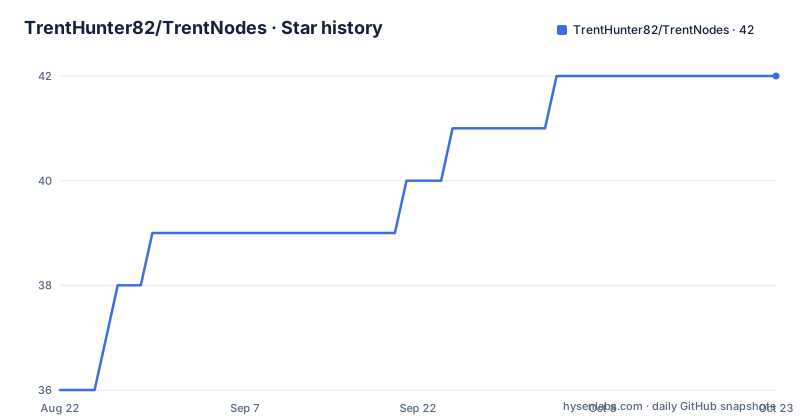
Star history
- TrentHunter82/TrentNodes42 ★ · +6
| Repository | 2026-08-22 | 2026-10-23 |
|---|---|---|
| TrentHunter82/TrentNodes | 36 | 42 |
6 Stars in the last 62 days, measured from the daily GitHub snapshot. Compare with other projects
Editorial analysis
The registry installs from the manifest, and the manifest once shipped too little
The packaging comment in the project file is the most useful paragraph in the repository. It instructs maintainers to keep that file's dependency list in sync with the uncommented lines of the requirements file, and then explains why the sync matters: the node registry installs from the manifest, so anything missing there is simply absent for a registry install. The comment then admits the failure mode happened, naming two features that shipped without their dependencies as a result. So a user who installed through the manager or the registry and then found a node erroring on a missing library was not misusing anything; they hit a documented consequence of a two-file dependency model. The requirements file remains the right list for a manual install, which is why both exist, and why a self hosted environment that installs manually can behave differently from a registry one.
The default shot detector is excluded from the dependency list on purpose
The shot boundary node offers three detectors and defaults to trying the strongest one first. That detector is a 2026 shot-query video transformer from a university computer vision lab, released under a permissive licence. It is also not published to a package index. So it is deliberately left out of the dependency list, and the requirements file carries the reasoning: the package itself imports neither the transformer library nor anything the host lacks, which is exactly why letting the installer resolve its dependencies would be wrong. The consequence for a user is concrete. Out of the box you get the fallback detector, whose weights ship inside its wheel, which runs on the processor, and which reports hard cuts only. To get transition typing you have to install the stronger model yourself.
Installing the strong detector without dependencies is not optional
The requirements file is unusually insistent about one flag, and the reason given is a trap that would otherwise cost people an afternoon. It explains that the detector repository pins a specific version of the transformer library and lists the deep learning runtime packages in its own manifest, so a plain install would resolve to those pins and downgrade a working ComfyUI environment. Hence the instruction to install from the git address with dependency resolution turned off, spelled out as a command. The file then restates the same point a second time, saying the flag matters twice over. It also notes what the model actually needs and does not need: it does not import the transformer library itself, it does not need anything ComfyUI lacks, it needs an accelerator, and the fallback detector runs fine without it. So the rule is narrow and worth following exactly.
pip install --no-deps \
  git+https://github.com/UVA-Computer-Vision-Lab/OmniShotCut.git
Detector fallback is reported four ways and can be made to fail instead
A cascade that quietly degrades is the classic failure mode of a multi detector design, and this node is explicit about closing it. There is an output that names which detector actually ran. The generated report headlines a fallback when one happened. The film strip preview subtitle flags it. And the console logs it as a warning. On top of reporting, there is a policy setting that decides whether fallback happens at all: one mode allows all three detectors in sequence, another forbids the weakest and never uses it, and a third accepts only the strongest and raises an error otherwise. That third mode is the one to pick if a downstream prompt generator is going to act on the cut list, because a worse cut list handed silently to another model is the failure the policy exists to prevent. The sensitivity control is also detector-specific and the documentation says which detectors honour it.
The canvas tools rewrite the graph in one keystroke, with one undo
Several of these are not nodes but graph editing tools registered under a menu, and they follow a consistent pattern worth naming. One arranges the children of any selected group into a left to right layered layout: sources on the left, sinks on the right, columns ordered by how deep they sit in the dependency graph, and nodes within a column stacked by the average vertical position of their downstream targets so the wires stay roughly parallel. Collapsed nodes are right aligned inside their column so their sockets stay near the next column. Another swaps the host's native video nodes for their video helper equivalents, collapsing the intermediate nodes that become redundant, and it works on a selection or on the whole graph. A third completes that swap by wiring frame rate through from the loader and setting an encoder and quality level. All of them are advertised as a single undoable action.
Six reference slots stay wired even when the folder is empty
The batch loading nodes solve a problem that sounds trivial and is not: pairing each clip in a folder with its own prompt file and its own folder of reference images. The pairing is done by filename, so a clip named with a numeric prefix automatically finds a prompt file with the same prefix and a reference folder with the same prefix. Prompt files are loaded one per clip with natural sorting, and there is a modification time cache so re-running does not reload unchanged files. The reference node loads up to six images onto six fixed outputs, and the empty case is handled the interesting way: an empty slot emits a null rather than disconnecting, because downstream optional inputs skip nulls silently. The documented consequence is that all six sockets stay wired and a run with no references completes without erroring instead of failing.
The PSD background swap has three modes and one documented limitation
Layered source files rarely have a single obvious background layer, so this node offers an escalating set of strategies rather than one guess. The first swaps a single layer chosen by index, which is the original behaviour. The second swaps a contiguous range of layers between a start and end index with one image, sized either to the canvas or to the union bounding box of the layers it covers. The third pastes the replacement underneath every original layer, which is the escape hatch when you cannot pin the range down at all. A companion detect node scores candidate layers using name patterns, how much of the canvas they cover, their opacity, their blend mode, and a bias toward lower layers, then emits a recommended start and end range to wire in. The documentation also names its own limitation plainly: re-exporting the file back to a layered format only works in the single layer mode.
Three install paths, and the node registry is the recommended one
Installation is documented three ways and the page recommends the first. The recommended path is the ComfyUI manager: search for the package by its display name and install it. The second path is a single command through the project's command line tool, which fetches from the same registry the manager uses, so both remote paths share one source of truth. The third is manual: move into the host's custom nodes directory, clone the repository, change into it, and install the requirements file. Given the earlier note about which file the registry reads, the three paths are not equivalent. A registry install resolves dependencies from the project manifest, while a manual install resolves them from the requirements file. Choose the manual path if you want the wider dependency set or need the extra detector, and the registry path if you want the node to arrive with the manifest's curated set.
comfy node registry-install trentnodescd ComfyUI/custom_nodes
git clone https://github.com/TrentHunter82/TrentNodes.git
cd TrentNodes
pip install -r requirements.txtEditorial conclusion
Adopt TrentNodes if you build video pipelines in ComfyUI and want shot boundary detection that labels the kind of cut rather than just flagging one. Before you install it, read the dependency notes rather than the feature list, because there are two different dependency files serving two different installation paths and they are not interchangeable. And plan the extra step: the best detector has to be compiled from source without its own dependencies, on a machine with a supported accelerator, or you accept the CPU baseline. If you only need a keyer or a degradation pass, you can install those without touching the detector stack at all.
Frequently asked questions
How do I install Trent Nodes into ComfyUI?
Three ways are documented. Search for the package by its display name in the ComfyUI manager and install it, which is the recommended path. Run the project's command line tool with the registry install command for the same registry source. Or clone the repository into the host's custom nodes directory and install its requirements file, which is the path that resolves the wider dependency set.
Why did shot detection not work after a registry install?
Because registry installs resolve dependencies from the project manifest rather than the requirements file, and the documentation admits two features once shipped without their dependencies as a result. The default neural detector is also deliberately excluded from the manifest because it is not on a package index, so a registry install gives you the baseline detector, whose weights ship in its wheel and which runs on the processor and reports hard cuts only.
What does the CorridorKey green screen node do that a normal keyer does not?
It is described as unmixing the true foreground colour out of a green background rather than producing a binary mask, which preserves semi transparent detail such as hair, motion blur and out of focus edges. It outputs a clean foreground, an alpha matte and a composite preview, and it uses a separate segmentation model to generate an alpha hint automatically when you have not supplied a mask.
Official sources
Add this badge to your README
If you maintain this project, the badge below links readers to this analysis and shows its maintenance status from the daily GitHub snapshot. Paste the markdown into your README; add ?metric=license or ?metric=stars to the image URL for a different field.

[](https://hysenlabs.com/projects/trenthunter82-trentnodes)Star history chart for your README
[](https://hysenlabs.com/projects/trenthunter82-trentnodes)Was this useful?