TurboDiffusion: distilling video diffusion into one to four sampling steps
TurboDiffusion: 100–200× Acceleration for Video Diffusion Models
At a glance
- What is it?
- TurboDiffusion is a CUDA extension plus a set of distilled Wan checkpoints that cut video diffusion sampling from many steps to between one and four, using SageAttention, SLA and rCM rather than new attention math. The reported numbers are large and the measurement is narrow: single RTX 5090, end to end time excluding text encoding and VAE decoding.
- Who is it for?
- Use TurboDiffusion if you are generating Wan 2.1 or Wan 2.2 video on a single modern NVIDIA GPU and your current wall clock is dominated by sampling steps, since that is the exact condition its distilled checkpoints target.
- Can I use it commercially?
- Yes. Apache-2.0 is a permissive licence: you can use, modify and sell software built on it, as long as you keep its copyright and licence notices.
- Is it still maintained?
- Yes. The repository last received commits 11 days ago.
- What is it written in?
- Mainly Python, according to GitHub's language statistics.
Answers come from the project's GitHub data, last synced on November 15, 2026, and from our analysis. They are not legal advice.
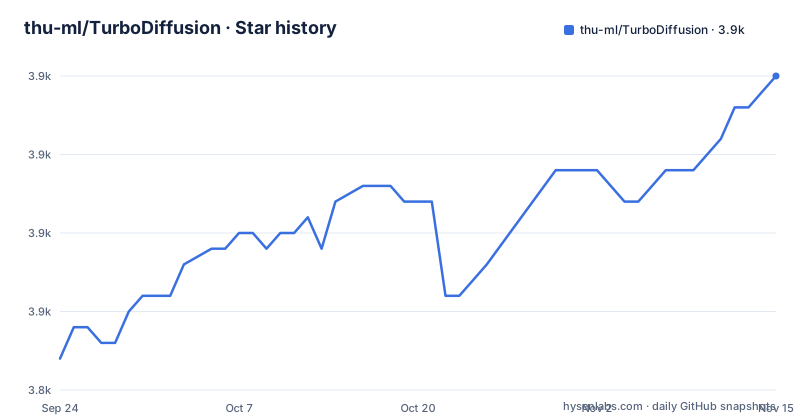
Star history
- thu-ml/TurboDiffusion3,865 ★ · +18
| Repository | 2026-09-24 | 2026-11-15 |
|---|---|---|
| thu-ml/TurboDiffusion | 3.8k | 3.9k |
18 Stars in the last 52 days, measured from the daily GitHub snapshot. Compare with other projects
Editorial analysis
Four Wan checkpoints, each split into a high and low noise pair where applicable
The distributable surface is four model names on Hugging Face: TurboWan2.2-I2V-A14B-720P, TurboWan2.1-T2V-1.3B-480P, TurboWan2.1-T2V-14B-480P and TurboWan2.1-T2V-14B-720P. The naming encodes the base model, the parameter count and a resolution tag, and the Best Resolution column records where each gives its best video quality, which is not the same as a hard limit: all four checkpoints are said to generate at either 480p or 720p. The image to video entry is the odd one out in a useful way. It is downloaded as two files, a high noise and a low noise checkpoint, because the inference script switches between them at a timestep boundary that defaults to 0.9. A single file per checkpoint covers the three text to video entries.
Quantized and unquantized checkpoints are chosen by GPU memory, not by preference
The inference section draws a hard line at 40GB of GPU memory. On an H100 or anything larger you use the unquantized checkpoints, the ones without the -quant suffix, and you leave --quant_linear off the command line. On an RTX 5090, an RTX 4090 or similar you use the -quant checkpoints and you add --quant_linear. Matching the flag to the checkpoint matters, since linear quantization inside the network and a quantized checkpoint file are two separate decisions that the same instruction pairs up. The download commands make the split explicit by repeating it in their comments:
# For Wan2.1-T2V-1.3B
wget https://huggingface.co/TurboDiffusion/TurboWan2.1-T2V-1.3B-480P/resolve/main/TurboWan2.1-T2V-1.3B-480P-quant.pth

# For Wan2.2-I2V-14B
wget https://huggingface.co/TurboDiffusion/TurboWan2.2-I2V-A14B-720P/resolve/main/TurboWan2.2-I2V-A14B-high-720P-quant.pth
wget https://huggingface.co/TurboDiffusion/TurboWan2.2-I2V-A14B-720P/resolve/main/TurboWan2.2-I2V-A14B-low-720P-quant.pth
Note that the file names carry the model family, so the Wan2.2 pair is still named TurboWan2.1-T2V-1.3B-480P-quant.pth for the 1.3B line, which makes filenames worth reading rather than pattern matching.
Installing means compiling CUDA for five GPU architectures
This is a source distribution in practice. The recommended path is:
conda create -n turbodiffusion python=3.12
conda activate turbodiffusion

pip install turbodiffusion --no-build-isolation
Building from source adds a submodule step, because .gitmodules is present at the top level and the build expects the submodule tree to be in place:
git clone https://github.com/thu-ml/TurboDiffusion.git
cd TurboDiffusion
git submodule update --init --recursive
pip install -e . --no-build-isolation
The --no-build-isolation flag appears in both, and it is not decorative: the build backend needs torch available while it runs, plus ninja and a CUDA toolchain. setup.py builds a CUDAExtension named turbo_diffusion_ops from bindings.cpp and a set of .cu files under turbodiffusion/ops, compiling with -O3, -std=c++17, --use_fast_math and relaxed constexpr flags. The gencode list covers compute_120a, compute_100, compute_90, compute_89 and compute_80, so the first build compiles kernels for five architectures, which is where most of the install time goes.
SageSLA is opt-in and depends on a separate install
Attention acceleration comes from two projects outside this repository. TurboDiffusion builds on SageAttention and on SLA, sparse-linear attention, and gets its speedups in that direction rather than by shipping new attention math of its own. Timestep distillation is likewise borrowed: rCM is the mechanism that turns a many step sampler into a short one. The SageSLA path is a fast SLA forward pass layered on SageAttention, and it is not on by default. Enabling it means installing SpargeAttn first:
pip install git+https://github.com/thu-ml/SpargeAttn.git --no-build-isolationSo the dependency chain has three links of different types: two Python packages you install from GitHub or pip, and one CUDA extension this project compiles itself. None of the three is optional in the sense of being optional to use, but only the third is built locally.
Sampling steps collapse to one through four, and sigma_max trades diversity for quality
The T2V script exposes a small set of arguments that matter more than they look:
export PYTHONPATH=turbodiffusion

# Arguments:
# --dit_path            Path to the finetuned TurboDiffusion checkpoint
# --model               Model to use: Wan2.1-1.3B or Wan2.1-14B (default: Wan2.1-1.3B)
# --num_samples         Number of videos to generate (default: 1)
# --sigma_max           Initial sigma for rCM (default: 80); larger choices (e.g., 1600) reduce diversity but may enhance quality
# --vae_path            Path to Wan2.1 VAE (default: checkpoints/Wan2.1_VAE.pth)
# --text_enc
The headline is num_steps, whose accepted range is 1 to 4 with a default of 4. A single figure shows what the distillation bought: a five second clip from Wan-2.1-T2V-1.3B-480P is reported at 184s end to end originally and 1.9s on TurboDiffusion, on one RTX 5090. The second lever is sigma_max, the initial sigma for rCM, defaulting to 80, where the documentation states that larger choices such as 1600 reduce diversity but may enhance quality. That is the one knob here with a quality and variety trade off attached, and it is also the one the documentation flags as a judgement call rather than a setting with a right answer.
End to end time excludes the two stages users actually watch
Read the reported numbers with the measurement definition in hand. Every figure is produced on a single RTX 5090, and E2E Time is defined as the end-to-end diffusion generation latency excluding text encoding and VAE decoding. The headline pair is 184s down to 1.9s for the 5 second 480P clip, and the I2V entry at 720P is shown going from 4549s to 38s. Those two excluded stages are not free: both the Wan2.1 VAE and the umT5 text encoder are required downloads, and the umT5 encoder arrives as models_t5_umt5-xxl-enc-bf16.pth, an xxL sized text encoder. The same VAE and encoder serve both Wan2.1 and Wan2.2, so the setup is shared rather than duplicated across model families.
Long English prompts only, and checkpoints the authors call unfinished
Two warnings sit at the top of the file and both bound what you can expect. The models are trained only on long English prompts, and the instruction for other prompt types is to augment them to get better performance. Second, the checkpoints and the paper are not finalized and are said to be updated later to improve quality. The package metadata says version 1.0.0 while the project carries no GitHub releases, and the last push to the default branch main is dated 2026-08-27. The project also ships a separate turbot2va/ directory beside turbodiffusion/, plus assets/, scripts/ and a pyproject.toml that declares the console script turbodiffusion-serve.
A terminal REPL is wired in as turbodiffusion-serve
Interactive generation lives at turbodiffusion/serve/ and is exposed as the project script turbodiffusion-serve, which pyproject.toml maps to turbodiffusion.serve.tui:main. The reason it matters for anyone scripting inference is stated plainly: it allows multi-turn video generation without reloading the model. Given that the VAE and the xxL umT5 text encoder both have to be resident, avoiding a reload per prompt is the difference between iterating on a prompt and waiting for setup on every attempt. The dependency list behind the interface is visible too, with prompt-toolkit 3.0 or newer and rich 13.0 or newer listed alongside transformers, ftfy and regex, which is the usual stack for a prompt loop that cleans up text.
Editorial conclusion
Use TurboDiffusion if you are generating Wan 2.1 or Wan 2.2 video on a single modern NVIDIA GPU and your current wall clock is dominated by sampling steps, since that is the exact condition its distilled checkpoints target. Skip it if your prompts are short or non English, if you need training rather than inference, or if you cannot compile CUDA for your card, because the install builds kernels locally and lists gencode targets only for compute_120a, compute_100, compute_90, compute_89 and compute_80. Before you plan a workload around the speedups, confirm two things: that your measured time is actually sampling, since text encoding and VAE decoding sit outside the reported E2E figure, and that you pick the quantized or unquantized checkpoint your GPU memory calls for, around the 40GB line. The authors also state the checkpoints are not finalized and the models were trained only on long English prompts.
Frequently asked questions
Which TurboDiffusion checkpoints should I download for an RTX 5090?
Use the quantized checkpoints whose filenames end in -quant and add --quant_linear to the inference command. Unquantized checkpoints without that suffix are meant for GPUs with more than 40GB of memory such as an H100, where the flag should be removed.
How many sampling steps does TurboDiffusion need for a video?
The --num_steps argument accepts 1 to 4 steps and defaults to 4. The reported example is a 5 second clip from Wan-2.1-T2V-1.3B-480P generated on one RTX 5090, measured at 184s originally and 1.9s with TurboDiffusion.
What does the --sigma_max option do in TurboDiffusion?
It sets the initial sigma for rCM and defaults to 80. The README states that larger choices such as 1600 reduce diversity but may enhance quality, so it is the quality against variety control.
Do TurboDiffusion models work with prompts in languages other than English?
The models were trained only on long English prompts. For other prompt types the project advises augmenting them to get better performance.
Can TurboDiffusion generate multiple turns without reloading the model?
Yes. Interactive inference is available in the turbodiffusion/serve/ directory through the turbodiffusion-serve console script, which allows multi-turn video generation without reloading the model.
Official sources
Add this badge to your README
If you maintain this project, the badge below links readers to this analysis and shows its maintenance status from the daily GitHub snapshot. Paste the markdown into your README; add ?metric=license or ?metric=stars to the image URL for a different field.

[](https://hysenlabs.com/projects/thu-ml-turbodiffusion)Star history chart for your README
[](https://hysenlabs.com/projects/thu-ml-turbodiffusion)Was this useful?