The same sudo-rs binary has a different name on different distributions
A memory safe implementation of sudo and su.
At a glance
- What is it?
- sudo-rs reimplements sudo and su in Rust for memory safety, but what your package manager calls it, which features the build has, and whether it starts at all without hand written PAM and sudoers files all differ by distribution.
- Who is it for?
- sudo-rs fits teams that want sudo and su rewritten in Rust and can accept the gaps: the README itself warns that features expected from original sudo may be unimplemented or not planned, and the two audits covered 0.2.0 and 0.2.8 while the current release is 0.2.15. Do not deploy it on Debian 13 and expect `su-rs` to work, since that package is missing its setuid bit, and check that `/etc/pam.d/sudo` exists or the binary may refuse to run.
- Can I use it commercially?
- Yes. Apache-2.0 is a permissive licence: you can use, modify and sell software built on it, as long as you keep its copyright and licence notices.
- Is it still maintained?
- Yes. The repository received new commits within the last day.
- What is it written in?
- Mainly Rust, according to GitHub's language statistics.
Answers come from the project's GitHub data, last synced on November 23, 2026, and from our analysis. They are not legal advice.
Star history
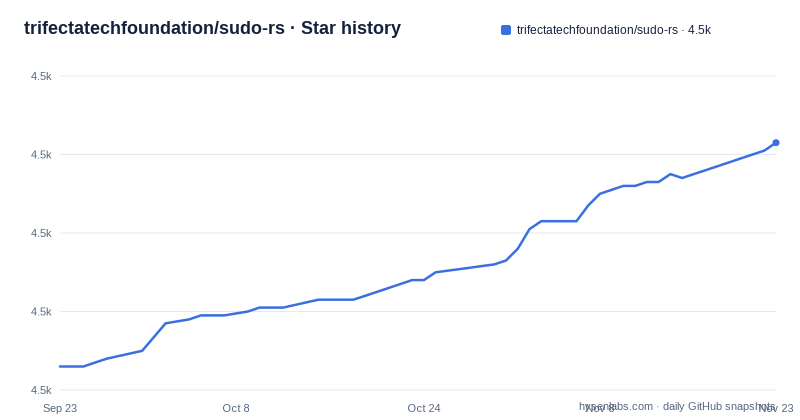
- trifectatechfoundation/sudo-rs4,523 ★ · +57
| Repository | 2026-09-23 | 2026-11-23 |
|---|---|---|
| trifectatechfoundation/sudo-rs | 4.5k | 4.5k |
57 Stars in the last 61 days, measured from the daily GitHub snapshot. Compare with other projects
Editorial analysis
update-alternatives picks the sudo your shell runs
Ubuntu is the case where you may not install anything at all. On Ubuntu 25.10 (Questing Quokka) and 26.04 (Resolute Raccoon), sudo-rs is installed and enabled by default, and choosing between the two implementations is a single alternatives question.
update-alternatives --config sudoThe packaged versions differ between those two releases. The sudo-rs package in Ubuntu 25.10 is based on v0.2.8 with additional bug fixes backported from newer versions, while the package in Ubuntu 26.04 LTS is based on v0.2.13 with additional bug fixes. So the same command on two consecutive Ubuntu releases can behave differently, and reading the base version rather than the changelog is the first thing worth doing on that distribution. postmarketOS is the other default-install case: sudo-rs is installed and enabled by default on all new installs there, with no package command to run.
Your package manager decides what the command is called
The naming differs per distribution, and that is where most of the confusion comes from. Arch Linux installs `sudo-rs`, `sudoedit-rs`, `visudo-rs` and `su-rs`. Fedora offers `sudo-rs`, `visudo-rs` and `su-rs`, with no `sudoedit-rs`. Debian 13 (trixie) and later offer only `sudo-rs` and `visudo-rs`, and if you want the familiar names instead you prepend `/usr/lib/cargo/bin` to your current `$PATH` variable.
apt-get install sudo-rsNixOS takes a different route: adding `security.sudo-rs.enable = true;` to your configuration replaces the usual `sudo` and `sudoedit` commands. Alpine Linux installs `sudo`, `visudo` and `sudoedit` directly but not `su`, which is still offered through BusyBox, and `apk add sudo-rs-su` is a separate package for the sudo-rs version of `su`. The common thread is that distributions avoid colliding with original sudo, so a script written against `sudo` is not portable between them.
Debian's su-rs has no setuid bit set
Debian 13 (trixie) is the distribution to read carefully. The sudo-rs version packaged there is based on release 0.2.5 from April 2025, which is missing `sudoedit`, `NOEXEC:`, and many other usability and compatibility improvements, while still being up to date with respect to security patches. It is not stale in the way that matters most for security, and it is plainly behind in the ways that matter for day to day use. On top of that, a misconfiguration in this package means `su-rs` cannot be used at all, because the setuid flag is not set on the binary. If you planned to use `su-rs` from that package, it will not work. Debian unstable (sid) may have a newer version, and the pre-compiled tarballs sidestep the packaging question entirely.
FreeBSD ships two flavours that differ only in conflicts
The FreeBSD port is maintained by the project itself, lives in the ports tree, and comes in two flavours.
pkg install sudo-rsThat one gives you `sudo`, `visudo` and `sudoedit`, which conflicts with the `security/sudo` package, so you cannot have both installed at the same time. The alternative removes the collision.
pkg install sudo-rs-coexistThis installs `sudo-rs`, `visudo-rs` and `sudoedit-rs` and does not conflict with `security/sudo`. The catch is the ports branch: for those commands to work, `pkg` needs to be using the `2025Q4` quarterly branch or later, so an older quarterly snapshot will not see the packages. Getting the absolute latest version means switching the branch from quarterly to `latest`, which is a system-wide change to how `pkg` tracks ports rather than a per-package one. Remember too that sudo-rs targets FreeBSD and Linux-based operating systems only.
sudo-rs reads /etc/sudoers-rs first and never creates it
If Todd Miller's sudo is not already installed on the machine, nobody has written a sudoers file for you. sudo-rs processes `/etc/sudoers-rs` if it exists and otherwise falls back to `/etc/sudoers`, so you have to create one yourself.
Defaults secure_path="/usr/local/sbin:/usr/local/bin:/usr/sbin:/usr/bin:/sbin:/bin"

%sudo ALL=(ALL:ALL) ALL
Path order matters too. Installing the pre-compiled tarballs puts the binaries in `/usr/local/bin` and `/usr/local/sbin`, and if your default `PATH` gives `/usr/bin` and `/usr/sbin` priority, the old sudo keeps winning no matter which package you just installed. The README asks you to double check that ordering, and it links to the upstream sudoers man page for the syntax instead of reproducing it.
No PAM files means it may refuse to start
This is the failure mode most likely to cost you a lockout. If original sudo is not installed, there are no `/etc/pam.d/sudo` or `/etc/pam.d/sudo-i` files, and you are asked to create both, with this content for Debian and Ubuntu.
session required pam_limits.so

@include common-auth
@include common-account
@include common-session-noninteractive
Skip that step and one of two things happens: either a fallback PAM policy is used, or sudo-rs simply refuses to run because it cannot initialize PAM. On Fedora the syntax is slightly different, but the correct PAM configuration files will most likely be already installed. On FreeBSD the files belong in `/usr/local/etc/pam.d` instead.
A Cargo feature that exists to stop you building it
`Cargo.toml` is candid about its own sharp edges. `do-not-use-all-features` is present only so that an accidental `cargo --all-features` build fails loudly, since the comment says the feature should never be enabled. `dev` enables detailed logging to `/tmp`, and the file notes that this compromises the security of sudo-rs somewhat, which is why it is for development only. `pam-login` switches `sudo -i` to the `sudo-i` PAM service name, and the comment is explicit: enable it only if you know original sudo on the target system uses `sudo-i`, naming Debian and Fedora as examples and Arch as a counterexample. `apparmor` enforces AppArmor profiles, `gettext` turns on localized user-facing messages, and `unstable-remote-sudoers` exposes the unstable `@socket` feature for fetching a remote sudoers file. The release profile strips symbols and sets `lto = true` and `opt-level = "s"`, and the lint table denies `unsafe_op_in_unsafe_fn`.
Audited at 0.2.0 and 0.2.8 while the release is 0.2.15
sudo-rs has been audited twice: version 0.2.0 in August 2023 and version 0.2.8 in August 2025, with both reports under `docs/audit`. The Cargo package version is 0.2.15, published on 2026-08-31, so the newer audit covers a version seven patch releases behind the current one. Completeness is the other thing to weigh. The README says plainly that sudo-rs is being actively maintained, but that features you might expect from original sudo may still be unimplemented or not planned, and it points you at `FAQ.md` for the frequently asked questions and at the issue tracker to request one that is missing. That caveat carries more weight for sudo-rs than for most replacements, because the original carries years of accumulated behaviour in its flags and edge cases. Building from source needs Rust 1.85 or newer, the crate sets `edition = "2024"`, and translated messages need gettext tools for `msgfmt`.
Editorial conclusion
sudo-rs fits teams that want sudo and su rewritten in Rust and can accept the gaps: the README itself warns that features expected from original sudo may be unimplemented or not planned, and the two audits covered 0.2.0 and 0.2.8 while the current release is 0.2.15. Do not deploy it on Debian 13 and expect `su-rs` to work, since that package is missing its setuid bit, and check that `/etc/pam.d/sudo` exists or the binary may refuse to run. Confirm the packaged version before switching, because Debian 13 ships a build based on 0.2.5.
Frequently asked questions
What are the key differences between sudo and sudo-rs?
sudo-rs is a safety oriented, memory safe implementation of sudo and su written in Rust, and it targets FreeBSD and Linux based operating systems only. It is not a feature match: the README says features you might expect from original sudo may still be unimplemented or not planned. sudo-rs itself has been audited twice, at version 0.2.0 in August 2023 and version 0.2.8 in August 2025.
How do you use sudo-rs after installing it?
On Arch, `pacman -S sudo-rs` gives you `sudo-rs`, `sudoedit-rs`, `visudo-rs` and `su-rs`. On Fedora, `dnf install sudo-rs` gives you `sudo-rs`, `visudo-rs` and `su-rs`. On Debian 13 or later, `apt-get install sudo-rs` gives you `sudo-rs` and `visudo-rs`, and prepending `/usr/lib/cargo/bin` to `$PATH` lets you call `sudo` and `visudo` instead.
What is sudo-rs?
It is a memory safe implementation of sudo and su written in Rust, with the Cargo package licensed `Apache-2.0 OR MIT` and set to `default-run = "sudo"`. The whole crate depends on two libraries, `libc = "0.2.176"` and `glob = "0.3.0"`, and it has no default features enabled.
sudo-rs vs sudo: can both be installed at once?
On many distributions both are kept, so sudo-rs is offered under modified command names to avoid conflicts. On FreeBSD, `pkg install sudo-rs` provides `sudo`, `visudo` and `sudoedit` and conflicts with the `security/sudo` package, while `pkg install sudo-rs-coexist` installs `sudo-rs`, `visudo-rs` and `sudoedit-rs` and does not conflict with it.
How does sudo-rs compare with doas?
The README sets out how each distribution renames the sudo-rs commands to avoid colliding with original sudo, and the fact that on Alpine Linux `su` is still offered through BusyBox unless you separately install the `sudo-rs-su` package.
Does sudo-rs work with Ansible?
The README warns that if your distribution keeps original sudo installed alongside sudo-rs, creating an `alias` changes only your own invocations of `sudo` and not the invocations made by other programs and scripts, which is the part that matters for automation.
Official sources
Add this badge to your README
If you maintain this project, the badge below links readers to this analysis and shows its maintenance status from the daily GitHub snapshot. Paste the markdown into your README; add ?metric=license or ?metric=stars to the image URL for a different field.

[](https://hysenlabs.com/projects/trifectatechfoundation-sudo-rs)Star history chart for your README
[](https://hysenlabs.com/projects/trifectatechfoundation-sudo-rs)Was this useful?