KonomiTV: a TV and recording server that hides the tuner, the files and the encoder behind one interface
KonomiTV: Kept Organized, Notably Optimized, Modern Interface TV media server
At a glance
- What is it?
- KonomiTV is a Python and Vue media server for Japanese broadcast television, sitting on top of Mirakurun and EDCB, with FastAPI on the back end and a Vuetify front end served as a PWA. Its central design rule is that the user should never have to pick a tuner, find a file on disk or choose a stream, and the implementation cost of that rule is visible throughout the project.
- Who is it for?
- KonomiTV is worth adopting for a household or small office in Japan that already has a broadcast tuner, Mirakurun and EDCB in place, and wants recordings and live television presented the way a streaming service presents them rather than the way a file browser does.
- Can I use it commercially?
- Yes. MIT is a permissive licence: you can use, modify and sell software built on it, as long as you keep its copyright and licence notices.
- Is it still maintained?
- Yes. The repository last received commits 1 day ago.
- What is it written in?
- Mainly Python, according to GitHub's language statistics.
Answers come from the project's GitHub data, last synced on November 7, 2026, and from our analysis. They are not legal advice.
Star history
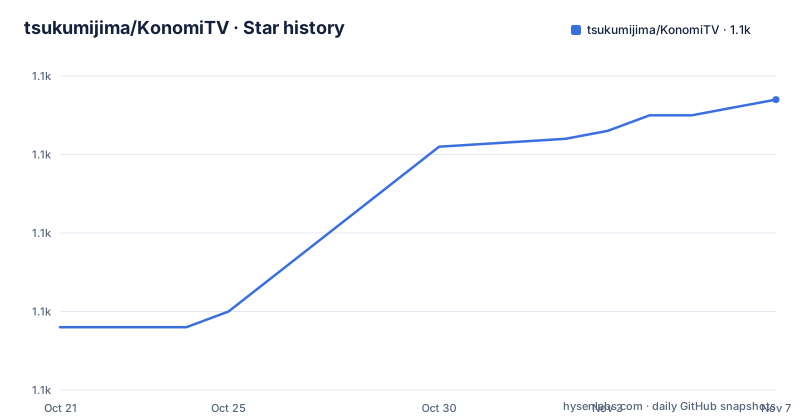
- tsukumijima/KonomiTV1,107 ★ · +29
| Repository | 2026-10-21 | 2026-11-07 |
|---|---|---|
| tsukumijima/KonomiTV | 1.1k | 1.1k |
29 Stars in the last 17 days, measured from the daily GitHub snapshot. Compare with other projects
Editorial analysis
The design rule is to remove the concepts the user does not need
The README states the design philosophy at unusual length, and it is worth reading because it explains every awkward part of the code.
The starting observation is about how television is watched without a tuner. The description says many people watch TV with TVTest, manage recordings as files, and open recordings in a media player, and that within that flow there are steps that are not really part of watching a programme. Choosing a BonDriver, hunting for a file in a folder, and opening the next episode from the start are all described as unnecessary friction, the kind of distraction that gets in the way of enjoying the programme.
The response is to borrow from streaming services. Netflix, Amazon Prime Video and AbemaTV are named as the reference points, with the observation that they are popular precisely because the user does not have to think, and can watch comfortably anywhere at any time. The stated goal is to make watching television and recordings feel like a private Netflix.
What follows is a concrete formulation of the rule: hide as much as possible from the surface the concepts and operations that are unnecessary for watching and enjoying video content, so the user is not distracted by anything other than their actual purpose.
The examples given make it concrete. The concept of a stream, which existed in TVRemotePlus, is dropped, so clicking a channel starts watching immediately. Behind that, the tuner is shared, and if the same channel is being watched on several devices, the sessions are joined automatically into a shared viewing. The quality selection UI is integrated into the player like on a video site, even though the encoder is restarted on every switch, so from the surface it looks as if several quality levels were prepared in advance.
And the README is explicit about the cost. Running on an ordinary PC means resources are limited, and not every Netflix feature can be implemented. Hiding the dirty work makes the implementation considerably harder, and getting the details right takes a lot of time and effort. The author accepts that trade because the result improves the viewing experience for the users including himself.
What is actually implemented, and what the roadmap still holds
The README is careful to say that as of October 2025 the plan is grand but only the following features are mainly implemented, and the list is short enough to be a useful scope statement.
Watching television is there, with high quality and low latency live viewing, and comments from NicoNico live commentary and Twitter alongside the programme. Watching video is there, with a polished interface like a video delivery service and a comment replay feature that lets a viewer relive the atmosphere of the moment a programme aired. The programme guide is there, with a readable colour-coded design, light operation, and one-click recording reservation, marked as new. Recording reservations are there, with programme details and broadcast time visible at a glance and support for real-time viewing, also marked as new. Then there is a my list, a viewing history that tracks what has been watched and resumes from where the viewer left off, KonomiTV accounts that share lists, history and settings between a phone outside the home and a PC at home, a client settings screen for the PWA, and a server settings screen for the runtime and streaming configuration.
The planned items are named in one sentence: programme search, management of keyword based automatic reservation conditions, automatic encoding of recorded programmes, and management of capture images. All four are described as additions to be made in order.
The reason the roadmap is spelled out is that this is a large project, and the distinction between what works and what is planned tells a reader where the rough edges will be. A feature that is implemented but new, such as the programme guide and recording reservation, is where a bug report is worth filing.
The supported environment is narrower than the feature list suggests
The operating requirements section is where this project is most honest, and the constraints are concrete.
The server runs on a Windows 10 or 11 PC or a Linux PC, and the tested-and-verified combination is Windows 10 Pro and Ubuntu 20.04 LTS. Windows 11 is expected to work but has not been verified, because the author has no such machine, though reports of it working have come in. 32-bit Windows 10 is not supported. On the Linux side, only Ubuntu from 20.04 LTS and Debian from 11 Bullseye are supported, and Debian has not actually been tested. Running under Docker is possible, and the recommendation for anything other than Ubuntu is to install with Docker rather than natively.
The author names the reason for the narrow support list: development and verification resources are substantially lacking, so RedHat-family systems and Arch Linux might work but are not supported. The same resource constraint explains the ARM story. There is support for Rockchip RK3568 and RK3588 SoCs with hardware encoders, arm64 only, and the Raspberry Pi 4 and 5 are explicitly not planned, since their hardware encoders are weak and their availability is questionable.
There is a glibc floor that catches people out. The prebuilt third-party libraries depend on glibc 2.31 or later, so an operating system adopting glibc 2.30 or below will not work when installing without Docker.
One more limitation is architectural rather than technical. Because the Windows service is run in an unusual way, environments that require enterprise user authentication such as Active Directory do not work. A corporate Windows deployment is therefore out of reach, and this is a home-labelled product.
The Docker image is a three-stage build that downloads binaries from the release artefacts
The Dockerfile in the repository root shows how the project is assembled, and it is a useful piece of information because the packaged image pulls prebuilt libraries from outside the repository.
The first stage downloads the third-party binaries, and the header comment explains the reason for the multi-stage layout: keeping the final image small and making the build cache effective. The stage is based on ubuntu:22.04 and installs aria2, ca-certificates, unzip and xz-utils. The download step itself is worth reading, because it contains two variants of the same command, one commented out:
FROM ubuntu:22.04 AS thirdparty-downloader
ENV DEBIAN_FRONTEND=noninteractive
RUN apt-get update && apt-get install -y --no-install-recommends aria2 ca-certificates unzip xz-utils
WORKDIR /
RUN aria2c -x10 https://nightly.link/tsukumijima/KonomiTV/actions/runs/38796129820/thirdparty-linux.tar.xz.zip
RUN unzip thirdparty-linux.tar.xz.zip && tar xvf thirdparty-linux.tar.xz
The commented-out lines point at the release version of the same artefact hosted on the releases page, and the active line points at a nightly build artefact for the development version, described in the comment as the 0.xx.x-dev case. The comment above the download also notes that the third-party libraries change rarely, so the download runs first to keep the build cache useful.
The second stage builds the client. It is based on node:20.16.0, copies only client/package.json and client/yarn.lock before running `yarn install --frozen-lockfile`, then copies the client source and runs `yarn build`. The comment on that stage says the built output in dist is committed to git, and the build is repeated anyway in case of a forgotten build or for convenience on development branches.
The pattern to notice is that the Docker image depends on artefacts hosted outside the repository, at a pinned workflow run URL for the development build. That is a reasonable trade for shipping prebuilt native libraries, and it does mean the image is not reproducible from source alone without also producing the third-party archive.
The stack is FastAPI and Tortoise behind a Vuetify PWA
The project topics and the repository layout point to a specific and fairly modern stack.
The topics list names fastapi, uvicorn, tortoise-orm and vue, with vuetify for the interface, and also isdb, mirakurun, edcb and dtv, which are the broadcast side. The primary language is Python, and the repository is split into client/, server/, chrome-extension/ and installer/, with config.example.yaml and docker-compose.example.yaml at the root as the configuration templates, an AGENTS.md and a CLAUDE.md, and a.claude/ directory.
The broadcast stack is the reason the project exists at all. Mirakurun and EDCB both appear in the prerequisites, and KonomiTV sits on top of them. The tuning described in the prerequisites is the part that surprises newcomers, because the project expects the tuner's driver to be changed to px4_drv, and the EDCB configuration to be prepared in advance. The hardware encoder section covers QSVEncC, NVEncC, VCEEncC and rkmppenc, with separate instructions for Windows and for Linux under each of those four names, so the encoder you have determines which path you take.
The client is a PWA, and the documentation has a section on using KonomiTV as a desktop app or a phone app, plus a separate section for the client settings screen, which covers the fine-grained settings of that PWA. The chrome-extension/ directory in the root relates to the Twitter live comment feature, whose setup instructions involve installing a Chrome extension called GET cookies.txt LOCALLY, logging in to the web version of Twitter in a private window, exporting the cookie data from the extension, and then pasting that data into the KonomiTV settings screen.
That last detail is the one to think about before enabling the feature. It asks for the cookies of a real account, exported by hand, and pasted into the server's settings. The reason given is to read comments alongside a live stream, and the cost is that a live session token for a social account is now sitting in a server configuration file.
Where KonomiTV is the wrong tool
The limits follow from the project's scope and from the resources behind it, and the README is candid about both.
The first is the hardware dependency. KonomiTV is not a media player that reads files you already have. It is a television and recording server that needs a broadcast tuner, the px4_drv driver, Mirakurun and EDCB, and a supported hardware encoder. Without that stack there is nothing for it to do, and the app is not a downloader or a library for existing video files.
The second is the platform list. The verified set is Windows 10 Pro and Ubuntu 20.04 LTS, with Windows 11 unverified, Debian untested, and other distributions unsupported because of a lack of development resources. The Raspberry Pi is explicitly not planned, and 32-bit ARM and 32-bit Windows are not supported. A company standardising on Red Hat has to use Docker and accept the untested status.
The third is the incompleteness of the feature set relative to the ambition. Programme search, keyword based automatic reservations, automatic encoding and capture image management are all listed as future work, and the author says the plan is grand while the implementation is mostly the list above. A user who wants a searchable archive with automatic encoding of a whole season is waiting for features that are not there.
The fourth is the operational shape of the Twitter comments feature, described above, where a session cookie is pasted into the server configuration. That is a design choice with a cost, and a household that does not want a social account token sitting in a config file can simply leave the feature off.
There is also a maintenance point worth checking before installing. The published releases are v0.14.1 from 2026-06-18, v0.14.0 from 2026-06-10 and v0.13.0 from 2026-01-12, and every release title carries the beta marker. The last push was on 2026-10-15, so work continues after the last tag, and the documentation distinguishes stable and development builds, which is the right thing to check when choosing what to run.
Editorial conclusion
KonomiTV is worth adopting for a household or small office in Japan that already has a broadcast tuner, Mirakurun and EDCB in place, and wants recordings and live television presented the way a streaming service presents them rather than the way a file browser does. It is the wrong tool for a household without that tuner stack, for a 32-bit ARM board, or for anyone who needs the software to be supported on a distribution other than Ubuntu or Debian, since the project states its testing boundary plainly. Before installing, read the client and server settings pages in the documentation, confirm your encoder is one of the supported ones, and check the glibc requirement if you are installing without Docker.
Frequently asked questions
What is KonomiTV and what does it need to run?
KonomiTV is a web based TV and recording media server written in Python with a Vue and Vuetify front end, built on Mirakurun and EDCB. It needs a broadcast tuner with the px4_drv driver, EDCB configured in advance, and a supported hardware encoder such as QSVEncC, NVEncC, VCEEncC or rkmppenc.
Which operating systems does KonomiTV support?
The verified systems are Windows 10 Pro and Ubuntu 20.04 LTS. Windows 11 is expected to work but has not been verified, 32-bit Windows 10 is not supported, and on Linux only Ubuntu from 20.04 LTS and Debian from 11 Bullseye are supported, with Debian untested. The project recommends Docker installation on any other distribution.
Does KonomiTV run on a Raspberry Pi?
No. The project states that the Raspberry Pi 4 and 5 are not planned for support, because their hardware encoders are weak and their availability is questionable. ARM support exists for Rockchip RK3568 and RK3588 SoCs with hardware encoders, arm64 only.
Can I install KonomiTV with Docker?
Yes. The repository contains a Dockerfile built in stages, downloading prebuilt third-party libraries, building the client with yarn, and the root also carries docker-compose.example.yaml. The documentation notes that on Ubuntu 24.04 LTS the behaviour is entirely unverified and that installing with Docker is likely to cause fewer problems there.
How does the Twitter comment feature get set up?
The documentation asks you to install the GET cookies.txt LOCALLY Chrome extension, log in to the web version of Twitter in a private window, export the cookie data from the extension, and enter that data in the KonomiTV settings screen. The feature is optional and can be left disabled.
Official sources
Add this badge to your README
If you maintain this project, the badge below links readers to this analysis and shows its maintenance status from the daily GitHub snapshot. Paste the markdown into your README; add ?metric=license or ?metric=stars to the image URL for a different field.

[](https://hysenlabs.com/projects/tsukumijima-konomitv)Star history chart for your README
[](https://hysenlabs.com/projects/tsukumijima-konomitv)Was this useful?