Ulauncher: the main branch is a v6 rewrite that accepts no new features
Feature rich application Launcher for Linux
At a glance
- What is it?
- A GTK+ application launcher for Linux whose default branch carries an unreleased v6 rewrite, so the feature set, the extension API and the release channel a user actually gets all depend on which branch they take.
- Who is it for?
- Ulauncher is a reasonable pick for a Linux desktop that wants fuzzy app search plus an extension catalog, and a poor fit for anyone who needs a stable extension API today. Read the branch banner before installing, because main is the v6 rewrite and the v5 code sits on its own branch.
- Can I use it commercially?
- Check first. The repository uses a licence we do not classify automatically, so read its LICENSE file before any commercial use.
- Is it still maintained?
- Yes. The repository last received commits 19 days ago.
- What is it written in?
- Mainly Python, according to GitHub's language statistics.
Answers come from the project's GitHub data, last synced on November 24, 2026, and from our analysis. They are not legal advice.
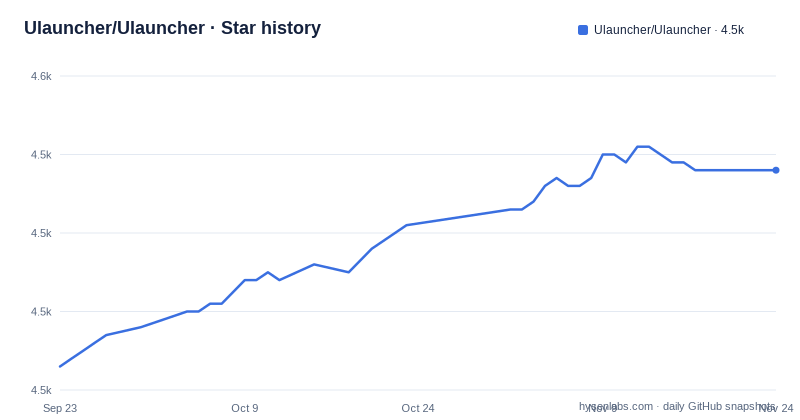
Star history
- Ulauncher/Ulauncher4,538 ★ · +25
| Repository | 2026-09-23 | 2026-11-24 |
|---|---|---|
| Ulauncher/Ulauncher | 4.5k | 4.5k |
25 Stars in the last 62 days, measured from the daily GitHub snapshot. Compare with other projects
Editorial analysis
The default branch refuses new features until v6 ships
The first line a visitor meets is a warning, not a description. Main is the branch for the unreleased v6 release, tracked in issue 869, and the v5 code lives on a separate branch. The stated policy is blunt: work on v6 is a huge rewrite, v5 functionality is the only thing being supported in the meantime, and no new features or improvements are landing until then. Pre-releases are being cut for v6, the newest being v6.0.0-beta35 on 2026-09-21, alongside 5.16.2 on 2026-09-17 and 5.16.1 on 2026-09-01. The consequence for a reader is concrete. Installing from the default branch gets you a rewrite, and the project says so itself rather than letting you discover it. The last push was on 2026-10-21 and the repository is not archived.
systemctl --user enable --now ulauncher only works with the shipped unit
Startup handling has two paths and the first one has a precondition worth reading. If the distribution uses systemd and the package includes ulauncher.service, you enable it with:
systemctl --user enable --now ulauncherOtherwise you open Ulauncher and turn on "Launch at Login" in the preferences. Which path you get depends on your package rather than on your choice, because the systemd unit is only useful if the packaging step placed it. The same file list explains why a manual install can behave differently from a distribution package: setup.py writes ulauncher.service into lib/systemd/user, alongside the desktop entry into share/applications, the D-Bus service file into share/dbus-1/services, and a gzipped ulauncher.1 into share/man/man1. Skip that data_files step and the enable command has nothing to enable.
Packaging writes into /usr, so nothing lands in your home directory
setup.py carries the comment "These will be placed in /usr" directly above its data_files list, and the destinations confirm it. The desktop entry goes to share/applications, the D-Bus service definition to share/dbus-1/services, the man page to share/man/man1, the systemd unit to lib/systemd/user, and the license text to share/licenses/ulauncher, with the remaining data added recursively as share/ulauncher. Packages come from setuptools.find_packages with tests and conftest.py excluded. For a reader on a distribution package this is invisible and fine.
Three runtime dependencies, all of them GTK bindings
The runtime dependency list is short enough to read in one breath: PyGObject, pycairo and python-xlib, with requires-python set to 3.8 or newer. That floor is taken seriously in the build image, which installs python3.8 from the deadsnakes PPA specifically for the test venv while the system python stays at 3.10 for apt and the deb tooling. The same image installs gobject-introspection, gir1.2-glib-2.0, gir1.2-gtk-3.0, python3-gi and python3-gi-cairo, so the GTK stack comes from the distribution rather than from wheels. The static type configuration agrees with the floor, pinning python-version 3.8 and python-platform linux under a strict preset. What none of this documents is a Wayland story: python-xlib sits in the dependency list and the README says nothing about sessions other than the X11 client library.
The lint config states outright that pylint is not in CI
A comment in pyproject.toml is unusually candid about a gap in the checks. Pylint is not run in CI and is not part of make check because it is slow, and the file points at make pylint as an occasional manual audit instead. pyrefly carries the load, with a strict preset at min-severity info over the ulauncher and tests directories, and three error classes switched off: bad-param-name-override, missing-override-decorator and implicit-any-lambda. Pylint is then configured the other way around, with disable set to all and a short list re-enabled for the failures other linters cannot see yet, such as access-member-before-definition and bad-except-order. A contributor reading this learns that a green make check does not mean a clean pylint run, which is the kind of thing better said plainly than discovered later.
requirements.txt is the staleness clock for the dev venv
The dev environment has a declared source of truth. The header of requirements.txt says to keep all venv dependencies in that file because it is used to determine whether a .venv is outdated, and the pinned set includes build, git-cliff, lefthook, pygobject-stubs, pylint, pyrefly, pytest, pytest-mock, ruff, rumdl, typing-extensions and typos, most with version ranges or exact pins. A marker sits on the stub package too, noting that pygobject-stubs needs PYGOBJECT_STUB_CONFIG=Gtk3,Gdk3,Soup2. One inconsistency is visible without running anything: rumdl is conditioned on python_version >= '3.9' while requires-python allows 3.8, so an environment built on the project's own minimum version silently skips the markdown linter.
Extensions carry the feature set, and the v6 API is still moving
The launcher ships App Search with fuzzy matching, a Calculator, Shortcuts, File browser mode and Custom Color Themes, and everything else arrives through Extensions hosted at ext.ulauncher.io. That catalog is not built inside this repository. The README points contributors at three separate projects: the app itself with contributor-friendly labels for Python, VueJS and Linux work, the extensions website frontend written in ReactJS, and the extensions API written in Python with the bottle library. The risk sits in the v6 rewrite. The README states that the new extension API is not yet 100% set and that further major changes may come. An extension written for v5 is therefore a bet on a moving target, while a plain launcher install is not.
Editorial conclusion
Ulauncher is a reasonable pick for a Linux desktop that wants fuzzy app search plus an extension catalog, and a poor fit for anyone who needs a stable extension API today. Read the branch banner before installing, because main is the v6 rewrite and the v5 code sits on its own branch. If you want v5 behavior, take the v5 branch and its 5.16.2 release rather than the v6.0.0-beta35 pre-release, and expect to redo extension work once the v6 API settles.
Frequently asked questions
What is Ulauncher used for?
It is a fast application launcher for Linux written in Python using GTK+. Its features are App Search with fuzzy matching, a Calculator, Extensions, Shortcuts, File browser mode and Custom Color Themes.
How do I install Ulauncher on Ubuntu?
The README carries no install command and sends you to ulauncher.io for download links. The project Dockerfile, built with make docker, uses Ubuntu 22.04 as its base image for building and testing.
Is Ulauncher open source?
Yes. The license file is GNU GPL v3.0, and setup.py declares the same license as GPL-3.0. The project also keeps a CONTRIBUTING.md, an AUTHORS file and a CODE_OF_CONDUCT.md.
How do I run Ulauncher at login?
If your distribution uses systemd and the package includes ulauncher.service, run systemctl --user enable --now ulauncher. Otherwise open Ulauncher and enable "Launch at Login" in the preferences.
How do I install Ulauncher themes?
Custom Color Themes are a documented feature, with the theme documentation at docs.ulauncher.io/en/stable/themes/themes.html. The README gives no theme install command, and setup.py adds the data directory recursively under share/ulauncher.
Official sources
Add this badge to your README
If you maintain this project, the badge below links readers to this analysis and shows its maintenance status from the daily GitHub snapshot. Paste the markdown into your README; add ?metric=license or ?metric=stars to the image URL for a different field.

[](https://hysenlabs.com/projects/ulauncher-ulauncher)Star history chart for your README
[](https://hysenlabs.com/projects/ulauncher-ulauncher)Was this useful?