AI Elements: two Node floors, an example that stops mid tag, and a private root package
AI Elements is a component library and custom registry built on top of shadcn/ui to help you build AI-native applications faster.
At a glance
- What is it?
- vercel/ai-elements is a React component library layered on shadcn/ui that copies its components into your codebase through a CLI wrapper. The repository documents itself with two different minimum Node versions, points its architecture section at a registry file its own commands never use, and ends the quick start mid tag.
- Who is it for?
- AI Elements fits teams already on Next.js with the AI SDK installed and shadcn/ui configured in CSS Variables mode, because the components land in your repository as editable source rather than as an imported package.
- Can I use it commercially?
- Check first. The repository uses a licence we do not classify automatically, so read its LICENSE file before any commercial use.
- Is it still maintained?
- Yes. The repository last received commits 30 days ago.
- What is it written in?
- Mainly TypeScript, according to GitHub's language statistics.
Answers come from the project's GitHub data, last synced on November 13, 2026, and from our analysis. They are not legal advice.
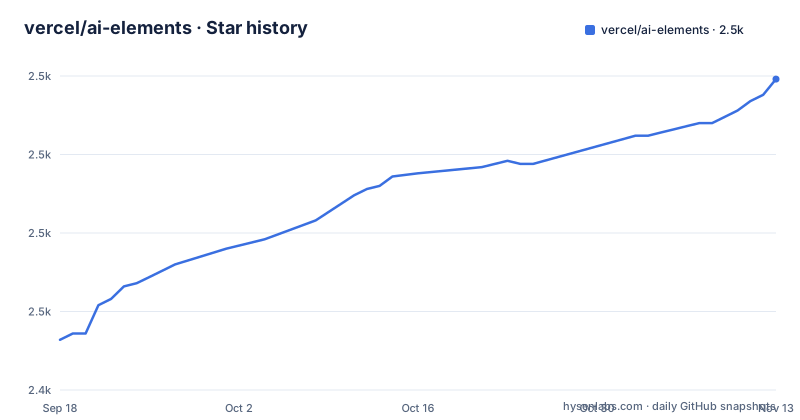
Star history
- vercel/ai-elements2,524 ★ · +83
| Repository | 2026-09-18 | 2026-11-13 |
|---|---|---|
| vercel/ai-elements | 2.4k | 2.5k |
83 Stars in the last 56 days, measured from the daily GitHub snapshot. Compare with other projects
Editorial analysis
Two different minimum Node versions in one checkout
The prerequisites list, the first thing a reader is told to satisfy, puts the floor at Node.js 18 or later. The repository root says something different. The manifest at the top of the tree declares its engines field as node >=20.12, a stricter number, and in the same block of settings it pins a single package manager to [email protected]:
  "engines": {
    "node": ">=20.12"
  },
  "packageManager": "[email protected]",
Two files in the same checkout therefore give two minimum runtimes, and neither page mentions the gap. The stricter figure is the one tooling reads, so a Node 18 project that satisfies the written prerequisite can still be turned away at install time. That is the sort of mismatch worth catching before a build fails rather than after.
The architecture section names a registry file the commands never use
The numbered description of what the CLI does names its second step as fetching a component registry from `https://elements.ai-sdk.dev/api/registry/registry.json`. Every command a reader is actually told to run points somewhere else. Installing the full set goes through the shadcn CLI against `https://elements.ai-sdk.dev/api/registry/all.json`, and installing one component on its own goes against a per component file such as `message.json`:
# Install all components
npx shadcn@latest add https://elements.ai-sdk.dev/api/registry/all.json

# Install a specific component
npx shadcn@latest add https://elements.ai-sdk.dev/api/registry/message.json
So the filename the mechanism section describes is not the filename the instructions use, and nothing on the page says what `registry.json` holds or whether it is still the live index.
The quick start stops one line into closing MessageContent
The example opens a client component, takes `useChat` from `@ai-sdk/react`, imports Conversation, ConversationContent, Message, MessageContent and MessageResponse from the ai-elements directory, maps over the messages array and opens MessageContent. Then it stops. The last token in the listing is an unfinished closing tag, so the JSX never closes and the snippet cannot be pasted into a file as it stands:
import {
  Message,
  MessageContent,
  MessageResponse,
} from "@/components/ai-elements/message";

export default function Chat() {
  const { messages } = useChat();

  return (
    <Conversation>
      <ConversationContent>
        {messages.map((message, index) => (
          <Message key={index} from={message.role}>
            <MessageContent>
              <MessageResponse>{message.content}</MessageResponse>
            </MessageC
The prerequisites ask for the AI SDK and the recommended setup asks for Vercel AI Gateway with `AI_GATEWAY_API_KEY` in `.env.local`, yet no line of the example names either one.
The root manifest is private, so the published CLI lives elsewhere
The manifest at the root is named `ai-elements` and marked `"private": true`, while the documented install is `npx ai-elements@latest`, which resolves to something published. The root manifest is not that package. Every script in it is a turbo task, build, dev, test and test:coverage, fanning out across a workspace declared in `pnpm-workspace.yaml` with a `turbo.json` beside it. The CLI a user runs therefore comes from somewhere under `packages/`, which the top level listing shows only as a directory. Two paths inside it are named elsewhere: contributing tells you to change components in `packages/elements`, and the `bump-ui` script points at `packages/shadcn-ui`. Neither directory's contents are enumerated here, so which one holds the CLI cannot be read off this checkout.
Four package managers are detected, one override only binds on one of them
The first step of the CLI is automatic detection between npm, pnpm, yarn and bun. The root manifest then declares one package manager for the workspace, `[email protected]`, and the lockfile at the root is `pnpm-lock.yaml`. Right below the engines block sits a pnpm scoped overrides entry:
  "pnpm": {
    "overrides": {
      "parse5": "^7.2.1"
    }
  }
That pin is only honoured when the install runs under pnpm. A reader whose detection lands on npm, yarn or bun gets the components without it. Four supported package managers is really four ways to copy the files in, with the dependency constraint applying to one.
The dependency bump script excludes two packages by name
Routine maintenance runs npm-check-updates with `--deep` and `-u`, then pipes into `pnpm install`. Two packages are held out of that path explicitly:
"bump-deps": "npx npm-check-updates --deep -u -x recharts,react-resizable-panels && pnpm install",
"bump-ui": "npx shadcn@latest add --all --overwrite -c packages/shadcn-ui && npx shadcn@latest migrate radix -c packages/shadcn-ui",
`recharts` and `react-resizable-panels` stay where they are through every ordinary run, so a clean sweep says nothing about them. The second script is the opposite habit: `bump-ui` replaces the UI layer wholesale, running the shadcn installer with `--all --overwrite` against `packages/shadcn-ui`, then migrating radix in the same directory. Local edits under that path are what `--overwrite` discards.
Tailwind has to be in CSS Variables mode, and that is the only mode
Theming is not a preference here. The prerequisites require Tailwind CSS to be configured and add a parenthetical that AI Elements supports CSS Variables mode only, and the recommended setup repeats the same constraint as its second item. That is a hard condition on how your shadcn/ui project was initialized before a single component is installed. The same configuration decides where files land, since components are written to the directory named in `components.json`, and the quick start reaches them through the conventional `@/components/ai-elements/` path, with `conversation` and `message` shown as the modules inside it. A project that was set up on a different theme variable scheme has to be reconciled before the library is useful. Worth noting is that no configuration step is offered beyond that: there is no theme object, no variant layer and no per component option anywhere on the page, so colour and spacing decisions stay in the CSS variable layer you already have, and any change to it lands in your own copy of every component rather than in a shared package.
A LICENSE file at the root and no licence recorded for the package
A LICENSE file sits at the top level of the tree, while the licence recorded for the package itself is left unresolved, so the file and the package metadata do not agree and nothing on the page says which terms govern use. Release dates tell a second story. Version 1.9.0 went out on 2026-03-12, 1.8.4 on 2026-02-05 and 1.8.3 on 2026-02-04, two releases a day apart, while the default branch took a push on 2026-09-01 with the repository still open. Nearly six months separate the newest tag from that commit, which leaves the published version behind whatever has landed since. The root listing also carries `.changeset/` beside `skills/`, and a `generate-skills` script filters a workspace package named `@repo/scripts`, for which there is no top level `scripts/` directory. Tooling is otherwise unusually specific for a repository this size: oxfmt and oxlint hold their own root config files, `check` and `fix` both shell out to ultracite, and the test dependencies pull in two vitest browser modes, one of them playwright driven.
Editorial conclusion
AI Elements fits teams already on Next.js with the AI SDK installed and shadcn/ui configured in CSS Variables mode, because the components land in your repository as editable source rather than as an imported package. Check three things before you start: the Node version, since the front page says 18 while the manifest says 20.12; the state of the quick start, since the example does not close and you will be writing the rest of the component yourself; and which of packages/elements or packages/shadcn-ui a change should land in. Do not expect the pinned dependency script to keep every package current, as two of them are excluded from it by name.
Frequently asked questions
What is AI Elements?
It is a component library built on top of shadcn/ui for AI applications, offering pre-built, customizable React components including conversations, messages, code blocks and reasoning displays. Installation copies those components into your own codebase rather than adding a runtime dependency, and the CLI reaches your project through the shadcn/ui CLI under the hood.
What has to be in place before installing AI Elements?
Node.js 18 or later, a Next.js project with the AI SDK installed, shadcn/ui initialized through npx shadcn@latest init, and Tailwind CSS configured, since the front page says CSS Variables mode is the only mode supported. The recommended setup adds Vercel AI Gateway with AI_GATEWAY_API_KEY in .env.local, TypeScript, and the CSS Variables mode again for theming.
Does the front page or the package manifest give the correct Node version?
They disagree and the page does not reconcile them. The prerequisites say Node.js 18 or later, while the root package.json sets engines to node >=20.12 and pins packageManager to [email protected]. The stricter manifest value is the one package tooling reads, so treat 20.12 as the real floor.
Where do AI Elements components end up in a project?
In the components directory named in your components.json file, typically @/components/ai-elements/, which is the path the quick start imports from with conversation and message modules. Once there they are ordinary files in your codebase and are meant to be edited directly rather than consumed as a package.
What does the ai-elements CLI actually run?
It detects npm, pnpm, yarn or bun, fetches a component registry, and then installs through the shadcn/ui CLI under the hood, adding dependencies to your project. The registry URL named in the mechanism section is https://elements.ai-sdk.dev/api/registry/registry.json, while the install commands point at all.json or a per component file such as message.json.
Official sources
Add this badge to your README
If you maintain this project, the badge below links readers to this analysis and shows its maintenance status from the daily GitHub snapshot. Paste the markdown into your README; add ?metric=license or ?metric=stars to the image URL for a different field.

[](https://hysenlabs.com/projects/vercel-ai-elements)Star history chart for your README
[](https://hysenlabs.com/projects/vercel-ai-elements)Was this useful?