VIAME ships four install paths, and the GPU ones want driver 570.65
Video and Image Analytics for Multiple Environments
At a glance
- What is it?
- VIAME bundles detection, tracking, annotation, measurement and evaluation into one toolkit built on the KWIVER pipeline, and its install options differ in ways worth checking before you download: four paths, two binary versions, and a driver floor for the GPU builds.
- Who is it for?
- Adopt VIAME when detection, tracking and annotation have to live in one place on a 64-bit Windows or Linux host, and when a C++ build boundary is acceptable. Leave it if your team works on macOS, where only the web and standalone annotation tools are supported, or if detections must match another system's format exactly.
- Can I use it commercially?
- Check first. The repository uses a licence we do not classify automatically, so read its LICENSE file before any commercial use.
- Is it still maintained?
- Yes. The repository last received commits 13 days ago.
- What is it written in?
- Mainly Python, according to GitHub's language statistics.
Answers come from the project's GitHub data, last synced on October 22, 2026, and from our analysis. They are not legal advice.
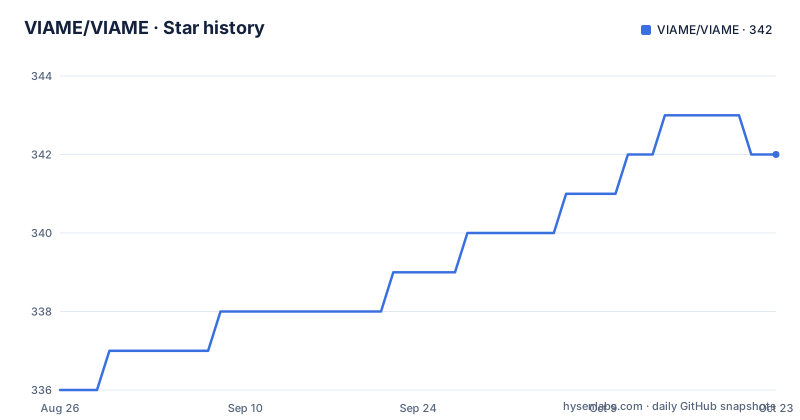
Star history
- VIAME/VIAME342 ★ · +6
| Repository | 2026-08-26 | 2026-10-22 |
|---|---|---|
| VIAME/VIAME | 336 | 342 |
6 Stars in the last 57 days, measured from the daily GitHub snapshot. Compare with other projects
Editorial analysis
Four install paths, and macOS only reaches two of them
VIAME arrives four ways, and the one you pick decides what you can run afterwards. The full desktop product is a .zip for Windows or a .tar.gz for Linux that you extract wherever you like; the README suggests /opt/noaa/viame on Linux and C:\Program Files\VIAME on Windows. That build is 64-bit only, and the supported list is Windows 7, 8, 10 or 11 plus RHEL, CentOS and Ubuntu. Windows 7 needs service packs and updates such as KB2533623 before anything installs cleanly.
The second path is DIVE, distributed as an .msi installer, which can then pull VIAME in from its add-ons page. DIVE itself ships for Linux, macOS and Windows, which makes it the only annotator you can install natively on an Apple machine.
The third path is a set of Docker images, the fourth is a Python package on pypi that wraps the same command line tool the desktop build ships. Disk cost is fixed at the top end: up to 8 Gb for the full installation.
macOS is the gap to know before you plan a deployment around this. The requirements say macOS is currently supported for running the web and standalone annotation tools, but not the full desktop. A Mac-only team can annotate, in a browser or through DIVE, and cannot run the algorithms on the machine it owns.
v0.23.5 wants driver 570.65 while v0.21.1 is the CPU-only fallback
The desktop downloads come in two flavours per platform. VIAME v0.23.5 is the GPU-enabled build, a .zip on Windows and a .tar.gz on Linux, with two mirrors for each. VIAME v0.21.1 is the CPU-only build, same two formats, same two mirrors.
The GPU build asks for NVIDIA drivers version 570.65 or above, and the recommendations go further: a CUDA-enabled GPU with 8 Gb or more of VRAM. That floor softens in one specific direction. The README says the driver requirement is not needed if you are only using manual annotators, or do not care much about algorithm speed. Annotation by hand and detector training sit on opposite sides of the same 570.65 line, so the honest question before downloading anything is which of the two you are installing for.
The CPU build costs you two feature versions. v0.21.1 is the newest CPU-only artifact on offer and the GPU build is already at v0.23.5, so anything that landed between those two tags reaches CPU-only users later, if at all, through these archives.
There is no release feed to sort this out with. The repository has no GitHub releases, so these version strings live only inside the download links, and a RELEASE_NOTES.md file sits in the tree for anyone who needs the history.
pip install viame covers Python 3.10 to 3.14, and Windows needs torch first
The Python package is the smallest door into the project. It wraps the main command line tool and the libraries that run individual algorithms, and it sits on pypi for Python 3.10 through 3.14. On Linux the whole install is one line.
pip install viameWindows is a two-step install, because the PyTorch runtime has to land first with CUDA 12 support.
pip install "torch<2.11"That upper bound is the detail to watch. The pin keeps the CUDA 12 wheels within reach, but it also couples the package to a PyTorch release line that stops at 2.11, and the README's Windows sequence stops at that same line. The command following the torch step is not present in the README, so the exact Windows follow-up is not something this document settles.
What the Python package does not settle either is the native side. VIAME is a C++ application with Python bindings rather than a pure Python library, so a pip install that looks self-contained still leans on compiled code for the heavier algorithms, and the documentation example directories cover running algorithms from code as a separate case from driving them through a pipeline.
The headless image ships the CLI at /opt/noaa/viame and none of the add-on models
Server-side and continuous-integration installs are meant to go through Docker. Images live on Docker Hub, and the default container, carrying just the core algorithms and runnable from the command line, carries this tag.
kitware/viame:gpu-algorithms-defaultTwo properties of that image shape what you can plan around. It is headless, with no GUI of any kind, so no annotator is present and the command line installation sits in /opt/noaa/viame inside the container. Most add-on models are also absent from it by default. The image is a runtime, not a model bundle.
Filling the models in is a separate step. From inside the container, the add-on script in the bin folder pulls them down.
./download_viame_addons.shThe same models can arrive through the viame add-ons tool instead, which is the path to take when you want to choose what lands on disk rather than accept the whole set. Full VIAME-Web containers exist as well, referenced from the installation documentation rather than from the image list in the README, so a web deployment is a separate image decision from the headless one.
The pipeline threads C++ and Python nodes, and it comes from KWIVER
VIAME's algorithms do not call each other directly. They sit on a pipeline framework that connects C++ and Python nodes in a multi-threaded fashion, and that framework is KWIVER, a Kitware project in its own right. The README sends the pipelining overview to the kwiver repository and the core class reference to kwiver.readthedocs.io, which says where the API contract lives: read those when writing a node, because the VIAME pages will not carry the node interface.
The repository layout backs this up. The top level holds CMakeLists.txt alongside cmake/, packages/, plugins/, tools/, configs/, tests/ and docs/, the shape of a C++ project with a Python layer on top. plugins/templates holds pipeline plugin templates, examples/example_pipeline shows one being wired, and examples/using_algorithms_in_code covers embedding an algorithm rather than running it from a pipeline file.
The practical consequence is about what extension costs. A node with real work in it is a C++ plugin compiled against that framework, with Python on the other side of the boundary. Teams who would rather prototype entirely in Python are using the wrappers rather than extending VIAME, and that is a decision to make before commissioning an algorithm, not after.
Stereo or monocular: the examples tree shows where the real forks are
The examples directory describes what VIAME does more honestly than any feature list, because each subdirectory is one task. Detection and its training loop are object_detection and object_detector_training. Tracking has object_tracking, with object_tracker_training kept separate. Measurement forks in two: stereo_measurement and monocular_measurement are different problems with different inputs rather than one setting, and picking the wrong one invalidates the result.
Geometry work is registration_and_mosaicing, with image_enhancement beside it. Two directories exist purely for interoperability: detection_file_formats and detection_file_conversions, both about moving results between VIAME and other tools, with a separate detection file format page in the documentation carrying the format definitions themselves. Scoring and evaluation live in scoring_and_evaluation, and scene_segmentation, frame_level_classification and text_based_search cover the per-frame and per-query analysis paths, the last being query-based search across imagery.
The cost implied by that tree is integration work, not accuracy work. If detections have to land inside another system, the conversion and format handling is part of adopting VIAME, and how many of those directories your team ends up reading is a fair measure of how much surface you are taking on.
Pushed 2026-09-30, no GitHub releases, and an unnamed licence
The maintenance picture here needs reading in a specific order. The last push to the repository was on 2026-09-30, and nothing is attached as a GitHub release, so tags, changelogs and packaged notes do not arrive through the normal release feed. The version numbers that matter to an installer live in the download links and in RELEASE_NOTES.md instead.
Licensing deserves the same directness. No licence identifier is attached to this project, though a LICENSE.txt file sits at the top level of the repository. What that file permits is a question for whoever owns your compliance process, and this overview does not answer it. Read it before the annotation archive or any trained model leaves your organisation.
The documentation is split in a way that follows from all this. A User's Quick-Start Guide and a full manual are published separately, and the quick-start page is also where the installation flavours are described in more depth than the README manages, so an unusual platform question is better asked there than inferred from the download list.
Editorial conclusion
Adopt VIAME when detection, tracking and annotation have to live in one place on a 64-bit Windows or Linux host, and when a C++ build boundary is acceptable. Leave it if your team works on macOS, where only the web and standalone annotation tools are supported, or if detections must match another system's format exactly. Check the download first: v0.23.5 with driver 570.65 for GPU work, v0.21.1 for hand annotation, then read LICENSE.txt before either leaves your machine.
Frequently asked questions
What is Viame?
VIAME is a computer vision application for do-it-yourself artificial intelligence, covering object detection, object tracking, data annotation, multi-camera processing, size measurement, image enhancement, rapid model generation, query-based search, mosaicing and algorithm evaluation. It grew out of marine species analytics and now serves as a general toolkit.
Does VIAME have a full desktop version on macOS?
No. The requirements state that macOS is currently supported for the web and standalone annotation tools, but not for the full desktop application.
Which Python versions does the viame package support?
The viame package on pypi is published for Python 3.10 through 3.14, with wrappers around the main command line tool and libraries for running different algorithms.
Does VIAME publish releases on GitHub?
The repository has no GitHub releases. Version numbers such as v0.23.5 and v0.21.1 appear in the desktop download links, and RELEASE_NOTES.md sits in the repository tree.
Official sources
Add this badge to your README
If you maintain this project, the badge below links readers to this analysis and shows its maintenance status from the daily GitHub snapshot. Paste the markdown into your README; add ?metric=license or ?metric=stars to the image URL for a different field.

[](https://hysenlabs.com/projects/viame-viame)Star history chart for your README
[](https://hysenlabs.com/projects/viame-viame)