vllm-metal: an Apple Silicon backend pinned to one MLX build
Community maintained hardware plugin for vLLM on Apple Silicon
At a glance
- What is it?
- The vLLM Metal plugin runs vLLM on Apple Silicon by making MLX the primary compute backend, and it makes that work by pinning MLX to an exact version and packaging a prebuilt kernel. The dependency file explains why in three comments that read like an incident report.
- Who is it for?
- vllm-metal is worth trying if you have an Apple Silicon Mac on macOS 15 or later and you specifically want vLLM's server rather than a bare MLX server, and you are prepared to track a plugin that is classified as alpha and tagged with development builds. Check three things first.
- Can I use it commercially?
- Yes. Apache-2.0 is a permissive licence: you can use, modify and sell software built on it, as long as you keep its copyright and licence notices.
- Is it still maintained?
- Yes. The repository received new commits within the last day.
- What is it written in?
- Mainly Python, according to GitHub's language statistics.
Answers come from the project's GitHub data, last synced on November 14, 2026, and from our analysis. They are not legal advice.
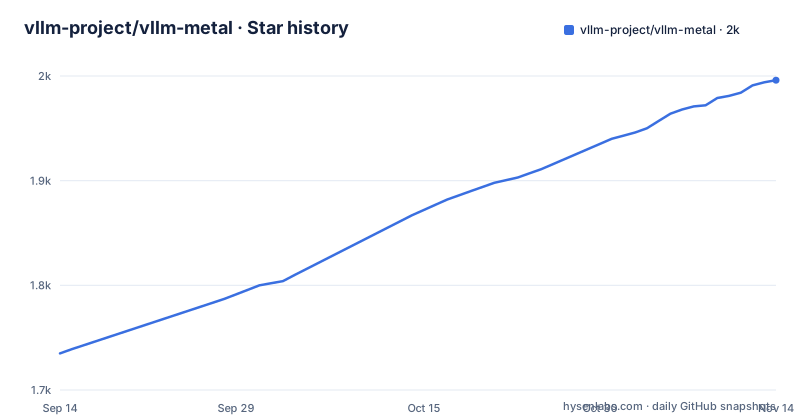
Star history
- vllm-project/vllm-metal1,996 ★ · +261
| Repository | 2026-09-14 | 2026-11-14 |
|---|---|---|
| vllm-project/vllm-metal | 1.7k | 2k |
261 Stars in the last 61 days, measured from the daily GitHub snapshot. Compare with other projects
Editorial analysis
The MLX pin is exact because the binary carries no ABI version
The dependency file carries a comment block that explains the whole installation story. MLX is pinned as `mlx==0.32.1`, and the reason given is in the source: the prebuilt `_paged_ops.so` links MLX private headers and subclasses `mlx::core::Primitive`, and `libmlx.dylib` carries no SONAME version at all, its compatibility version is 0.0.0. So the dynamic linker has nothing to check, and a wheel built against one MLX is only ABI safe against that exact MLX. The comment ends with an instruction rather than a hope: rebuild and re release the wheel on every MLX bump.
That is the whole reason the install path is shaped the way it is, and it is rare to see a Python project explain itself this plainly in its own metadata.
Both MLX dependencies carry the same platform marker, `platform_system == 'Darwin' and platform_machine == 'arm64'`. On any other machine the accelerator is not installed at all, which matches the stated requirement of macOS 15 (Sequoia) or later on Apple Silicon. A third dependency, `llguidance`, is bounded to `>=1.7.0,<1.8.0` and carries a wider marker naming x86_64, arm64 and aarch64.
mlx-lm is pinned to a commit, with a date attached
The second accelerator dependency is not a version at all. `mlx-lm` is required straight from Git, at a specific commit hash dated 2026-08-25 in the comment, and the justification is again about what the code needs rather than what is newest.
The comment says that revision requires MLX 0.32.1 or newer, and that it includes cache APIs which are not available in the latest release, 0.31.3. So the pinned commit is ahead of the published package on purpose, which means the plugin is knowingly depending on unreleased upstream behaviour. When upstream ships that cache API in a release, the pin becomes a version, and until then a plain `pip install` of mlx-lm would not satisfy it.
That combination, an exact MLX version plus a commit for mlx-lm, is why the project offers three different ways in rather than one. Two are documented on the front page and the third is a pointer to the contribution guide, and each carries a different consequence for what you have to compile.
The plugin owns the attention path and leaves the server alone
The architecture paragraph is four clauses long and the division is deliberate. Upstream vLLM supplies the API server, the scheduler and the paged block manager. `mlx_lm` supplies the token wise model layers. vllm-metal owns the request aware attention path, which is named as three things: the paged varlen kernel, M5 NAX prefill, and speculative decoding.
So the plugin is not a fork and not a reimplementation. It takes the serving machinery it already has and replaces the part that touches the GPU, which is why it can describe itself as unifying MLX and PyTorch under a single lowering path rather than as an alternative to vLLM.
Two of the three owned pieces are tied to specific hardware generations. M5 NAX prefill is a tensor unit path, and the news list ties it to accelerating MHA, GQA and MQA prefill. Paged varlen is described as the default attention backend since v0.2.0. Speculative decoding is named without a version or a hardware note, so whether it is complete is not something the front page settles.
The project lives under the `vllm-project` organisation but describes itself as community maintained, and the package metadata lists the author as the vLLM Community.
Homebrew and a curl script, with different ergonomics
Two installation paths are documented, and the difference is about what you have to do afterwards.
The stable release goes through Homebrew:
brew tap vllm-project/vllm-metal https://github.com/vllm-project/vllm-metal
brew install vllm-project/vllm-metal/vllm-metal
With that, you run `vllm` with no environment to activate. The formula source is in the tree under `Formula/`.
The development build uses a script fetched over the network and piped into a shell:
curl -fsSL https://raw.githubusercontent.com/vllm-project/vllm-metal/main/install.sh | bash
source ~/.venv-vllm-metal/bin/activate
Both are described as needing no compiler. The second one asks you to activate a virtual environment at a fixed path under your home directory before you can run anything.
The third path is for people changing Python or kernel code, and it is not spelled out on the front page at all: the contribution guide has a development setup section for an editable checkout with native build tools. That is the one path where a toolchain becomes your problem, and it is the only one behind a documentation link rather than a command.
setup.py exists so no compiler is ever invoked
There is a small `setup.py` beside `pyproject.toml`, and it does one job. Its docstring says it packages prebuilt native artifacts without invoking a compiler.
The mechanism is a custom distribution class whose `has_ext_modules` returns true, with a comment explaining that the prebuilt extension requires CPython and platform specific tags. The package data then ships the extension module under its computed suffix, a `_paged_ops.mlx-version` marker file, Metal libraries, C++ sources, and a `kernels_v2` directory of `.metal` files. The wheel platform name is hardcoded to `macosx_15_0_arm64`.
That last line is the reason the plugin cannot be installed anywhere else even accidentally. A wheel tagged for macOS 15 on arm64 will refuse to install on an Intel Mac, on Linux, or on an older macOS, which matches the documented requirement rather than working around it.
Shipping `.cpp` and `.metal` sources inside the wheel is the other detail. The kernel sources travel with the binary, so the reason for an MLX mismatch is at least inspectable in an installed environment rather than only in the repository.
Alpha status, and a release line that includes nightly builds
The package metadata classifies this as Development Status 3, Alpha, and the repository is not archived with a last commit on 2026-10-01. The release list explains why alpha is the honest label.
Three releases are recent: v0.29.0 on 2026-09-11, v0.30.0 on 2026-09-23, and a development build tagged v0.30.0.dev20261003083535 on 2026-10-03. The third one is a nightly style tag carrying a date and a time in its version string, published two days after the last commit. The version field in `pyproject.toml` still reads `0.30.0`.
So there are three version numbers in play at once, the last stable tag, the nightly build, and the declared package version, and they only agree when you happen to be on the tag they all share.
The requirements are narrow alongside that. `requires-python` is `>=3.12,<3.14`, and the classifiers name Python 3.12 and 3.13 only. A developer on 3.11 or 3.14 is outside the range the project supports.
The performance numbers are news items with an old baseline
The only performance claims on the front page are three news entries, and they are worth reading as claims rather than as a benchmark section.
The April 2026 entry says that v0.2.0 made the unified paged varlen Metal kernel the default attention backend, and that it delivered 83x TTFT and 3.6x throughput compared to v0.1.0. Those are large multipliers against a very old baseline. Nothing on the page states the hardware, the model, the batch size or the sequence lengths behind them, so the figures cannot be reproduced from what is written.
The August entries are narrower claims. One says the M5 NAX tensor units now accelerate MHA, GQA and MQA prefill. The other says Qwen3.8 runs on Metal, with `mlx-community/Qwen3.8-27B-8bit` serving a 27B hybrid SDPA plus GDN linear model on a single Apple Silicon Mac.
That last entry is the most useful thing on the page, because it names a concrete quantised model and the attention and linear attention mix it uses. And the supported model list itself is not here: it lives in `docs/supported_models.md`, on the documentation site rather than in the repository, alongside an MkDocs configuration and a Read the Docs config.
Editorial conclusion
vllm-metal is worth trying if you have an Apple Silicon Mac on macOS 15 or later and you specifically want vLLM's server rather than a bare MLX server, and you are prepared to track a plugin that is classified as alpha and tagged with development builds. Check three things first. Whether the exact MLX pin still installs for you, because the project states the wheel has to be rebuilt on every MLX bump. Whether your Python is 3.12 or 3.13, since anything outside that range is excluded. And whether the model you want is on the matrix, because the project keeps that list in the documentation site rather than the repository.
Frequently asked questions
What is vllm-metal?
A community maintained hardware plugin that lets vLLM run on Apple Silicon Macs with MLX as the primary compute backend, unifying MLX and PyTorch under a single lowering path. Upstream vLLM keeps the API server, scheduler and paged block manager; vllm-metal owns the request-aware attention path.
How do I install vllm-metal on a Mac?
Two documented paths, neither needing a compiler. The stable release installs with brew tap and brew install and then you run vllm with no environment to activate. The development build uses a curl installer piped to bash, after which you run source ~/.venv-vllm-metal/bin/activate.
How do I use vllm-metal once it is installed?
Run vllm. The requirement is macOS 15 (Sequoia) or later on Apple Silicon, and Python 3.12 or 3.13, since requires-python is >=3.12,<3.14. The list of supported models is kept in docs/supported_models.md on the documentation site.
Official sources
Add this badge to your README
If you maintain this project, the badge below links readers to this analysis and shows its maintenance status from the daily GitHub snapshot. Paste the markdown into your README; add ?metric=license or ?metric=stars to the image URL for a different field.

[](https://hysenlabs.com/projects/vllm-project-vllm-metal)Star history chart for your README
[](https://hysenlabs.com/projects/vllm-project-vllm-metal)Was this useful?