WeAct MiniF4: one core board, three STM32F4 chips and two ways to flash
MiniF4-STM32F401CEU6/STM32F411CEU6 Product Literature
At a glance
- What is it?
- The WeActStudio.MiniSTM32F4x1 repository is product literature for the MiniF4 core board rather than a driver library: it holds the chip comparison tables, the pinout diagram, MicroPython board definitions, the HID flash instructions and the ISP mode procedures for the STM32F401CCU6, STM32F401CEU6 and STM32F411CEU6.
- Who is it for?
- This repository is worth adopting if you own a MiniF4 board and want the vendor's own reference documentation in one place, especially the pinout diagram contributed by Richard Balint, the MicroPython board definition paths and the HID flash procedure, since those are the parts most likely to be lost in a forum thread.
- Can I use it commercially?
- Not without permission. GitHub finds no licence file in the repository, and without a licence all rights are reserved by default: you may read the code but not reuse it. Check the README, or ask the authors, before using it.
- Is it still maintained?
- Yes. The repository last received commits 5 days ago.
- What is it written in?
- Mainly C, according to GitHub's language statistics.
Answers come from the project's GitHub data, last synced on November 7, 2026, and from our analysis. They are not legal advice.
Star history
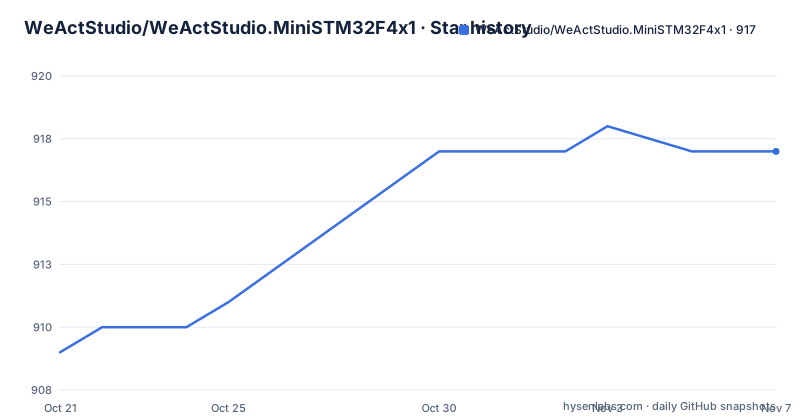
- WeActStudio/WeActStudio.MiniSTM32F4x1917 ★ · +8
| Repository | 2026-10-21 | 2026-11-07 |
|---|---|---|
| WeActStudio/WeActStudio.MiniSTM32F4x1 | 909 | 917 |
8 Stars in the last 17 days, measured from the daily GitHub snapshot. Compare with other projects
Editorial analysis
The same board name covers three different chips
The first thing to settle is which silicon you actually have, because the MiniF4 core board is sold in three chip variants and they are not equivalent. The README's comparison table lists the STM32F401CCU6 at 84Mhz with 64KB of RAM and 256KB of ROM, the STM32F401CEU6 at 84Mhz with 96KB of RAM and 512KB of ROM, and the STM32F411CEU6 at 100Mhz with 128KB of RAM and 512KB of ROM. The same figures are repeated in the chip information table further down, with the part numbers shortened to STM32F401CC, STM32F401CE and STM32F411CE. The sale status column matters even more: both 401 variants are marked discontinued, while the 411 is the one still in the sale. So the current board you are most likely to receive is the fastest of the three, and the two 84Mhz parts are documented for reference and for the boards already in circulation.
A documentation tree, not a source tree
It helps to know what kind of repository you are reading. The top level contains Datasheet/, General document/, Hardware/, SDK/, Soft/ and images/, plus the English README and a Chinese version at README-zh.md. There is no build system, no package manifest and no library code at the top level, so this is product literature that happens to be published as a Git repository, and it is also a convenient place to pull board files from. What you get is exactly what a hardware vendor would want on the table: the STM32F4x1 v2.0+ pin layout diagram credited to Richard Balint, the board shape image for version 2.0 and later, 3D views, the packaging photo, the chip marking reference and the board logo and version number graphic. There is no licence file among the top-level entries, and the licence for the repository is recorded as unknown, which is worth remembering if you intend to reuse the pinout artwork in your own documentation.
MicroPython board definitions are given as repository paths
For firmware work, the README points at MicroPython support with a specific version, V1.12-35, and states that the STM32F401CEU6 and the STM32F411CEU6 are supported. The board definition is not a package to install from an index. It is a file inside this repository, and the README gives the exact location for each chip family:
/SDK/STM32F401CEU6/MicroPython/WeAct_F411CE
/SDK/STM32F411CEU6/MicroPython/WeAct_F411CE
The naming is worth reading carefully, because the folder for the 401 path carries the WeAct_F411CE board name, which is the kind of copy and paste artefact that will send you to the wrong configuration if you are not paying attention. The README also states that the pin allocation diagram exists to make working with MicroPython and Arduino easier, and it links to the stm32duino Arduino_Core_STM32 repository for the Arduino route. Those are the two programming paths the documentation supports, and the difference between them is substantial: the Arduino path is a standard board support package for an established core, while the MicroPython path depends on a board definition shipped in this repository and on a specific firmware version.
Three separate routes to get code onto the chip
Flashing is documented as three distinct procedures rather than one. The HID flash route is the one designed to need no extra hardware. You hold down the KEY button, power on or reset, and the C13 LED blinks to signal that the bootloader has been released. The README then tells you to run the APP that enters the bootloader, referencing the project stm32f401_test_APP 0x8004000.zip, and points to the longer instructions in the Soft/WeAct_HID_FW_Bootloader/README.md file, noting that the tool is available in English and Chinese. The ISP mode procedures are manual: with power on, press BOOT0 and reset, release reset, then release BOOT0 after 0.5 seconds, or with power off hold BOOT0 and release it 0.5 seconds after power on. The README also describes a DFU mode over the data cable, a serial port mode that connects PA9 and PA10 of the core board to a USB serial port, and the use of STM32CubeProg as a software path.
Counterfeits are the risk the README actually worries about
The most emphatic passage in this documentation is not about firmware. It is about boards that arrive without the WeAct Studio logo and version number, and the project states plainly that those are not produced by them, that any quality or technical problem with such a board should be taken to the seller, and that the report should be commented on so other buyers are not misled. A graphic in the images directory shows what the logo and version number should look like, which tells you the check is visual and takes seconds at the point of delivery. The purchase routes given are the WeAct Studio official store on TaoBao and the WeAct Studio Official Store on AliExpress. Manufacturing details are also spelled out, with lead-free gold sinking on the 411, lead-free process on the 401, gold-plated pins, ROHS conformance, metal shell crystals at 25MHZ and 32.768khz, a reserved flash area with a USBDisk and FATFFS routine for large storage and MicroPython, and three buttons on version V3.1 of the board, a reset key, a BOOT0 key and a user key.
Chip date codes tell you which batch you have
The chip information section carries a table of manufacturing date codes for each part, which is unusually useful documentation for a cheap board. For the STM32F411CE the codes are 014 (2020.06), 947 and 002 (2020.03), 946 and 947 (2020.01) and 19+ (2019). For the STM32F401CC, which is marked End Of Life, the entries are 609 and 608, 723 (2020.01) and 16+ (2019). For the STM32F401CE they are 934 and 935 (2020.06), plus the same 2020.01 and 2019 entries. The marking reference image shows where to find that code on the package. The README also states that all chips are functional and original. The practical value of these tables is that they let you date a board precisely enough to know which era of silicon and which firmware era you are dealing with, rather than guessing from a listing photo.
Where the documentation stops
There are gaps an engineer should know about before relying on this repository as a reference. The README does not provide a MicroPython firmware download or flashing step of its own, it defers to a board definition path and to the HID bootloader notes. It does not include a schematic in the text, though the tree carries Datasheet/ and Hardware/ directories where such files would live, and the pinout is delivered as a PNG image rather than as a machine readable pin table, so you will be reading coordinates off a picture. The Arduino section is a single link to the stm32duino core repository rather than a board specific guide. The only tagged release is V.10, titled as the MiniF4 product literature, dated 2020-06-17, while the last push to the repository was on 2026-10-15 and the repository is not archived. In other words, the prose is being kept current, but the versioned artefacts and the silicon itself are several years old, and buying the 411 today means buying a part whose earliest documented batch is from 2019.
Editorial conclusion
This repository is worth adopting if you own a MiniF4 board and want the vendor's own reference documentation in one place, especially the pinout diagram contributed by Richard Balint, the MicroPython board definition paths and the HID flash procedure, since those are the parts most likely to be lost in a forum thread. It is not the place to look for a schematic PDF, a driver library, or a current firmware release: the only tagged release is V.10 from 2020-06-17, the chip date codes in the tables run from 2019 to 2020, and the README does not document a MicroPython image download beyond the board definition paths. Check first that the board carries the WeAct Studio logo and version number, since the project states it does not support boards without them, and confirm that the file at Soft/WeAct_HID_FW_Bootloader/README.md matches your board revision before you rely on the C13 LED as the bootloader signal.
Frequently asked questions
Which STM32 chips are used on the WeAct Studio MiniF4 core board?
Three are documented: the STM32F401CCU6 at 84Mhz with 64KB RAM and 256KB ROM, the STM32F401CEU6 at 84Mhz with 96KB RAM and 512KB ROM, and the STM32F411CEU6 at 100Mhz with 128KB RAM and 512KB ROM. The README marks both 401 variants as discontinued and the 411 as in the sale.
How do I flash firmware onto the MiniF4 board over USB?
The HID flash route needs no extra hardware: hold down the KEY button, power on or reset, and the C13 LED blinks to release the bootloader. The README points to the stm32f401_test_APP 0x8004000.zip project and to the longer instructions in the Soft/WeAct_HID_FW_Bootloader/README.md file.
Is MicroPython supported on the MiniF4 core board?
Yes, for the STM32F401CEU6 and the STM32F411CEU6, with MicroPython version V1.12-35. The board definitions live in the repository itself at /SDK/STM32F401CEU6/MicroPython/WeAct_F411CE and /SDK/STM32F411CEU6/MicroPython/WeAct_F411CE.
Official sources
Add this badge to your README
If you maintain this project, the badge below links readers to this analysis and shows its maintenance status from the daily GitHub snapshot. Paste the markdown into your README; add ?metric=license or ?metric=stars to the image URL for a different field.

[](https://hysenlabs.com/projects/weactstudio-weactstudio-ministm32f4x1)Star history chart for your README
[](https://hysenlabs.com/projects/weactstudio-weactstudio-ministm32f4x1)Was this useful?