The committed version is 0.1.0 and the published one is 3.22
Run AI models locally on your machine with node.js bindings for llama.cpp. Enforce a JSON schema on the model output on the generation level
At a glance
- What is it?
- withcatai/node-llama-cpp wraps a native inference engine in a typed Node library with a command line, and ships prebuilt binaries for three platforms with a source build as fallback. Its manifest version is a placeholder that the release pipeline rewrites, along with the install hook itself.
- Who is it for?
- This suits a TypeScript project that wants a local model without a separate service, and that needs the output constrained rather than merely prompted, since enforced schemas and structured decisions are the features the project leads with. Two things to know before you pin a version.
- Can I use it commercially?
- Yes. MIT is a permissive licence: you can use, modify and sell software built on it, as long as you keep its copyright and licence notices.
- Is it still maintained?
- Yes. The repository received new commits within the last day.
- What is it written in?
- Mainly TypeScript, according to GitHub's language statistics.
Answers come from the project's GitHub data, last synced on November 25, 2026, and from our analysis. They are not legal advice.
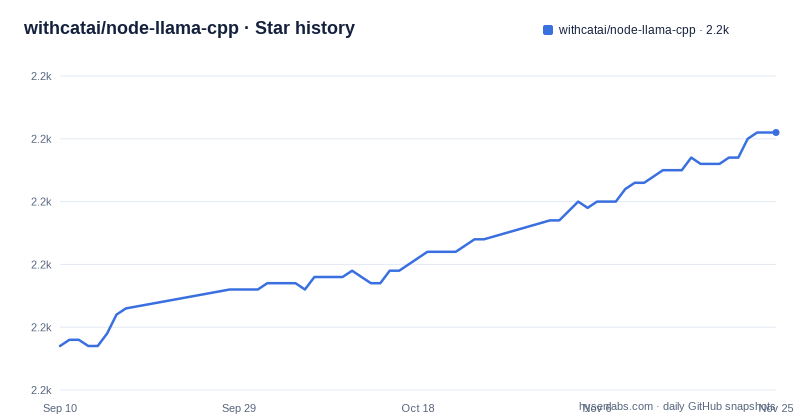
Star history
- withcatai/node-llama-cpp2,211 ★ · +34
| Repository | 2026-09-10 | 2026-11-25 |
|---|---|---|
| withcatai/node-llama-cpp | 2.2k | 2.2k |
34 Stars in the last 76 days, measured from the daily GitHub snapshot. Compare with other projects
Editorial analysis
Two script hooks, and the published one replaces the repository one
The install behaviour of this package is decided by two different scripts depending on where it came from. In the repository, the install hook changes into a templates directory and runs a nested install, because the templates have to be packed before they can be shipped. There is a separate script whose only job is to rewrite that hook to call the shipped command line instead, and the release pipeline runs it after versioning. So the same manifest describes two behaviours, and the one you get depends on whether you cloned or installed from the registry. There is also a prepare hook that installs a commit-hook tool, guarded so it does nothing when the environment marks the run as continuous integration, and a post-version hook that runs a script after a version bump.
Prebuilt binaries for three platforms, and a fallback you can switch off
The install story is the most considered part of the project. The package carries prebuilt binaries for macOS, Linux and Windows, so the normal case is a single install command with no toolchain. Where no binary exists for a platform, the fallback downloads a release of the native engine and builds it from source with cmake, and the documentation emphasises two things it will not need: a native addon build toolchain and a Python interpreter. That is a meaningfully lighter requirement than the usual binding package, and it is the reason the feature list calls the fallback out separately. There is also an environment variable that disables the download-and-build behaviour entirely, for anyone who would rather fail fast than compile during an install, and the documentation points out that the engine version can also be refreshed on demand with a single command.
You can talk to a model before anything is installed
The page opens its try-it section with a one-line command that fetches the package at runtime and starts a chat:
npx -y node-llama-cpp chatThat is worth noting on its own, because it means evaluating the project does not require committing to it. The same entry point is then available as a permanent command after installation, under two names: the full package name and a three-letter abbreviation, both pointing at the same file. Two names for one command is a small ergonomic choice rather than a design decision, but it is the kind of detail that tells you the author expects people to type the short form often.
Three levels of output constraint, not one
The feature list distinguishes three things that are easy to conflate. The first is asking for output in a parseable format such as JSON, which is prompt-level and best-effort. The second is enforcing a specific schema on generation, which the repository description leads with and which the documentation gives its own section. The third is structured decisions with any model, which is called out separately at the top of the page as the new feature. Beneath those sit the more conventional capabilities: giving a model functions it can call on demand to retrieve information or take actions, embeddings, and reranking. So the project's argument is not that local models are good, but that local models can be made to behave predictably enough to program against.
Special token injection gets its own documentation page
One bullet in the feature list is a safety property rather than a capability: the library is described as safe against special token injection attacks, with a link to a dedicated documentation page. That is the right thing for this project to call out, because the whole value proposition is that a local model can be constrained to emit a schema, and a model that can be talked into emitting an end-of-sequence token is a model that can be talked into leaving the schema. The page also claims hardware adaptation with nothing to configure, supporting three accelerator backends, which is the other claim most likely to need reading before you rely on it, since the feature list gives no measurement behind it.
The published file list is the real package boundary
The manifest's file list is short and tells you what a consumer actually receives: the compiled output, a packed templates directory, a vendored native build directory, a binaries directory, and the three top-level files. That vendored native directory is why a source build is possible without the usual tooling, and the packed templates directory is the artefact of the install hook rewriting described earlier. Alongside it the repository holds a workspace directory, a scripts directory, a source directory, a test directory and a documentation site built with a static site generator, plus a comment widget configuration. The package also exports a second entry point, and it exports it twice under two spellings that resolve to the same file, which is harmless and slightly untidy.
The usage example stops mid-statement and the feature list has two filler entries
The code sample is the standard three-step shape: obtain the runtime, load a model from a local path, create a context, open a chat session against a sequence from that context and prompt it. It then cuts off partway through the line that prints the answer, so the block does not compile as printed. Two entries in the feature list are also worth discounting: one describes the package as a complete suite of everything needed, and the last is two words saying there is much more. Neither is harmful, but they sit in a list where every other bullet names a specific capability, and a reader scanning for what the library does will read them as capabilities.
Editorial conclusion
This suits a TypeScript project that wants a local model without a separate service, and that needs the output constrained rather than merely prompted, since enforced schemas and structured decisions are the features the project leads with. Two things to know before you pin a version. The version in the repository is a placeholder, so the number you read in the manifest is not the number you will install, and the release pipeline rewrites it. And the install hook is rewritten too, so what runs after installation differs between a checkout and a published package, which is worth knowing before you debug an install by reading the scripts.
Frequently asked questions
What is withcatai/node-llama-cpp?
It is an MIT-licensed TypeScript library, with a command line, that runs AI models locally through bindings to a native inference engine. Its stated emphasis is output control: making a model produce a parseable format such as JSON, enforcing a specific schema on generation, and supporting structured decisions with any model, plus function calling, embeddings and reranking.
How do I install node-llama-cpp?
With a single install command from the registry. The package carries prebuilt binaries for macOS, Linux and Windows. Where none exists for your platform it falls back to downloading a release of the native engine and building it from source with cmake, and setting the skip-download environment variable to true turns that fallback off.
Do I need to build the native engine myself with node-llama-cpp?
No. Prebuilt binaries are provided for the three desktop platforms, and the source-build fallback explicitly does not require the native addon build toolchain or a Python interpreter, only cmake. The documentation also notes that the engine version can be downloaded and compiled on demand with a single command if you want something newer than the bundled one.
Can node-llama-cpp enforce a JSON schema on model output?
Yes, and that is the feature the repository description leads with. The page distinguishes three levels: asking for a parseable format, enforcing a particular schema on generation, and structured decisions with any model, each with its own documentation section. It also lists safety against special token injection as a property of the library, with a page of its own.
Can I try node-llama-cpp without installing it?
Yes. A single command fetches the package at runtime and starts a chat with a model in the terminal. After installing, the same entry point is available as a command under two names, the full package name and a three-letter abbreviation, both pointing at the same file.
Official sources
Add this badge to your README
If you maintain this project, the badge below links readers to this analysis and shows its maintenance status from the daily GitHub snapshot. Paste the markdown into your README; add ?metric=license or ?metric=stars to the image URL for a different field.

[](https://hysenlabs.com/projects/withcatai-node-llama-cpp)Star history chart for your README
[](https://hysenlabs.com/projects/withcatai-node-llama-cpp)Was this useful?