GPT-Image2-Skill: a prompt gallery that was turned into two agent skills and a CLI
GPT Image 2/2.5 prompt gallery, image prompt library, agentic skill, and CLI for OpenAI image generation/editing
At a glance
- What is it?
- A bilingual prompt collection for OpenAI's image models, packaged as installable skills for Claude Code and Codex plus a Python CLI. The interesting part is the packaging, not the pictures.
- Who is it for?
- What makes this repository more than a list of prompts is the decision to split the gallery into per-category reference files, and to keep a real CLI alongside the skill instructions. The prompts themselves are strong on layout language and weak on the constraints that make image models behave, which is why the author says plainly that showing a reference beats describing at length.
- Can I use it commercially?
- Yes. MIT is a permissive licence: you can use, modify and sell software built on it, as long as you keep its copyright and licence notices.
- Is it still maintained?
- Yes. The repository last received commits 17 days ago.
- What is it written in?
- Mainly Python, according to GitHub's language statistics.
Answers come from the project's GitHub data, last synced on November 25, 2026, and from our analysis. They are not legal advice.
Star history
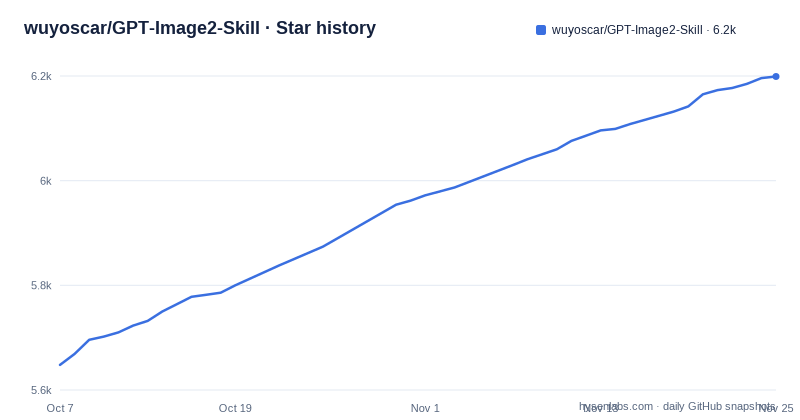
- wuyoscar/GPT-Image2-Skill6,199 ★ · +551
| Repository | 2026-10-07 | 2026-11-25 |
|---|---|---|
| wuyoscar/GPT-Image2-Skill | 5.6k | 6.2k |
551 Stars in the last 49 days, measured from the daily GitHub snapshot. Compare with other projects
Editorial analysis
Three surfaces built from one prompt collection
wuyoscar/GPT-Image2-Skill bills itself as a prompt gallery, an image prompt library, an agentic skill and a CLI, and that list is accurate. It has 5,972 stars and 479 forks, two open issues, and its last push was on 2026-09-30. The language is Python, the license is MIT, and the pyproject.toml keywords enumerate exactly which use cases the author has in mind: agent-skills, claude-code-skill, codex-skill, image-editing, research-figures, text-to-image and ui-mockups among them.
The surfaces are worth separating because they serve different readers. The README is a browsable gallery for a human deciding what to try. The skills are instructions for an agent runtime. The CLI is for people who want a script.
The project structure makes that split explicit. `skills/` holds the two agent skills with their reference files, `src/` holds the Python package, `docs/` holds assets and guides, `tests/` is present, and `.claude-plugin/` declares plugin metadata for Claude Code. `pyproject.toml`, `CHANGELOG.md`, `CONTRIBUTING.md`, `CODE_OF_CONDUCT.md`, `SECURITY.md`, `SUPPORT.md` and `TODO.md` sit at the root, which is more governance than most prompt collections bother with.
The README is bilingual, with English and a separate Chinese file linked at the top.
The gallery as numbered, categorised reference material
The README describes the collection as 163 numbered entries across 31 categories. Entries are referenced by number in the surrounding prose, which is what makes them usable as a lookup rather than as wallpaper. Sample A of the showcase is entry No. 113, and sample B builds on the reference from No. 54.
The prompts are long and specific in the way that works for image models. The Meridian 8 example, an exploded-view illustration of a fictional wristwatch, does not say nice or professional; it names the eleven components to separate vertically, the materials to use, the exact in-image strings to render, and the callouts and labels to include.
Create a premium technical exploded-view illustration of a fictional mechanical wristwatch called the Meridian 8, centered on a dark slate background with fine blueprint grid accents.The edit prompt in sample B works the same way, anchoring on a supplied reference image and then specifying what changes: keep the street footprint and the corner cafe recognizable, transform into a three-storey cutaway diorama, open the front-facing walls to reveal the espresso bar and jazz lounge, then list the material and lighting treatment. That structure is a useful thing to copy, because it separates the parts you keep from the parts you change, which is exactly what an edit model needs.
The 2.5 samples share a stated configuration: model `gpt-image-2.5-sunburst`, 2048x2048, quality `high`. Attribution is handled explicitly, with sample B crediting an external community prompt collection and linking the source.
Two skills and the context-window argument behind them
The gallery is split into category-level reference files such as `gallery-technical-illustration.md` and `gallery-isometric.md` under `skills/gpt-image/references/`.
Two skills ship. One handles image generation and editing, the other image-to-prompt extraction. That second one is the more interesting design idea: given an existing image, extract a prompt that would reproduce it. It turns the collection from a lookup table into something that can be extended with a reference the user already has.
The install story is broader than a single runtime. The pyproject.toml keywords list claude-code-skill and codex-skill, and the README names Claude Code, Codex, OpenClaw, Hermes Agent and other skill-capable runtimes. A repo that ships an agent skill has to solve distribution, and this one tries to work across several agent hosts rather than betting on one.
The CLI wraps the Image API and nothing more
The Python side is small and honest about its scope. `pyproject.toml` declares the distribution name as `gpt-image-cli`, version 0.2.0, requiring Python 3.11 or newer, with two runtime dependencies: `openai` at 2.32.0 or newer, and `python-dotenv`.
[project.scripts]
gpt-image = "gpt_image_cli.cli:main"
So the CLI is a console entry point over the official SDK, with dotenv support so the API key can live in a local file. The classifiers mark it as beta and target Python 3 only.
The README is specific about what the CLI is for. For editing, you export the relevant PDF pages as PNG, WebP or JPG and attach them with `-i`. It notes that the Image API outputs PNG, JPEG or WebP, which means editable SVG or PowerPoint shapes need a separate authoring step, and that for slide work it is worth aiming at vector-style diagrams, icons and layouts rather than expecting a slide file back.
That caveat is the most useful sentence in the README for anyone planning real work with it. A tool that generated an editable artefact would be a different category of thing, and this one is not claiming to be it.
Numbers and dates that do not agree across the repository
A few details are worth knowing if you cite the project.
First, the count. The README overview table says 163 numbered entries across 31 categories.
Second, the update date. The README table says last update 2026-09-10. The repository's last push was 2026-09-30.
Third, the repository name in URLs. The project is named `GPT-Image2-Skill`, but every link in `pyproject.toml` and in the badge URLs points at `wuyoscar/gpt_image_2_skill`. GitHub redirects those, so they resolve, but the canonical name and the linked name differ in case and separators. The `name` field in the project metadata is a third variant again: `gpt-image-cli`. Nothing is broken; all three simply identify different things, and a reader looking for the code under `src/` should search for the Python package rather than the repository name.
Editorial conclusion
What makes this repository more than a list of prompts is the decision to split the gallery into per-category reference files, and to keep a real CLI alongside the skill instructions. The prompts themselves are strong on layout language and weak on the constraints that make image models behave, which is why the author says plainly that showing a reference beats describing at length. If you want the catalogue, browse the README gallery index. If you want it in your agent runtime, install the skill and let it read the category files on demand.
Frequently asked questions
What is GPT-Image2-Skill and how do I use it?
It is three things from one prompt collection: a browsable gallery of numbered prompts for OpenAI's GPT Image 2 and 2.5 models, two installable agent skills, and a Python CLI installed as the gpt-image console command. The README gives per-category gallery indexes and the skills directory carries the same material for agent runtimes.
Does this repository contain prompts for GPT-1 or GPT-2 language models?
No. Those are different things entirely. The name refers to OpenAI's GPT Image 2 and 2.5 image generation models, and the collection covers text-to-image generation and reference-image editing rather than any language model.
Can the CLI edit an image from a PDF?
Yes, indirectly. The README's instruction is to export the relevant PDF pages as PNG, WebP or JPG first and attach them with the -i flag. The Image API outputs PNG, JPEG or WebP only, so anything needing editable vector output needs a separate authoring step.
How many prompts are in the gallery?
The README overview table states 163 numbered entries across 31 categories.
Official sources
Add this badge to your README
If you maintain this project, the badge below links readers to this analysis and shows its maintenance status from the daily GitHub snapshot. Paste the markdown into your README; add ?metric=license or ?metric=stars to the image URL for a different field.

[](https://hysenlabs.com/projects/wuyoscar-gpt-image2-skill)Star history chart for your README
[](https://hysenlabs.com/projects/wuyoscar-gpt-image2-skill)Was this useful?