dify-for-dsl records a different minimum Dify version for every workflow it shares
A collection of DSL workflow scripts built on the open-source Dify project.
At a glance
- What is it?
- dify-for-dsl is a collection of workflow definition files for the Dify platform, meant to be imported rather than installed. Its index is the interesting artefact: fifty rows, a version floor per workflow that disagrees with the version the page asks for, one column that is empty throughout, and a handful of entries that call reverse-engineered service endpoints.
- Who is it for?
- dify-for-dsl is worth bookmarking if you build workflows on Dify and want examples with their ingredients listed, since the technologies column is genuinely useful for finding a workflow by the nodes it uses. Three things to know before you import anything.
- Can I use it commercially?
- Not without permission. GitHub finds no licence file in the repository, and without a licence all rights are reserved by default: you may read the code but not reuse it. Check the README, or ask the authors, before using it.
- Is it still maintained?
- Yes. The repository last received commits 4 days ago.
- What is it written in?
- Mainly Python, according to GitHub's language statistics.
Answers come from the project's GitHub data, last synced on November 15, 2026, and from our analysis. They are not legal advice.
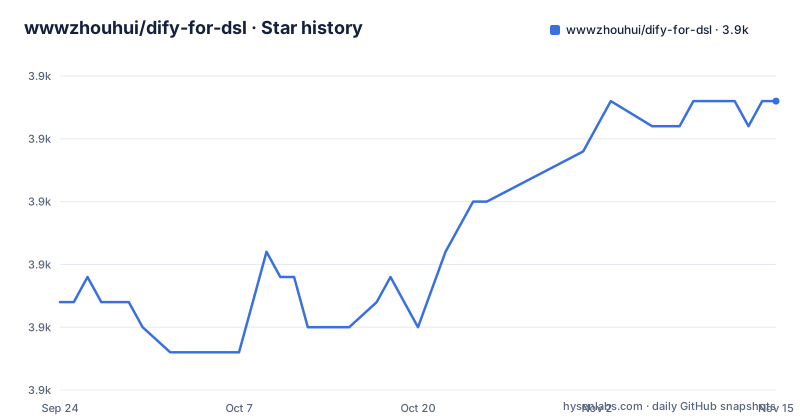
Star history
- wwwzhouhui/dify-for-dsl3,884 ★ · +8
| Repository | 2026-09-24 | 2026-11-15 |
|---|---|---|
| wwwzhouhui/dify-for-dsl | 3.9k | 3.9k |
8 Stars in the last 52 days, measured from the daily GitHub snapshot. Compare with other projects
Editorial analysis
Every file names its own minimum version
The index that fills most of this page has six columns, and the last one is a version number that differs on almost every row. The visible entries span a wide range: a workflow recorded against a very early release, several against an early 1.x line, a cluster against a mid 1.x line, and the most recent rows against two later 1.9 releases. So the table is not a compatibility statement about the collection, it is a per-file note about what each file was built for. That is more useful than a single floor, because a file from an old line often still imports and runs while a newer one breaks on a renamed node, and the column lets you sort the collection by recency without opening anything.
The page asks for 0.8.0 and the table goes back much further
The introductory paragraph tells you to import the files with Dify 0.8.0 or later. The table does not agree. Among the visible rows, one is recorded against a release numbered 0.0.1, several against an early 0.15 release, and a couple against a line in the low 1.x series, all of which are below the stated floor. There is also a row that lists two versions joined by or, which is a different kind of statement again, and a final row whose version cell is empty while its name has a stray space before the extension. None of this makes the collection unusable, since the page's floor is best read as advice for the majority rather than a gate, and the per-row column is the more precise instrument. But a reader who trusts the prose alone will filter out files that were working before the prose was written.
One column is empty in every visible row
The second column of the index is headed as the workflow's display name, and it is blank in every row you can see. What fills the table instead is the file name, the technologies used, a date, an author and a version. The blank column looks like a template that was never filled in, or a field that only some rows would populate once a workflow has been run and given a name inside the platform. It is a small thing, but it means the table has one fewer usable key for finding a file, and it is the kind of gap that suggests the index was started from a spreadsheet and extended over months without a schema. The date column is the one that is consistently maintained, and it runs from the middle of one year to near the end of the next, which gives a reliable sense of the collection's vintage even where the version column is missing.
Several entries call reverse-engineered endpoints
The technologies column lists what each workflow needs, and most of it is ordinary: language model nodes, code execution, HTTP requests, template conversion, document extraction, chart generation. A minority is not. Several entries name a reverse-engineered interface to a commercial image or video generation service, reached over HTTP or through a small local service, and one names a reverse-engineered avatar style transfer endpoint. A couple more name a search service and a rail ticket lookup through the model context protocol. These are the entries most likely to stop working without notice, because nothing in a shared workflow file can tell you when a third party changed an internal interface, and the failure will look like an empty result rather than an error.
Self-developed plugins get their own directory
Four entries in the table mark their plugin as self-developed, and the repository layout is consistent with that: there is a directory for plugins, a directory for model context protocol pieces, and a directory with Python in it, which is where the small services the reverse-engineered entries call would live. Two entries are variants of the same workflow, one using a generic document parser and one using a named parser, which suggests the collection is updated when an upstream parser changes rather than when an idea is had. There is also a slide-deck-to-poster workflow and a spreadsheet-to-chart workflow that both lean on the same third-party tooling, and a newsletter workflow that reaches another automation tool and a mail provider, which is a reminder that these files orchestrate services as much as models.
The usage steps are separated by characters that render as nothing
The installation section is four numbered steps: open the platform, import the file through the import option offered when creating an application, create, and you are done. Between those steps the page contains characters that produce no output at all, where a screenshot was clearly intended and the image did not come through. A reader following the page literally will see four consecutive lines of text and no illustration of where the import control lives, which is the one step worth showing. The oddity is small and it is the kind of artefact that a repository full of YAML files accumulates when files are assembled from a notebook, and the presence of a notebook checkpoint directory in the root supports that reading.
A notebook checkpoint folder and a test plan sit at the root
The root listing is thirteen entries and three of them do not belong to a collection of workflow files. There is an editor configuration directory, there is a notebook checkpoint directory, which is the kind of thing a version control system is supposed to ignore and frequently does not, and there is a directory whose name is a tool's. There is also a single HTML file at the root whose name suggests a demonstration page, and a markdown file whose name translates as an adversarial test plan, which the readme never mentions. On top of that the repository has no licence file and no continuous integration directory. The workflow collection is the point and it is well indexed, but the surrounding tree is what a long-lived personal collection looks like rather than a packaged project, and the missing licence is the one item with consequences for anyone who wants to pass a file on.
Editorial conclusion
dify-for-dsl is worth bookmarking if you build workflows on Dify and want examples with their ingredients listed, since the technologies column is genuinely useful for finding a workflow by the nodes it uses. Three things to know before you import anything. Check the version column rather than the page's stated minimum, because the two disagree and several files are recorded against much older releases. Several workflows depend on plugins and endpoints that are not part of Dify, some of them reverse-engineered third-party services, so they are the ones likely to fail silently later. And the repository carries no licence file, so read the terms you are importing under before redistributing a workflow.
Frequently asked questions
What is dify-for-dsl?
A collection of workflow definition files for the Dify platform, shared for personal use and study. The files are imported through Dify's DSL import screen rather than installed, and the readme asks for Dify 0.8.0 or later.
How do I import a workflow from dify-for-dsl?
Open Dify, choose the import option for a DSL when creating an application, and select the file. Nothing is installed from this repository and there is no package to add.
Which Dify version do these workflows need?
It varies by file. The last column of the index records a different minimum for each workflow, several of them below the version the readme asks for, one row offering two versions with or between them, and one row with no version at all.
What do the dify-for-dsl workflows depend on?
Mostly language model nodes, code execution and HTTP requests, plus plugins, four of which the table marks as self-developed. A handful of entries also call reverse-engineered third-party endpoints through a small local service, which is the part most likely to stop working.
Who writes the workflows in dify-for-dsl?
The table credits one maintainer for most of them, with a few entries credited to other people, sometimes two names in one cell. The repository has no licence file, and its header records no recognised licence value either.
Official sources
Add this badge to your README
If you maintain this project, the badge below links readers to this analysis and shows its maintenance status from the daily GitHub snapshot. Paste the markdown into your README; add ?metric=license or ?metric=stars to the image URL for a different field.

[](https://hysenlabs.com/projects/wwwzhouhui-dify-for-dsl)Star history chart for your README
[](https://hysenlabs.com/projects/wwwzhouhui-dify-for-dsl)Was this useful?