form-create-designer: three Vue form designer packages and the gaps between them
An easy-to-use Vue low-code visual AI form designer that lets you build forms quickly by dragging and dropping, boosting developer productivity. Supports PC and mobile, and is already stably used in government systems, OA systems, ERP systems, e-commerce systems and workflow management systems.
At a glance
- What is it?
- Three designer packages sit in one pnpm and lerna workspace, each documented with two npm lines, two app.use calls and a CDN snippet that pins no version at all.
- Who is it for?
- FormCreate designer fits teams that already speak its JSON rules and want a drag and drop editor for Vue applications in Element Plus, Ant Design Vue or Vant. Before putting it into production, pin a released version rather than the `@next` tag every example uses, finish the mobile CDN entry that stops at `dist/`, and accept that Element Plus rides along inside the mobile bundle.
- Can I use it commercially?
- Yes. MIT is a permissive licence: you can use, modify and sell software built on it, as long as you keep its copyright and licence notices.
- Is it still maintained?
- Yes. The repository last received commits 19 days ago.
- What is it written in?
- Mainly Vue, according to GitHub's language statistics.
Answers come from the project's GitHub data, last synced on November 24, 2026, and from our analysis. They are not legal advice.
Star history
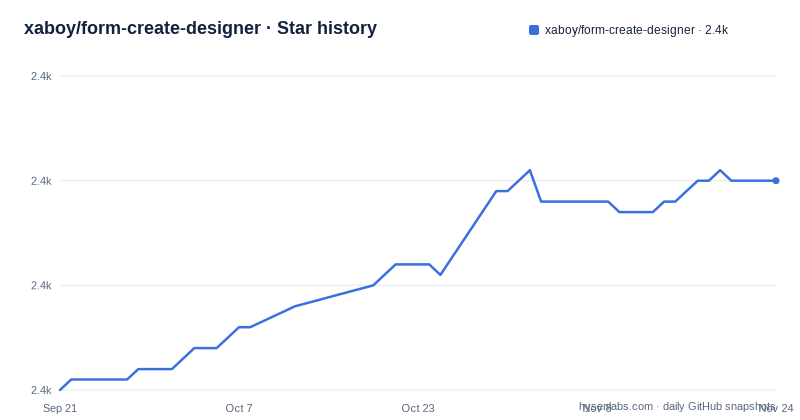
- xaboy/form-create-designer2,380 ★ · +20
| Repository | 2026-09-21 | 2026-11-24 |
|---|---|---|
| xaboy/form-create-designer | 2.4k | 2.4k |
20 Stars in the last 64 days, measured from the daily GitHub snapshot. Compare with other projects
Editorial analysis
Three designer packages sit inside one private workspace
The repository root is not something you install. Its package.json carries `"private": true`, a Chinese one line summary, and a script block that hands every task to lerna with one dev entry per designer package:
"scripts": {
    "dev:ele": "lerna run dev --scope=@form-create/designer",
    "dev:vant": "lerna run dev --scope=@form-create/vant-designer",
    "dev:antd": "lerna run dev --scope=@form-create/antd-designer",
    "build": "lerna run build",
    "build:locale": "lerna run build:locale",
    "build:preview": "lerna run build:preview"
}
`build:locale` and `build:preview` are bare passthroughs, so whatever those two targets do is defined inside the packages rather than at the root.
The shipped code lives under `packages/`, and the README links point into three of those directories on the `next` branch: `packages/element-ui`, `packages/vant` and `packages/ant-design-vue`. Alongside `lerna.json` the root holds `pnpm-workspace.yaml` and `pnpm-lock.yaml`, which means package management runs through a pnpm workspace while task running goes through lerna. `.eslintrc.js`, `.eslintignore` and `tsconfig.json` sit at the same level, so lint and TypeScript settings are shared rather than per package.
That branch choice carries downstream. The default branch is `next`, and every install line and every CDN URL in the README asks for `@next`, so the branch you read and the tag you install are meant to be the same line of work. The newest release is v3.5.0 from 2026-06-02, and the last push to this repository landed on 2026-09-16.
Registration needs two plugins, not one
Every renderer registers itself twice. The Element Plus setup imports the designer, installs the UI library, then makes three calls: the library, the designer, and the designer object a second time through its `formCreate` property.
import FcDesigner from '@form-create/designer'
import ELEMENT from 'element-plus';
import 'element-plus/dist/index.css';

app.use(ELEMENT);
app.use(FcDesigner)
app.use(FcDesigner.formCreate)
The Ant Design Vue block is shaped the same way, with the designer coming from `@form-create/antd-designer` and antd registered first. The editor component and the form renderer it produces output for are two separate plugins hanging off one object, so a half finished registration leaves you with a component whose rules nothing draws. The two calls are easy to get wrong because they sit next to each other with identical syntax and no comment marking which one is the renderer.
The usage surface given for all three variants is one custom element with a ref and nothing else:
<fc-designer ref="designer"/>No props, no events and no options appear beside it. Every knob past mounting lives on the documentation site, which the header links as 帮助文档 at view.form-create.com. For a component whose pitch is drag and drop, that is a thin contract: the mount syntax is here, and everything about loading rules, saving them, and the editor options themselves is somewhere else. The ref is the handle you would need for any programmatic work, and it is shown without a single example of being used.
The mobile designer installs the desktop renderer too
The mobile package is not a standalone mobile stack. Its install block names five packages, and two of them belong to the desktop line:
npm install @form-create/vant-designer@next
npm install @form-create/element-ui@next
npm install @form-create/vant@next
npm install element-plus
npm install vant
The import block confirms the shape. `FcDesignerMobile` is registered after Element Plus and Vant, then its `formCreate` property is registered too, and both stylesheets are pulled in: `vant/lib/index.css` and `element-plus/dist/index.css`. Element Plus stays in the mobile build while Vant supplies the phone sized controls around it. The desktop Element Plus designer listed earlier needs three packages; the mobile one needs five, and the extra pair is the whole reason the two are not interchangeable.
The mount tag changes with the package, becoming `<fc-designer-mobile ref="designer"/>`, and the ref name stays `designer`. A page carrying both editors therefore needs one of the two refs renamed by hand, since the documentation offers no naming convention for the collision.
The mobile CDN block repeats the same duplication in asset form, loading the Element Plus stylesheet, the Vant stylesheet, Vue, the full Element Plus build, `vant@4/lib/vant.min.js`, the `@form-create/element-ui` dist, the `@form-create/vant` dist, and only then the designer dist. If you are budgeting bytes for a phone sized page, that ordering is the line item to look at first: a designer meant for reviewing forms on a phone arrives with a desktop component library in the request list.
The CDN path pins nothing, and the mobile block stops mid attribute
No CDN example in this README carries a version. Every form-create URL ends in `@next/dist/...`, and the Vue script is requested as `https://unpkg.com/vue` with no version segment at all. That matters because the Element Plus designer is documented as supporting both Vue 2 and Vue 3, a compatibility script tags cannot express. Whichever major Vue that alias resolves to at load time is the major the designer will meet, and nothing in the page lets you choose. The Node install path leaves the same gap open, since all three npm blocks ask for `@next` too, so pinning a release is a decision you make yourself rather than one the setup hands you.
The mobile block is weaker still. Its last line stops after `dist/`, with no file name and no closing tag on the script element, so the final asset has to be completed by hand before the page will run:
<link rel="stylesheet" href="https://unpkg.com/element-plus/dist/index.css"></link>
<link rel="stylesheet" href="https://unpkg.com/vant@4/lib/index.css"/>
<script src="https://unpkg.com/vue"></script>
<script src="https://unpkg.com/element-plus/dist/index.full.js"></script>
<script src="https://unpkg.com/vant@4/lib/vant.min.js"></script>
<script src="https://unpkg.com/@form-create/element-ui@next/dist/form-create.min.js"></script>
<script src="https://unpkg.com/@form-create/vant@next/dist/form-create.min.js"></script>
<script src="https://unpkg.com/@form-create/vant-designer@next/dist/
One more naming detail worth copying correctly: the renderer dist is called `form-create.min.js` in all three variants, Element Plus, Ant Design Vue and Vant alike, while the desktop designer dists are `index.umd.js`. So the file name tells you which layer a script belongs to, not which UI library it draws.
The AI assistant lives in another repository, with no install line
The capability list ends with support for the AI form assistant, and the header links it out to `xaboy/form-create-assistant`, mirrored on Gitee and AtomGit, described as generating and modifying FormCreate form rules from natural language descriptions. It arrived with the release titled v3.4 & v1.3 on 2025-11-22. Nothing at the root of this repository carries it: the entries are `.eslintignore`, `.eslintrc.js`, `.github/`, `.gitignore`, `LICENSE`, `README.md`, `lerna.json`, `package.json`, `packages/`, `pnpm-lock.yaml`, `pnpm-workspace.yaml` and `tsconfig.json`. No install command for the assistant appears anywhere here, only the three repository links and a line stating that it is open source.
The release titles also explain a versioning fact the install lines never mention. v3.5.0 on 2026-06-02 carries only the 3.x number, while the two releases before it are paired: v3.4.0 with v1.3, and v3.3.1 with v1.2.1 on 2025-09-05. So this designer and at least one sibling ship on separate version series cut on the same day. Because `@next` is the only tag the setup asks for, nothing here tells you which of those two numbers a given change belongs to, or which one to write into your lockfile.
For an evaluation that matters: the assistant is a different codebase with its own release rhythm, so the feature bullet in this README is a pointer, not evidence about what ships in this package.
A 2020 era lint stack sits beside the Vue 3 build pieces
The root devDependencies mix tool generations in one list. On the lint side sit `eslint ^7.7.0`, `eslint-plugin-vue ^6.2.2` and `babel-eslint ^10.1.0`, configured through the legacy `.eslintrc.js` plus `.eslintignore` rather than a flat config. On the build side sit `@vue/cli-service ^4.5.3` and `@vue/cli-plugin-babel ^4.5.13`, which belong to the webpack era of the Vue CLI, next to `@vitejs/plugin-vue ^3.2.0`, `@vitejs/plugin-vue-jsx ^2.0.1`, `@vue/compiler-sfc ^3.0.11` and `esno ^0.9.1` for the Vite era. Both build paths are wired into the same workspace.
The supporting cast is equally mixed: `gulp ^4.0.2` with `html-webpack-plugin ^4.3.0`, `commander ^6.0.0`, `husky ^4.2.5` with `lint-staged ^10.2.11`, `jsonlint-mod ^1.7.6`, `fast-glob ^3.2.7`, `fs-extra ^10.0.0`, `execa ^5.1.1`, `cross-env ^7.0.2`, `chalk ^4.1.2`, `css-loader ^4.2.1`, `cssnano ^5.1.13` with `cssnano-preset-advanced ^5.3.8`, `humps ^2.0.1`, `figlet ^1.5.0` and `@sixian/css-url ^1.0.3`. There is a TypeScript config at the root while the lint config is still the older format, so the two toolchains have drifted apart at the file level.
What that means in practice is concrete for anyone patching a designer package inside `packages/`. Installing runs through pnpm workspaces, task running goes through a lerna scope, two bundler generations can rebuild the same package, and commits pass through husky and lint-staged, which puts a lint failure in front of any test result you might want.
The deployment claim arrives without a single reference
The project summary states that the designer is in stable use across government systems, OA systems, ERP systems, e-commerce systems and process management. Nothing in the README backs that up: no named deployment, no customer, no scale figure, no browser matrix. The capability list beside it is equally unquantified, covering JSON driven form generation, custom component extension, built in form and layout components described as 40 or more, a form operation API, sub forms and grouping, event configuration, style configuration, table layout, validation, multi language and the AI assistant. That component count is the only number attached to any of it, and it is not broken down by category or version.
Three URLs point at the same site in three spellings: the header links the official site to `https://www.form-create.com`, the homepage field in package.json says `https://form-create.com`, and the help documentation link goes to `https://view.form-create.com/`. Three header anchors point at form-create with no visible label between them. The documentation is Chinese only, and the root tree lists `README.md` with no translated file beside it, so an English reading of this project means the documentation site rather than the repository.
The absences are as telling as the list. No supported browser statement, no description of how a saved rule set is versioned, no migration path between the Element Plus, Ant Design Vue and Vant renderers that share the JSON format, no rollback story for a rule change already live on a form, no permission model for who may edit a design, and no note on what happens to a form when a package moves off `@next`. Contact runs through the issues link and a QQ group number, and the license is MIT with copyright held by xaboy from 2021 onward.
Editorial conclusion
FormCreate designer fits teams that already speak its JSON rules and want a drag and drop editor for Vue applications in Element Plus, Ant Design Vue or Vant. Before putting it into production, pin a released version rather than the `@next` tag every example uses, finish the mobile CDN entry that stops at `dist/`, and accept that Element Plus rides along inside the mobile bundle. Treat the AI assistant as a separate repository to evaluate on its own, and treat the government, OA, ERP and e-commerce deployment claim as unverified, because nothing in the repository backs it. The open question is migration: the three packages share one rule format, and no documentation covers moving an existing rule set from one renderer to another.
Frequently asked questions
Does form-create-designer support Vue 2 as well as Vue 3?
The Element Plus package does. `@form-create/designer`, built on `@form-create/element-ui` and Element Plus, is documented as supporting Vue 2 and Vue 3, while the Vant and Ant Design Vue designers are listed as Vue 3 only. Note that the CDN examples request `https://unpkg.com/vue` with no version segment, so that support cannot be exercised from the script tags alone.
What does form-create-designer need before the designer component will mount?
Register two plugins on the app, `app.use(FcDesigner)` and `app.use(FcDesigner.formCreate)`, after installing the matching UI library, then render `<fc-designer ref="designer"/>`. The renderer plugin is the second of the two calls, and the ref attribute is the only handle shown for programmatic work.
Which packages does the mobile form-create-designer install?
Five of them: `@form-create/vant-designer@next`, `@form-create/element-ui@next`, `@form-create/vant@next`, `element-plus` and `vant`, so the desktop Element Plus renderer is part of the mobile install rather than an optional extra.
Is the AI form assistant part of form-create-designer itself?
No. It is developed in the separate `xaboy/form-create-assistant` repository, mirrored on Gitee and AtomGit, and it arrived with the v3.4 and v1.3 release on 2025-11-22. No install command for it appears in this repository, only the links.
Does form-create-designer pin a version in its install instructions?
No. Every npm install and every CDN URL uses the `@next` tag, and the Vue script is requested as `https://unpkg.com/vue` with no version at all. The newest release referenced is v3.5.0 from 2026-06-02.
Official sources
Add this badge to your README
If you maintain this project, the badge below links readers to this analysis and shows its maintenance status from the daily GitHub snapshot. Paste the markdown into your README; add ?metric=license or ?metric=stars to the image URL for a different field.

[](https://hysenlabs.com/projects/xaboy-form-create-designer)Star history chart for your README
[](https://hysenlabs.com/projects/xaboy-form-create-designer)Was this useful?