pgroll: reversible Postgres schema migrations through parallel schema versions
PostgreSQL zero-downtime migrations made easy
At a glance
- What is it?
- A Go command-line tool that keeps old and new schema versions live at the same time using views over physical tables, so a migration can be rolled back instantly instead of being a one-way door.
- Who is it for?
- pgroll solves one specific problem well: changing a live schema while old and new application code are both running. The mechanism is a set of virtual schemas built from views, which is why a rollback is a command rather than a restore, and why columns get backfilled automatically.
- Can I use it commercially?
- Yes. Apache-2.0 is a permissive licence: you can use, modify and sell software built on it, as long as you keep its copyright and licence notices.
- Is it still maintained?
- Yes. The repository last received commits 32 days ago.
- What is it written in?
- Mainly Go, according to GitHub's language statistics.
Answers come from the project's GitHub data, last synced on October 23, 2026, and from our analysis. They are not legal advice.
Star history
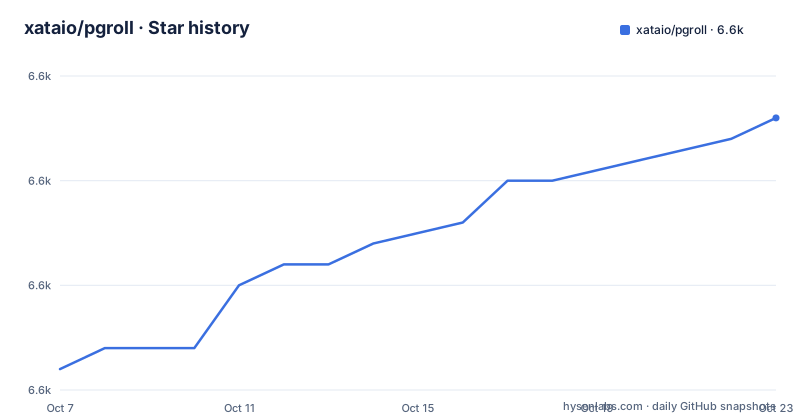
- xataio/pgroll6,608 ★ · +12
| Repository | 2026-10-07 | 2026-10-23 |
|---|---|---|
| xataio/pgroll | 6.6k | 6.6k |
12 Stars in the last 16 days, measured from the daily GitHub snapshot. Compare with other projects
Editorial analysis
The idea is two schemas where the application expects one
A conventional migration tool changes the schema in place and hopes your fleet is homogeneous while it does. pgroll takes the opposite approach: it serves multiple schema versions simultaneously, and it does so with views on top of physical tables. Both versions are valid SQL objects in the same database, and a client picks one by setting its search path.
The README's own framing of the benefit is about client applications rather than the database. Both the old version and the new version work at the same time, even when the change is a breaking one, which removes the risk of a migration and simplifies rolling out a new application build. Rollback becomes instant because the new schema can simply be dropped while the old one is untouched.
The feature list adds the pieces that make that workable in practice: no database locking, automatic column backfilling when needed, and the ability to start from an existing schema rather than from scratch. It works with Postgres 14.0 or later and with any Postgres service, including RDS and Aurora.
The design also names its own weakness, implicitly. If two schema versions are live, then something has to decide which one a given connection uses. That is the search path, and it moves the problem from the migration tool into your deployment.
The command sequence a first migration actually takes
The quick start is a fixed sequence, and it is worth reading in order because the order encodes the model.
First, pgroll needs somewhere to keep its own state:
pgroll --postgres-url postgres://user:password@host:port/dbname initThen, if the database already has data, you baseline it. The README is explicit that this is needed for an already populated database, and optional for an empty one:
pgroll --postgres-url postgres://user:password@host:port/dbname baseline 000_existing_schema ./migrations/After that you write a migration file and start it. The README's example is a JSON document with a name and an operations array containing a create_table operation, and the start command takes the filename:
pgroll --postgres-url postgres://user:password@host:port/dbname start initial_migration.jsonThat start command creates the new schema version and leaves the old one in place, and it prints the new schema version name. Point clients at it:
SET search_path TO 'public_initial_migration';When you are confident no client is still on the old version, complete the migration, which removes the old schema. Until then, rollback removes the new one and leaves the old as it was.
The examples directory and the Makefile do not use the same vocabulary
There is a mismatch worth knowing about before you follow the quick start to the letter. The README's flow uses init, baseline, start, complete and rollback, with a single JSON file as input. The examples directory in the repository is named differently: twenty-four YAML files running from 01_create_tables.yaml through 24_drop_foreign_key_constraint.yaml, with a ledger file alongside them.
The Makefile closes the loop, and its examples target uses a verb the README never mentions:
examples: ledger
	@go build
	@./pgroll init
	@./pgroll migrate examples --complete
So the repository's own smoke test drives a `migrate` subcommand over a directory of YAML files and completes in one step, while the documented happy path is `start` on one JSON file followed by a separate `complete`. Both are consistent with the project having a directory-oriented migration mode alongside the single-file mode, but the README is the one place where you would look first and it does not mention it.
The same target regenerates the ledger with `cd examples && ls > .ledger`, which means the examples are treated as an ordered suite rather than as independent samples. The naming convention is therefore load-bearing: 10 comes before 11 because the tool will run them in that order.
If you plan to build on the examples, read them as a tutorial in sequence rather than as isolated snippets.
Go version, Postgres version and the schema definition file
Two build facts disagree with the README in ways that will cost you an afternoon if you do not catch them early.
The README says installing from source requires Go 1.24 or later. The go.mod at the root declares `go 1.26.3`, and the release that set it is visible in the changelog for 0.16.2, whose entire content is an update of Golang to v1.26.3. So the documented floor is two minor versions behind the actual one. Trust the module file over the README here.
The Postgres picture has moved in the other direction. The README promises support from Postgres 14.0 onward, which is a floor rather than a target, and the development compose file now pins `image: 'postgres:18'`, the newest major. A tool that builds virtual schemas from views depends heavily on Postgres view behaviour, so testing on the newest major tells you more about the project's current practice than the README's minimum does.
The third artifact is schema.json at the root, the JSON schema that defines what a migration document may contain. The Makefile formats it with prettier through a container, and the generate target pipes it through a Go JSON schema code generator to produce the migration types in Go, then prepends the SPDX license header. That loop means the schema file is the source of truth for what a migration can express, and the Go types are generated from it.
Release notes dominated by dependency bumps say something about the project
Reading the three most recent releases tells you what the maintainers are actually spending time on. Version 0.16.3, from September 2026, contains no features at all: six dependency bumps, covering an archive library, a terminal library, the Postgres testcontainers module, crypto and tools packages, plus a formatting pass. Version 0.16.2 contains exactly one line, the Golang update already mentioned.
Version 0.16.1 is different and more informative. It eliminates connection leaks during the backfilling process of `migrate`, and the changelog lists both that fix and a second commit eliminating multiple connection leaks. Two of the three recent releases are about keeping the build current and one is about a resource leak in the backfill path.
That is a coherent picture for a tool that manipulates schemas at runtime: the risky code is not the SQL generation but the long-running work against a live database, and connection management during a backfill is exactly where a migration tool earns or loses trust.
The project is Apache-2.0 licensed, is not archived, and was pushed to on 2026-09-21. The homepage is pgroll.com and the README points at an introductory blog post explaining the problems it solves, which is a better read than the feature list if you want the reasoning behind the design.
What the README leaves to the documentation site
The README has a Documentation section and a Benchmarks section in its table of contents, and neither is filled in on the front page. That is the honest boundary of this project: the command sequence is documented, the reasoning is a blog post away, and the operational detail lives on the documentation site.
What you will want from those pages and will not find here: how backfill throughput behaves on a large table, what happens if two migrations are started concurrently, how the views behave under a hot workload, and what the escape hatch is if you need a single schema again. The README's claim of no database locking is exactly the kind of claim that needs a page behind it before you schedule it against a production table.
One more practical note. Because pgroll stores its own state in a table in your database and creates schemas in that same database, it is not a tool you point at a fleet through a proxy or a migration service. It connects directly, it acts as a privileged user, and its objects live alongside your tables. That is consistent with the feature claim about working with any Postgres service including RDS and Aurora, but it also means your least-privilege story needs thought.
With twenty-four worked examples in the repository, a JSON schema that defines the file format and a documented expand and contract workflow, this is one of the better-organised migration tools to read before adopting.
Editorial conclusion
pgroll solves one specific problem well: changing a live schema while old and new application code are both running. The mechanism is a set of virtual schemas built from views, which is why a rollback is a command rather than a restore, and why columns get backfilled automatically. The cost is that your schema stops being one thing: clients select a version by setting their search path, and nothing works until they do. The documentation site, not the README, is where concurrency behaviour and backfill performance are settled. Start with init, then baseline an existing database before your first real migration, and treat the search path as part of your application deploy rather than an afterthought.
Frequently asked questions
What is zero downtime migration?
It is a migration that does not stop the running application while it happens. pgroll's approach is to keep the old and new schema versions live simultaneously using views over the physical tables, so clients on either version keep working until you point them at the new one and then complete the migration.
What is the best tool for migrating PostgreSQL data?
It depends on whether you mean schema or rows. pgroll is a schema migration tool, and it explicitly works by serving several schema versions at once so that code changes and schema changes can be deployed separately. It is not a data movement tool, and the README frames its benefit around client applications rather than row copies.
How do I roll back a pgroll migration?
Run the rollback command at any point during a migration. It removes the new schema and leaves the old one as it was before the migration started, which is why the README calls rollback instant. The old schema is never modified while the new one is being applied.
Can I use pgroll on a database that already has tables?
Yes, and you are supposed to. The README lists works against existing schemas, no need to start from scratch as a feature, and the baseline command imports the current structure so you can continue from a populated database rather than building one from an empty schema.
Official sources
Add this badge to your README
If you maintain this project, the badge below links readers to this analysis and shows its maintenance status from the daily GitHub snapshot. Paste the markdown into your README; add ?metric=license or ?metric=stars to the image URL for a different field.

[](https://hysenlabs.com/projects/xataio-pgroll)Star history chart for your README
[](https://hysenlabs.com/projects/xataio-pgroll)Was this useful?