Xposed-Modules-Repo submission: an issue title that creates your repository
Submit your Xposed Modules!
At a glance
- What is it?
- This repository is the intake form for the Xposed Modules Repo, not a module. Submitting means opening an issue titled `[submission] packagename`, after which a bot creates a repository for you and invites you as maintainer. The parts that will cost you time are the application ID ownership rule and the tag that the automation cannot fix for you.
- Who is it for?
- Use this repository if you maintain an Xposed module and want it listed in a central index, and read it as a submission contract rather than a codebase: the deliverable is a repository the bot creates for you, populated with a summary, a README, collaborators and a tagged release. Three things to get right before you file the issue.
- Can I use it commercially?
- Not without permission. GitHub finds no licence file in the repository, and without a licence all rights are reserved by default: you may read the code but not reuse it. Check the README, or ask the authors, before using it.
- Is it still maintained?
- Yes. The repository last received commits 13 days ago.
- What is it written in?
- Mainly JavaScript, according to GitHub's language statistics.
Answers come from the project's GitHub data, last synced on October 22, 2026, and from our analysis. They are not legal advice.
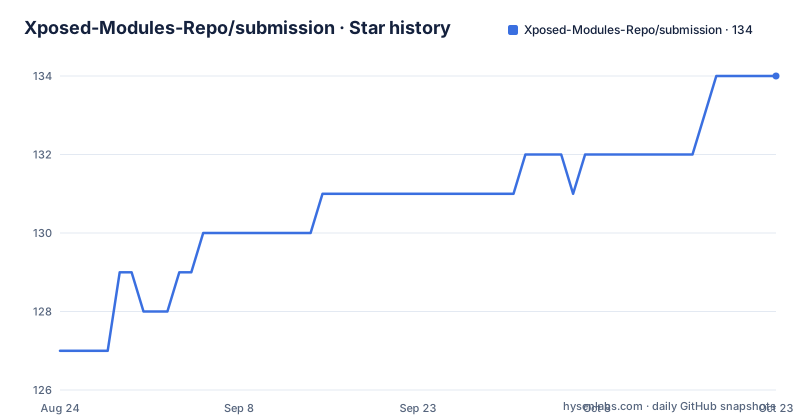
Star history
- Xposed-Modules-Repo/submission134 ★ · +7
| Repository | 2026-08-24 | 2026-10-22 |
|---|---|---|
| Xposed-Modules-Repo/submission | 127 | 134 |
7 Stars in the last 59 days, measured from the daily GitHub snapshot. Compare with other projects
Editorial analysis
Submission is an issue title, and a bot does the rest
The whole intake mechanism is one issue. You open an issue on this repository with the title `[submission] packagename`, where `packagename` is the application ID of your module, and a bot responds by creating a new repository under the modules organisation and inviting you to be its maintainer. There is no form, no manifest to hand-write, and no configuration file to get right. That design has a consequence worth stating: you do not submit a module here, you request the creation of a repository you will then own and fill in. Maintainership matters for that reason, since the listing is built from what you push afterwards, and an abandoned repository is a listing with nothing behind it. The same mechanism handles a different case as well, covered below, so the issue tracker is the only channel you need for both joining and moving an existing project in.
The application ID has to be provably yours
There is a verification requirement on the application ID, and it exists because the listing is a namespace of trusted names. If you use reverse domain name notation, you are asked to set a TXT record on your root domain with the value `lsposed-modules-repo-verification=your_github_username`, which ties the domain to your account. If you own no domain at all, the fallback is an `io.github.{username}` prefix, and the guidance is that your GitHub username or organisation username works there. The catch in the fallback path is that your organisation membership has to be public before you create the submission, otherwise there is nothing for the check to read. The stated reason for the rule in general is to use something you own rather than a random domain, and both routes are a way of demonstrating exactly that. Budget for the DNS step if you take the first route, since a TXT record is not instant and the submission cannot complete until it resolves.
What the bot fills in, field by field
The repository it creates has a defined shape, and matching it is what makes the entry render. The repository title is the package name, for example `com.example.xposedmodule`, and the description is the human-readable module name, for example `Example Xposed Module`. Collaborators are the authors of the module. The home page is a support link. Then there are two files that matter for the listing: a summary, which is what appears on the front page, and a `README.md` holding the full description. What does not belong is your source code, and the instruction is direct about it: do not upload source code to the listing repository, because it is not wanted there. A line referring to an example repository for the available meta files is struck through in the current documentation, so treat the summary and README as the two files to get right and the rest of the layout as conventional.
A release tag the bot cannot repair for you
The releases are where automation has a documented blind spot, and it is worth reading closely because it wastes an afternoon if you hit it. The release title is the version name, the release content is the changelog, and the release tag combines a version code and a version name in that order. If you create the release together with the APK asset, the bot updates the tag automatically. If you later edit the release and change only the APK, the bot cannot detect it: GitHub's webhooks do not report a change to a release asset, and the project links to the explanation of that limitation. So the tag goes stale and your module's update does not show up. The stated best practice follows directly: always submit a release with a valid APK rather than editing an existing one. If your repository is incomplete it will not be displayed at all, which is the other reason to fill in the summary and README before expecting an entry.
Pushes trigger a build and a five to fifteen minute wait
Once the repository exists, updates are automatic rather than submitted. A push to your module repository triggers a build workflow in the modules organisation, and the documentation gives a five to fifteen minute window before the change is shown. There is no second submission step and nothing to re-trigger, which means a typo in the summary is fixed by editing and pushing rather than by opening another issue. Two practical habits follow. Since the listing is only as good as what you push, keep the summary current rather than treating it as initial metadata, and since the build is what surfaces the change, a release that is not showing up is more often a tagging problem than a build problem. The build and tag workflows are separate, which is consistent with the asset change limitation: one publishes the entry, the other moves the version pointer.
Transfers work by handing over the original repository
If a module already has a repository somewhere else, the intake path is different and the mechanism is a transfer rather than a creation. You open an issue titled `[transfer] packagename` and transfer ownership of your original repository to the organisation. No new repository is created, so the history, issues and stars come with it, and the application ID is one already in use elsewhere, which is why this is a separate verb from submission. The trade is that you give up ownership of the repository you built, and the value you get in return is the same listing with your history intact. For a long-lived module that already has a following, that is usually the better path. For a module you are still reorganising, creating fresh through the submission route leaves you with a repository you own outright and no history to carry over.
The intake form is a TypeScript bot with an unusual dependency
The repository behind the form is small and worth a look if you want to know what the bot actually does. It is a TypeScript project on pnpm, with a `src/` directory, a build step through `tsc`, a start script that compiles and then runs the entry point through `tsx`, and `standard --fix` as the lint command. The runtime dependencies describe the bot's job precisely: the GitHub Actions toolkit core and client libraries, the Octokit retry plugin, and `tldts`, which is a public suffix list parser. That last dependency is the giveaway that the application ID check is real: parsing a domain to determine its registrable suffix is how you verify that a claimed root domain is not someone else's subdomain, which is exactly the TXT record rule stated earlier. A pnpm workspace file and a lockfile are committed, the entry point is under `src/`, and the last push to this repository was on 2026-09-28. Nothing here declares a licence, and there are no releases in this repository because the releases live in the module repositories the bot manages.
Editorial conclusion
Use this repository if you maintain an Xposed module and want it listed in a central index, and read it as a submission contract rather than a codebase: the deliverable is a repository the bot creates for you, populated with a summary, a README, collaborators and a tagged release. Three things to get right before you file the issue. Prove you own the application ID, either with a TXT record on your root domain or with the `io.github.{username}` prefix and a public organisation membership. Put a valid APK in the release, because editing an existing release's asset alone will not move the tag. And keep your source code in your own repository, since the listing repository is not where code belongs. Licence is not declared for this repository, the last push was on 2026-09-28, and there are no GitHub releases here because the releases that matter are the ones in the module repositories this process creates.
Frequently asked questions
How do I submit an Xposed module to the Xposed Modules Repo?
Open an issue on the submission repository with the title [submission] packagename, where packagename is your module's application ID. A bot then creates a new repository for you and invites you to be its maintainer.
What application ID can I use for an Xposed module submission?
If you use reverse domain name notation you must own the domain and set a TXT record on it with the value lsposed-modules-repo-verification=your_github_username. Without a domain, use an io.github.{username} prefix and make your organisation membership public before submitting.
What files should my module repository contain?
A summary of your module, which is shown on the front page, and a README.md with the full description. The repository title is the package name, the description is the module name, collaborators are the module's authors, and the home page is a support link. Do not upload your source code there.
Why is my Xposed module update not showing up?
Usually the release tag. If you submit a release with the APK asset the bot updates the tag automatically, but editing an existing release and changing only the APK does not trigger a webhook, so the tag will not update. Always submit a release with a valid APK rather than editing one.
How long does a module submission take to appear?
An update to your module repository automatically triggers a build and is shown in five to fifteen minutes. If the repository is incomplete it will not be shown at all, so the summary and README need to be filled in first.
How do I move an existing Xposed module repository into the modules repo?
Open an issue titled [transfer] packagename and transfer ownership of your original repository to the organisation. Unlike a submission, this keeps the existing history rather than creating a new repository, but you give up ownership of the repository you built.
Official sources
Add this badge to your README
If you maintain this project, the badge below links readers to this analysis and shows its maintenance status from the daily GitHub snapshot. Paste the markdown into your README; add ?metric=license or ?metric=stars to the image URL for a different field.

[](https://hysenlabs.com/projects/xposed-modules-repo-submission)Star history chart for your README
[](https://hysenlabs.com/projects/xposed-modules-repo-submission)