Reading the obsidian-spaced-repetition plugin closely
Fight the forgetting curve by reviewing flashcards & entire notes on Obsidian
At a glance
- What is it?
- A TypeScript Obsidian plugin that schedules flashcards and whole notes with FSRS or SM-2, wrapped in a repository that also carries a Python documentation site, two changelog paths, and a release trail that stops short of its last commit.
- Who is it for?
- The scheduling core is the finished part of this project. Card formats are documented down to the delimiter, deck selection is reduced to two commands that clearly separate scheduled work from cramming, and whole-note review is a first class path rather than a card trick wearing a hat.
- Can I use it commercially?
- Yes. MIT is a permissive licence: you can use, modify and sell software built on it, as long as you keep its copyright and licence notices.
- Is it still maintained?
- Yes. The repository last received commits 17 days ago.
- What is it written in?
- Mainly TypeScript, according to GitHub's language statistics.
Answers come from the project's GitHub data, last synced on October 22, 2026, and from our analysis. They are not legal advice.
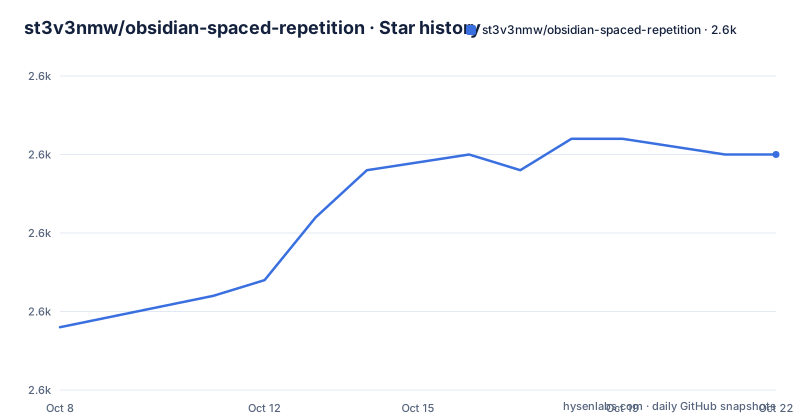
Star history
- st3v3nmw/obsidian-spaced-repetition2,590 ★ · +11
| Repository | 2026-10-08 | 2026-10-22 |
|---|---|---|
| st3v3nmw/obsidian-spaced-repetition | 2.6k | 2.6k |
11 Stars in the last 14 days, measured from the daily GitHub snapshot. Compare with other projects
Editorial analysis
What the plugin is built to do
The repository description states the goal in one line: fight the forgetting curve by reviewing flashcards and entire notes inside Obsidian. The README restates it more precisely, naming the two schedulers behind the feature, FSRS and SM-2, and linking both to the general spaced repetition concept rather than to a specific implementation.
This is an Obsidian community plugin, written in TypeScript, published under the MIT license, and loaded the way Obsidian loads plugins: a bundled JavaScript file. The package manifest points at it directly.
"main": "main.js",The scale is worth weighing when setting expectations. The repository carries 2,572 stars and 310 forks, which places it well above the typical community plugin. It also carries 347 open issues at the same time. Both numbers belong in the same sentence, because a project with that many stars attracts that many reports, and an issue count measures attention rather than neglect. The topics the repository tags itself with are narrow and honest: flashcards, obsidian, obsidian-md, obsidian-plugin, spaced-repetition, spaced-repetition-system, srs.
The last recorded push to the default branch came on 2026-09-01, well inside any reasonable definition of active. Whatever else is true about maintenance, the branch is being written to.
Card syntax and how a deck forms
The plugin leans on syntax already native to Obsidian rather than inventing a card editor. A note becomes a deck by carrying a tag. The base tag is `#flashcards`, and a nested tag creates a sub deck.
That single mechanism covers organization for most people: one tag for the whole vault, one tag per subject, one tag per project. The quick start section reduces it to three steps, and the first two are both about tags.
The feature list, though, describes decks as coming from Obsidian's hierarchical tags *or* folder structure, and points its getting-started guides at both. The quick start never mentions folders. Both statements sit in the same README, and the mismatch is real rather than a misreading: folder based decks are advertised in the feature links and absent from the instructions most readers will follow first.
Card syntax comes in five documented shapes. Two are single line and two are multi line, and each pair has a reversible variant.
Question
?
Answer
The reversible forms swap the double colon for a triple colon and the single question mark for a double question mark. Cloze deletion is handled separately, by marking the text to hide with `==highlight==`, by bolding it, by wrapping it in curly braces, or by configuring custom cloze patterns.
What makes the syntax pleasant is that cards inherit everything Obsidian already renders. Images, audio, video, LaTeX, fenced code with syntax highlighting, and footnotes all appear in a review session, because card content is markdown handled by the host editor rather than a string drawn by the plugin.
Card titles are also inferred from structure. A card sitting under headings reports its context as note title, then heading, then subheading, so a reviewer can tell where a card came from without opening the note at all.
Whole-note review and the sidebar queue
Flashcards are half the description and whole notes are the other half, which is where the plugin stops looking like a card viewer.
A note marked with the `#review` tag becomes reviewable. A command named Open Notes Review Queue in sidebar brings up a file explorer like panel where those notes are sorted by when they next fall due. Open one, recall it, then rate the recall through the Review note as YOUR_RATING command, or through the three dot menu on the item.
That rating feeds the same algorithm that schedules cards, and the next due date is recalculated from it. The rationale in the README is sound: some material is not a collection of atomic facts, and decomposing a coherent argument into question and answer pairs loses the very thing worth remembering.
Note that this path takes one rating for a whole document rather than one per fact. That is the tradeoff the design accepts, and it is a different unit of scheduling from the flashcard path even though both write into the same interval logic.
The two systems share a tag based entry convention, which is why `#flashcards` and `#review` read as one feature rather than two bolted together. A vault can mark a note for both purposes and get a card queue and a document queue out of a single file.
Two schedulers and the mode that ignores them
FSRS and SM-2 are the two algorithms named in the README, and the plugin lets a user choose between them. The choice matters more than the wording suggests. SM-2 is the older and simpler scheme, built on an ease factor and a fixed ladder of intervals. FSRS is the newer model that estimates how likely a specific memory is to be recalled and schedules against that estimate, which is why it can be tuned and why it tends to adapt better to individual learners.
The plugin ships both and keeps them as user settings. Nothing in the README pushes one over the other, which is respectful of the fact that the two suit different readers.
Then there is cram mode, and it deserves a careful read. Two commands open a deck list:
- Review Flashcards from all notes, where the algorithm decides what is due - Select a deck to cram, where all decks and all cards are reviewable and the algorithm is fully ignored
The same split exists for the current note, with Review flashcards in this note and Cram flashcards in this note. So the scheduling machinery the plugin is named for is bypassed by one of its two entry points. That is a deliberate and useful division, since cramming before an exam is a different job from retaining material over months, but it does mean the README's opening claim about FSRS and SM-2 does not describe what happens during a cram session. Both statements are true of the software; they describe different modes.
Once a deck is open, the reviewer rates their ability to remember the current answer, and that rating is what tells the algorithm what is known well and what is not.
A TypeScript plugin carrying a Python documentation site
The file tree is where this repository stops looking like a plugin and starts looking like two projects sharing a root directory.
The plugin side is conventional: `src/`, `tests/`, `styles.css`, `manifest.json`, `tsconfig.json`, `esbuild.config.mjs`, `eslint.config.mjs`, `jest.config.js`, a lockfile, and a workspace file. The quality scripts are wired into a single validation command that runs formatting, linting, and tests together, killing the others if any one fails.
"test": "pnpm jest",
"lint": "pnpm prettier --check . && pnpm eslint src/ tests/",
The documentation side is Python. Alongside the TypeScript tree there is `mkdocs.yml`, a `docs/` directory, and pinned MkDocs dependencies.
mkdocs==1.6.1
mkdocs-material==9.7.7
mkdocs-static-i18n==1.3.1
pymdown-extensions==11.0
Both live in the same checkout, and neither the README nor the tree marks one as optional. For a plugin whose shipped artifact is a single bundled file, having a Python documentation toolchain present in the repository is a real cost, and the validation script does not touch it. It covers the TypeScript side only.
The tree also holds two changelog destinations. A `CHANGELOG.md` sits at the root, while the changelog script in `package.json` writes its output to `docs/docs/changelog.md` and then formats that file. Two files, one generator, and no indication in the repository of which one a reader is meant to trust.
The static i18n plugin in those requirements explains something useful: the fifteen languages the README credits to the Obsidian community are all publishing into the same documentation site from one set of markdown sources.
Release history and who is actually maintaining it
The release trail is short and specific. Version 1.15.2 landed on 2026-06-01 and added an opt-in reminder system that notifies the user to review cards and auto-opens the review view, along with a fix for a crash when a spaced repetition tab was left open across an Obsidian restart. Version 1.15.3 on 2026-06-04 added an informational message to the deck list when no cards exist yet, aimed at onboarding, and fixed a settings page that would report that it needed more time to load and then never finish loading. Version 1.15.4 on 2026-06-14 fixed a card not redrawing right after an edit, odd ribbon icon behavior, cards reversing incorrectly after a reversed card was edited, and a broken bury-cards feature.
Two details in that list matter more than the fixes themselves. A settings page that appeared to hang, and a card that did not redraw after an edit, are symptoms of one underlying thing: the review view holds rendered state that can fall out of sync with the note beneath it. And the buried cards fix, sitting alongside a change that preserves FSRS sibling schedule placeholders in the same release, points at how much of the hard work lives in the seam between FSRS sibling scheduling and a live editing surface.
The release dates also draw a line the repository never draws for itself. The latest tag is dated 2026-06-14, and the last recorded push is 2026-09-01. Anyone reading the main branch is looking at roughly eleven weeks of work that has never shipped in a tagged release, and the version in the package manifest still reads 1.15.4.
Against all of that, the support table in the README names exactly two people: Stephen Mwangi as owner and Kyle Klus as maintainer, both with funding links attached. The package metadata agrees, listing Mwangi as author and Klus under maintainers. Two named humans, a community of fifteen translating languages, and 347 open issues is a load worth stating plainly, because it is the most reliable predictor of how fast the backlog drains.
Editorial conclusion
The scheduling core is the finished part of this project. Card formats are documented down to the delimiter, deck selection is reduced to two commands that clearly separate scheduled work from cramming, and whole-note review is a first class path rather than a card trick wearing a hat. What the repository does not smooth over is ownership. Two named humans are listed against 347 open issues, the docs are a separate Python build living inside a TypeScript plugin tree, and two changelog destinations sit side by side without either being marked canonical. None of that makes the plugin unusable, and the eleven weeks between the 1.15.4 tag and the last recorded push suggest ordinary work rather than abandonment. It does mean that anyone planning to depend on this long term is depending on two people and a docs pipeline that no script in the repository exercises.
Frequently asked questions
Does Obsidian have a spaced repetition plugin?
Yes. The obsidian-spaced-repetition plugin is a community plugin that schedules flashcards and whole notes inside Obsidian. It supports the FSRS and SM-2 algorithms, offers several card syntaxes including cloze deletion, and installs and updates through Obsidian's own plugin manager. Its documentation is hosted at stephenmwangi.com/obsidian-spaced-repetition.
How are decks and notes organized in this plugin?
Decks come from tags. Add #flashcards to a note to make it a deck, or #flashcards/YOUR_SUB_DECK_NAME to place it in a nested sub deck. Whole-note review works the same way with the #review tag, and the Open Notes Review Queue in sidebar command lists those notes sorted by when they are due. The feature pages also mention folder structure as an alternative to tags, though the quick start covers only tags.
Which scheduling algorithms does the plugin offer?
Two. The README names FSRS and SM-2 as the available spaced repetition algorithms and leaves the choice to the user. Note that cram mode bypasses both: the Select a deck to cram and Cram flashcards in this note commands make every card reviewable, and the algorithm is fully ignored.
What card formats are supported?
Five documented shapes. Question::Answer for single line cards, Question:::Answer for reversible single line cards, a lone question mark on its own line for multi line cards, a double question mark for reversible multi line cards, and cloze deletion using ==highlight==, bolded text, curly braces, or custom cloze patterns. Cards inherit Obsidian's rich text, so images, audio, video, LaTeX, highlighted code, and footnotes all render during review.
Official sources
Add this badge to your README
If you maintain this project, the badge below links readers to this analysis and shows its maintenance status from the daily GitHub snapshot. Paste the markdown into your README; add ?metric=license or ?metric=stars to the image URL for a different field.

[](https://hysenlabs.com/projects/st3v3nmw-obsidian-spaced-repetition)Star history chart for your README
[](https://hysenlabs.com/projects/st3v3nmw-obsidian-spaced-repetition)Was this useful?