jql ships two licence files, three releases in one afternoon and an empty-array truncate
A JSON Query Language CLI tool. Separators Group separator Group separators build up an array from sub-queries.
At a glance
- What is it?
- jql is a Rust command line tool that reads JSON, applies a query written as a sequence of tokens, and writes JSON back. The workspace it lives in is unusually well instrumented, with two fuzz targets, a nextest split per crate, a changelog generator and a documentation site built by running the binary itself, while the surface it exposes to users is a handful of selectors and five operators.
- Who is it for?
- jql earns a place in a shell pipeline when a transformation is a token string rather than a program: multiple documents in, one result each out, trailing junk rejected rather than skipped, and flags that line up with the jq habits people already have, including the sort-keys behaviour matched deliberately to jq's own flag. Two things deserve a look first.
- Can I use it commercially?
- Yes. Apache-2.0 is a permissive licence: you can use, modify and sell software built on it, as long as you keep its copyright and licence notices.
- Is it still maintained?
- Yes. The repository last received commits 3 days ago.
- What is it written in?
- Mainly Rust, according to GitHub's language statistics.
Answers come from the project's GitHub data, last synced on November 14, 2026, and from our analysis. They are not legal advice.
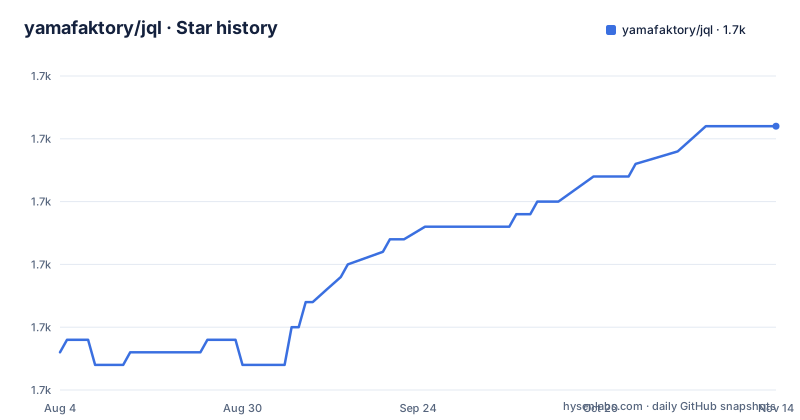
Star history
- yamafaktory/jql1,691 ★ · +18
| Repository | 2026-08-04 | 2026-11-14 |
|---|---|---|
| yamafaktory/jql | 1.7k | 1.7k |
18 Stars in the last 102 days, measured from the daily GitHub snapshot. Compare with other projects
Editorial analysis
Two licence files in the tree, one name in the metadata
The manifest offers a choice and the repository keeps both sides of it. Cargo.toml declares license as MIT OR Apache-2.0, and the top-level entries include LICENSE-MIT and LICENSE-APACHE as separate files, which is the usual way a dual licence is expressed in Rust. The repository metadata for the project, however, records Apache-2.0 on its own, and no line in the README picks between them. For anyone shipping jql inside a product, the short answer is that the tool is available under either licence and the choice is theirs to make and document, not something the repository decides. The rest of the manifest is conventional: edition 2024, a minimum rust-version of 1.88, resolver 3, workspace members taken from crates/, and an author of Davy Duperron.
Three releases published on the same afternoon
The tag list shows jql-v9.0.1 at 12:16 on 2026-09-08, jql-v9.0.2 at 19:33 the same day and jql-v9.0.3 at 19:51, so the current version line was finished inside one working session and the workspace version field reads 9.0.3 to match. Two files at the root explain how that happens without anyone editing the version by hand: release.toml drives the release, and cliff.toml configures git-cliff, which the justfile drives with --unreleased --prepend into CHANGELOG.md. The comment on that recipe is explicit that it runs before the branch is squashed, so the changelog is assembled from commits and then folded into one commit. The last commit on main carries the same date as the final tag.
The release profile asks for small, while the first philosophy line asks for fast
The workspace pins its release build in four lines: codegen-units set to 1, lto on, opt-level set to z, and panic set to abort, with a comment linking the cargo issue that prompted the setting. opt-level z is the size-oriented choice, optimising for the smallest binary rather than the fastest one, and codegen-units of 1 with full LTO is the expensive end of the build to get there. That sits next to a README whose first philosophy line is Be fast, and next to a tree holding PERFORMANCE.md and performance.sh, so the repository clearly measures something. What the README never does is quote a number: no timings, no memory figures, no comparison against the jq it names as the model for its sort-keys flag. Anyone deciding on speed has to go and produce those numbers themselves.
One binary, three published crates and two fuzz targets
The workspace is a crates/ glob, and the documentation links at the top of the README point at docs.rs for jql-parser and jql_runner separately from the jql crate on crates.io, so the parser and the runner ship as their own libraries rather than staying private to the command. Testing is split the same way: cargo nextest run for everything, then test-parser and test-runner for the two halves and test-bin for the binary alone. Two fuzzing targets sit beside them, fuzz_parser and fuzz_lazy, and the recipe for the second is described as fuzzing the lazy evaluator against the runner, which is a comparison between two implementations of the same evaluation rather than a parser crash hunt. Lint policy is strict for a small tool: unsafe_code is denied, clippy all is denied, and missing_docs is a warning, so every public item owes a doc comment.
The documentation site is produced by running the binary and a Python script
The docs recipe in the justfile is two commands: a release build of the jql package, then python3 docs/build.py. The README says the published grammar comes with every example generated by running jql itself, which is the interesting part, because it means the examples in the documentation are output of the current build rather than prose typed by hand. The cost of that guarantee is a toolchain: producing the site needs a release build, a Python 3 interpreter and the script in docs/, none of which is a Rust dependency. The same separation applies to the README, which is written by hand and shows the same input, query and output triples the generator produces, so the two can disagree without either failing a build. CLAUDE.md sits in the root next to them, alongside rustfmt.toml and the assets/ directory holding jql.svg.
Nine package managers, two of them kept by other people
Installation is nine commands long. Alpine uses apk, Arch Linux uses yay, Fedora uses dnf, FreeBSD uses pkg, openSUSE uses zypper, Nix uses nix-env, Homebrew uses brew, and Rust itself offers both cargo install and cargo binstall for jql. Two of those are explicitly not the author's: the Alpine package is maintained by @jirutka and the AUR package by @barklan, both named in their sections. Manual installation is the tenth route, downloading a compiled binary from the GitHub releases page, which is the only option listed for platforms none of the nine cover and also the only one that puts an unversioned binary on a PATH. The homepage is the crates.io listing for the crate, and the grammar and examples live on a separate project page.
Truncate turns [1, 2, 3] into an empty array
The five operators are the part of the language most likely to surprise. Flatten is .. and works on both arrays and objects, and the object case is the interesting one: flattening { "a": { "c": false } } yields keys written as dotted paths such as a.c, so a flatten over a nested object renames its keys rather than keeping the structure. Keys is @, returning the keys of an object or the indices of an array, and passing any other primitive through unchanged. Pipe in is > and applies the following tokens to each element of an array, and pipe out is <, which stops that iteration, optionally at a position, as in "a"|>"b""c"<|[1]. Truncate is !, declared as mapping output into simple primitives of boolean, null, number, string, [] or {}. The worked example feeds it { "a": [1, 2, 3] } and gets [] back, so the operator keeps the shape and discards the contents, which is a large loss for a name that suggests trimming.
Trailing input is an error, and the last flag stops mid-sentence
Input handling is stricter than most. The stream may hold several JSON documents concatenated and separated by whitespace or newlines, pretty printed or not, the query is applied to each, and one result is written per document:
printf '{ "a": 1 }{ "a": 2 }' | jql '"a"'Anything trailing that is not itself a document is an error rather than being skipped, so a stray byte at the end of a log file fails the command instead of passing through. Five flags are covered. Inline, or -i, turns off pretty printing; -q reads the query from a file instead of stdin, which is the flag to reach for when a query is longer than a shell line; -r writes strings without their JSON double quotes; and -S recursively sorts object keys in alphanumerical order, described as matching the behaviour of jq's own sort-keys flag. A sixth section begins describing line-by-line reading of a JSON stream and notes that without it the whole input is read before anything is written, and the visible text stops there.
Editorial conclusion
jql earns a place in a shell pipeline when a transformation is a token string rather than a program: multiple documents in, one result each out, trailing junk rejected rather than skipped, and flags that line up with the jq habits people already have, including the sort-keys behaviour matched deliberately to jq's own flag. Two things deserve a look first. The licence is MIT OR Apache-2.0 with both files in the tree while the repository metadata names Apache-2.0 alone, so a compliance check has to pick one deliberately instead of inheriting the shorter field. And the truncate operator is lossy in a way its name does not suggest, since it maps an array to an empty array. The workspace itself is in good shape, with unsafe code denied, clippy all denied, a size-optimised release profile and two fuzz targets, and version 9.0.3 shipped on 2026-09-08.
Frequently asked questions
What is jql and how do you pronounce it?
jql is a JSON Query Language tool written in Rust, described as jackal to say. It takes JSON as input, applies a query given as a sequence of tokens, and writes JSON back, with keys always double-quoted so a query stays compliant with the JSON format.
How do you install jql?
Through nine package managers: apk on Alpine, yay on Arch Linux, dnf on Fedora, pkg on FreeBSD, zypper on openSUSE, nix-env on Nix, brew on Homebrew, and either cargo install or cargo binstall. A tenth route is downloading a compiled binary from the GitHub releases page.
Can jql read several JSON documents at once?
Yes. The input may hold more than one document, concatenated and separated by whitespace or newlines, and the query is applied to every one of them with a result written per document. Anything trailing that is not itself a document is reported as an error instead of being ignored.
Which operators does jql provide?
Five. Flatten with .. works on arrays and objects, keys with @ returns the keys of an object or the indices of an array, pipe in with > applies the next tokens to each element, pipe out with < stops that iteration, and truncate with ! maps the output into boolean, null, number, string, an empty array or an empty object.
Under which licence is jql released?
Cargo.toml declares MIT OR Apache-2.0 and the tree carries both a LICENSE-MIT and a LICENSE-APACHE file, while Apache-2.0 on its own is what the project's GitHub licence field shows. A project embedding jql has to pick between the two rather than inherit the shorter one.
Official sources
Add this badge to your README
If you maintain this project, the badge below links readers to this analysis and shows its maintenance status from the daily GitHub snapshot. Paste the markdown into your README; add ?metric=license or ?metric=stars to the image URL for a different field.

[](https://hysenlabs.com/projects/yamafaktory-jql)Star history chart for your README
[](https://hysenlabs.com/projects/yamafaktory-jql)Was this useful?