mpv-Yaozhi's compatibility table is the most useful part of its README
mpv-Yaozhi, a self-built mpv distribution with a reworked playback core, custom UI tweaks, a visual config script, danmaku, and Chinese stats display.
At a glance
- What is it?
- A Windows-only mpv bundle whose documentation is unusually direct about limits: Dolby Vision is tone mapped rather than passed through, frame interpolation steps aside for several HDR formats, and 9.1.4 and 9.1.6 are verified only in software.
- Who is it for?
- The compatibility table is the reason to read this page carefully, because it states that Dolby Vision is tone mapped, that HDR Vivid is a label rather than a tone mapping path, and that only 5.1.4 and 7.1.4 have been verified on hardware.
- Can I use it commercially?
- Check first. The repository uses a licence we do not classify automatically, so read its LICENSE file before any commercial use.
- Is it still maintained?
- Yes. The repository last received commits 1 day ago.
- What is it written in?
- GitHub does not report a main language for this repository.
Answers come from the project's GitHub data, last synced on November 25, 2026, and from our analysis. They are not legal advice.
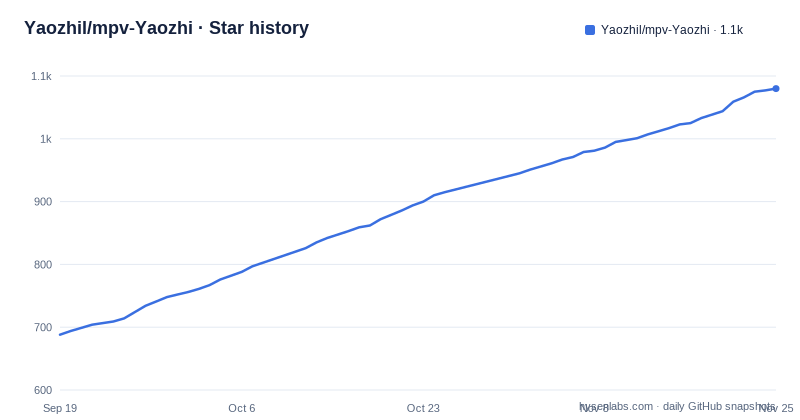
Star history
- Yaozhil/mpv-Yaozhi1,080 ★ · +392
| Repository | 2026-09-19 | 2026-11-25 |
|---|---|---|
| Yaozhil/mpv-Yaozhi | 688 | 1.1k |
392 Stars in the last 67 days, measured from the daily GitHub snapshot. Compare with other projects
Editorial analysis
The repository ships configuration, not the player
Five top level entries make up the tree: .gitignore, LICENSE.md, README.md, docs/ and portable_config/. No executable, no compiled core and no media sits in version control, which is consistent with the log path the issue template asks for, portable_config/files/mpv.log. The player itself arrives as a release archive, and the page names five steps for it: download the latest bundle from Releases, extract the whole archive to a writable directory rather than running it from inside the archive tool, double click mpv.exe or drag a media file onto it, optionally run the 杳知配置助手 sitting next to mpv.exe so the program detects the hardware and picks a configuration, and optionally run the 注册视频文件关联 script, which writes file associations for the current user only. The stated floor is Windows 10 or 11 on 64 bit with a Direct3D 11 capable card and recent drivers.
Dolby Vision is tone mapped here, not carried to the display
The compatibility table is where this project is most candid. Its Dolby Vision row says the feature is handled inside the player and output as HDR10/PQ or SDR suited to the display device, and that it is not a native Dolby Vision metadata passthrough solution. The next row is narrower still: HDR Vivid gets frame metadata recognition and an interface label, with no dedicated dynamic tone mapping and no display side passthrough in the current build. That distinction matters because the start-up format tag overlay advertises Dolby Vision and HDR Vivid as badges drawn over the picture, and the sub-picture list covers P5, P7 MEL/FEL, P8.1 and P8.4. A badge tells you what the player identified in the stream. It does not tell you the picture arrived at the television unmodified. Graphic subtitles are split the same way: on the gpu-next path, PGS embedded in UHD HDR or Dolby Vision content enters the HDR mapping chain alongside the video, while external or SDR graphic subtitles are handled conservatively as SDR and sRGB, and the graphic subtitle settings are stated not to affect the colour handling of the video, of ASS or text subtitles, or of the on screen display.
Frame interpolation steps aside for most of the formats people care about
RIFE v4.6 runs on a Vulkan environment shipped inside the package, and compatible NVIDIA RTX cards can pick a TensorRT FP16 backend once the full high end extension is installed. The conditions are stated as guardrails rather than features. The AI 2x chain is only built when the source resolution and the existing upscale quality can both be preserved, an automatic fallback runs when it cannot keep up in real time, and the player explicitly refuses to downsample first and interpolate afterwards. The format list is narrower than the decoder list: HDR10 and HDR10+ can use a safe path that preserves PQ, BT.2020 and per frame information, while Dolby Vision, HLG, HDR Vivid, disc playback and variable frame rate all keep the original colour chain and native smoothing. Spatial work runs through SSim and FSRCNNX, with Anime4K, NNEDI3 and RAVU left on manual selection.
Two layouts were checked on hardware, two only in software
The page publishes a channel order table for height channel PCM. 5.1.4 is ten channels laid out `FL-FR-FC-LFE-SL-SR-TFL-TFR-TBL-TBR`, so a 5.1.4 stream has no back pair at all. 7.1.4 is twelve channels and adds `BL-BR` between the LFE and the sides. 9.1.4 is fourteen channels with `TSL-TSR` at the end, and 9.1.6 is sixteen with `WL-WR` after those. For each one the player names a Windows speaker layout and a matching speaker mask so the height channels do not arrive as unknown channels. The verification boundary is stated separately: 5.1.4 and 7.1.4 have been checked for Windows device opening and real routing, while 9.1.4 and 9.1.6 have only been checked for software channel order and PCM order preservation, and the terminal device still has to support the layout. Final output depends on the sound card, driver, Windows audio interface, HDMI or eARC link and the endpoint itself.
Object audio renders to headphones, and Atmos has a second executable
AV3A, also called Audio Vivid and AVS3 Audio, is decoded by the player, and the compatibility row is explicit that the only spatial rendering mode currently provided for object and HOA content is binaural. A native mode keeps the transport channels and PCM as they are, while a binaural mode renders object, bed plus object and HOA content down to two channels for headphones. The page also notes that this is PCM output after decoding and not an S/PDIF passthrough format. Atmos and DTS:X are a different path: the main entry passes AC-3, E-AC-3, TrueHD, DTS and DTS-HD HRA/MA through in four selectable modes, and falls back to PCM when the device refuses the stream. Separately, the root directory holds mpv-Atmos.exe, described as an independent experimental entry for object audio decoding and status display that does not replace mpv.exe.
Key bindings are edited in a menu and input.conf is left alone
The shortcut list is reachable from 杳知 > 快捷键绑定列表, where common bindings can be searched, changed and restored using Chinese labels, and the page states that this path does not directly rewrite the original input.conf. That is a deliberate separation between the packaged defaults and your edits, and it means a reset does not cost you a hand written configuration file. The same menu prefix organises the rest: 蓝光圆盘菜单 for disc navigation entries, HDR 图形字幕色彩与亮度 for graphic subtitle handling with automatic, follow video and SDR/sRGB modes plus 150, 203, 250, 300 and 400 nits brightness, 起播格式标签 for the badges, 音频直通 for passthrough mode, and 超分与补帧 for the upscaling panel. Both AI features there are off by default and can be enabled and saved independently. Around all of it sits a customised uosc interface with one main menu, a right click menu, a playlist, a track list and subtitle content search, a status bar reporting decode method, picture specification, codec, audio, bitrate and network state, and a history that covers local files, cloud drives and signed URLs without being bulk cleared by a temporary outage.
The link parser covers four Chinese video sites, and one needs a login
Pasting a link with Ctrl+V on the start-up page resolves B站 videos and series in the ep, ss and md forms, YouTube videos, and the live pages of B站, 抖音, 斗鱼 and 虎牙. Live playback picks the highest available quality on its own and can be switched by hand across quality and line, and danmaku comments load on B站, 抖音's sibling services as listed, 斗鱼 and 虎牙. The catch is on 斗鱼: the higher bitrate tiers are only available after logging in with an account, so the automatic choice is capped for anyone not signed in. Progress previews work for network video and for files reached through AList, OpenList or WebDAV, whose browser supports refresh, sorting, long path handling and video inside ZIP or RAR archives, and the interface deliberately does not display account names, passwords or signature parameters.
The licence field asserts nothing and a licence file sits in the root
The repository's licence metadata is not asserted, while LICENSE.md is one of the five top level entries, and the credits section names mpv-player/mpv, dyphire/mpv-config and a Chinese translation of mpv-stats as the sources, with the last link ending partway through its address. Nothing on the page says which licence covers the bundle, which matters more than usual for a distribution that ships a self compiled core, a portable configuration and a Java runtime for BD-J menus. Two other things sit unresolved alongside it. The recent tags mix a public name, mpv-Yaozhi-1.0.6-2 from 2026-09-24, with two internal test tags, v1.0.6-internal and v1.0.5-internal. And the interface preview is a set of empty placeholders: the 界面预览 block opens with two headings and no images, and another block for the full format tag list is empty as well.
Editorial conclusion
The compatibility table is the reason to read this page carefully, because it states that Dolby Vision is tone mapped, that HDR Vivid is a label rather than a tone mapping path, and that only 5.1.4 and 7.1.4 have been verified on hardware. Anyone installing it should still settle the licence question themselves, since the repository metadata asserts none while a LICENSE.md sits at the root, and should expect a self compiled core and a bundled Java runtime rather than a stock mpv build.
Frequently asked questions
Is mpv-Yaozhi an official mpv build?
No. The page states it is a community maintained third party distribution and not an official mpv version. It is built on mpv-player/mpv together with dyphire/mpv-config, and its Windows x86-64 core is self maintained with D3D11, gpu-next, Schannel and libcurl changes plus a custom patch chain.
Does mpv-Yaozhi pass Dolby Vision through to the display?
No. Its compatibility table says Dolby Vision is handled inside the player and output as HDR10/PQ or SDR, and is not a native Dolby Vision metadata passthrough solution. HDR Vivid is limited to frame metadata recognition and a label in the interface.
What does mpv-Yaozhi need to run?
Windows 10 or 11 on 64 bit, a Direct3D 11 capable GPU with recent drivers, and for HDR, passthrough and 5.1.4 to 9.1.6 output a matching display, sound card, Windows audio interface, HDMI or eARC device or amplifier. No separate mpv or Java install is needed because the full bundle carries both.
Which AI upscalers and frame interpolators does mpv-Yaozhi use?
SSim and FSRCNNX for general spatial upscaling, with Anime4K, NNEDI3 and RAVU kept on manual selection, and RIFE v4.6 on Vulkan for temporal smoothing, with an optional TensorRT FP16 backend for compatible NVIDIA RTX cards. Both features are off by default.
Where does mpv-Yaozhi keep its configuration and log file?
Under portable_config, with the log the issue template asks contributors to excerpt at portable_config/files/mpv.log. That directory is one of five top level entries in the repository, alongside docs/, README.md, LICENSE.md and .gitignore.
Official sources
Add this badge to your README
If you maintain this project, the badge below links readers to this analysis and shows its maintenance status from the daily GitHub snapshot. Paste the markdown into your README; add ?metric=license or ?metric=stars to the image URL for a different field.

[](https://hysenlabs.com/projects/yaozhil-mpv-yaozhi)Star history chart for your README
[](https://hysenlabs.com/projects/yaozhil-mpv-yaozhi)Was this useful?