BDFramework.Core is a Unity project that announces version 4.0 and ships no release
Simple and powerful Unity3d game workflow.
At a glance
- What is it?
- yimengfan/BDFramework.Core presents itself as an industrialized Unity3d workflow covering hot-fixing, asset management and automated building. At the root of the repository, that claim sits inside a page of badges and link tables, with no tag, no release and no versioned download to point at.
- Who is it for?
- BDFramework.Core is worth opening if you build Unity games and want to see one organisation's hot-fixing, asset and build setup in one tree, and it is not something to adopt on the strength of its landing page.
- Can I use it commercially?
- Yes. Apache-2.0 is a permissive licence: you can use, modify and sell software built on it, as long as you keep its copyright and licence notices.
- Is it still maintained?
- Yes. The repository last received commits 10 days ago.
- What is it written in?
- Mainly C++, according to GitHub's language statistics.
Answers come from the project's GitHub data, last synced on November 15, 2026, and from our analysis. They are not legal advice.
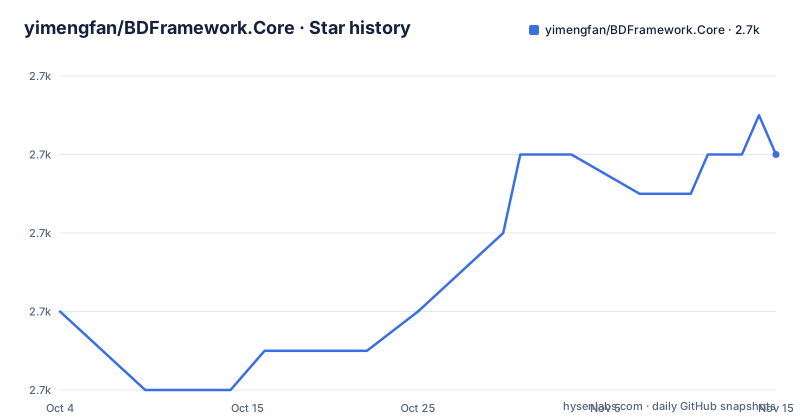
Star history
- yimengfan/BDFramework.Core2,712 ★ · +4
| Repository | 2026-10-04 | 2026-11-15 |
|---|---|---|
| yimengfan/BDFramework.Core | 2.7k | 2.7k |
4 Stars in the last 42 days, measured from the daily GitHub snapshot. Compare with other projects
Editorial analysis
A Unity project at the root, not an installable package
The root is laid out as a Unity project rather than as a library: Assets/, Packages/, ProjectSettings/ and UserSettings/ sit next to .gitattributes, .gitignore, LICENSE and README.md, with DevOps/, Doc/, HybridCLRData/ and a directory named 工具包/ beside them. A directory called UserSettings is usually the one a Unity editor writes for itself, so the repository is meant to be opened as a project instead of consumed as a dependency. That reading sits awkwardly with the first link in the header, which points at an OpenUPM package named com.popo.bdframework, a separate distribution channel carrying the same product name. Which one you get, and whether they hold the same code, is not something the root document settles. There is also no GitHub release for the project, so there is no tag to pin either channel to.
Version 4.0 is announced in the header and exists nowhere else
The only version statement in the repository is the red line at the top of the README, written in Chinese: 重要更新:下个版本V-4.0将全面进化为 ai workflow, announcing that the next version, V-4.0, will evolve entirely into an ai workflow. Nothing else in the tree carries a version number. There are no GitHub releases, no tags to compare against, and the Apache-2.0 metadata describes the repository rather than a build of it. So 4.0 is an intention stated in a badge-coloured paragraph, not something that can be downloaded or diffed. The repository is not archived, and the last commit is dated 2026-09-20, so the tree itself is current even though no version of it has been published. Read the announcement as a roadmap note from the maintainers, not as a release note.
Hot-fixing, asset management and building, named in one paragraph
The English prose on the root page is four sentences long, and they do the work of a summary. The framework is described as a pipeline for game development in Unity that provides a complete workflow from development to deployment, with hot-fixing, asset management and automated building as the named features, and automation and editor enhancements as the stated focus. That paragraph is the entire English description at this level of the repository. It does not say which Unity versions are supported, which editor versions the tooling expects, how a build is started, or what a hot fix is scoped to. A HybridCLRData directory sits at the root next to the hot-fixing claim, and no file in the root listing explains what belongs in it. The detail that would answer these questions is not in the landing page, and the landing page is the only page most visitors will read.
Two documentation files behind a two cell table
The header carries a two cell table whose left link is labelled 中文 and points at ./Doc/README.cn.md, and whose right link is labelled English and points at ./Doc/README.en.md. That is the whole documentation story at the root: the project keeps its manual twice, and README.md is a landing page made of HTML alignment, badges, this table and the summary paragraph. The presence of both files also means the two languages can drift, and nothing in the root page indicates when either was last revised or whether they cover the same ground. For a reader arriving through a search engine, the practical consequence is that the choice of link decides which documentation they get, and the root page gives no basis for preferring one. Anyone planning to rely on this should open both and compare the claims, since the only summary available to compare them against is the four sentences above.
Two of the four header links leave the project
Four links sit in the header block. One is an OpenUPM page for com.popo.bdframework, one is the project's own LICENSE file on GitHub, and two point outside the repository entirely: a LICENSE file hosted in the 996.icu repository, and a 996.icu page under its zh_CN route. Neither external link is labelled, so nothing in the README says what either one is for, and neither is needed to read the project's own licensing terms. The root does carry its own LICENSE file, and the package metadata records Apache-2.0, which is the pair of facts a reader can act on. The two unlabelled links sitting beside them in the same badge row are the kind of detail worth checking before assuming a page belongs to the project you are reading about, rather than a third party that references it.
DevOps and a toolkit directory the page never mentions
Two of the root directories have no counterpart anywhere in the README text. DevOps/ is named after the practice rather than a purpose, and 工具包/, which reads as a toolkit, is the only directory in the tree with a non English name. Set beside Assets/, they point at three different kinds of content: the project's own Unity assets, delivery or pipeline configuration, and tooling kept separately. The root document describes none of them, and it names no manifest, no package list and no entry point. That matters for anyone planning to reuse the workflow, because content that lives in a project directory is copied with the project while a toolkit directory may be meant to be installed next to it, and the repository gives no way to tell which of the two you are looking at without opening the folders. The tree is the documentation for its own layout here.
The closing credit names a tool, not a maintainer
The last line of the root README thanks GitHub Copilot for helping with the code and documentation. It is the only attribution on the page. No maintainer name, no contact address, no issue tracker link and no licence sentence appear in the text at all, even though a LICENSE file sits in the root. For a project that describes itself as commercial grade and distributes itself through OpenUPM, that is the thin part of the entry: a reader has a four sentence summary, two documentation links, an announcement about a version that has not shipped, and no person to ask. The information needed to evaluate it is all in Doc/, DevOps/, the toolkit directory and the project settings files, which means the evaluation work is reading files rather than reading a page.
Editorial conclusion
BDFramework.Core is worth opening if you build Unity games and want to see one organisation's hot-fixing, asset and build setup in one tree, and it is not something to adopt on the strength of its landing page. Three things have to be checked in the repository before any of it is used: the Doc/ files that hold the actual documentation, the contents of DevOps/ and the toolkit directory that the root document never describes, and the Unity versions the project supports, which the root README does not state. The release situation is the bigger constraint: no GitHub release exists, so nothing can be pinned or rolled back, and the V-4.0 ai workflow line describes a version that is not there yet. Copy the project, keep your own version control around it, and do not treat the OpenUPM package name in the header as the same artifact as this repository without checking.
Frequently asked questions
What is BDFramework.Core?
A Unity game development workflow project. Its root README describes a pipeline covering development through deployment, naming hot-fixing, asset management and automated building as the features, with automation and editor enhancements as the focus. The English text on the landing page is four sentences long.
How do I install BDFramework.Core?
The repository is laid out as a Unity project, with Assets/, Packages/, ProjectSettings/ and UserSettings/ at the root, so it is opened as a project rather than added as a library. The README also links an OpenUPM package named com.popo.bdframework, and the repository publishes no GitHub releases, so no version can be pinned from it.
Does BDFramework.Core do Unity hot fixing?
Hot-fixing is one of three features the root README names, alongside asset management and automated building, and a HybridCLRData directory sits at the repository root. The README does not describe how the two relate or what the hot fix covers.
What is the ai workflow in BDFramework version 4.0?
The red notice at the top of the README announces in Chinese that the next version, V-4.0, will evolve entirely into an ai workflow. There are no GitHub releases, so no 4.0 build exists to install, and the root document gives no further detail about the change.
Official sources
Add this badge to your README
If you maintain this project, the badge below links readers to this analysis and shows its maintenance status from the daily GitHub snapshot. Paste the markdown into your README; add ?metric=license or ?metric=stars to the image URL for a different field.

[](https://hysenlabs.com/projects/yimengfan-bdframework-core)Star history chart for your README
[](https://hysenlabs.com/projects/yimengfan-bdframework-core)Was this useful?