minecraft-mcp-server: the config runs the default branch, and the page names two different Minecraft versions
A Minecraft MCP Server powered by Mineflayer API. It allows to control a Minecraft character in real-time, allowing AI assistants to build structures, explore the world, and interact with the game environment through natural language instruction
At a glance
- What is it?
- An MCP server that drives a Minecraft character through Mineflayer, wired into Claude Desktop over a LAN world. The setup runs the GitHub default branch rather than a release, the version callout and the prerequisites disagree by three patch numbers, and eighteen commands ship with no gamemode requirement stated.
- Who is it for?
- Use minecraft-mcp-server if you want to watch a language model operate a Minecraft world and you already accept that a bot is joining a game client on your network. Four things to check before you wire it up.
- Can I use it commercially?
- Yes. Apache-2.0 is a permissive licence: you can use, modify and sell software built on it, as long as you keep its copyright and licence notices.
- Is it still maintained?
- Activity is slowing. The repository last received commits 7 months ago.
- What is it written in?
- Mainly TypeScript, according to GitHub's language statistics.
Answers come from the project's GitHub data, last synced on November 15, 2026, and from our analysis. They are not legal advice.
Star history
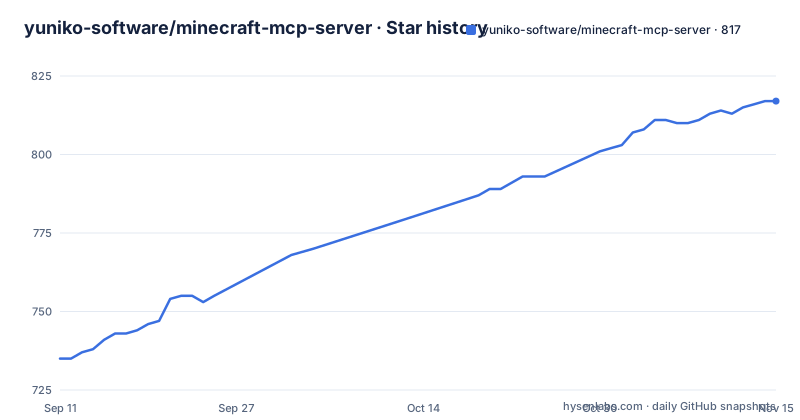
- yuniko-software/minecraft-mcp-server817 ★ · +82
| Repository | 2026-09-11 | 2026-11-15 |
|---|---|---|
| yuniko-software/minecraft-mcp-server | 735 | 817 |
82 Stars in the last 65 days, measured from the daily GitHub snapshot. Compare with other projects
Editorial analysis
The callout and the prerequisites name two Minecraft versions
An important callout near the top says the server currently supports Minecraft version 1.21.11 and that newer versions may not work. The prerequisites list, further down the same page, says the setup was tested with Minecraft 1.21.8 Java Edition included in Microsoft Game Pass. Three patch numbers apart, and only one of them carries the word tested. A reader who trusts the callout believes 1.21.11 is verified when the page says the opposite about the build that was actually exercised. The dependency side of the same story is the minecraft-data package at ^3.105.0, which is where the protocol and registry data for a specific version lives, so the version question is not only a client setting. When the two numbers drift, the failure surfaces as a bot that joins the world and then cannot parse what it is being told.
The client config runs the default branch, not a release
The whole installation is a JSON block pasted into claude_desktop_config.json, and the interesting part is the second argument:
{
  "mcpServers": {
    "minecraft": {
      "command": "npx",
      "args": [
        "-y",
        "github:yuniko-software/minecraft-mcp-server",
        "--host",
        "localhost",
        "--port",
        "25565",
        "--username",
        "ClaudeBot"
      ]
    }
  }
}
There is no version, tag or commit in that ref. Every time Claude Desktop restarts, npx resolves the repository's default branch as it stands at that moment, which means a behavioural change can arrive without an install step and without a release. Three releases are published, 2.0.2, 2.0.3 and 2.0.4, the newest from February 2026, and the manifest version matches 2.0.4 with no skew. The repository's last push is dated 4 April 2026, so the code that would actually run is later than the newest tag.
Open to LAN turns a singleplayer world into a reachable server
The setup instruction is to create a singleplayer world and open it to LAN from the pause menu. That is the whole hosting story: no server software, no whitelist, no account. The bot then connects as an ordinary player on port 25565 to the host localhost, with a username passed as ClaudeBot. The consequence is that the bot is not a spectator. It places blocks, digs them, smelts items, equips what it finds, flies, and reads recent chat messages from players through a read-chat command, all of which go into a model context. The page notes that the client will ask for your permissions, which is the right place for that control, and nothing on the page describes how wide the LAN setting reaches or how to keep the world from being edited while a language model is inside it.
Eighteen commands, and flight with no stated gamemode
The command list is grouped rather than exhaustive about its own limits. Movement takes five, get-position, move-to-position, look-at, jump and move-in-direction. Inventory takes three, block interaction four, communication two, and flight, furnace, entity interaction and game state take one each. That totals eighteen, grouped under seven headings. What the grouping does not say is which gamemode is required. fly-to sits in the list as an ordinary command, and survival worlds do not permit unprompted flight, while detect-gamemode exists to report the current one. The setup instructions say to create a singleplayer world without naming a mode, so the one command that cannot work everywhere is the one with no stated condition. Nothing in the list covers taking damage, crafting beyond the furnace, or trading.
The model wakes the server only when you name Minecraft
There is an unusual dispatch step here, and it is described plainly. You can give the bot commands through any active Claude Desktop chat, but the page insists on mentioning that the bot should do something in Minecraft, because saying that is the trigger to run the MCP server. In other words the model decides whether to touch the game world based on your wording rather than on the client always connecting. The client then asks for permissions. The page also recommends a particular model by name, saying Claude Sonnet could give interesting results, with no comparison, no measurement and no criteria behind the recommendation. The other promoted capability is visual: you can upload an image of a building and ask the bot to build it, which routes an uploaded picture into block placement in a live world.
The boot marker is a picture, so a failed start looks like silence
The page warns that it can take some time for Claude Desktop to boot the MCP server, then introduces the marker that the server started successfully, and delivers that marker as a linked image rather than as a condition you can check. There is no log line to look for, no port to probe and no command to print a status, so the only practical diagnostic on the page is whether the bot appears in the world. Two other small frictions compound it. The config change requires a complete reboot of Claude Desktop, including closing it from the OS tray rather than just quitting the window. And the Minecraft side has to be up first, with the world already opened to LAN, or the connection attempt has nothing to land on.
Two TypeScript runners in one dev dependency list
The development setup names tsx twice. The dev script runs tsx src/main.ts, and the test runner is configured with the argument --import=tsx so ava can load TypeScript directly. The dev dependency list also contains ts-node, which neither of those paths uses. Alongside them sit ava and @ava/typescript, plus sinon with its type package, and the lint script covers both trees in one glob, eslint over {src,tests}/**/*.ts, with eslint-plugin-ava installed for the test files. Two runners for one project is not a problem, but it is a fork in the road for a contributor who opens the file expecting the one they know. There are two tsconfig files as well, one for the editor and one named tsconfig.build.json that the build script points at.
Apache-2.0, an unscoped package name, and no npm install anywhere
The license is Apache-2.0 and a LICENSE file sits at the root, alongside CONTRIBUTING.md, a .gitattributes file, a .github/ directory, a src/ tree, a tests/ tree and an eslint.config.mjs. The package name is the unscoped minecraft-mcp-server, and the binary it registers is the same string pointing at dist/main.js. The floor for Node is given twice and agrees both times, >=20.10.0 in the prerequisites and the same range in the engines field. What the page never offers is an install command. Every documented route goes through npx and a GitHub reference, so a reader who would rather pin a version from a registry has no documented way to do it, and a reader who follows the page exactly is always running unreleased default-branch code.
Editorial conclusion
Use minecraft-mcp-server if you want to watch a language model operate a Minecraft world and you already accept that a bot is joining a game client on your network. Four things to check before you wire it up. Pin a version, because the documented client config resolves the GitHub default branch on every launch rather than a tag, so the code that runs is whatever main held at that moment, and the repository's last push sits after the newest release. Confirm which Minecraft build you are on, because the page states two different ones and only the older one was actually tested. Decide whether flight matters to you, because fly-to is on the command list and no gamemode requirement is stated anywhere. And decide whether you are comfortable with a chat-reading tool sitting inside your model context. If you want reproducible behaviour, a named release and a documented gamemode are the two gaps to close first; everything else on the page is straightforward.
Frequently asked questions
Which Minecraft version does minecraft-mcp-server support?
The page gives two answers. A callout says it currently supports Minecraft 1.21.11 and that newer versions may not work, while the prerequisites say the setup was tested with Minecraft 1.21.8 Java Edition.
Does the Claude Desktop config for minecraft-mcp-server pin a version?
No. The args array passes github:yuniko-software/minecraft-mcp-server to npx with no tag or commit, so the default branch is resolved each time the client starts. The newest release is 2.0.4.
How many commands does minecraft-mcp-server expose?
Eighteen, under seven headings: five for movement, three for inventory, four for block interaction, two for communication, and one each for flight, furnace, entity interaction and game state detection.
How does Minecraft have to be running for minecraft-mcp-server to connect?
Open a singleplayer world to LAN from the pause menu. The bot connects to port 25565 on localhost as a player named ClaudeBot, and both host and port can be changed in the client configuration.
What Node version does minecraft-mcp-server need?
Node 20.10.0 or newer. The prerequisites list and the manifest's engines field both state >=20.10.0, and Git is listed as the other prerequisite.
Official sources
Add this badge to your README
If you maintain this project, the badge below links readers to this analysis and shows its maintenance status from the daily GitHub snapshot. Paste the markdown into your README; add ?metric=license or ?metric=stars to the image URL for a different field.

[](https://hysenlabs.com/projects/yuniko-software-minecraft-mcp-server)Star history chart for your README
[](https://hysenlabs.com/projects/yuniko-software-minecraft-mcp-server)Was this useful?