Prat011/free-cluely: Open source desktop AI assistant setup and limitations
Cluely - The invisible desktop assistant that provides real-time insights, answers, and support during meetings, interviews, presentations, and professional conversations.
At a glance
- What is it?
- Free Cluely is an Electron and TypeScript desktop assistant for meetings, interviews, presentations, and technical work, with Gemini or Ollama as its AI provider. It offers local inference through Ollama, but its privacy claims, release history, and explicit interview assistance require careful review.
- Who is it for?
- Free Cluely is suitable for developers who want to inspect and adapt an Electron assistant with a local Ollama backend. It is a poor choice for meetings or interviews subject to disclosure rules, and for users who require a documented release process or independently verified privacy controls.
- Can I use it commercially?
- Yes. Apache-2.0 is a permissive licence: you can use, modify and sell software built on it, as long as you keep its copyright and licence notices.
- Is it still maintained?
- Activity is slowing. The repository last received commits 7 months ago.
- What is it written in?
- Mainly TypeScript, according to GitHub's language statistics.
Answers come from the project's GitHub data, last synced on November 7, 2026, and from our analysis. They are not legal advice.
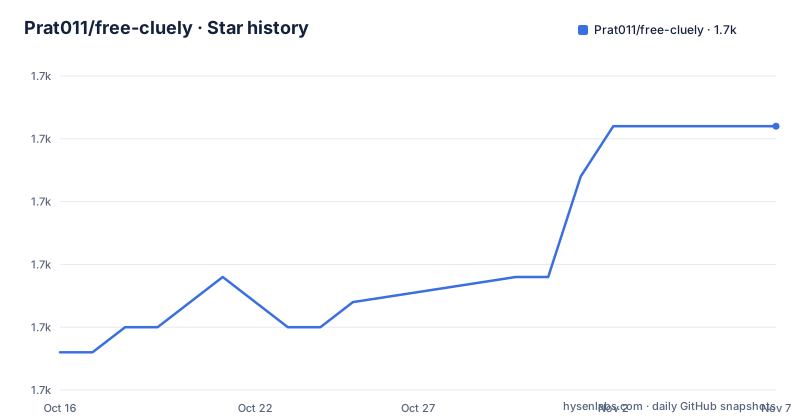
Star history
- Prat011/free-cluely1,698 ★ · +9
| Repository | 2026-10-16 | 2026-11-07 |
|---|---|---|
| Prat011/free-cluely | 1.7k | 1.7k |
9 Stars in the last 22 days, measured from the daily GitHub snapshot. Compare with other projects
Editorial analysis
Free Cluely targets concealed assistance during live desktop work
Free Cluely addresses a specific problem: obtaining AI assistance without switching away from the current application. The README describes a translucent, always-on-top window that can be hidden with a global shortcut. Its intended contexts include meetings, interviews, presentations, professional conversations, and technical work. That positioning is deliberately different from a conventional chat client. The application is meant to sit over other windows, accept a question, and return an answer while the user remains in the meeting or coding environment.
The audience is therefore split between people who want rapid assistance during presentations or client calls and developers who want to inspect or modify the TypeScript codebase. The README also lists research during online exams, technical interview coaching, and fact-checking as use cases. Those activities can conflict with employer, school, examination, or meeting rules because concealed assistance may be treated as unauthorized assistance. The repository does not include a policy framework, consent mechanism, or organizer-detection feature, so suitability cannot be decided from the feature list alone.
The open-source Apache-2.0 license permits inspection and modification under its terms, but this article does not interpret the license or provide legal advice. The absence of a homepage and GitHub releases also makes it harder to distinguish a packaged product from a source tree assembled for direct use. The package metadata names the application `Meeting Notes Coder` and the npm package `interview-coder`, which differ from the Free Cluely repository name.
Electron, Vite, and two AI providers define the application structure
The repository layout separates an Electron application from browser-facing code. The top level contains `electron/`, `renderer/`, `src/`, and `worker-script/`, while `package.json` compiles Electron TypeScript into `dist-electron` and uses Vite for the renderer build. Development starts Vite on port 5180, waits for that server with `wait-on`, and then launches Electron. This is a direct desktop architecture rather than a conventional hosted web service.
The documented interaction path begins with keyboard input. `Cmd/Ctrl + H` takes a screenshot, and `Cmd/Enter` requests a solution. The README says the assistant analyzes visible material and retains conversational context for follow-up questions. It also states that the app can process audio files and recordings, although the README does not identify a recording pipeline or enumerate the audio components used for that feature. That claim cannot be mapped to a specific implementation file from the repository entry names alone.
Two AI backends are documented. Gemini receives requests through `GEMINI_API_KEY`, while Ollama is selected with `USE_OLLAMA`, `OLLAMA_MODEL`, and `OLLAMA_URL`. The README names Llama 3.2, CodeLlama, and Mistral as Ollama models. This provider split changes both deployment and data handling: Gemini requires an internet connection and sends data to Google servers, whereas the local path is designed to keep requests on the computer and can work offline after the model is available. The README does not document a remote Ollama deployment, provider fallback behavior, or what happens when one provider becomes unavailable.
Free Cluely installation starts with Node.js, Git, and a model backend
A first local run requires Node.js, Git, and either a Gemini API key or a working Ollama installation. Clone the repository from its address, then enter the resulting `free-cluely` directory. The README uses a placeholder because it does not provide a repository-specific clone URL in the installation section.
git clone [repository-url]
cd free-cluely
Install dependencies with the normal npm command. The `package.json` also defines a `postinstall` script that rebuilds Sharp with `SHARP_IGNORE_GLOBAL_LIBVIPS=1`, so the normal install path includes native dependency handling.
npm installIf Sharp reports a Python or libvips build problem, the README gives this documented fallback. It removes installed dependency files before reinstalling without lifecycle scripts, then rebuilds Sharp separately.
rm -rf node_modules package-lock.json
SHARP_IGNORE_GLOBAL_LIBVIPS=1 npm install --ignore-scripts
npm rebuild sharp
For Ollama, install Ollama, start it if it is not already running, and pull the model named in the application configuration. The model download is separate from npm installation.
ollama pull llama3.2Create `.env` at the repository root. For a local provider, these are the exact documented settings.
USE_OLLAMA=true
OLLAMA_MODEL=llama3.2
OLLAMA_URL=http://localhost:11434
A Gemini setup instead uses the following value, replacing the placeholder with a key obtained from Google AI Studio.
GEMINI_API_KEY=your_api_key_hereRun `npm start` for development. Based on `package.json`, this starts Vite on port 5180, waits for the local server, and launches Electron. The visible application should provide the translucent assistant window described by the README.
npm startGlobal shortcuts drive screenshots and window control in the first session
The first useful exercise is to verify that a screenshot can be captured and sent to the configured provider. Launch the app with `npm start`, place it over non-sensitive content, and press `Cmd/Ctrl + H`. The README states that this takes a screenshot and asks the AI to analyze visible material. A subsequent `Cmd/Enter` request is documented as the way to get a solution.
Use a public image, sample document, or non-sensitive coding problem for this initial check. It can reveal whether the Electron window remains available, whether Ollama returns a response, and whether Gemini is reachable. The README does not document a test fixture, request log, provider status panel, or diagnostic command, so a visible response is the only first-use check described by the project.
Window movement uses `Cmd/Ctrl + Arrow Keys`, while `Cmd/Ctrl + B` toggles visibility. These controls matter because the application is designed to remain over other applications. If port 5180 is occupied, the README directs the user to inspect the process with `lsof`. The PID must come from that output before running the final command.
lsof -i :5180The app is quit with `Cmd + Q` on macOS or `Ctrl + Q` on Windows and Linux. The README explicitly says the X button does not work. That is a real usability limitation, especially for users who expect normal desktop window controls to terminate the process.
For a packaged build, the documented production command is `npm run dist`. `package.json` builds the renderer and Electron code and directs packaged output to `release`.
npm run distOllama reduces cloud exposure but does not verify every privacy claim
Ollama is the most consequential configuration choice. The README describes it as private because requests remain on the computer, avoids API charges, and works offline. It also states that screenshots are deleted after processing and that the application performs no tracking or storage. Those claims cannot be confirmed from `package.json` and the repository directory names alone. The README does not identify the screenshot lifecycle implementation, external network destinations, telemetry configuration, log locations, or verification steps for deletion.
A practical evaluation should distinguish model processing from every other application behavior. Even with Ollama, a user must determine whether Electron, shortcuts, updates, or other bundled components contact external services. The repository confirms an Electron application and a worker script, but the documentation does not describe all behavior in those directories. Local inference reduces reliance on a cloud AI provider; it does not by itself prove that the complete desktop application is offline.
Gemini presents a different boundary. The README says it requires an API key, internet access, and may incur usage costs. Screenshots and questions intended for Gemini are sent to Google servers. The documentation provides no mechanism for retention policy, organizational controls, or cloud-data exclusion. Users subject to contractual or regulatory restrictions therefore need to verify provider terms separately from this repository's high-level privacy statements.
Free Cluely trades release maturity and application polish for customization
A close alternative for meeting intelligence is a cloud meeting recorder or transcription service such as Recall.ai, which the README promotes as a hosted desktop recording API. The README describes it as an API for recording meetings. Free Cluely instead centers on an overlay application, explicit screenshots, contextual chat, and a choice between a cloud API and a local model. The former is oriented toward recording pipelines and meeting ingestion; the latter is oriented toward immediate, operator-controlled prompts over the desktop.
Granola and Fireflies are also named as repository topics. Those names do not establish a technical comparison in the README, so their exact features cannot be claimed. Based only on documented design choices, Free Cluely offers more direct control over provider selection and window behavior, while requiring users to operate the model service, desktop build, and policy considerations themselves.
Maintenance requires caution. The repository is not archived, but its last push was on 2026-04-07, which is more than six months before 2026-10-16. It has no GitHub releases, so there is no documented tagged upgrade path or packaged changelog. The last push date is evidence of the latest recorded repository update, not proof of active development.
Users should expect some upgrade work around Electron, Vite, TypeScript, Sharp, and native packaging. The repository contains both `package-lock.json` and `pnpm-lock.yaml`, but its documented commands all use npm. That mismatch can create ambiguity over the authoritative dependency graph. The known close-button defect and unspecified privacy implementation add operational cost beyond the initial installation.
Editorial conclusion
Free Cluely is suitable for developers who want to inspect and adapt an Electron assistant with a local Ollama backend. It is a poor choice for meetings or interviews subject to disclosure rules, and for users who require a documented release process or independently verified privacy controls. Inspect the provider configuration, window behavior, screenshot handling, and dependency state before adoption.
Frequently asked questions
Does Free Cluely support local AI models?
Yes. The README documents Ollama support through `USE_OLLAMA`, `OLLAMA_MODEL`, and `OLLAMA_URL`, with Llama 3.2 given as the example model.
Which AI providers can Free Cluely use?
The documented options are Google Gemini and Ollama. Gemini requires `GEMINI_API_KEY`, an internet connection, and may incur usage costs.
How do I start Free Cluely after installation?
Run `npm start`. The package script starts Vite on port 5180, waits for it, and launches Electron in development mode.
Does Free Cluely have packaged GitHub releases?
No. The repository has no GitHub releases. Its documented production build command is `npm run dist`, with output directed to the `release` folder.
Official sources
Add this badge to your README
If you maintain this project, the badge below links readers to this analysis and shows its maintenance status from the daily GitHub snapshot. Paste the markdown into your README; add ?metric=license or ?metric=stars to the image URL for a different field.

[](https://hysenlabs.com/projects/prat011-free-cluely)Star history chart for your README
[](https://hysenlabs.com/projects/prat011-free-cluely)Was this useful?