Zinit skips FPATH entirely and offers Turbo mode for faster startup
🌻 Flexible and fast ZSH plugin manager
At a glance
- What is it?
- Zinit is a Zshell plugin manager whose distinguishing claim is Turbo mode, with startup said to be 50 to 80 percent faster, and it does not use FPATH, so loading many plugins does not clutter it. It also reports what each plugin changed and can unload plugins.
- Who is it for?
- Zinit fits a Zsh user with a large plugin set whose shell startup has become the thing worth fixing, and who will read a wiki page to learn ice modifiers. It does not fit someone who wants a manager that behaves like Oh My Zsh or Prezto out of the box, since compatibility is supported but the implementation is deliberately not framework specific.
- Can I use it commercially?
- Yes. MIT is a permissive licence: you can use, modify and sell software built on it, as long as you keep its copyright and licence notices.
- Is it still maintained?
- Yes. The repository last received commits 2 days ago.
- What is it written in?
- Mainly Shell, according to GitHub's language statistics.
Answers come from the project's GitHub data, last synced on November 14, 2026, and from our analysis. They are not legal advice.
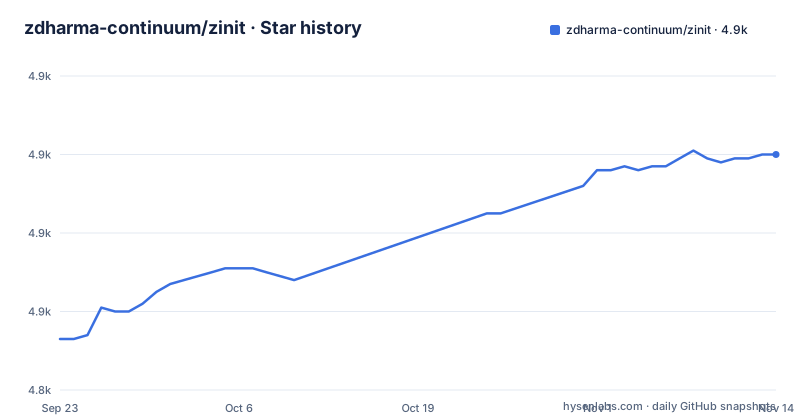
Star history
- zdharma-continuum/zinit4,900 ★ · +47
| Repository | 2026-09-23 | 2026-11-14 |
|---|---|---|
| zdharma-continuum/zinit | 4.9k | 4.9k |
47 Stars in the last 52 days, measured from the daily GitHub snapshot. Compare with other projects
Editorial analysis
The automatic install appends three lines to your .zshrc
The one-line install is a curl piped into bash:
bash -c "$(curl --fail --show-error --silent --location https://raw.githubusercontent.com/zdharma-continuum/zinit/HEAD/scripts/install.sh)"It installs into `~/.local/share/zinit/zinit.git` and appends three lines to the bottom of `.zshrc`. Those lines source `zinit.zsh` and set up completion for the `zinit` command. After reloading the shell you compile Zinit itself with:
zinit self-updateThe manual route is the same thing written out, which is worth preferring if you want to see what lands in your configuration:
ZINIT_HOME="${XDG_DATA_HOME:-${HOME}/.local/share}/zinit/zinit.git"
[ ! -d $ZINIT_HOME ] && mkdir -p "$(dirname $ZINIT_HOME)"
[ ! -d $ZINIT_HOME/.git ] && git clone https://github.com/zdharma-continuum/zinit.git "$ZINIT_HOME"
source "${ZINIT_HOME}/zinit.zsh"
Note that the destination is a git clone under your data directory, and the guard on the clone line means re-sourcing your configuration does not re-clone over an existing install.
Not using FPATH is the reason Turbo mode is possible
The claim in the README is that Zinit is the only plugin manager providing Turbo mode, which yields 50 to 80 percent faster Zsh startup, with the shell starting up to five times faster. A performance comparison with other managers is linked to a separate repository.
A separate point, fifth in the characteristics list, is that the system does not use `$FPATH`, so loading multiple plugins does not clutter FPATH with ten, fifteen or more entries. The code is also described as immune to `KSH_ARRAYS` and other options typically causing compatibility problems.
The README devotes a whole section to calling compinit with Turbo mode, calling it without Turbo mode, ignoring compdefs, and disabling the system-wide compinit call.
The last of those has distribution-specific instructions, with separate subsections for Ubuntu and for NixOS.
Reports tell you what a plugin did to your shell
The second characteristic is that the plugin manager gives reports from plugin loadings, describing what aliases, functions, bindkeys, Zle widgets, zstyles, completions, variables, PATH and FPATH elements a plugin has set up.
That list is the useful part. A plugin that silently rebinds a key you use, or defines an alias that shadows one of yours, or rewrites a zstyle, is a debugging session otherwise. A report turns that into a list you can read once after installing.
The third characteristic is related: unloading a plugin is supported, as is listing, installing and uninstalling, and selectively disabling or enabling a plugin's completions. Being able to unload a plugin inside a live session is what lets you test whether a plugin is causing a problem without restarting the shell.
The commands section of the README lists this surface under separate headings for loading and unloading, completions, tracking of the active session, reports and statistics, compiling, and other commands. Tracking of the active session is the piece that makes unload coherent, since the manager has to know what is currently loaded before it can take something out.
Ice modifiers are the real configuration language
The README's own table of contents devotes more space to ice modifiers than to anything else, and that reflects how the manager is configured in practice.
The categories are cloning options, selection of files to source, conditional loading, plugin output, completions, command execution after cloning updating or loading, sticky emulation of other shells, others, and order of execution. These are the options you pass with `zinit ice` before loading a plugin.
Two examples in the frequently asked questions show the range. `zi ice svn` is the answer for a plugin or snippet that requires an entire subdirectory rather than a single file, and `zi ice as'completion'` directly adds single file completion snippets.
Conditional loading and order of execution are the two that change what your shell actually does at startup, since they decide whether a plugin loads at all and in what sequence. Cloning options decide what gets fetched, which matters on a slow connection.
The consequence is that Zinit has no single configuration key to look up. A plugin loaded with a nontrivial ice line is not comparable to a bare load, and the wiki rather than the README is where the complete list with examples lives, which the README states explicitly.
Packages and annexes move work out of your .zshrc
Two extension mechanisms sit above plain plugins.
The sixth characteristic describes special, dedicated packages that offload the user from providing long and complex commands, with a growing list in a separate zinit-packages repository and a wiki article explaining the feature. The idea is that a common sequence, such as install a binary, download a tool and add it to the path, becomes one package declaration instead of an ice line and a post-install hook written by hand.
The seventh describes annexes, which extend the plugin manager itself with new commands, URL preprocessors, and post-install and post-update hooks. The README names the zinit-annex-readurl annex as a user of URL preprocessors. More annexes live in the zdharma-continuum organization.
Oh My Zsh and Prezto load, but the framework code stays out
The fourth characteristic addresses compatibility directly: Zinit supports loading plugins and libraries from Oh My Zsh or Prezto, and the implementation is not framework specific, which is stated as a deliberate choice to avoid bloating the plugin manager with such code.
This is the answer to the comparison people search for most often, and it is more precise than a yes or no. Loading a plugin written for either framework is supported. The wiki article on the topic is linked for the longer explanation.
Practically, migrating from one of those frameworks to Zinit means keeping the plugin list and rewriting the surrounding configuration, including the compinit handling and any theme you were using, since those are framework responsibilities you now hold yourself.
Tests run through zunit, docs are generated from the source
The repository's own tooling shows how a shell project of this size is checked.
Testing is zunit, configured by a .zunit.yml file at the root, and the Makefile runs it:
test:
	zunit run
Documentation is generated from the source rather than written twice. The doc target runs zsh with the zsd documentation tool, passing it the five main scripts, which the Makefile globs as zinit, zinit-additional, zinit-autoload, zinit-install and zinit-side. Those five files sit at the root of the repository, alongside zinit.zsh itself, a VERSION file, a CHANGELOG.md and a _zinit file that holds the completion function.
There are also editor tag targets that generate Emacs-style TAGS files and Vim-style tags using ctags with a zsh language definition from share/zsh.ctags, with a fallback path for older ctags versions that treats the scripts as shell. A container target builds a Docker image tagged ghcr.io, and a zwc target precompiles the scripts.
Releases are automated rather than tagged by hand, given a .releaserc.json at the root. The recent versions are v3.17.1 on 2026-10-10, v3.17.0 on 2026-09-02 and v3.16.0 on 2026-08-31, and the last push landed on 2026-10-27. That cadence means a branch checkout moves faster than most plugin ecosystems, so pin a tag for a stable configuration.
Editorial conclusion
Zinit fits a Zsh user with a large plugin set whose shell startup has become the thing worth fixing, and who will read a wiki page to learn ice modifiers. It does not fit someone who wants a manager that behaves like Oh My Zsh or Prezto out of the box, since compatibility is supported but the implementation is deliberately not framework specific. Before adopting it, read the Turbo and compinit section for your distribution, because the system-wide compinit call has to be disabled in specific ways on Ubuntu and on NixOS, and pin a release rather than tracking a branch that has shipped v3.16.0, v3.17.0 and v3.17.1 since 2026-08-31.
Frequently asked questions
How do I install Zinit?
Run bash -c "$(curl --fail --show-error --silent --location https://raw.githubusercontent.com/zdharma-continuum/zinit/HEAD/scripts/install.sh)", which installs into ~/.local/share/zinit/zinit.git and appends three lines to the bottom of your .zshrc sourcing zinit.zsh and setting up zinit completion. Then reload the shell and compile it with zinit self-update.
How do I use Zinit day to day?
Plugins are configured with ice modifiers passed through zinit ice before loading, covering cloning options, file selection, conditional loading, output, completions, command execution after loading, sticky emulation of other shells and order of execution. The README is an overview, and the Zinit Wiki carries the complete information with examples.
How does Zinit compare with Oh My Zsh?
Zinit can load plugins and libraries written for Oh My Zsh or Prezto, but the implementation is deliberately not framework specific and does not bloat the plugin manager with such code. Migrating means keeping the plugin list and rewriting the surrounding configuration yourself.
What can I use instead of Zinit?
The README links to a separate repository, zdharma-continuum/pm-perf-test, holding a speed comparison against other popular plugin managers.
Official sources
Add this badge to your README
If you maintain this project, the badge below links readers to this analysis and shows its maintenance status from the daily GitHub snapshot. Paste the markdown into your README; add ?metric=license or ?metric=stars to the image URL for a different field.

[](https://hysenlabs.com/projects/zdharma-continuum-zinit)Star history chart for your README
[](https://hysenlabs.com/projects/zdharma-continuum-zinit)Was this useful?