gitlab-mcp: 267 tools, two binaries, and a test script that hits a real project
First gitlab mcp for you, building together. Manage projects, merge requests, issues, pipelines, wiki, releases, tags, milestones, and more through stdio, SSE, and Streamable HTTP.
At a glance
- What is it?
- A TypeScript MCP server for GitLab with an enormous tool surface and a runtime discovery escape hatch. Its own test command reaches a live instance, its container installs dependencies twice under two different resolution modes, and its two shipped configuration examples disagree about the same variable.
- Who is it for?
- This is a serious piece of work for anyone who wants an agent to drive GitLab directly, and the design decision that matters most is the split between a small starting toolset and a discovery tool that activates more at runtime, which is the only sane way to expose 267 tools without swamping a client's context. Before you wire it in, three things to know.
- Can I use it commercially?
- Yes. MIT is a permissive licence: you can use, modify and sell software built on it, as long as you keep its copyright and licence notices.
- Is it still maintained?
- Yes. The repository received new commits within the last day.
- What is it written in?
- Mainly TypeScript, according to GitHub's language statistics.
Answers come from the project's GitHub data, last synced on November 14, 2026, and from our analysis. They are not legal advice.
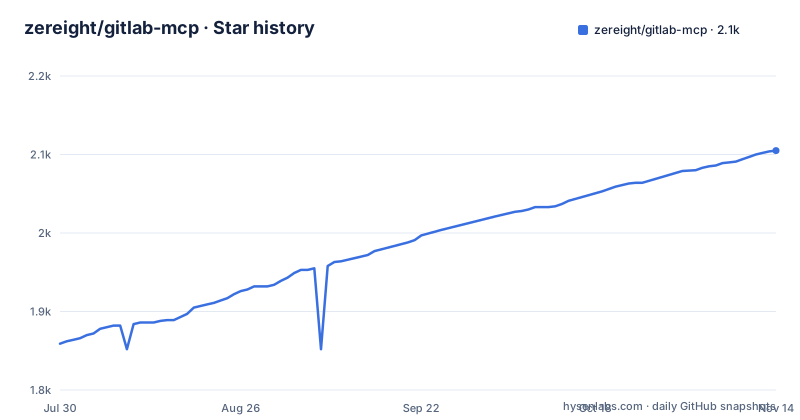
Star history
- zereight/gitlab-mcp2,105 ★ · +246
| Repository | 2026-07-30 | 2026-11-14 |
|---|---|---|
| zereight/gitlab-mcp | 1.9k | 2.1k |
246 Stars in the last 107 days, measured from the daily GitHub snapshot. Compare with other projects
Editorial analysis
267 tools, with a discovery tool as the way in
The tool count is the headline number and the design choice that makes it survivable. The server exposes around 267 granular tools plus one named discover_tools, and the guidance is to begin with a small set and activate more at run time, deliberately avoiding grouped tool families. Two optional layers sit on top. A merge request review is a two step flow: list the changed files first, then fetch their diffs in batches, so a large request does not become one enormous response. And any tool call can take a query expression that filters the returned JSON without changing the request sent to GitLab, which is the cheap way to keep a 267 tool surface from flooding a client. One interaction to note: when response masking is switched on, that filter runs on the masked data rather than on the raw response.
npm install -g @zereight/mcp-gitlabFour auth methods, and two shipped examples disagree on one variable
Authentication is split by where the server runs. For a desktop or laptop it is either a personal access token, which the page calls the simplest setup, or an OAuth browser flow, which it recommends for better security. For a server it is either an OAuth proxy for remote clients such as a hosted assistant, or per-request remote authorization where every caller supplies their own token, which is the multi-user answer. A CI job token is also accepted, and the environment example notes that when it is set the credential is sent as a job-token header rather than a bearer authorization header. The inconsistency worth catching: the example environment file sets the API URL variable to the bare site root, while the one-click install badge in the header sets the same variable to the versioned API root. The badge also sets a permission mode variable that the environment example never mentions.
npm test runs against a live GitLab project
The test script chain is short enough to read in one look, and it is the part of this repository most likely to surprise you.
"test": "npm run test:all",
"test:all": "npm run build && npm run test:mock && npm run test:live",
"test:mock": "bash scripts/run-mock-tests.sh"
The default test target is not mock only, it is mock and then live, so `npm test` contacts a real GitLab instance. The example environment file shows what that needs: a separate test token variable, a test project id, and an issue number, which together mean the live suite writes into a real project rather than a throwaway. So the token you give this command is a token with write access to something you care about. Two smaller details in the same manifest: a prepare script runs the build, so installing from a git checkout compiles the TypeScript, and the build step makes the output file executable, which is how a plain JavaScript entry point works when installed globally.
The container installs dependencies twice, under two different rules
The image has a builder stage on a glibc base and a release stage on a musl base, both pinned to the same exact Node version, and the comment at the top explains why the split exists: the Alpine variant crashed under emulation on arm64 with an illegal instruction fault during dependency installation, which hung the multi-platform build until the job timed out. Inside, the builder runs a plain install with a cache mount, and the release stage then runs a clean, lockfile-driven install with scripts disabled and dev dependencies omitted, before dropping to an unprivileged user.
FROM node:22.21.1-bookworm-slim AS builder
RUN --mount=type=cache,target=/root/.npm npm install

FROM node:22.21.1-alpine AS release
RUN npm ci --ignore-scripts --omit-dev
USER node
ENTRYPOINT ["node", "build/index.js"]
So dependency resolution happens once without the lock file and again with it, in two different C library environments, while only the build output is published to the registry. The release stage also disables scripts, which is why the compiled directory is copied in rather than rebuilt.
Two binary names pointing at one file, and a pin one release behind
The manifest registers two executable names, and both point at the same compiled file. One of them is the bare generic name inherited from earlier versions, and the page explains the reason for the second: the prefixed name is less likely to collide with other tools in the same environment. If a client cannot resolve the command, the documented fallback is to paste the absolute path from the shell's own lookup. The version guidance is the part with a date attached. Rather than telling you to take the newest release, the page recommends pinning to the previous stable version and gives a concrete example one release behind the current tag, while offering a floating tag as the alternative for people who always want the newest. The server also writes a notice to standard error on startup when a newer version exists, and there is an environment variable to turn that check off.
A Node project whose documentation is built by mkdocs in a Python venv
The Makefile is not about the server at all, it is about the documentation, and it needs Python to run. It creates a virtual environment, installs a requirements file into it, and then drives the static site generator, with a build target that passes a strict flag to match what the pipeline does, and a serve target on a local port with reload. The most interesting target is the one that regenerates tool documentation: it runs a Node script that rewrites the per-tool pages and a tool coverage page from the code itself. With 267 tools, that means the tool reference on the hosted documentation site is a build artefact rather than prose anyone maintains, which is the only maintainable arrangement at that scale and also means the reference is only as fresh as the last build.
make tools-docs
make build
Three test files committed at the repository root
The root of the tree mixes shipping code with what look like experiments. Three files with test-prefixed or test-suffixed names sit at the top level, next to the entry point, the config module and the schema modules, rather than inside any test directory: a plain JavaScript CLI test and two TypeScript ones about issue notes, one of which is named for resolving an issue note. Everything else is organised, with an auth command and retry module, three separate OAuth modules covering local, proxy and device flow, a client pool, a masking directory, a stateless directory, the server and protocol directories, and a client directory. There is also a directory whose name is simply downloads, sitting at the root next to a static assets directory, which is not something a server package usually wants to carry. An environment example and an editor-directory file also live at the root, so the repository root is doing duty as both a package and a workspace.
Five distribution channels, four readme languages, three releases in four days
The server reaches users through more channels than most projects of this size attempt: an npm package, a Homebrew tap with a formula directory, a Nix flake with a committed lock file, a Dockerfile and a Docker directory, and two separate MCP directory manifests plus a well-known directory for hosted discovery. That is a maintenance surface, not a convenience, since every channel is a version that can drift. The documentation lives on its own GitHub Pages site rather than in the repository, and the readme exists in four languages including Korean, Simplified Chinese and Brazilian Portuguese. The release cadence is the other thing to note: three of the most recent tags landed within four days, all on the same minor line, and the last push to the default branch was on 2026-10-03, the same day as the newest tag.
Editorial conclusion
This is a serious piece of work for anyone who wants an agent to drive GitLab directly, and the design decision that matters most is the split between a small starting toolset and a discovery tool that activates more at runtime, which is the only sane way to expose 267 tools without swamping a client's context. Before you wire it in, three things to know. The default test command runs against a live GitLab project, so do not run it in an unattended pipeline with a token that has write access. The two shipped configuration examples set the same API URL variable to two different values, so check which form your instance wants. And pinning matters here, because releases land daily on the 2.1.x line and the project's own recommended pin is already one release behind.
Frequently asked questions
Is zereight a GitLab MCP server?
Yes. It is a GitLab MCP server published to npm as @zereight/mcp-gitlab, exposing about 267 tools plus a discover_tools tool, and it speaks stdio, SSE and Streamable HTTP. It is MIT licensed and requires Node 18.17 or newer.
How does the zereight gitlab-mcp server avoid overwhelming a client with tools?
You start with a small toolset and activate more at run time through a discovery tool, rather than having grouped tool families exposed up front. Individual tool calls also accept a JMESPath expression that filters the returned JSON without changing the request sent to GitLab.
What authentication options does gitlab-mcp support?
Four: a personal access token, a local OAuth2 browser flow, an OAuth2 MCP proxy for remote clients such as Claude.ai, and per-request remote authorization where each caller brings its own token. A CI job token is also accepted and is sent as a job-token header instead of a bearer header.
How do I pin a version of the zereight GitLab MCP server?
With npx, pin an exact version, and the documentation's own example is one release behind the current tag at 2.1.68, or use the latest tag to always take the newest. The server also prints a notice to standard error on startup when a newer version exists, which an environment variable disables.
Can the zereight gitlab-mcp server run against my own GitLab instance?
Yes. Custom GitLab instances, proxy settings and dynamic API URL routing are supported, the transport is selected with flags in priority order of Streamable HTTP, then SSE, then stdio, and there is a stateless mode guide for multi-pod autoscaling alongside a Dockerfile.
Official sources
Add this badge to your README
If you maintain this project, the badge below links readers to this analysis and shows its maintenance status from the daily GitHub snapshot. Paste the markdown into your README; add ?metric=license or ?metric=stars to the image URL for a different field.

[](https://hysenlabs.com/projects/zereight-gitlab-mcp)Star history chart for your README
[](https://hysenlabs.com/projects/zereight-gitlab-mcp)Was this useful?