MSST for Training Music Source Separation Models
Repository for training models for music source separation.
At a glance
- What is it?
- ZFTurbo/Music-Source-Separation-Training provides a Python training and inference framework for separating music into stems. It is aimed at researchers who need configurable experiments across MDX23C, Demucs, RoFormer, SCNet, DTTNet, and other architectures.
- Who is it for?
- MSST suits researchers who need to train or adapt models on their own music datasets, especially when they can work with Python, YAML configurations, PyTorch checkpoints, and substantial accelerator memory. It is less suitable for users who only want a packaged separation application or need a documented, one-command rollback process.
- Can I use it commercially?
- Yes. MIT is a permissive licence: you can use, modify and sell software built on it, as long as you keep its copyright and licence notices.
- Is it still maintained?
- Yes. The repository last received commits 5 days ago.
- What is it written in?
- Mainly Python, according to GitHub's language statistics.
Answers come from the project's GitHub data, last synced on November 7, 2026, and from our analysis. They are not legal advice.
Star history
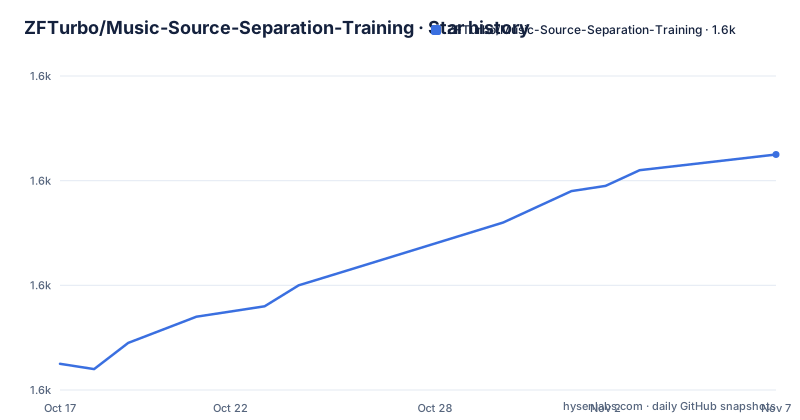
- ZFTurbo/Music-Source-Separation-Training1,625 ★ · +40
| Repository | 2026-10-17 | 2026-11-07 |
|---|---|---|
| ZFTurbo/Music-Source-Separation-Training | 1.6k | 1.6k |
40 Stars in the last 21 days, measured from the daily GitHub snapshot. Compare with other projects
Editorial analysis
What MSST Does for Music Separation Experiments
ZFTurbo/Music-Source-Separation-Training, commonly represented by the MSST package, is a repository for training models that separate a mixed music recording into source signals. The intended users are researchers and engineers who need to change model architectures, datasets, training parameters, validation behavior, or checkpoint handling rather than simply run a fixed separation tool. The README describes the central goal as training code that is easy to modify for experiments.
The project does not limit users to one architecture. The documented `--model_type` choices include `mdx23c`, `htdemucs`, `segm_models`, `torchseg`, `bs_roformer`, `mel_band_roformer`, `swin_upernet`, `bandit`, `scnet`, `bandit_v2`, `apollo`, `bs_mamba2`, `conformer`, `dttnet`, `bs_conformer`, `scnet_tran`, and `scnet_masked`. This is a broad research surface, but it also means that model selection, configuration, dependency compatibility, and checkpoint shape are part of the adoption work.
The repository includes separate paths for training and inference. It also documents LoRA training, model ensembling, validation metrics, augmentations, dataset types, a graphical interface, and a list of pre-trained models. That makes the repository more than a single training script, although the README does not describe every option in the scripts or the behavior of every model family.
How MSST Moves Data Through Training and Inference
The repository layout shows that `train.py` is the main training entry point for a single GPU, while `train_ddp.py` handles Multi GPU configuration. `train_accelerate.py` is also present at the top level, and `valid.py` and `valid_ddp.py` cover validation paths. The README specifically says to use `train_ddp.py` for two or more GPUs because it is described as faster than `train.py`.
At a high level, a training run receives a model type, a YAML configuration path, an optional starting checkpoint, a results directory, training data paths, validation data, worker count, and device configuration. The model-specific YAML files live under `configs/`. Files prefixed `config_musdb18_` are identified as examples for the MUSDB18 dataset. The repository also contains `dataset.py`, which is described as the component that creates new samples for training.
Inference uses `inference.py` with a model type, configuration, checkpoint, input folder, and output directory. The documented data flow is folder based: the input folder contains music files, and `store_dir` receives the separated results. The README does not claim that this interface handles arbitrary streams or that every accepted audio format is covered. The `gui/` directory and `gui-wx.py` indicate an additional graphical route, while `ensemble.py` is intended to combine results from different models.
A key implementation constraint is that configuration and architecture must agree. The README says the code supports loading weights whose shapes do not fully match when they have the same architecture, and it suggests starting from older weights because training will be faster. It also warns that memory-related batch settings must be changed for smaller GPUs.
Installing MSST and Running the First Inference
The README gives a direct package installation command:
pip install msstThe `pyproject.toml` file identifies the project as `music-source-separation-training`, requires Python `>=3.10`, and lists core dependencies including `torch>=2.0.1`, `torchaudio`, `numpy>=2.0.0`, `librosa`, `soundfile`, `omegaconf`, `pandas`, `tqdm`, and `PyYAML`. Optional dependency groups cover training, validation, accelerate, LoRA, optimizers, and individual model families. The dependency surface is therefore larger than the short install command suggests, especially when using features such as Apollo, Bandit, LoRA, or the GUI.
After installation, the repository provides a documented inference example. This command selects `mdx23c`, loads `configs/config_mdx23c_musdb18.yaml`, starts from `results/last_mdx23c.ckpt`, reads files from `input/wavs/`, and writes to `separation_results/`.
python inference.py \
    --model_type mdx23c \
    --config_path configs/config_mdx23c_musdb18.yaml \
    --start_check_point results/last_mdx23c.ckpt \
    --input_folder input/wavs/ \
    --store_dir separation_results/
The README says that `inference.py` processes a folder of music files and separates them. It does not document a sample input file in this section, so the reader must supply audio under `input/wavs/` and a compatible checkpoint before starting. The README links to `docs/compatibility.md` for model extras, devices, and audio formats, but that content is not included here.
For training, the documented command uses `mel_band_roformer`, a YAML config, an optional checkpoint, two training dataset paths, a validation path, four workers, and GPU `0`.
python train.py \
    --model_type mel_band_roformer \
    --config_path configs/config_mel_band_roformer_vocals.yaml \
    --start_check_point results/model.ckpt \
    --results_path results/ \
    --data_path 'datasets/dataset1' 'datasets/dataset2' \
    --valid_path datasets/musdb18hq/test \
    --num_workers 4 \
    --device_ids 0
This is a training example, not a claim that those paths already exist in a reader's checkout. The repository documentation points to `utils/settings.py` for the full parameter set.
Configuration Choices, Checkpoints, and Hardware Limits
MSST separates configuration from the command line, but the README gives only a partial view of the controls. Model selection uses `--model_type`, while the YAML file supplies model-specific settings through `--config_path`. The result path is controlled by `--results_path`, and an existing checkpoint can be supplied with `--start_check_point`.
The strongest documented hardware warning concerns memory. The README says all batch sizes in the configuration files are adjusted for a single NVIDIA A6000 with 48GB of memory. Systems with less memory should adjust `training.batch_size` and `training.gradient_accumulation_steps` in the model configuration. This is a direct engineering constraint for anyone reproducing a configuration on smaller GPUs.
The project also supports different training strategies. `train.py` targets a single GPU, `train_ddp.py` is documented for Multi GPU use, and the top-level `train_accelerate.py` provides another entry point. The README describes LoRA training in `docs/LoRA.md`, and `pyproject.toml` exposes optional packages such as `loralib` and `peft`. These paths are useful when full fine-tuning is not the intended workflow, but the README does not state the exact conditions under which one strategy is preferable.
Checkpoint compatibility deserves attention. The documentation says that weights from the same architecture can be loaded even when shapes do not fully match. It does not explain which parameters are transferred, how mismatches are reported, or whether a particular checkpoint can initialize every listed architecture. Users should therefore treat the checkpoint and model family as a coupled choice rather than assuming that any listed model can consume any `.ckpt` file.
When MSST Is the Wrong Tool
MSST is not the best fit for a user whose requirement is a ready-made audio separation service. The repository centers on Python scripts, model configurations, checkpoints, training data, and GPU-oriented execution. The documented inference command requires a model type, a configuration, a checkpoint, and an input folder. That is a research workflow, not a self-contained end-user installer.
It is also a poor match for projects that require a documented rollback or migration path. The README points to model, dataset, augmentation, GUI, compatibility, and pre-trained model documentation, but it does not document rollback behavior, checkpoint retention policy, or an automatic mechanism for reverting a training run. Maintenance and upgrade planning must therefore be based on the repository files and release history rather than an assumed operational workflow.
Model quality cannot be inferred from the list of architectures or releases alone. The README names supported models and points to pre-trained weights, but it does not provide a universal accuracy result for a given stem type, sample rate, or checkpoint. The repository is better suited to users who can define an evaluation set and inspect validation metrics than to users seeking a fixed quality guarantee.
A second limitation is the breadth of optional dependencies and model-specific integrations. `pyproject.toml` includes groups for model families, optimizers, LoRA, validation, and training. Installing every feature may introduce compatibility questions that are not answered by the short `pip install msst` example. The README provides links for compatibility and package-specific setup, but its main page does not reproduce those details.
MSST Alternatives and Maintenance Context
The closest in-repository alternative for training scale is `train_ddp.py`. Its approach is different from `train.py`: the former is documented as the faster path for two or more GPUs, while the latter is the single-GPU entry point. This is a deployment and execution distinction, not a different separation model. A user with one GPU should follow the `train.py` path; a user with multiple GPUs should inspect the DDP entry point and its configuration requirements.
For inference optimization, the README links to `ZFTurbo/MSS_ONNX_TensorRT` for converting models to ONNX and TensorRT formats. That is a different approach from loading a PyTorch checkpoint directly with `inference.py`: it moves part of the deployment path toward exported formats and runtime-specific execution. The README does not document conversion commands, supported models, or accuracy implications, so it identifies an alternative path without claiming that it is suitable for every checkpoint.
Maintenance information is concrete in the repository record. The repository is not archived, and the last push was on 2026-10-15. Recent releases include `v1.0.22` for DTTNet MUSDB18 weights, `v1.0.21` for an MVSep Mega 53 Stems model, and `v1.0.20` for BS PolarFormer weights. These facts show recent release activity, but they do not establish that every model path or optional dependency receives the same level of updates.
The license is MIT. The `pyproject.toml` declares `MIT` and includes the repository license file. That means the project is distributed under a permissive open-source license, but users still need to review the actual `LICENSE` file and account for model weights, datasets, and third-party dependencies separately. The repository documentation does not provide legal analysis of those components.
Editorial conclusion
MSST suits researchers who need to train or adapt models on their own music datasets, especially when they can work with Python, YAML configurations, PyTorch checkpoints, and substantial accelerator memory. It is less suitable for users who only want a packaged separation application or need a documented, one-command rollback process. Before adoption, verify the selected architecture and checkpoint are compatible with the target stems, inspect the dataset format documentation, and adjust `training.batch_size` and `training.gradient_accumulation_steps` for the available GPU memory.
Frequently asked questions
How do I install ZFTurbo/Music-Source-Separation-Training?
The README documents `pip install msst`. The `pyproject.toml` requires Python `>=3.10` and declares dependencies such as `torch>=2.0.1`, `torchaudio`, `librosa`, and `numpy>=2.0.0`.
How do I run inference with MSST?
Use `inference.py` with `--model_type`, `--config_path`, `--start_check_point`, `--input_folder`, and `--store_dir`. The README describes the command as processing a folder of music files and storing separated results.
Can I train a music source separation model with MSST?
Yes. The README provides `train.py` and `train_ddp.py` entry points, YAML model configuration files, dataset and validation paths, checkpoint initialization, and a documented training example. It recommends `train_ddp.py` for two or more GPUs.
Official sources
Add this badge to your README
If you maintain this project, the badge below links readers to this analysis and shows its maintenance status from the daily GitHub snapshot. Paste the markdown into your README; add ?metric=license or ?metric=stars to the image URL for a different field.

[](https://hysenlabs.com/projects/zfturbo-music-source-separation-training)Star history chart for your README
[](https://hysenlabs.com/projects/zfturbo-music-source-separation-training)Was this useful?