Diffuman4D stores 48 cameras per scene and renders 44 of them
[ICCV 2025] Diffuman4D: 4D Consistent Human View Synthesis from Sparse-View Videos with Spatio-Temporal Diffusion Models
At a glance
- What is it?
- Diffuman4D turns four cameras and 150 frames of a human performance into 44 rendered views, and its quick start sends step five at a directory step four never writes. EasyVolcap installs twice with --no-deps, and open3d sits commented out.
- Who is it for?
- Diffuman4D is worth the setup if you are working on free-viewpoint human video and want the re-annotated camera, mask, and skeleton labels rather than recomputing them. It is a poor fit for a quick look, since the RGB images still have to come from the DNA-Rendering site by hand and the reconstruction half of the pipeline depends on LongVolcap, which is not open-sourced.
- Can I use it commercially?
- Check first. The repository uses a licence we do not classify automatically, so read its LICENSE file before any commercial use.
- Is it still maintained?
- Yes. The repository last received commits 61 days ago.
- What is it written in?
- Mainly Python, according to GitHub's language statistics.
Answers come from the project's GitHub data, last synced on November 14, 2026, and from our analysis. They are not legal advice.
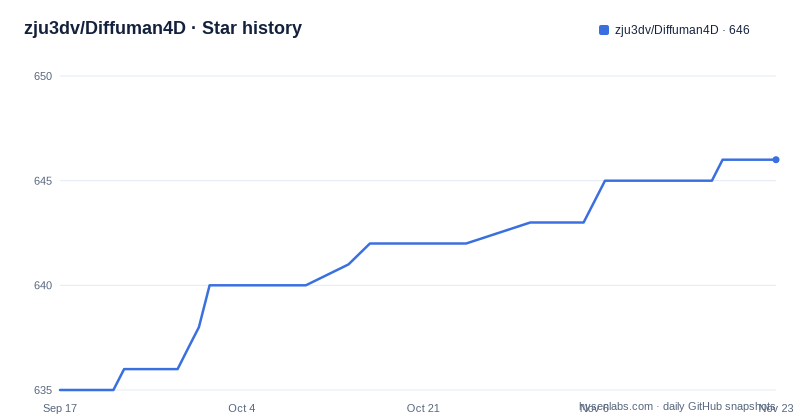
Star history
- zju3dv/Diffuman4D645 ★ · +10
| Repository | 2026-09-17 | 2026-11-14 |
|---|---|---|
| zju3dv/Diffuman4D | 635 | 645 |
10 Stars in the last 58 days, measured from the daily GitHub snapshot. Compare with other projects
Editorial analysis
requirements.txt leaves open3d commented out in the middle
The dependency file is organised as three commented blocks, and each has a job. The first is inference: torch 2.7.1, torchvision 0.22.1, transformers 4.49.0, diffusers with the torch extra at 0.33.1, then torchmetrics, einops, and ipdb unpinned, plus three Hydra plugins pinned exactly, hydra-core 1.3.2, hydra-colorlog 1.2.0, and hydra-optuna-sweeper 1.2.0. The second is preprocess: fire, h5py, kornia, opencv-python, ipython 8.20.0, timm, scipy, and json_tricks, followed by a line containing nothing but # open3d. The third is download dataset: huggingface_hub, datasets, pyarrow, pandas, and pycolmap. That commented open3d line is the only trace of the point-cloud stack, and it sits exactly where an active entry would be, which leaves the decision visible instead of quietly removed.
EasyVolcap is installed twice, both times with --no-deps
Reconstruction and preprocessing come from a second repository, installed from git rather than from a package index:
pip install git+https://github.com/zju3dv/EasyVolcap.git --no-depsThat command appears twice in the readme, once in the main install step and again in the dataset download step. The --no-deps flag is the part worth pausing on, because it means none of EasyVolcap's own dependencies are pulled in either, so everything it needs has to already be present. The preprocess block in requirements.txt is what stands in for that, which is a plausible reason for the disabled open3d line. The other consequence is that pip install -r requirements.txt does not follow the readme's own two-phase story, so someone who only wants inference still installs the preprocessing stack.
Step five reads a directory step four never writes
Two path strings in the quick start do not match. Step four says the sampling results are saved in ./output/results/dna_rendering/0023_06. Step five then points nerfstudio at ./output/results/dna_rendering_tiny/0023_06/transforms.json, with dna_rendering_tiny rather than dna_rendering. The suffix matches the name of the reduced-frame preset, so the example reads as though it were written against the tiny run and never revised when step four's path was generalised. A reader following the six steps in order has to work out which directory name to create or rename. The block around the inference commands also closes with a two-backtick marker followed by a lone three-backtick one, which shifts how everything after it renders.
Four cameras in, forty-four rendered, forty-eight stored
The demo presets make the shape of the problem concrete. The example scene 0023_06 stores 48 camera directories for each data type, with fmasks showing 00 and 01 followed by 46 more, and each camera directory holding 150 numbered frames from 000000.png upwards. Inference consumes four of those cameras and renders the other 44. Three presets differ only in how much time they cover: demo_3d turns four input cameras into 44 output cameras, demo_4d_tiny takes four cameras and 15 frames to 44 cameras and 15 frames, and demo_4d takes four cameras and 150 frames to 44 cameras and 150 frames. For a single-GPU server the readme recommends the first preset or the tiny one, which is the practical difference between a smoke test and the full sequence.
Every experiment parameter arrives as a Hydra dot override
The presets are passed on the command line as dotted overrides rather than flags:
python inference.py exp=demo_3d data.scene_label=0023_06 data.data_dir=./data/datasets--krahets--diffuman4d_exampleThat is Hydra composition, and the dependency file backs it with hydra-core, a colour logger, and an Optuna sweeper, so the configuration surface is set up for sweep search rather than for plain argument parsing. The repository layout matches that: a configs/ directory, a single inference.py at the root, the library under src/, and the download and image-extraction helpers under scripts/. None of the visible commands sets a seed or a device, so both choices fall to the config defaults and to whatever hardware the machine has, which matters when a render fans out to 44 cameras.
The 4D step stands in for a tool that is not open
The reconstruction story splits in two, and the second half is a substitute. The 3D Gaussian splatting step is a nerfstudio install followed by a splatfacto training run against the transforms.json that inference produced. The 4D step is different: the readme states that because LongVolcap has not been open-sourced, alternative 4D-Gaussian-Splatting reconstruction scripts will be provided instead. So the temporal half of the pipeline points at a third-party repository rather than at anything inside this one, and the wording is a promise rather than a link. There is also a coordinate convention to absorb on the way in: nerfstudio uses the OpenGL or Blender camera convention, and anyone needing Colmap or OpenCV has to flip the Y and Z axes of the transform_matrix.
Ten million images, two frame counts, one manual download
The processed DNA-Rendering release is the largest artifact here and the most manual to assemble. It re-annotates the DNA-Rendering dataset by recalibrating camera parameters, optimizing image color correction matrices, predicting foreground masks, and estimating human skeletons, and it is described as 1000 or more multi-view human video sequences with 48 cameras each, at 225 or 150 frames, totalling ten million images. The re-annotated labels download from a script, but the RGB images do not: they come from the official DNA-Rendering website as archived files, then need a second extraction script with raw_root and processed_root pointed at the two locations. Each scene's camera folder holds ccm files used to correct image colour, colmap files used to undistort images, and intri.yml and extri.yml for intrinsics and extrinsics.
Editorial conclusion
Diffuman4D is worth the setup if you are working on free-viewpoint human video and want the re-annotated camera, mask, and skeleton labels rather than recomputing them. It is a poor fit for a quick look, since the RGB images still have to come from the DNA-Rendering site by hand and the reconstruction half of the pipeline depends on LongVolcap, which is not open-sourced. Before starting, resolve the dna_rendering versus dna_rendering_tiny output path, install EasyVolcap knowing that --no-deps means its dependencies are yours to supply, and check the commented open3d line in requirements.txt against the point-cloud work you actually intend to do.
Frequently asked questions
What is Diffuman4D?
It is the official repository for Diffuman4D, an ICCV 2025 project on 4D consistent human view synthesis from sparse-view videos with spatio-temporal diffusion models. The goal is free-viewpoint rendering of human performances, with an interactive demo hosted on 4dv.ai.
How do I install Diffuman4D?
Create a conda environment with python=3.12, activate it, then run pip install -r requirements.txt. For 3D and 4D reconstruction and data processing you also install EasyVolcap from git with the --no-deps flag, which leaves its own dependencies to you.
How many cameras does the Diffuman4D example dataset use?
Each scene stores 48 camera directories per data type, with 150 numbered frames in each. The demo presets consume 4 input cameras and render 44 output cameras, at 15 frames for demo_4d_tiny and 150 frames for demo_4d.
Where do I get the Diffuman4D training data?
The re-annotated DNA-Rendering labels download from the dna_rendering_processed dataset on Hugging Face, covering 1000 or more sequences and ten million images. The RGB images are not included: they come from the official DNA-Rendering website and are extracted with a separate script.
Can I reconstruct 4D Gaussian splatting with Diffuman4D?
Not from this repository alone. The readme says that because LongVolcap has not been open-sourced, it will provide alternative 4D-Gaussian-Splatting reconstruction scripts instead. The 3D step uses nerfstudio with splatfacto.
Official sources
Add this badge to your README
If you maintain this project, the badge below links readers to this analysis and shows its maintenance status from the daily GitHub snapshot. Paste the markdown into your README; add ?metric=license or ?metric=stars to the image URL for a different field.

[](https://hysenlabs.com/projects/zju3dv-diffuman4d)Star history chart for your README
[](https://hysenlabs.com/projects/zju3dv-diffuman4d)Was this useful?