nali: ten databases, five of which fetch themselves, and a release from 2023
An offline tool for querying IP geographic information and CDN provider.
At a glance
- What is it?
- nali is an offline Go tool that annotates IP addresses with geographic information and CDN provider wherever they appear in a stream of text, which is what makes it useful in a pipe rather than only at a prompt. Its README is better organised than its release history: the database table, the distribution matrix and the configuration compatibility note are all current, while the newest release tag is from December 2023.
- Who is it for?
- Use this if you read a lot of tool output containing addresses and want to know where they are without a network round trip, which is the whole design. Two things to check before you commit to it.
- Can I use it commercially?
- Yes. MIT is a permissive licence: you can use, modify and sell software built on it, as long as you keep its copyright and licence notices.
- Is it still maintained?
- Yes. The repository last received commits 13 days ago.
- What is it written in?
- Mainly Go, according to GitHub's language statistics.
Answers come from the project's GitHub data, last synced on November 13, 2026, and from our analysis. They are not legal advice.
Star history
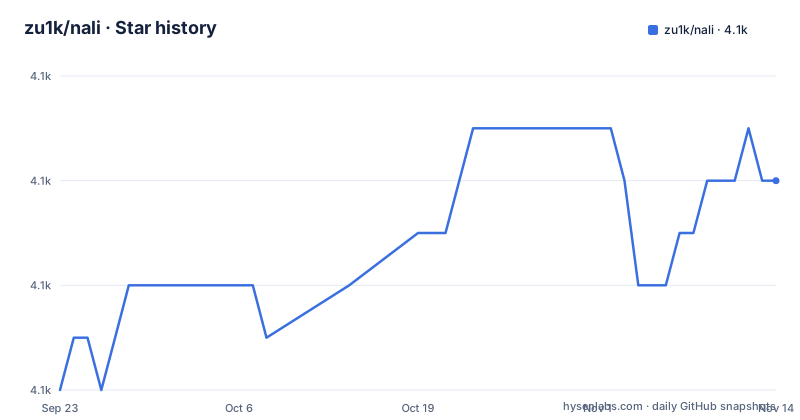
- zu1k/nali4,108 ★ · +4
| Repository | 2026-09-23 | 2026-11-13 |
|---|---|---|
| zu1k/nali | 4.1k | 4.1k |
4 Stars in the last 51 days, measured from the daily GitHub snapshot. Compare with other projects
Editorial analysis
Ten databases, and five of them download themselves
Invoked with an address, it prints the address followed by its location in brackets:
$ go install github.com/zu1k/nali@latestThe distinguishing feature is not the number of databases but the split in how you get them. Five are fetched automatically the first time they are needed: two Chinese offline databases, one covering IPv4 and one covering IPv6, the ip2region pair for both address families, a free country and network database from IPinfo, and the CDN provider list. Five you have to obtain yourself and drop into the data directory, or point at with an absolute path in the configuration file: a city-level GeoIP or GeoLite database, two more commercial databases, a second free Chinese one, and a free location database whose distribution file name still carries an older version number and an uppercase extension. Two more entries are optional in the sense that the tool runs without them, and the CDN one is listed as the default for domain lookups. The table in the README names each one with its aliases, so you can refer to a database by any of two or three names in your configuration.
A release from 2023 and a branch pushed in 2026
The version history has three tags in it and none is recent. The newest is 0.8.1, published in December 2023, preceded by 0.8.0 in October 2023 and 0.7.3 in May 2023. The last commit to the branch, though, is from September 2026, so there are close to three years of work on the branch with no release behind it. That matters more here than in most projects, because the tool's usefulness depends on how current its databases are, and the databases are not in this repository: the upstream data files move, and a build from the tip of the branch can behave differently from a released binary purely because of which upstream files a release happened to bundle. The homepage field is also the repository's own address rather than a project site, even though the README's own examples resolve a domain belonging to the project, so the one link a package index would show leads to the source rather than to the documentation.
The tool annotates text, which is why it belongs in a pipe
Read the examples rather than the feature list and the design is obvious. Invoked with an address, it prints the address followed by its location in brackets. Fed a line on standard input, it does the same to whatever addresses it finds on that line, which is why the README pairs it with a lookup utility and pipes the short-form answer straight in, and why it says it can be used with any program at all. That single property is what makes it more than a lookup table: a stream of output from another tool becomes annotated output, with the location inserted after each address. It also runs interactively, reading addresses until you type a quit word, which is the same interface with the loop left open. Colour output and multiple output languages are listed as features, and the IPv6 section states that usage is identical, so the same annotations appear for either address family.
Three packages in one repository and four Debian architectures
The packaging section is the longest part of the README and it is arranged by distribution rather than by method. Source installation is one command after a note that a recent Go toolchain is required. Precompiled executables come from the releases page with an instruction to pick the build matching your system and architecture. The Arch family gets three separate packages, and the distinction between them is worth reading because it is the kind of thing that decides whether you get a reproducible build: one compiles the release at install time, one ships a prebuilt binary from the release, and one tracks the latest development branch and also compiles. Debian and Ubuntu are served with per-architecture packages, covering four architectures, installed from the downloaded file. Five routes for one small binary is a lot, and it means the release page is doing real work that a package registry would otherwise do.
Configuration files from older versions keep working
The tool writes its own configuration on first run and tells you not to touch it. Each database entry names the database, the alternative names you can use for it, the format of the file, the file itself, the languages it supports and the address families it covers. What is easy to miss is the compatibility note: a configuration file written by an older version needs no modification, because any database the file does not mention falls back to the built-in default definition. That is the right design for a tool whose database set grows between versions, since adding a database then does not require everyone to regenerate their configuration or lose their local customisations. The tool prints the exact data directory when you ask it for information, which is the answer to the most common first-run question, namely where the manually downloaded files have to go.
CDN lookups need you to run the lookup yourself first
The CDN feature works differently from the geographic one, and the README explains why. Content delivery networks are usually reached through a canonical name, so an address lookup alone tells you where the edge machine is rather than who operates it. The recommendation is to run a name lookup and pipe the output in, at which point the canonical names in the answer are annotated with the provider. The worked example uses a government site whose chain of canonical names resolves through a Chinese provider and then to an address in Singapore, which is exactly the case where the address alone would be misleading. Once you know the canonical name you can query it directly, but the tool does not perform resolution itself, which keeps it a single-purpose annotator rather than a lookup client. It also means it needs no network access to resolve, which is the same property the whole design rests on.
Two badges for the same link and an English readme beside the Chinese one
Two small things in the header. The releases link appears as two identical badges, so the header has four badge slots for three destinations. And the Chinese README, which is the default file, links to a separate English one rather than offering a language toggle, so a reader arriving from search in either language has to guess which file they want. Both are cosmetic, and both are the kind of thing that survives because nobody is tidying a page whose content is still correct. The rest of the README is unusually well organised for a single-page document: install by method, usage by scenario, including pipe, interactive, lookup-tool pairing, IPv6 and CDN, then a database table with aliases, formats, default file names and download behaviour, then the configuration file format as a worked example. That structure is what makes a tool with ten data sources legible in one screen.
Editorial conclusion
Use this if you read a lot of tool output containing addresses and want to know where they are without a network round trip, which is the whole design. Two things to check before you commit to it. The geographic answers are only as good as the database files you loaded, and five of the ten are not loaded for you, so decide which sources you trust and whether their licensing suits you. And for CDN attribution, read the caveat: because networks resolve through canonical names, the tool will annotate an address rather than name the operator unless you pipe a name lookup in first. And if you install from the development branch rather than a release, remember that the newest tag is nearly three years old, so the branch and the release will not agree on which database files they carry.
Frequently asked questions
What does nali do?
It is an offline terminal tool that annotates IP addresses with geographic information and CDN provider. Because it reads text and annotates the addresses it finds, it works in a pipe, so you can query several addresses at once, feed it the output of another program, or use it interactively. It supports both address families, multiple output languages and colour output.
Which IP geolocation databases does nali support?
Ten entries in total. Five download themselves on first use: two Chinese offline databases covering IPv4 and IPv6, the two ip2region databases, a free country and network database from IPinfo, and the CDN provider list. Five have to be obtained by hand and placed in the data directory, or pointed at with an absolute path: a city-level GeoIP or GeoLite database, two commercial ones, a second free Chinese database, and a free location database.
How do I install nali?
Four documented routes. From source with a recent Go toolchain, using the install command for the module. Precompiled executables from the releases page. Three packages in the Arch user repository, one compiling the release at install time, one shipping a prebuilt binary, and one tracking the development branch. Or Debian and Ubuntu packages for four architectures, installed from the downloaded file.
Does nali need an internet connection?
Not to answer queries, which is the point of the design. Five of the supported databases fetch themselves the first time they are needed, so a first run on a new machine makes network requests until those files exist. The other five have to be downloaded manually and placed in the data directory that the tool reports when asked for its information.
How is nali configured?
A configuration file is written into a config directory on first run and the built-in defaults work without edits. Each entry names a database, its aliases, its file format, the file itself, the languages it supports and the address families it covers. Configuration files written by older versions need no changes, because any database the file does not mention falls back to the built-in definition.
Official sources
Add this badge to your README
If you maintain this project, the badge below links readers to this analysis and shows its maintenance status from the daily GitHub snapshot. Paste the markdown into your README; add ?metric=license or ?metric=stars to the image URL for a different field.

[](https://hysenlabs.com/projects/zu1k-nali)Star history chart for your README
[](https://hysenlabs.com/projects/zu1k-nali)Was this useful?