1Password for Open Source is an application process, not a library
Get a 1Password team account for free to support your open source initiatives!
At a glance
- What is it?
- The 1Password for Open Source repository is the application desk for a free 1Password Teams account, not a code dependency. It suits maintainers of permissive-licence projects who need a shared password vault and can meet the eligibility rules.
- Who is it for?
- 1Password for Open Source is worth an application if you maintain a permissive-licence project that is at least 30 days old, your account carries no commercial activity, and you can add a second owner to the team. It is the wrong route for a company that needs an enterprise password manager, for a personal account, or for a project that has not been running for a month.
- Can I use it commercially?
- Not without permission. GitHub finds no licence file in the repository, and without a licence all rights are reserved by default: you may read the code but not reuse it. Check the README, or ask the authors, before using it.
- Is it still maintained?
- Yes. The repository last received commits 2 days ago.
- What is it written in?
- Mainly Go, according to GitHub's language statistics.
Answers come from the project's GitHub data, last synced on October 23, 2026, and from our analysis. They are not legal advice.
Star history
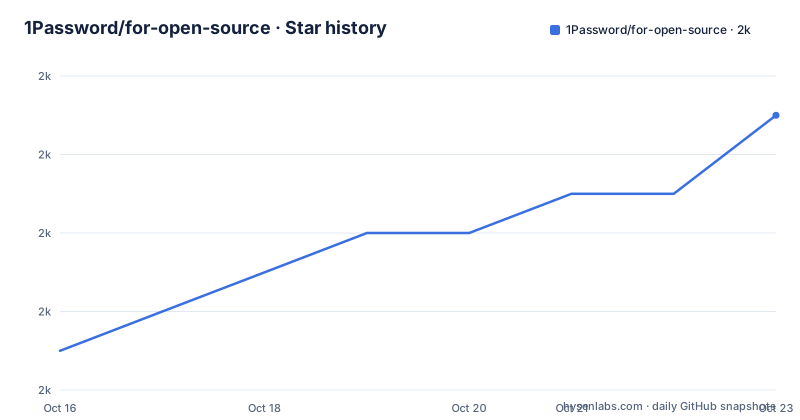
- 1Password/for-open-source1,989 ★ · +6
| Repository | 2026-10-16 | 2026-10-23 |
|---|---|---|
| 1Password/for-open-source | 2k | 2k |
6 Stars in the last 7 days, measured from the daily GitHub snapshot. Compare with other projects
Editorial analysis
The repository is the application desk
It is easy to mistake this repository for a tool. It is not a library, a CLI or a service you call, and nothing in the top-level layout suggests one: .github/, .gitignore, a Makefile, README.md, data.json, a data directory and a script directory. What it is, is the front desk of a funding programme. The README states the premise plainly, that 1Password relies on open source software every day, and the offer follows: a free 1Password Teams account for teams working on open source projects.
The problem it addresses is real and unglamorous. A project with four or five maintainers needs somewhere to keep shared logins, API tokens, SSH keys and database credentials, and somewhere to use those secrets in the day-to-day workflow rather than in a shared document. The programme addresses the tooling, not the funding gap in general. Reading the membership details list in order, the offer is a Teams account that does not expire as long as the project stays eligible, usable on macOS, Windows, iOS, Android, Linux and in the browser, with the developer integrations for SSH keys, commit signing, biometric authentication for CLIs and secrets management.
For an engineering lead, the interesting part is that the process itself is public. Applications are filed as issues in this repository, which means the rules are readable before you invest time in them, and accepted applications leave a record in the same place.
The eligibility rules that filter most applicants out
The requirements section is the part worth reading twice, because two of the conditions are absolute. Only team accounts qualify; personal, family and business accounts are not currently eligible, and the README points anyone in the wrong account type at a support page about changing it. Second, the account must not be associated with commercial activity, with a single named exception for open source funding programmes such as GitHub Sponsorships or Open Collective. A company shopping for an enterprise password manager is redirected to the business product instead.
The third condition depends on what you are applying for. A single-project application requires that you are a core contributor, that the project is at least 30 days old, that it is active, and that it uses a permissive open source licence. A team application applies the same rules to the projects the team works on, with the addition that those projects must primarily be open source and must not be supported by commercial activity. Organizers of community meetups, events and conferences related to open source are also accepted, which widens the programme beyond code projects.
The practical reading is that the programme is designed for genuinely volunteer or foundation-funded work. A maintainer with a day job who sponsors the project through a funding platform can qualify, but a startup whose engineers work on the project during business hours is outside the rules no matter how small the team is.
Applying means opening an issue with a template
The application procedure has three steps and the first two are about your account rather than your project. You must already be an owner of a team account, and the README suggests starting from a 14 day trial if you do not have one. Then it asks you to invite at least one other person to the team and add them to the Owners group. The stated reason is practical: to decrease the chances of getting locked out of your own account, since a single-person Owners group has no second route back in.
The third step is the actual filing. Applications are made by completing a form and opening a new issue in the repository, with a label of application and a title pattern of Application for [project name]. The repository also carries an application template, so the fields you are asked for are visible before you start typing, which is a small courtesy that saves a rejected submission.
One more detail is buried in a callout and it catches people out. If you signed up for the programme before November 26, 2021, you need to contact [email protected] to convert what was then a two-year membership into one that does not require renewal. Older members are not automatically in the current model. The same address is the contact point for any question about whether a project qualifies, and the README invites that contact before applying rather than after a rejection.
What the membership actually gives the team
The developer integrations are the substance of the offer, and they are the part a project can actually adopt. Managing SSH keys through the vault means a new maintainer receives a key through the same sharing mechanism as any other secret, and signing Git commits ties the commit identity to the same store. Authenticating CLIs with biometrics removes the long-lived API token from a developer's shell configuration, and secrets management covers the API keys and database credentials that a project accumulates.
The platform list in the membership details is worth noting for a distributed team: macOS, Windows, iOS, Android, Linux and a browser extension, so contributors on different systems can use the same shared vaults. That matters more for an open source project than for a company, because the people joining a project are often not the people who set it up.
Two conditions attach to the membership rather than to the software. The README says all requests are reviewed and accepted at the discretion of the programme, and that details of participation may be recorded in the repository and used for promotional purposes. Memberships may also be cancelled if the account no longer meets the eligibility requirements, and they cannot be transferred or sold. So the account is granted conditionally and kept conditionally.
The processor script and the Makefile behind the public record
The repository does contain Go code, and it is worth understanding what it is for, because it is not the product. The script directory holds a processor that works with the data directory and data.json, and the Makefile exposes four targets for building and releasing it. Installing the dependencies is a go get inside the script directory:
install_deps:
	@cd ./script && go get -v -t -d .
The processor itself is built as a separate binary at the repository root:
build_processor:
	@cd ./script && go build -v -o ../processor .
Tests run the same way, inside the script directory, and the version bump target is the interesting one. It reads the most recent tag matching the processor- prefix, extracts the number after the prefix, increments it, creates the new tag and pushes the tags:
bump_processor_version:
	@$(eval LAST_TAG=$(shell git rev-list --tags='processor-*' --max-count=1 | xargs -r git describe --tags --match 'processor-*'))
	@$(eval LAST_NUM=$(if $(LAST_TAG),$(shell echo $(LAST_TAG) | sed 's/processor-//'),0))
	@$(eval NEW_NUM=$(shell echo $$(($(LAST_NUM) + 1))))
	$(info Creating new processor tag: processor-$(NEW_NUM))
	@git tag processor-$(NEW_NUM)
	@git push --tags
The tag pattern is visible in the release history, where the releases are named processor-1, processor-2 and processor-3 rather than carrying the project name. This is a small internal automation tool whose job is to turn application data into whatever form the programme publishes. Nothing in it is a dependency of your project, and no README instruction tells you to run it.
Where the programme stops, and what it does not cover
The limits here are not technical, and pretending otherwise would be misleading. This is a commercial programme run by a vendor. An application can be refused, and the README says acceptance is at the discretion of the programme, without publishing criteria for rejection beyond the eligibility list. Membership can be cancelled if the account stops qualifying, so a project that later takes commercial sponsorship, or whose owner changes to a commercial entity, can lose the account it was granted. Memberships cannot be transferred, which means the account cannot be handed to a successor project or a new maintainer organisation, and it cannot be sold, which is a reasonable condition but does limit unusual restructurings.
The scope of the tooling is also narrower than the phrase password manager suggests. What you get is a Teams account with the developer integrations, and the README points anyone looking for an enterprise password manager, with its own compliance and administration requirements, at a different product. The developer Slack workspace, the newsletter and the community forums are where developer questions go, while product and account support questions go to the support site, so the two kinds of question are not answered in the same place.
One legal point is explicit in the footer. Using the 1Password Developer Tools means agreeing to the API and SDK Terms of Service, which is a separate agreement from the open source programme membership itself. Reading the two documents side by side is worth doing before a team commits its production credentials.
A live repository with an old release history
The maintenance picture is slightly unusual and worth stating accurately. The repository is not archived, and the last push was on 2026-10-15, so the application process and the automation behind it are being worked on. The release history, however, stops earlier: the most recent tagged release is processor-3 from 2024-06-07, after processor-2 on 2024-06-03 and processor-1 on 2024-04-15. The processor is therefore versioned separately from the programme itself, and a new tag does not signal a new feature of the account offer.
The licence field on the repository says unknown, so no recognised licence identifier is available, and the README does not state a licence for the repository contents. That is unremarkable for a repository whose primary content is a README, an issue tracker and an internal script, but it means nobody should copy the processor or the data files into their own project and assume the permission is there. Read the terms in the README and the API and SDK Terms of Service, and treat the eligibility rules as the actual contract between the programme and an applicant.
For anyone deciding whether to apply, the practical sequence is short: confirm the account type, add a second owner, check the 30 day and permissive licence conditions against the project, then file the issue template. The acceptance is discretionary, so a clear application that answers the eligibility questions is the best available lever.
Editorial conclusion
1Password for Open Source is worth an application if you maintain a permissive-licence project that is at least 30 days old, your account carries no commercial activity, and you can add a second owner to the team. It is the wrong route for a company that needs an enterprise password manager, for a personal account, or for a project that has not been running for a month. Before you file the issue template, check that your account type is Teams rather than personal, family or business, invite a second owner into the Owners group so you are not the only one who can administer it, and read the membership terms, because accepted memberships can be cancelled and cannot be transferred or sold.
Frequently asked questions
Who qualifies for a free 1Password Teams account through 1Password for Open Source?
Only team accounts qualify; personal, family and business accounts are not currently eligible. The account must not be associated with commercial activity, with the exception of open source funding programmes such as GitHub Sponsorships or Open Collective.
How do I apply for 1Password for Open Source?
You must be an owner of a team account, invite at least one other person and add them to the Owners group, then complete the application form and open a new issue in the repository using the application template. All requests are reviewed and accepted at the discretion of the programme.
Does the 1Password membership expire?
The membership does not expire as long as the project remains eligible for the programme. Memberships may be cancelled if accounts no longer meet the eligibility requirements, and they cannot be transferred or sold.
What developer features does the 1Password Teams account include?
The README lists managing SSH keys and signing Git commits, authenticating CLIs with biometrics, and securing secrets throughout your projects. The account itself works on Mac, Windows, iOS, Android, Linux and in the browser.
Official sources
Add this badge to your README
If you maintain this project, the badge below links readers to this analysis and shows its maintenance status from the daily GitHub snapshot. Paste the markdown into your README; add ?metric=license or ?metric=stars to the image URL for a different field.

[](https://hysenlabs.com/projects/1password-for-open-source)Star history chart for your README
[](https://hysenlabs.com/projects/1password-for-open-source)Was this useful?