MindPaw: A ¥50 ESP8266 Quadruped Robot With Voice, Gestures, and a Doubao AI Backend
MindPaw is an ESP8266-based desktop quadruped robot dog with voice interaction (HLK-V20), gesture recognition (OV2640 + lightweight MLP), AI conversation (Doubao LLM), PAD emotion computing, and WiFi web remote control. Total parts cost is about 50 RMB; code, PCB, and 3D-print files are fully open source, suited for robotics beginners, embedded AI, and HRI emotional-interaction research.
At a glance
- What is it?
- MindPaw is an open-source desktop quadruped robot built on an ESP8266, with voice control, gesture recognition, an OLED face, and optional AI chat via Doubao. At roughly ¥50 in parts, it targets hobbyists and embedded-AI learners, with a separate gateway path for researchers.
- Who is it for?
- MindPaw suits hobbyists, students, and embedded-AI researchers who want a from-scratch quadruped project with voice, gesture, and AI chat for under ¥50 in parts. It is not for anyone expecting a polished consumer toy or a production-grade robotics platform: the ESP8266 has limited RAM, the camera gesture model is a lightweight MLP, and the AI features require external API keys.
- Can I use it commercially?
- Check first. The repository uses a licence we do not classify automatically, so read its LICENSE file before any commercial use.
- Is it still maintained?
- Yes. The repository last received commits 8 days ago.
- What is it written in?
- Mainly C++, according to GitHub's language statistics.
Answers come from the project's GitHub data, last synced on October 23, 2026, and from our analysis. They are not legal advice.
Star history
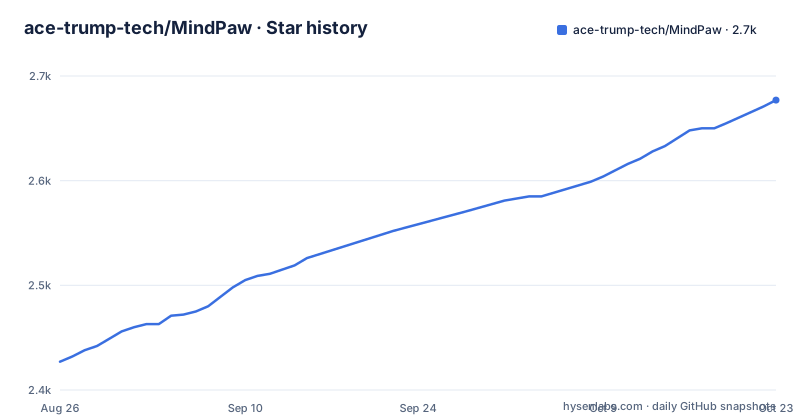
- ace-trump-tech/MindPaw2,677 ★ · +250
| Repository | 2026-08-26 | 2026-10-23 |
|---|---|---|
| ace-trump-tech/MindPaw | 2.4k | 2.7k |
250 Stars in the last 58 days, measured from the daily GitHub snapshot. Compare with other projects
Editorial analysis
What MindPaw Actually Solves
MindPaw addresses a specific gap: most low-cost robot kits are remote-controlled cars, not interactive agents. This project builds a four-legged desktop robot on an ESP8266 that responds to voice commands, recognizes hand gestures, shows emotions on an OLED, and can hold an AI conversation through the Doubao large model. The target user is a beginner who wants to learn how to integrate a microcontroller, servos, a camera, a voice module, and a cloud AI API into one working device. The README emphasizes that the project was built from zero, not from a commercial dev board kit, so the code and docs are meant to teach integration. The total bill of materials is roughly ¥50, with a basic version at ¥35 that drops the camera. That price point is the core value proposition: it makes an interactive robot accessible to students and hobbyists who would not buy a commercial quadruped.
How the Robot Is Wired and Controlled
The hardware centers on an ESP12F module, which is the ESP8266 in a bare form. The README explicitly advises buying the bare module instead of a NodeMCU board because the board costs three times more. Four SG90 servos drive the legs. An SSD1306 OLED displays seven expressions plus weather and time. An OV2640 camera feeds a lightweight MLP for gesture recognition. An HLK-V20 voice module, which the README says is the same as the SU-03T, handles speech commands. A small speaker with an S8050 transistor plays ten sound effects. The data flow is straightforward: the ESP8266 reads input from the voice module, the camera, and a web interface served at 192.168.4.1. It then drives the servos, updates the OLED, and optionally calls the Doubao API for AI responses. The web interface also allows configuration of API keys. The gesture recognition is described as a lightweight MLP, which suggests it runs on the ESP8266 itself, though the README does not specify the inference details. That is a significant constraint: the ESP8266 has very limited RAM and no floating-point unit, so the MLP must be tiny. The README does not state the model size or accuracy, so expect basic gesture detection with possible false positives.
Getting It Running: Firmware, PCB, and Assembly
The README gives a concrete sequence. First, clone the repository: git clone https://github.com/ace-trump-tech/MindPaw.git. Then open the MindPaw_main folder in VSCode with the PlatformIO extension. Compile with pio run, upload with pio run -t upload, and upload the web files with pio run -t uploadfs. To enter programming mode, connect GPIO0 to ground before powering on. After upload, disconnect GPIO0 and press RST. The robot then creates a WiFi access point named MindPaw, and you open 192.168.4.1 in a browser for the remote control interface. For hardware, the README directs you to export Gerber files from the EDA project file MindPaw_SCH&PCB.epro2, then order free PCBs from JLCPCB using their monthly coupon. The 3D models are STL files in the 3Dmodel folder, also printable with a free coupon. Assembly is stepwise: solder the power section first, test 3.3V and 5V, then add the ESP12F, then each module in order. The voice module requires a separate PC-side tool called SU-03T to configure 22 voice commands before it works. The README warns that you need a USB-TTL adapter for that. The AI features are optional: you can skip the Doubao API and still have movement, expressions, and voice control.
The AI Infra Gateway: A Second Path for Researchers
Beyond the basic firmware, the repository includes an optional ai-infra directory that turns the robot into a client of a separate gateway service. This is a Python application using FastAPI and uvicorn. The README positions it for researchers interested in AI infrastructure, edge computing, and agent development. The gateway handles upstream model adaptation, authentication, timeouts, and structured output validation. To run it, you copy .env.example to .env, set GATEWAY_TOKEN, AI_PROVIDER, and the upstream API key, then create a virtual environment and run uvicorn gateway.app:app --host 0.0.0.0 --port 8000. There is also a Docker option: docker compose up --build -d. The robot connects to the gateway by entering the gateway address in the web page at http://192.168.4.1/aiconfig.html. The README notes that you can set AI_PROVIDER to mock if you have no cloud key, which lets you test the device link. This dual-path design is unusual for a hobby robot. It means the same hardware can serve two audiences: beginners who skip the gateway and use the direct Doubao connection, and researchers who want to experiment with model routing and structured output. The README acknowledges that the monorepo is a temporary arrangement, with a plan to split ai-infra into a separate package once the interface stabilizes. That is a honest statement about the current state, but it also means the gateway API may change without notice.
Where It Falls Short: ESP8266 Limits and Documentation Gaps
The most obvious limitation is the ESP8266 itself. This chip has about 80 KB of usable RAM and a single-core 32-bit processor at 80 MHz. Running an MLP for gesture recognition, an OLED, a web server, and a voice module simultaneously is a tight fit. The README does not describe the MLP's memory footprint or inference latency. If you are used to the ESP32, you will find the ESP8266 unforgiving. The gesture recognition is likely limited to a few simple gestures like waving, fist, and pointing, as listed in the feature table. Accuracy is not specified, so do not expect robust recognition in poor lighting. Another gap is the documentation: the README has two steps both labeled '第四步' (step four), one for configuring APIs and one for starting the AI Infra gateway. That is a minor editorial error, but it signals that the docs may not be fully polished. The voice module configuration requires a separate tool and a 22-command table, which is not in the README itself but in Docs/07_API_Guide.md. If that document is incomplete, the voice feature will not work. Also, the README states that the HLK-V20 is the same as the SU-03T, but that claim needs verification before you buy, because the modules may have different firmware or pinouts.
Comparing to Alternatives: ESP32 Robots and Dedicated Kits
The closest alternative is any ESP32-based quadruped or robot kit. The ESP32 offers more RAM (about 320 KB), dual cores, and built-in Bluetooth, plus more GPIO pins. A project like that would allow a larger gesture model, faster web serving, and the possibility of over-the-air updates. The trade-off is cost: an ESP32 module is typically two to three times the price of an ESP12F, which would push the bill of materials above the ¥50 target. Another alternative is to skip the camera entirely and use a pure voice-controlled robot, which is exactly what the basic version of MindPaw offers at ¥35. That path avoids the MLP complexity and the OV2640's FIFO-less interface, which can be tricky to handle on an ESP8266. For AI chat, you could also use a simpler approach: a Raspberry Pi Pico W with a microphone and a cloud API, but that lacks the servos and the mechanical design. The key difference is that MindPaw is a complete, from-scratch design with PCB and 3D files included, whereas many alternatives are based on commercial chassis or require you to design your own structure. That completeness is the main reason to choose MindPaw over a generic ESP32 robot tutorial.
Maintenance, Upgrades, and License Considerations
The repository has no release tags and no recorded last push date in the provided material, so the maintenance status is unclear. The README mentions a plan to split ai-infra into a separate repository, which would be a breaking change for anyone relying on the current monorepo layout. The firmware is written in C++ with PlatformIO, so updating dependencies is straightforward via the platformio.ini file, but the README does not show that file's contents. The hardware is modular: you can start with the basic version and add the camera later, which is a sensible upgrade path. The license field is listed as unknown, which is a red flag for adoption. The README has a LICENSE file link, but its content is not described. Without a clear open-source license, you cannot legally reuse the code, PCB, or 3D files in your own projects, even though the README says '全开源' (fully open source). That is a contradiction: the claim of full open source is meaningless without a license identifier. Before using this project, verify the actual license text in the LICENSE file. If it is missing or proprietary, treat the code as all-rights-reserved. This is a practical concern, not a legal opinion: no license means no permission to copy or modify.
Editorial conclusion
MindPaw suits hobbyists, students, and embedded-AI researchers who want a from-scratch quadruped project with voice, gesture, and AI chat for under ¥50 in parts. It is not for anyone expecting a polished consumer toy or a production-grade robotics platform: the ESP8266 has limited RAM, the camera gesture model is a lightweight MLP, and the AI features require external API keys. Before adopting, verify the current state of the docs (especially the firmware flashing guide and the SU-03T command table) because the README contains a duplicate step number, and confirm that the HLK-V20 module you buy is the same as the SU-03T as claimed. If you want a simpler path, skip the ai-infra gateway and use the direct Doubao connection; if you need a more capable robot, look at ESP32-based projects with more GPIO and memory.
Frequently asked questions
What is MindPaw?
A desktop sized quadruped robot built on an ESP8266 microcontroller, with voice interaction through an HLK-V20 or SU-03T module, gesture recognition through an OV2640 camera, chatbot dialogue through a large language model API, an OLED expression display, and a web control interface served at 192.168.4.1 once the device joins its own WiFi network.
How much does it cost to build a MindPaw?
The parts total is listed at about 50 yuan for the full build with a camera and about 35 yuan without it, with the prices taken from real listings in July 2026. Three lines are priced at zero because they are covered by free board and printing coupons, and shipping of roughly 8 yuan is not included in either figure.
Do I need Python or Docker to use MindPaw?
Not for the basic build. The page states that beginners need neither Python nor Docker nor an AI gateway for the demonstration firmware. Python with a virtual environment, or a Docker compose run, is only needed for the optional ai-infra gateway layer, which handles upstream model adaptation, authentication, timeouts and structured output checks.
What is the MindPaw streaming 3D reconstruction feature?
A version 2.0 perception layer that streams camera frames to an edge gateway so the robot can sense obstacle distance and avoid obstacles, with a sparse point cloud in the browser. It is disabled by default and is enabled by filling a recon gateway address into the configuration page, and the end to end timing is described as about 150 milliseconds with no measurement method given.
What licence applies to MindPaw?
The repository metadata reports the licence as unknown, and the root contains both a LICENSE file and a separate CONTENT-LICENSE.md. The page does not explain whether documentation and images are under different terms from the source code.
Official sources
Add this badge to your README
If you maintain this project, the badge below links readers to this analysis and shows its maintenance status from the daily GitHub snapshot. Paste the markdown into your README; add ?metric=license or ?metric=stars to the image URL for a different field.

[](https://hysenlabs.com/projects/ace-trump-tech-mindpaw)Star history chart for your README
[](https://hysenlabs.com/projects/ace-trump-tech-mindpaw)Was this useful?