VNCCS in ComfyUI: four steps from one portrait to a sprite sheet
Visual Novel Character Creation Suite is a comprehensive tool for creating character sprites for visual novels. It allows you to create unique characters with a consistent appearance across all images, which was previously a challenging task when using neural networks.
At a glance
- What is it?
- ComfyUI_VNCCS is a custom node pack that turns a single character image into posed and costumed sprites through model downloads picked in a control center, then stores poses, emotions and outfits as reusable data. It suits visual novel artists who are tired of re-describing the same face, and it requires a ComfyUI setup plus downloadable pose and outfit models.
- Who is it for?
- VNCCS is worth the setup for a solo artist or a small team that already runs ComfyUI on a GPU with room for several checkpoints, and it is the wrong tool for a machine that cannot hold them or for anyone who needs reproducible sprites without babysitting a model download.
- Can I use it commercially?
- Yes. MIT is a permissive licence: you can use, modify and sell software built on it, as long as you keep its copyright and licence notices.
- Is it still maintained?
- Yes. The repository received new commits within the last day.
- What is it written in?
- Mainly Python, according to GitHub's language statistics.
Answers come from the project's GitHub data, last synced on November 7, 2026, and from our analysis. They are not legal advice.
Star history
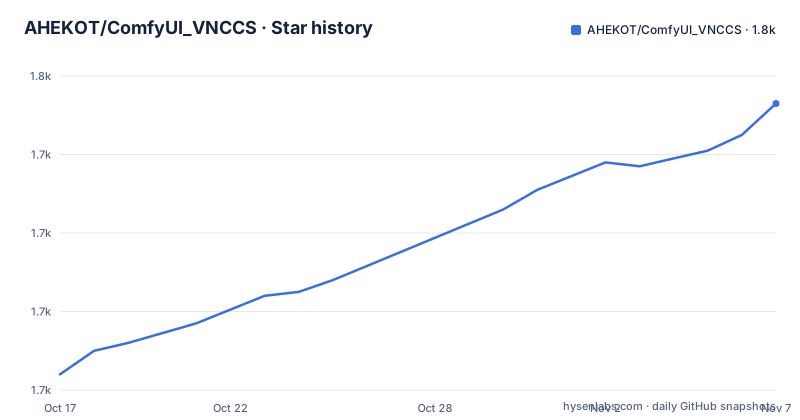
- AHEKOT/ComfyUI_VNCCS1,753 ★ · +69
| Repository | 2026-10-17 | 2026-11-07 |
|---|---|---|
| AHEKOT/ComfyUI_VNCCS | 1.7k | 1.8k |
69 Stars in the last 21 days, measured from the daily GitHub snapshot. Compare with other projects
Editorial analysis
The problem: one face that survives a hundred prompts
A neural image model will happily draw a pretty stranger. Holding that stranger identical across a dozen poses, outfits and emotions is the hard part, and it is where most character-art workflows break down. VNCCS targets that gap specifically, and it is not a generic prompt helper. The project describes itself as a pipeline for character sprites rather than a single workflow for consistency, which is a distinction worth keeping in mind before you install anything.
The scope is the visual novel sprite sheet: a character rendered in multiple poses, wardrobe options and emotional states that a game engine can swap at runtime. The scope is not illustration, backgrounds or animation. Everything in the repository is oriented toward keeping a single character object alive across images, which is why the package carries its own emotion configuration directory and its own pose utilities instead of leaving those to ComfyUI internals.
The audience is ComfyUI users. There is no standalone application, no CLI and no server component; the whole thing lives inside a node graph. If you have never opened ComfyUI, this is the wrong entry point, and the project says so indirectly by splitting its install instructions into a new user path and an experienced user path.
Four downloads and a Control Center that decides the whole pipeline
The design choice that separates VNCCS from a pile of custom nodes is where the models live. The VNCCS Control Center holds the pose and outfit models and lets you Download the ones your hardware can carry. Three are named in the workflow guide. Qwen Image 2.1 changes poses and clothing from a finished character image and can produce a transparent background, which removes the green screen step. Flux Klein9b produces sprites in four steps, which is the option to reach for while you are still iterating. MiniMax H3 is a video model that the guide still recommends trying for poses and clothes.
That choice propagates. You pick the pose model in the Control Center, then pick the generation model in VNCCS Character Creator V2, and the two decisions shape everything downstream. Illustrious is described as older but paired with a large LoRA catalog. Anima is newer and broader but heavier, with fewer LoRAs. Qwen Image 2.1 appears in both roles, and its Turbo option reduces generation steps. The README explicitly tells you to try all three and pick, so the project offers no single blessed path.
The repository root backs this up: control_center.json holds the registry, nodes/ holds the node implementations, pose_utils/ and presets/ hold the pose and preset data, and workflows/ holds the JSON graphs you open in ComfyUI.
Installing into custom_nodes and letting Comfy Manager fill the gaps
Experienced users install from ComfyUI's Custom Nodes Manager by finding VNCCS - Visual Novel Character Creation Suite and choosing the latest version. The manual path is a clone into the custom_nodes directory followed by a dependency install, and the README walks it step by step:
git clone https://github.com/AHEKOT/ComfyUI_VNCCS.git
cd ComfyUI_VNCCS_Utils
pip install -r requirements.txt
After either route you still start ComfyUI, open Comfy Manager, and click Install missing custom nodes. That step is not optional in the docs, which is a hint that VNCCS depends on sibling packs it does not vendor itself.
New users are pointed at a separate repository, VNCCS Easy-Install, described as installing ComfyUI with a preconfigured setup and working VNCCS nodes. That is a useful shortcut but it also means two repositories are involved and two sets of versions can drift.
The dependency list is heavy and mostly GPU-oriented: torch, torchvision, timm, transformers, kornia, opencv-python, Pillow, pymatting, transparent-background, safetensors, einops, aiohttp, json_repair, numpy, huggingface-hub[torch]>=0.22 and llama-cpp-python>=0.3.16. pyproject.toml carries the same list under the project name vnccs with a MIT license file, and it also registers the pack with the Comfy Registry under the PublisherId vnccs.
Writing a character, by hand or through the wizard
Once the models are in place you open VNCCS_3.0_Step1_CharacterCreator.json. Press NEW to create a character and give it a name, which the guide insists on more than once. From there you have two routes. You can fill descriptions manually, or use pencil buttons for curated presets covering race, skin tone, body type, face, hair, eyes and details, plus sex, age and generation type. An NSFW switch decides whether the base character is clothed. Alternatively CHARACTER WIZARD takes a natural language description and fills the options itself, and the guide tells you to check what it set.
Race presets carry natural language anatomy descriptions that are appended automatically to the generation prompt for Illustrious, Anima and Qwen Image 2.1. Multiple species can be combined for hybrids, custom traits can be typed, and explicit prompt text takes priority over preset defaults. Creator V2 reads character_template/character_presets_v2.json while the older catalog stays available to Character Cloner. GENERATE PREVIEW renders a quick look without restarting a full generation, which is the button you will press most in practice.
The style library writes user files back into the node directory
Styles live in character_template/character_styles.json with 1024x1024 WebP previews in character_template/style_previews/. Custom style or New style opens a form for a name, short description, reference and style prompt. Save style files it into My styles, and Generate preview saves it and renders a single square portrait at seed 0 using the current character tags and generation settings, with Resolution scale controlling render quality before the result is resized.
The detail that matters for anyone with a shared checkout: previews are composited onto the same dark gradient as the built-in cards, written as opaque WebP at quality 90 inside the node directory, and deliberately not routed through ComfyUI's output directory. User styles and previews are kept in character_template/character_styles.user.json and user_*.webp files next to the built-in images, and both are excluded from Git and from packaged updates. Built-in styles cannot be deleted; user styles open a confirmation dialog on the x button, and deleting the active style drops the Creator back to its default style.
The 3.0 migration step that can lose characters if rushed
Projects that jump a major version usually leave old data behind. VNCCS does not. If you used a version before 3.0, your characters survive but need converting. Open VNCCS_MigrationAssistant.json, select the characters, click migrate, and the suite transfers them into the new format. The README then shouts in capitals that you must make sure they work correctly before deleting the old folder.
That warning is the most concrete failure mode in the documentation. Migration writes new files next to the old ones, so a broken run leaves two sets of character data and no documented way to tell from the interface which one the node is currently reading. The repository does contain tests/ and a scripts/ directory, and release 3.0.3 shipped a Changelog, but the docs give no rollback procedure for a migration that produced the wrong result.
The version numbering also moves independently of the README's step numbers. Tagged releases include 3.2.0 and 3.2.3 in early October 2026 and 3.0.3 in July, while pyproject.toml sits at version 3.2.4, so the packaged version can be ahead of the most recent tag.
Where this fits against a plain ComfyUI graph
The difference is that VNCCS encodes the sprite workflow as a product: a model registry with a download button, a character record with race and body presets, a style library with its own persistence, and pose utilities that live in the repository rather than in your graph.
The tradeoff is control. Because the Control Center decides which pose model the run uses, and the generation model is chosen from a fixed set, you are inside a directed pipeline rather than an open graph. Community work such as LoRA ecosystems for Illustrious is an argument for that choice, since preset characters benefit from an existing LoRA catalog. If you need a model the Control Center does not list, or you need to intercept the conditioning at an arbitrary point, the suite is in the way. The README does not document a way to add an arbitrary model to the registry.
Cost of staying current, and what MIT covers
The last push was on 2026-10-15, so the repository is being changed at the moment you are reading this, and two releases landed in the first week of October 2026. That pace is a feature for a suite that depends on fast moving checkpoints and a real cost for anyone with tuned workflows: your graphs reference node names that a major release can rename, and the 3.0 migration is proof that a minor looking upgrade can cost an afternoon.
The license is MIT, declared both in the LICENSE file and in pyproject.toml, so redistribution and modification carry the usual notice obligations and no warranty. That covers the pack's own code. It does not cover the licenses of the checkpoints you download through the Control Center, which come from their own sources and carry their own terms. Read those separately before shipping generated sprites commercially.
Editorial conclusion
VNCCS is worth the setup for a solo artist or a small team that already runs ComfyUI on a GPU with room for several checkpoints, and it is the wrong tool for a machine that cannot hold them or for anyone who needs reproducible sprites without babysitting a model download. Before committing, open VNCCS_Easy-Install, read control_center.json to see which checkpoint each pose model expects, and run one character through the migration assistant if you have pre-3.0 data, keeping the old folder until the new output looks right.
Frequently asked questions
How do I install VNCCS in ComfyUI?
Experienced users find VNCCS - Visual Novel Character Creation Suite in the Custom Nodes Manager and install the latest version. Manual installs clone the repository into ComfyUI/custom_nodes/ and run pip install -r requirements.txt, and Comfy Manager's Install missing custom nodes is still required afterwards. New users are directed to the separate VNCCS Easy-Install repository.
Do my old VNCCS characters work after the 3.0 update?
They are preserved but not converted automatically. Open VNCCS_MigrationAssistant.json, select your characters and click migrate, then verify the results before deleting the old folder, which the README insists on in capitals.
Which pose and generation models should I pick?
Qwen Image 2.1 handles pose and clothing changes and can return a transparent background, Flux Klein9b renders sprites in four steps, and MiniMax H3 is a video model the guide also suggests. On the generation side the guide recommends trying Illustrious, Anima and Qwen Image 2.1 before deciding.
Where are my custom styles saved?
User styles go to character_template/character_styles.user.json, with user_*.webp previews stored alongside the built-in images in character_template/style_previews/. Those files are excluded from Git and from packaged updates, and previews are written inside the node directory rather than ComfyUI's output directory.
Official sources
Add this badge to your README
If you maintain this project, the badge below links readers to this analysis and shows its maintenance status from the daily GitHub snapshot. Paste the markdown into your README; add ?metric=license or ?metric=stars to the image URL for a different field.

[](https://hysenlabs.com/projects/ahekot-comfyui-vnccs)Star history chart for your README
[](https://hysenlabs.com/projects/ahekot-comfyui-vnccs)Was this useful?