Alibaba-Quark/LiveAvatar: a 14B diffusion model that streams talking-head video at 45 FPS
[ECCV 2026 Spotlight] Implementation of "Live Avatar: Streaming Real-time Audio-Driven Avatar Generation with Infinite Length"
At a glance
- What is it?
- LiveAvatar is Alibaba Quark's Apache-2.0 research release for real-time, infinite-length audio-driven avatar video. It is a multi-GPU diffusion pipeline, not a hosted avatar product, and the README's own todo list shows what is still missing.
- Who is it for?
- Adopt LiveAvatar if you have at least one 80GB GPU and want to study or extend a streaming diffusion avatar pipeline in Python; the single-GPU script is the honest starting point, and the multi-GPU script is for H800-class hardware. Do not adopt it if you need a finished product with a UI, TTS, or a training recipe, because the todo list still marks those as open.
- Can I use it commercially?
- Yes. Apache-2.0 is a permissive licence: you can use, modify and sell software built on it, as long as you keep its copyright and licence notices.
- Is it still maintained?
- Yes. The repository last received commits 91 days ago.
- What is it written in?
- Mainly Python, according to GitHub's language statistics.
Answers come from the project's GitHub data, last synced on November 23, 2026, and from our analysis. They are not legal advice.
Star history
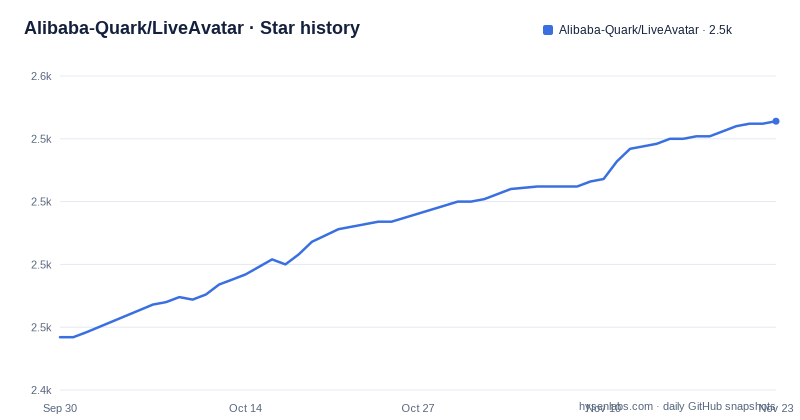
- Alibaba-Quark/LiveAvatar2,532 ★ · +86
| Repository | 2026-09-30 | 2026-11-23 |
|---|---|---|
| Alibaba-Quark/LiveAvatar | 2.4k | 2.5k |
86 Stars in the last 54 days, measured from the daily GitHub snapshot. Compare with other projects
Editorial analysis
The gap LiveAvatar is trying to close: long, low-latency, audio-driven video
Most audio-driven avatar systems are built for clips. You supply a portrait and a waveform, the model generates a fixed number of frames, and the process stops. That design is fine for a demo and useless for a conversation, because a conversation has no known end and cannot wait for a batch to finish.
LiveAvatar is aimed at the streaming case. The README describes it as an algorithm and system co-designed framework for real-time, streaming, infinite-length interactive avatar video generation, and the headline numbers are 45 FPS on multi-card H800 GPUs with 4-step sampling, plus Block-wise Autoregressive processing for 10,000+ second streaming videos. The intended user is a researcher or engineer with datacenter GPUs who wants to run or extend that pipeline, not someone looking for a web app that turns a photo into a talking head.
The repository is Python, licensed Apache-2.0, and was last pushed on 2026-08-24. The paper is on arXiv as 2512.04677 and the model weights are published on Hugging Face under Quark-Vision/Live-Avatar.
How the streaming pipeline is put together
Two mechanisms do most of the work, according to the README. The first is distribution-matching distillation to 4 steps, which is what makes a 14B-parameter diffusion model fast enough to be useful per frame. The second is timestep-forcing pipeline parallelism, which spreads the work across cards so that generation can overlap with playback instead of blocking it.
The repository layout reflects this split. There are two shell entry points for inference, infinite_inference_single_gpu.sh and infinite_inference_multi_gpu.sh, and two for the web interface, gradio_single_gpu.sh and gradio_multi_gpu.sh. The liveavatar/ directory holds the implementation and minimal_inference/ holds a smaller path, which suggests the project intends a lighter route for people who do not want the full stack. A separate streaming VAE is listed as integrated in the todo list, and the README notes FP8 quantization as the change that brought inference down to 48GB GPUs, with compilation and cuDNN attention contributing to the reported speed-up.
The important architectural consequence is that the system is autoregressive in blocks. Length is not a fixed parameter you set at launch. That is what makes the 10,000+ second claim possible, and it is also why the memory profile depends on how long you let it run rather than only on the model size.
Installing LiveAvatar and running a first inference
The README gives a conda-based setup. The environment is Python 3.10, and the CUDA dependencies are marked optional, so you can skip that step if your driver already provides a working toolkit.
conda create -n liveavatar python=3.10 -y
conda activate liveavatar
conda install nvidia/label/cuda-12.4.1::cuda -y
conda install -c nvidia/label/cuda-12.4.1 cudatoolkit -y
PyTorch is pinned to 2.8.0 with torchvision 0.23.0 from the cu128 index. The README then branches on hardware: Hopper cards such as H800 and H200 are told to use FlashAttention 3, everything else FlashAttention 2. Note that the FlashAttention 3 wheel index is a third-party GitHub Pages link, not an official PyTorch channel.
pip install torch==2.8.0 torchvision==0.23.0 --index-url https://download.pytorch.org/whl/cu128
pip install flash_attn_3 --find-links https://windreamer.github.io/flash-attention3-wheels/cu128_torch280 --extra-index-url https://download.pytorch.org/whl/cu128
pip install flash-attn==2.8.3 --no-build-isolation
The remaining Python dependencies are in requirements.txt at the repository root, and the README's installation section continues into an "Insta" step that is cut off in the published text, so read the file itself rather than trusting a summary. Once the environment resolves, the single-GPU script is the sensible first run. The README says it was released so that a single 80GB VRAM GPU is enough, with no need for five H800s.
bash infinite_inference_single_gpu.shThe examples/ directory ships paired inputs you can point it at: examples/boy.jpg with examples/boy.wav, examples/cyclops_baker.jpg with examples/cyclops_baker.wav, and several more portrait and audio pairs. Expect a long first-run download of the Hugging Face weights before any frames appear.
Where LiveAvatar will not work for you
The hardware floor is the first constraint and it is not negotiable. The README's v1.1 note says FP8 quantization enables inference on 48GB GPUs, and the single-GPU release is described as needing 80GB of VRAM. Anything below that is outside the documented envelope, and the multi-GPU path assumes H800-class cards.
TTS is not included. The todo list has "TTS integration" as an unchecked item, which means you supply the audio yourself. If your goal is text in, talking head out, you are assembling two systems, and the seam between them is yours to manage.
Training code is also unchecked, as is UI integration for streaming interaction and the v1.2 milestone. So the repository gives you inference and a Gradio interface, not a way to fine-tune on your own subject. The generalization claims in the README cover cartoon characters, singing and diverse scenarios, but there is no documented recipe for adapting the model to a specific person beyond what the released weights already handle.
Finally, the project is a research release with no published releases in the repository. There is no versioned artifact to pin against, so reproducibility depends on the state of main.
How it differs from hosted avatar services
The search results around this project are dominated by HeyGen, and that comparison is worth making explicit because the two things are not substitutes. HeyGen is a hosted product: you upload or choose an avatar, send text or audio through an API, and receive video, with the GPU cost, the TTS layer and the interface all handled for you. LiveAvatar is the opposite arrangement. You own the weights, the environment and the inference loop, and in exchange you get to inspect and modify the generation process.
The trade is stark in both directions. A hosted service works immediately on a laptop and gives you nothing to tune. LiveAvatar gives you a 14B diffusion model with 4-step distillation and pipeline parallelism that you can change, but it requires datacenter hardware and a working Python environment before the first frame exists. If your question is "what does this model do when I change the sampling schedule," only the second option answers it. If your question is "how do I get a talking avatar on my website this week," the first one does.
Licence, maintenance and what an upgrade actually costs
The repository is Apache-2.0, which permits commercial use and modification, but the licence covers the code in this repository. The model weights live separately on Hugging Face at Quark-Vision/Live-Avatar and may carry their own terms; check that page before assuming the same permissions apply. Nothing here is legal advice.
Maintenance is active in the narrow sense that matters: the last push was on 2026-08-24, and the README's news section shows a steady cadence of releases through 2026, including the v1.1 performance work in January and the ECCV 2026 Spotlight acceptance in June. There are no tagged releases, so an upgrade means pulling main and re-resolving dependencies. The pins in requirements.txt make that non-trivial: peft is fixed at exactly 0.17.1 and transformers is capped at 4.51.3, so a newer version of either in your environment will conflict. Budget for a fresh conda environment per upgrade rather than an in-place pip install. The dependency list is long and includes deepspeed, sam2, insightface and openai-whisper, which is a lot of surface area to keep consistent.
Editorial conclusion
Adopt LiveAvatar if you have at least one 80GB GPU and want to study or extend a streaming diffusion avatar pipeline in Python; the single-GPU script is the honest starting point, and the multi-GPU script is for H800-class hardware. Do not adopt it if you need a finished product with a UI, TTS, or a training recipe, because the todo list still marks those as open. Before committing, open requirements.txt and check that peft==0.17.1 and transformers<=4.51.3 resolve against your existing environment, then confirm you can download the Hugging Face weights at Quark-Vision/Live-Avatar.
Frequently asked questions
What is a live avatar in the context of the LiveAvatar project?
It is an audio-driven talking-head video generated in a streaming, autoregressive way rather than as a fixed-length clip. The README describes it as real-time, streaming, infinite-length interactive avatar video generation, with 10,000+ second continuous output supported.
Is LiveAvatar free to use?
The code in the repository is released under Apache-2.0, so there is no licence fee for the code. The model weights are hosted separately on Hugging Face at Quark-Vision/Live-Avatar, and the README does not state terms for those, so check that page. The real cost is hardware: the single-GPU path is documented as needing 80GB of VRAM.
How does LiveAvatar compare with HeyGen's live avatar?
HeyGen is a hosted service, while LiveAvatar is a self-hosted research release you run yourself. The README positions LiveAvatar as an algorithm and system co-designed framework with a 14B diffusion model, 4-step sampling and multi-card H800 support, which is a different arrangement from an API that returns finished video.
What is HeyGen's live avatar and how is it related to LiveAvatar?
HeyGen's live avatar is a hosted commercial service, and the LiveAvatar README does not describe any relationship between the two. The association appears only because people search for both terms together; the projects are separate.
Is there an alternative to LiveAvatar for running an avatar model yourself?
The LiveAvatar README documents only LiveAvatar itself, so it cannot name a self-hosted alternative with confidence. What it does establish is the shape of the trade: LiveAvatar gives you the weights and the inference loop, while a hosted service such as HeyGen gives you the output without the hardware.
Official sources
Add this badge to your README
If you maintain this project, the badge below links readers to this analysis and shows its maintenance status from the daily GitHub snapshot. Paste the markdown into your README; add ?metric=license or ?metric=stars to the image URL for a different field.

[](https://hysenlabs.com/projects/alibaba-quark-liveavatar)Star history chart for your README
[](https://hysenlabs.com/projects/alibaba-quark-liveavatar)Was this useful?