Apache Gravitino: A Federated Metadata Lake with Direct Connectors and REST Catalogs
Project brief: World's most powerful open data catalog for building a high-performance, geo-distributed and federated metadata lake.
At a glance
- What is it?
- Apache Gravitino is a Java-based metadata lake that unifies catalogs across Hive, MySQL, S3, and more. It offers direct metadata integration and native Iceberg and Lance REST catalog services, but its geo-distribution claims need careful verification.
- Who is it for?
- Adopt Apache Gravitino if you need a single metadata API across Hive, MySQL, S3, and similar sources, especially with Trino or Spark, and if you want built-in Iceberg or Lance REST catalog services. Skip it if your environment is Windows-only, since the build does not support Windows, or if you require mature AI asset management, which is still work in progress.
- Can I use it commercially?
- Yes. Apache-2.0 is a permissive licence: you can use, modify and sell software built on it, as long as you keep its copyright and licence notices.
- Is it still maintained?
- Yes. The repository last received commits 1 day ago.
- What is it written in?
- Mainly Java, according to GitHub's language statistics.
Answers come from the project's GitHub data, last synced on November 14, 2026, and from our analysis. They are not legal advice.
Star history
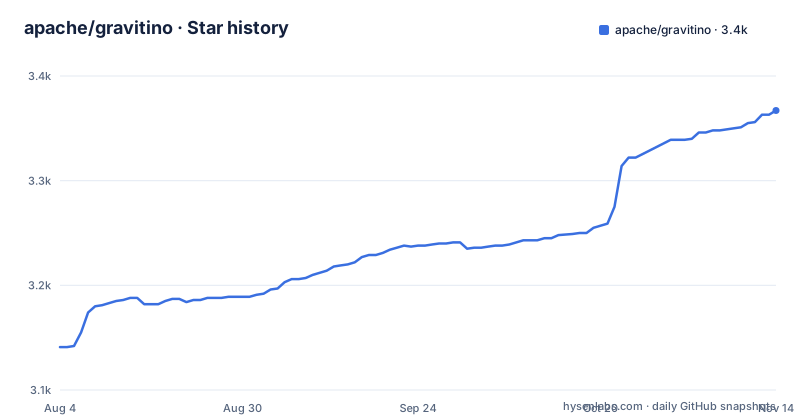
- apache/gravitino3,367 ★ · +226
| Repository | 2026-08-04 | 2026-11-14 |
|---|---|---|
| apache/gravitino | 3.1k | 3.4k |
226 Stars in the last 102 days, measured from the daily GitHub snapshot. Compare with other projects
Editorial analysis
What Problem Does Gravitino Actually Solve?
Gravitino targets the messy reality of modern data stacks where metadata lives in many places: Hive metastores, MySQL databases, object stores like S3, and HDFS. The README calls it a federated metadata lake, meaning it gives you one model and one API to manage metadata across these sources. The problem it solves is the fragmentation of metadata access. Data engineers and platform teams often need to query catalogs from multiple engines, and each source has its own API and semantics. Gravitino promises unified access without requiring you to modify SQL dialects in your query engines. The target audience is teams running hybrid or multi-cloud architectures, or those doing federated discovery across data lakes and warehouses. It is also aimed at organizations that want to govern both data and AI assets, though the AI part is explicitly marked as work in progress.
Direct Metadata Integration: The Core Mechanism
The key architectural claim is direct metadata integration. The README states that changes in underlying systems are immediately reflected via Gravitino's connectors. This is different from a caching or synchronization approach. Instead of copying metadata into a central store and then serving it, Gravitino reads and writes metadata directly in the source systems. That means when a table is created in Hive, Gravitino sees it right away, because it is actually looking at Hive's metadata. The same applies to MySQL, MariaDB, HDFS, and S3. This design has a clear advantage: no lag between the source and the unified view. But it also means Gravitino's reliability depends on the connectors for each source. If a connector is incomplete or breaks, your unified access breaks. The README does not list which connectors are production-ready, so you have to check the documentation for that.
Getting It Running: Commands and Configuration
The quick start is straightforward. You download a binary release, edit conf/gravitino.conf, and start the server with ./bin/gravitino.sh start. Stopping uses ./bin/gravitino.sh stop. There is an optional UI switch controlled by the GRAVITINO_USE_WEB_V2 environment variable. By default, Gravitino uses Web V2. To go back to the legacy v1 UI, you set GRAVITINO_USE_WEB_V2=false and restart. The README also mentions a Docker Compose playground in a separate repository, which is recommended for a full-stack experience. For building from source, you use Gradle. A clean build without tests is ./gradlew clean build -x test. To build a distribution, run ./gradlew compileDistribution -x test. You can skip the Web UI builds with -PskipWebBuild=true. Artifacts go to the distribution/ directory. Windows is not supported for building, which is a real constraint for some teams.
Native REST Catalog Services: Iceberg and Lance
Gravitino ships with a native Iceberg REST catalog service and a Lance REST catalog service. This is notable because it means Gravitino can act as a drop-in catalog for engines that speak the Iceberg REST protocol. The README points to separate documentation pages for each. The Iceberg REST catalog is significant because Iceberg is a widely adopted table format, and having a REST catalog server is a common requirement for query engines like Spark or Flink. Lance is a newer format for vector and multimodal data, which aligns with the AI asset management direction. The existence of these services suggests Gravitino is not just a metadata proxy but also a server that implements catalog protocols. The README does not give details on how these services are configured, so you would need to read the linked docs. But the fact that they are native, not wrappers, is a differentiator.
Trino Connector: Federated Access Without SQL Changes
Gravitino includes a Trino connector for federated metadata access. The README says it integrates with query engines without modifying SQL dialects. That means you can point Trino at Gravitino and query tables across Hive, MySQL, and S3 using the same SQL syntax. The connector is a concrete integration point that makes Gravitino useful in practice. The documentation link for the Trino connector is provided, and that is where you would find installation and configuration details. This is a practical way to evaluate Gravitino: set up the connector in Trino and see if your existing queries work unchanged. The README does not mention Spark explicitly in the integration list, but the use cases section says 'engines like Trino or Spark,' so Spark support may exist but is not detailed here.
Geo-Distribution and Governance: Claims vs. Evidence
The README lists geo-distribution support as a key feature: share metadata across regions and clouds to support global architectures. It also mentions end-to-end data governance, including access control, auditing, and discovery. These are bold claims. However, the README gives no mechanism details. How does geo-distribution work? Is it active-active replication, or just the ability to have multiple Gravitino instances pointing to the same sources? The documentation is not in this material, so you cannot verify the architecture. Similarly, access control and auditing are mentioned but not explained. This is a limitation of the information, not necessarily of the product. But for an engineer evaluating adoption, the lack of specifics is a red flag. You should read the governance documentation carefully before trusting these features in production.
Limitations and Wrong Tool Scenarios
One clear limitation is that Windows is not supported for building from source. If your team develops on Windows, you cannot build Gravitino locally, though you might still run the binary release. Another limitation is that AI asset management is work in progress. If you need production-ready model lineage or feature tracking, Gravitino is not there yet. The direct metadata integration model also means that Gravitino's behavior is tied to the source systems' metadata APIs. If a source changes its API or has non-standard metadata, the connector may fail. Also, the README does not describe how Gravitino handles conflicts when two sources have the same table name or schema. Federated metadata often has naming collisions, and the README does not address that. So Gravitino may be the wrong tool if you need a fully consistent, ACID-compliant metadata store that snapshots metadata, because it is designed to reflect live sources, not to be a source of truth itself.
Alternatives and How They Differ
A common alternative is a centralized metadata store like Apache Atlas or a data catalog tool like Amundsen. The difference is that those tools typically extract metadata into their own storage and then serve it, which means there is a delay and a risk of staleness. Gravitino's direct integration model is fundamentally different: it does not copy metadata, it reads it live from the sources. Another alternative is using each engine's native catalog, such as Hive Metastore for Hive and the AWS Glue catalog for S3. That approach requires you to manage multiple catalogs and translate between them. Gravitino aims to unify them under one API. The trade-off is that Gravitino adds a layer of complexity and a new server to operate, whereas native catalogs are already there. The choice depends on whether you value a single API over operational simplicity.
Maintenance and Upgrade Cost
Gravitino is an Apache project with a regular release cadence: v1.1.1 in April 2026, v1.2.1 in May 2026, and v1.3.0 in June 2026. That is roughly one release per month, which means frequent upgrades. The README does not mention a migration path or upgrade notes, but the release notes are linked for each version. You should expect to spend time reading those notes and testing upgrades. The build system uses Gradle, and the distribution can be built with or without the Web UI. There is a compileDistribution task and an assembleDistribution task for compressed packages. The maintenance cost includes keeping the server updated, monitoring connector compatibility with your source systems, and managing the Web UI version switch if you rely on the legacy v1 UI. The license is Apache-2.0, which is permissive and does not impose copyleft obligations, but you should review the LICENSE file for any third-party notices.
Editorial conclusion
Adopt Apache Gravitino if you need a single metadata API across Hive, MySQL, S3, and similar sources, especially with Trino or Spark, and if you want built-in Iceberg or Lance REST catalog services. Skip it if your environment is Windows-only, since the build does not support Windows, or if you require mature AI asset management, which is still work in progress. Before committing, verify the geo-distribution behavior in a multi-region deployment, check the exact connector coverage in the latest documentation, and confirm that the Web V2 UI switch meets your operational needs. The direct metadata integration model is the core differentiator, so test it with your actual source systems to see if changes reflect immediately as claimed.
Frequently asked questions
What is Apache Gravitino used for?
It is described as a high-performance, geo-distributed and federated metadata lake. It manages metadata directly in different sources, types and regions and provides unified metadata access for data and AI assets, under the Apache License 2.0.
How do you start Apache Gravitino on your own machine?
Download a binary release from gravitino.apache.org/downloads, extract it, edit conf/gravitino.conf, then run ./bin/gravitino.sh start. The same script stops the server, and the recommended alternative is the Docker Compose playground in the separate apache/gravitino-playground repository.
Can you build Apache Gravitino from source on Windows?
No. The README states that Gravitino uses Gradle and that Windows is not currently supported. On Windows the documented options are the prebuilt binary release or the Docker Compose based playground.
How do you switch Apache Gravitino back to the legacy web UI?
Web V2 is the default. Set GRAVITINO_USE_WEB_V2 to false in conf/gravitino-env.sh or in the environment before starting, then run ./bin/gravitino.sh restart, since the switch is not applied to a running process.
Does Apache Gravitino support AI model and feature tracking today?
The feature list marks AI Asset Management as WIP while describing it as support for AI model and feature tracking. The introduction and the use cases already speak of unified access for data and AI assets and of AI model lineage, so the positioning runs ahead of that entry.
Official sources
Add this badge to your README
If you maintain this project, the badge below links readers to this analysis and shows its maintenance status from the daily GitHub snapshot. Paste the markdown into your README; add ?metric=license or ?metric=stars to the image URL for a different field.

[](https://hysenlabs.com/projects/apache-gravitino)Star history chart for your README
[](https://hysenlabs.com/projects/apache-gravitino)Was this useful?