Hardeneks runs EKS Best Practices checks against a live cluster
Runs checks to see if an EKS cluster follows EKS Best Practices.
At a glance
- What is it?
- Hardeneks is a Python CLI from aws-samples that evaluates an EKS cluster against AWS EKS Best Practices rules, grouped by scope and category, with a config file to narrow the set and four export formats plus Security Hub output. It reports state, it does not change it.
- Who is it for?
- Hardeneks suits platform and security engineers who need a repeatable, exportable read on one EKS cluster and who accept its read-only posture; teams that want findings turned into fixes, multi-cluster coverage in one run, or a stable rule contract should look elsewhere.
- Can I use it commercially?
- Yes. MIT-0 is a permissive licence: you can use, modify and sell software built on it, as long as you keep its copyright and licence notices.
- Is it still maintained?
- Yes. The repository last received commits 7 days ago.
- What is it written in?
- Mainly Python, according to GitHub's language statistics.
Answers come from the project's GitHub data, last synced on November 7, 2026, and from our analysis. They are not legal advice.
Star history
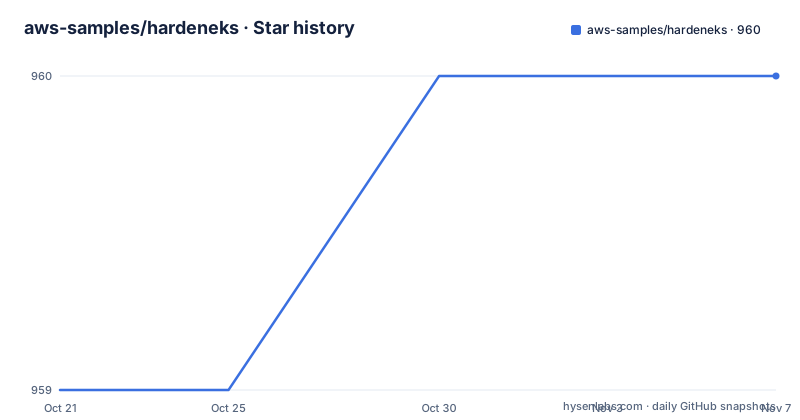
- aws-samples/hardeneks960 ★ · +1
| Repository | 2026-10-21 | 2026-11-07 |
|---|---|---|
| aws-samples/hardeneks | 959 | 960 |
1 Stars in the last 17 days, measured from the daily GitHub snapshot. Compare with other projects
Editorial analysis
What Hardeneks checks and who it is for
Hardeneks answers a single question about a running EKS cluster: does its current configuration follow the AWS EKS Best Practices guidance. It is a command line tool written in Python, published under the aws-samples organization, and it does not install agents, mutate resources, or take over cluster operation. It reads state and produces findings.
The rule set is organised along two axes. Scope separates cluster_wide checks, such as endpoint public access and cluster role wildcards, from namespace_based checks that look at workloads inside namespaces, such as service account token mounts and readiness probes. Category separates security, reliability and scalability. Concrete rule identifiers include disable_anonymous_access_for_cluster_roles, check_endpoint_public_access, ensure_namespace_quotas_exist, use_encryption_with_ebs, check_metrics_server_is_running and check_readiness_probes, and they read like checklist items rather than abstract principles.
That structure targets platform engineers, security engineers and cluster operators who own an EKS cluster and want the same questions asked every time instead of a human rereading a long guidance document. The tooling behind it is visible in the dependency list: kubernetes for the cluster side, boto3 for the AWS side, and typer for the command line.
Getting started: one virtualenv, one pip install, one command
The quick start is short enough to run from memory. Create an isolated environment with a supported Python version, activate it, install the package from PyPI, and run the entry point with no arguments. The default behaviour is to run all the checks, so a bare invocation is already a full scan of the cluster your current kube context points at.
python3.10 -m venv /tmp/.venv   # Or any other supported Python version listed above.
source /tmp/.venv/bin/activate
pip install hardeneks
hardeneks
The console contract is a Typer application, so the usage line and its options are the whole interface:
hardeneks [OPTIONS]* `--region TEXT`: AWS region of the cluster. Ex: us-east-1
* `--context TEXT`: K8s context
* `--cluster TEXT`: EKS Cluster name
* `--namespace TEXT`: Namespace to be checked (default is all namespaces)
* `--config TEXT`: Path to a hardeneks config fileBefore the first run you need to know which context and cluster to point at. The project documents the discovery commands for both, and they are the same two commands you would use anyway.
kubectl config get-contextsaws eks list-clusters --region us-east-1The package requires Python 3.10 or newer, and the release script entry point is a single console command, so nothing has to be installed inside the cluster itself.
The config file narrows the rule set and can silence namespaces
Running everything on every cluster produces noise. The config file is the escape hatch. It has a top-level key for namespaces to skip and a rules tree that lists exactly which checks to run. Namespaces are usually noisy for a reason, since cluster system components are not subject to workload policies.
ignore-namespaces:
  - kube-node-lease
  - kube-public
  - kube-system
  - kube-apiserver
  - karpenter
- kubecost cluster_wide:
security:
iam:
- disable_anonymous_access_for_cluster_roles
- check_endpoint_public_access
- check_aws_node_daemonset_service_account
- check_access_to_instance_profile
- restrict_wildcard_for_cluster_roles
multi_tenancy:
- ensure_namespace_quotas_existThe namespace_based side mirrors the same shape under security and reliability, listing rules such as disallow_container_socket_mount, disallow_host_path_or_make_it_read_only, disable_run_as_root_user, schedule_replicas_across_nodes and run_multiple_replicas.
Two properties are worth noting. First, config is opt-in narrowing: without a file, everything runs. Second, the same mechanism that removes noisy rules also removes real ones, so a config that ignores a namespace silences every namespace_based check inside it, not just the ones you dislike. If you want a shared baseline, treat the config as reviewed code rather than a scratch file.
The permission footprint is read-only but not small
Hardeneks needs credentials on both sides, and the documented policies are the most useful part of the setup documentation because they tell you exactly what the tool reads. The AWS side is a single allow statement over a specific set of read actions: eks:ListClusters, eks:DescribeCluster, eks:DescribeClusterVersions, eks:ListPodIdentityAssociations, ecr:DescribeRepositories, inspector2:BatchGetAccountStatus, ec2:DescribeFlowLogs, ec2:DescribeInstances, plus IAM policy read actions.
                "eks:ListClusters",
                "eks:DescribeCluster",
                "eks:DescribeClusterVersions",
                "eks:ListPodIdentityAssociations",
                "ecr:DescribeRepositories",
                "inspector2:BatchGetAccountStatus",
                "ec2:DescribeFlowLogs",
                "ec2:DescribeInstances"
On the Kubernetes side the minimal ClusterRole is even clearer about intent, because every rule grants list, and serviceaccounts get get.
kind: ClusterRole
apiVersion: rbac.authorization.k8s.io/v1
metadata:
  name: hardeneks-runner
rules:
- apiGroups: [""]
  resources: ["namespaces", "resourcequotas", "persistentvolumes", "pods", "services", "nodes"]
  verbs: ["list"]
- apiGroups: [""]
  resources: ["serviceaccounts"]
  verbs: ["get"]
The wider list verbs cover rbac.authorization.k8s.io objects, networking.k8s.io networkpolicies and storage.k8s.io storageclasses. This is a good property for an audit tool and a bad one for a sandbox: there is no update, patch or create verb anywhere in it, which is also the reason the tool cannot fix what it finds.
Four export formats and a Security Hub destination
Terminal output is the default, and the command line lets you bound the table to a fixed width and height instead of letting it stretch to the terminal size. That matters when the output is piped into a report or pasted into a ticket.
* `--export-txt TEXT`: Export the report in txt format
* `--export-csv TEXT`: Export the report in csv format
* `--export-html TEXT`: Export the report in html format
* `--export-json TEXT`: Export the report in json format
* `--export-security-hub`: Export failed checks to AWS Security Hub
The Security Hub option is the one that changes how the tool fits into a workflow. Rather than leaving findings in a scrollback buffer, failed checks can be pushed as findings into an existing security posture system where they can be triaged and tracked like other detections. The csv and json formats serve the other common need, which is comparing results between clusters or between runs, even though the tool itself keeps no history and offers no diff mode.
One flag deserves a note from a security standpoint: --insecure-skip-tls-verify exists as an option, which tells you TLS verification is enforced by default. Turning it off trades transport integrity for convenience, and it is hard to imagine a good reason to do so against a cluster API endpoint.
The export flags take a path argument each, so one run can produce several formats at once, which is the practical way to feed both a ticket and a dashboard from the same scan.
Where Hardeneks stops: findings without remediation, one cluster at a time
The tool reports. It does not repair. A failed check such as restrict_wildcard_for_cluster_roles produces a finding and, at most, a pointer to the rule; nothing rewrites the role binding for you. That is a deliberate design choice for a read-only auditor, and it also means a clean run is a signal, not a fix.
The second limit is scope. Every option that selects a target, such as --region, --context, --cluster and --namespace, points at one thing at a time. There is no documented mode for scanning an organisation, an account or a fleet of clusters in a single invocation, so covering many clusters means running the tool many times and comparing the exported json yourself.
The third limit is that the rules encode one point of view. Checks such as use_encryption_with_ebs or check_horizontal_pod_autoscaling_exists reflect an AWS opinionated baseline, and some clusters will never satisfy every rule without redesigning workloads for reasons that have nothing to do with security. Because a config file can silence rules, the tool can be made to pass, which is also its main misuse risk: a config that quietly drops hard rules turns a genuine audit into a green report.
Finally, the checks depend on AWS-side facts like flow logs, ECR repositories, Inspector status and pod identity associations. A cluster running in a different account, a disconnected environment or a homegrown Kubernetes distribution will not produce the same findings, and the project targets EKS specifically rather than generic Kubernetes.
Hardeneks versus reading the guidance and inspecting by hand
The manual alternative is real: open the AWS EKS Best Practices guidance, work through the sections, and check each item yourself with kubectl and the AWS CLI. The project documentation itself hands you the discovery commands for that workflow.
kubectl config current-contextaws eks list-clusters --region us-east-1The difference is not depth but repeatability and coverage. By hand, every check is a separate decision, the reasoning is written in a ticket rather than in a machine-readable record, and the answer to the same question in six months cannot be produced without doing the work again. Hardeneks evaluates a named rule set deterministically, encodes that rule set in a config file you can review and version, and writes the result to txt, csv, html or json, or pushes failures into Security Hub where other detections already live.
A second alternative is to lean entirely on cluster-native controls instead of an external auditor. The rule list shows where the two meet: ensure_namespace_psa_exist checks that Pod Security Admission is configured for a namespace. Hardeneks therefore complements admission control rather than replacing it, since admission blocks what is submitted while an audit observes what already exists, including objects created before a policy tightened.
Hardeneks is the better fit when the answer must be repeatable and comparable. Manual review is better when the context matters, when a rule does not fit the workload, or when the cluster is small enough that a person can hold it in their head.
Version cadence, dependencies and the MIT-0 licence
The project is not archived and its last push was on 2026-10-02, so it is being worked on. Release tags tell a shorter story: v1.0.0 and v1.1.0 both landed on 2026-03-23, and v1.1.1 followed on 2026-07-24. The pyproject version field reads 1.1.1, and commitizen is configured to tag v-prefixed releases from conventional commits, which explains the shape of the tags.
Dependencies are narrow: typer, kubernetes and boto3, all with caret ranges, with Python ^3.10 as the floor. The build backend is poetry-core, the formatter is black with a line length of 79, and the test group uses pytest, pytest-cov and tox with tox-gh-actions. The repository carries a CHANGELOG.md alongside the source, tests, scripts and docs directories, so rule-level changes have somewhere to be recorded.
The licence is MIT-0. Compared with plain MIT, MIT-0 removes the attribution condition while keeping the warranty disclaimer, so you can use the tool inside a product or a pipeline without carrying the copyright notice forward. That is a licence fact rather than legal advice; read the LICENSE file before relying on it in a delivery you are accountable for.
Upgrade cost is low for a cluster tool, because nothing is deployed into the cluster. Upgrading is a matter of refreshing the virtualenv, and the compatibility risk sits in the AWS APIs and the Kubernetes client library, not in agents you would have to roll out.
Editorial conclusion
Hardeneks suits platform and security engineers who need a repeatable, exportable read on one EKS cluster and who accept its read-only posture; teams that want findings turned into fixes, multi-cluster coverage in one run, or a stable rule contract should look elsewhere. Before adopting, run it against one non-critical cluster with the documented ClusterRole, compare the reported rule names against your own expectations, and confirm that the rules it flags match the AWS guidance you actually intend to enforce.
Frequently asked questions
Does Hardeneks change anything in my EKS cluster?
No. The minimal ClusterRole it documents grants list and get verbs only, and the command line options cover selecting a target and exporting a report rather than applying changes.
How do I point Hardeneks at a specific cluster and namespace?
Use the --region, --context, --cluster and --namespace options, where namespace defaults to all namespaces. The project shows kubectl config get-contexts and aws eks list-clusters --region us-east-1 as the way to find the values first.
Can Hardeneks send its findings to AWS Security Hub?
Yes, the --export-security-hub option exports failed checks to Security Hub. The same run can write a local file in txt, csv, html or json format using the four matching export options.
Which Python versions does Hardeneks support?
The pyproject.toml requires Python ^3.10, and the quick start creates a virtual environment with python3.10 while noting that any other supported version listed in the documentation works too.
Can I skip certain checks or namespaces?
Yes. A config file passed with --config can list namespaces to ignore and name the exact rules to run under cluster_wide and namespace_based, and the default behaviour with no config file is to run every check.
Official sources
Add this badge to your README
If you maintain this project, the badge below links readers to this analysis and shows its maintenance status from the daily GitHub snapshot. Paste the markdown into your README; add ?metric=license or ?metric=stars to the image URL for a different field.

[](https://hysenlabs.com/projects/aws-samples-hardeneks)Star history chart for your README
[](https://hysenlabs.com/projects/aws-samples-hardeneks)Was this useful?