Bedrock Cosmos Launcher: A Local Proxy for Custom Capes in Minecraft Bedrock
Launcher for the Bedrock Cosmos local proxy on Windows devices.
At a glance
- What is it?
- The Bedrock Cosmos Launcher runs a local proxy on Windows to inject custom capes and skin packs into Minecraft Bedrock Edition. It is a niche tool with a clear dependency stack and an MIT license, but its documentation is thin.
- Who is it for?
- Adopt the Bedrock Cosmos Launcher if you are a Windows Minecraft Bedrock player who wants custom capes or skin packs and is comfortable running a local proxy that decrypts and modifies game traffic. Do not adopt it if you are on a non-Windows platform, if you need detailed documentation, or if you are uncomfortable with the security implications of MITM traffic interception.
- Can I use it commercially?
- Yes. MIT is a permissive licence: you can use, modify and sell software built on it, as long as you keep its copyright and licence notices.
- Is it still maintained?
- Yes. The repository last received commits 4 days ago.
- What is it written in?
- Mainly C#, according to GitHub's language statistics.
Answers come from the project's GitHub data, last synced on October 22, 2026, and from our analysis. They are not legal advice.
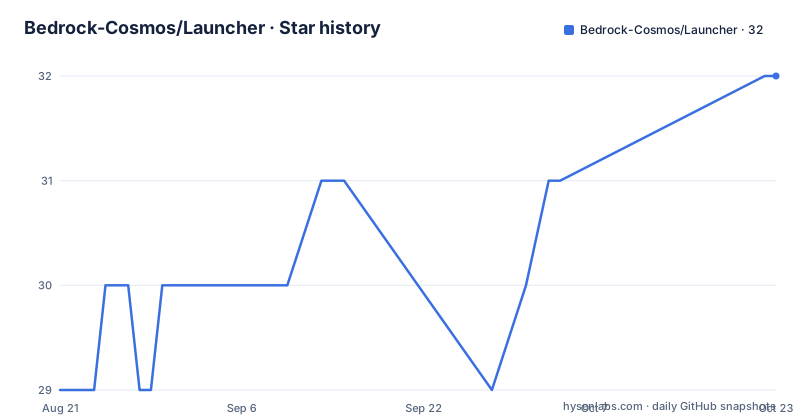
Star history
- Bedrock-Cosmos/Launcher32 ★ · +3
| Repository | 2026-08-21 | 2026-10-22 |
|---|---|---|
| Bedrock-Cosmos/Launcher | 29 | 32 |
3 Stars in the last 62 days, measured from the daily GitHub snapshot. Compare with other projects
Editorial analysis
What the Launcher Actually Does
The Bedrock Cosmos Launcher is a Windows-only application that runs as a local proxy to add custom capes and skin packs to Minecraft Bedrock Edition. It does not modify the game files directly. Instead, it sits between the game and the network, intercepting traffic and altering responses. The README states it acts as a local proxy on your Windows device. That is the entire stated purpose. The tool is for players who want cosmetic customization that the vanilla game does not offer, and it targets a very specific platform: Windows. There is no mention of macOS or Linux support, so those users are out of scope.
The Proxy Mechanism and Its Dependencies
The core mechanism relies on the Titanium.Web.Proxy NuGet package, which allows for the decryption and modification of web traffic. The launcher intercepts HTTPS traffic from Minecraft Bedrock, decrypts it, modifies the payload to inject custom cape or skin data, and re-encrypts it. The README mentions a reference is included in the source code to fix an exception thrown while debugging with the latest NuGet package. That is a notable detail: it suggests the project maintainers had to patch around a dependency issue, which could affect stability. The other dependencies are AutoUpdater NET for self-updates, Discord Rich Presence for showing activity, and System.Text.Json for handling JSON data. The use of System.IO.Compression.FileSystem for extracting Zip files implies that skin packs are distributed as compressed archives.
Getting It Running: What the Material Shows
The README does not provide installation or usage commands. It only lists dependencies and says more documentation is coming soon. That is a real gap. As of the latest push on 2026-08-22, the repository has no setup guide, no command-line instructions, and no configuration keys. The only concrete step you can infer is that you must build the project with the listed NuGet packages restored, likely via dotnet restore or Visual Studio, but that is not stated. The release tags (v1.1.2, v1.1.1, v1.1.0) suggest a compiled binary is available on the releases page, but the README does not describe how to install or launch it. If you are a user who expects a double-click installer, you will be guessing.
The Security and Stability Trade-off
Any local proxy that decrypts traffic is a Man-in-the-Middle (MITM) tool. That has security implications: the launcher can read and modify all traffic from Minecraft Bedrock, which is a privilege that could be abused if the software were compromised. The README does not discuss certificate handling or how the proxy is trusted by the game. That is a genuine limitation. Additionally, the dependency on Titanium.Web.Proxy with a source reference fix suggests that the proxy library can break with updates. The README explicitly notes an exception while debugging with the latest NuGet package, which means the maintainers had to pin or patch the reference. For a tool that intercepts live game traffic, any instability could cause crashes or failed connections.
Who Should Not Use This Tool
This is the wrong tool if you are playing Minecraft Bedrock on a console, mobile device, or non-Windows PC, because the launcher is Windows-only. It is also wrong if you play on a server with strict anti-cheat policies. Modifying network traffic could be flagged as cheating, even if the change is only cosmetic. The README does not mention anti-cheat compatibility, so you cannot assume it is safe. Furthermore, if you are not comfortable with the idea of a third-party proxy decrypting your game traffic, this tool is not for you. The absence of documentation about certificate trust or data handling makes it hard to evaluate the risk.
Alternatives and How They Differ
A common alternative is using a resource pack or behavior pack that adds capes or skins, which is a vanilla-supported method. That approach does not require a proxy; you simply load the pack through Minecraft's settings. The difference is that resource packs are limited to what the game allows, and they do not modify network traffic. Another alternative is a skin editor that changes your character model, but that does not affect other players' views. The Bedrock Cosmos Launcher's approach is fundamentally different: it intercepts server responses to inject data that the game would otherwise reject. That gives it more power, but also more risk. No other tool in the same category is named in the material, so this comparison stands on the mechanism alone.
Maintenance and License Implications
The project is licensed under MIT, which permits free use, modification, and distribution, including commercial use, as long as the license notice is preserved. That is a permissive license, but it does not come with any warranty or support obligation. The repository is not archived, and the last push was on 2026-08-22, which is recent relative to the release of v1.1.2 on the same date. The release cadence (v1.1.0 in May, v1.1.1 in July, v1.1.2 in August) suggests active maintenance. However, the README's promise of more documentation coming soon has not been fulfilled, which raises a question about the project's maturity. The AutoUpdater NET dependency means the launcher can self-update, but that also means you are trusting the maintainers to push safe updates. There is no mention of a changelog or upgrade path, so you should check the release notes on GitHub before each update.
What to Verify Before Adopting
Before you rely on this launcher, verify that the latest release works with your version of Minecraft Bedrock. The proxy intercepts traffic, so a game update could break the interception. Check the GitHub issues for any reports of connection failures or crashes after a Minecraft update. Also, inspect the source code for the Titanium.Web.Proxy reference fix, because the README says the latest NuGet package throws an exception during debugging. That means the project may be using a modified or pinned version of the library, which could be a maintenance burden. Finally, confirm that your Windows environment allows the necessary certificate installation, because a local proxy that decrypts HTTPS traffic typically requires a trusted root certificate. None of these steps are documented in the README, so you must find them in the repository's issues or release notes.
Editorial conclusion
Adopt the Bedrock Cosmos Launcher if you are a Windows Minecraft Bedrock player who wants custom capes or skin packs and is comfortable running a local proxy that decrypts and modifies game traffic. Do not adopt it if you are on a non-Windows platform, if you need detailed documentation, or if you are uncomfortable with the security implications of MITM traffic interception. Before using it, verify the current release (v1.1.2 as of August 2026) works with your Minecraft Bedrock version, check the GitHub issues for any known conflicts with anti-cheat systems, and review the source code for the Titanium.Web.Proxy reference fix, since the README notes an exception during debugging with the latest NuGet package.
Frequently asked questions
What does launcher mean in the Bedrock Cosmos project?
It is the Windows application that runs the proxy, not the proxy configuration itself. The README describes the Bedrock Cosmos Launcher as acting as a local proxy on your Windows device to add custom capes and skin packs to Minecraft Bedrock Edition.
Can the Bedrock Cosmos Launcher be installed on Android?
Nothing in the repository covers Android. The README describes the launcher as acting on a Windows device, and the tree holds a Launcher/ and an Installer/ directory with no mobile build, while the README itself says more documentation will be coming soon.
Which launcher is best, and how does Bedrock Cosmos compare?
The repository makes no comparison of its own. What it states is the mechanism: it proxies web traffic on Windows, using Titanium Web Proxy for decryption and modification, so that custom capes and skin packs can be added to Minecraft Bedrock Edition.
Official sources
Add this badge to your README
If you maintain this project, the badge below links readers to this analysis and shows its maintenance status from the daily GitHub snapshot. Paste the markdown into your README; add ?metric=license or ?metric=stars to the image URL for a different field.

[](https://hysenlabs.com/projects/bedrock-cosmos-launcher)Star history chart for your README
[](https://hysenlabs.com/projects/bedrock-cosmos-launcher)