Cedar splits into eight crates for several audiences
Implementation of the Cedar Policy Language
At a glance
- What is it?
- Cedar is an authorization policy language implemented as a Rust workspace. The public surface is the cedar-policy crate for embedding, cedar-policy-cli for testing policies by hand, and cedar-wasm for JavaScript, with the parser, evaluator and typechecker living in an internal crate you should not depend on directly.
- Who is it for?
- Cedar fits teams that want authorization rules to live outside application code, be schema validated, and be checkable by a symbolic compiler rather than only by review. It does not fit a codebase that wants to express its rules in the language it already uses, since adopting it means a new policy language, a schema, and a second place to look when debugging access.
- Can I use it commercially?
- Yes. Apache-2.0 is a permissive licence: you can use, modify and sell software built on it, as long as you keep its copyright and licence notices.
- Is it still maintained?
- Yes. The repository last received commits 1 day ago.
- What is it written in?
- Mainly Rust, according to GitHub's language statistics.
Answers come from the project's GitHub data, last synced on November 7, 2026, and from our analysis. They are not legal advice.
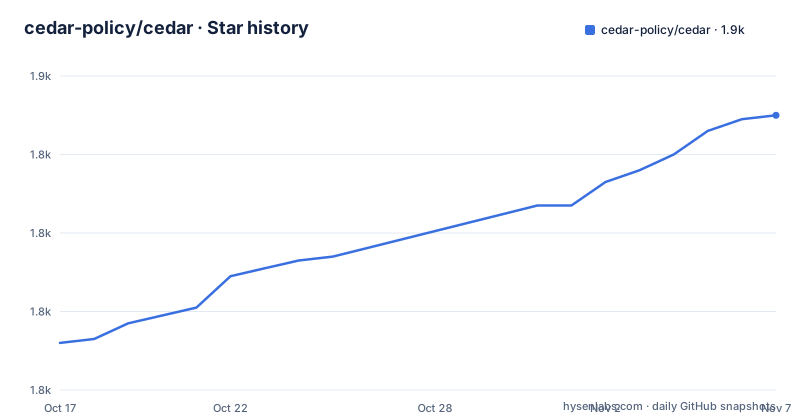
Star history
- cedar-policy/cedar1,850 ★ · +58
| Repository | 2026-10-17 | 2026-11-07 |
|---|---|---|
| cedar-policy/cedar | 1.8k | 1.9k |
58 Stars in the last 21 days, measured from the daily GitHub snapshot. Compare with other projects
Editorial analysis
The policy is a data model, not a function call
Cedar's pitch is separation of concerns with teeth. The README states that Cedar policies are separate from application code, so they can be independently authored, updated, analyzed and audited. An application does not ask "is this user an admin"; it hands the policy engine a request built from a principal, an action and a resource, and the engine returns a decision.
The quick start makes the shape concrete. The policy is a single permit statement:
permit (
  principal == User::"alice",
  action == Action::"view",
  resource in Album::"jane_vacation"
);
That one line grants alice the view action on anything inside the jane_vacation album. The in operator does the work of the entity hierarchy: the resource is a photo, and photos carry a parent reference to an album.
Entities live in JSON, and each one has a type and an id, plus optional attributes and a list of parents:
{
    "uid": { "type": "Photo", "id": "VacationPhoto94.jpg"},
    "attrs": {},
    "parents": [{ "type": "Album", "id": "jane_vacation" }]
}
Attribute values are typed. The README notes that the age attribute of User::"alice" is the integer 18, which matters because Cedar has a typechecker rather than treating everything as a string.
The CLI makes a deny decision visible in one line
Testing a policy by hand is a first class workflow here, not an afterthought. The cedar binary takes the policy file, the entity file and a request, and prints a decision:
cargo run --bin cedar authorize \
   --policies policy.cedar \
   --entities entities.json \
   --principal 'User::"alice"' \
   --action 'Action::"view"' \
   --resource 'Photo::"VacationPhoto94.jpg"'
The output is the single word ALLOW. Swap the resource to Photo::"SecretPhoto94.jpg", run the same command, and the output is DENY, because that photo's parent is Album::"jane_secrets" and no permit covers it.
That two-line demo is the whole reason to run the CLI during development. A policy can be exercised against known-good and known-bad requests, and the deny case can reveal whether the hierarchy and permit behave as assumed.
Eight crates, three audiences
The workspace has eight members, and the README separates them by who needs them.
The user-facing crates are cedar-policy, the main crate for authorizing access requests and validating policies against a schema, and cedar-policy-cli, described as a simple command line interface for interacting with Cedar. Two more are for adjacent runtimes: cedar-wasm defines the wasm interface that enables use with JavaScript and TypeScript, and cedar-language-server contains the language server implementation for editors.
The rest are internal: cedar-policy-core holds the parser, evaluator, typechecker and other core components, cedar-policy-formatter is an auto-formatter for policy files, and cedar-testing carries integration test code. cedar-policy-symcc sits in between, holding the symbolic compiler that verifies properties about policies and produces concrete counterexamples.
The practical guidance is that you depend on cedar-policy and treat the rest as implementation detail. Depending on cedar-policy-core directly means depending on a crate the README explicitly marks internal.
Getting Cedar into a Rust application is one command:
cargo add cedar-policyValidation against a schema is what makes policies reviewable
Two capabilities in the README go beyond a boolean check, and both are about confidence rather than convenience.
The first is schema validation. The README says you can use Cedar's validator to check that policies are consistent with a declared schema which defines your application's authorization model. A policy that references an action or entity type the application never defines is then a validation error rather than a silently unreachable branch. For a system where policies are written by people outside the core team, that check is the difference between reviewable artifacts and guesswork.
The second is formal analysis. Cedar is described as designed for analysis using Automated Reasoning, which the README says enables analyzer tools capable of optimizing policies and proving that the security model is what you believe it is. The cedar-policy-symcc crate is the concrete form of that claim: a symbolic compiler that verifies properties and returns counterexamples when a property fails.
Cedar's structure is designed for indexing, quick retrieval and fast, scalable real-time evaluation with bounded latency.
What the release engineering reveals
The workspace Cargo.toml carries more release detail than most readers expect, and it is worth reading for what it implies about the artifact you install.
The release profile enables overflow-checks = true, so integer arithmetic panics rather than wrapping in a shipped binary. That is a deliberate correctness choice for an authorization engine, and it costs some performance.
Distribution runs through cargo-dist at version 0.32.0 with dist = false at the workspace level, meaning each package opts in; cedar-policy-cli opts in through its own package metadata. Release targets are five: x86_64 and aarch64 on linux-gnu, x86_64 and aarch64 on apple-darwin, and x86_64-pc-windows-msvc. Installers are shell and powershell, and install-updater = false, so the CLI has no built-in self update. Tag namespaces are per crate, cedar-policy-symcc-v0.7.0 and cedar-policy-cli-v4.13.0 among the recent releases alongside v4.13.0 for the main crate.
The generated workflow pins its GitHub Actions by commit SHA, which is a supply chain practice worth noting. Release artifacts include NOTICE and THIRD_PARTY_LICENSES.txt, and the repository carries both at the top level alongside an Apache-2.0 LICENSE.
Changelogs are maintained on the main branch for every release branch, with the public ones being cedar-policy and cedar-policy-cli.
Where Cedar is the wrong choice
The costs are structural. A team adopting Cedar takes on a policy language, a schema, and the cedar-policy CLI, plus a validator that has to agree with whatever the application actually enforces. If your authorization rules are already expressed as ordinary application code and reviewed as such, Cedar adds a second source of truth rather than removing one.
The README is also candid about where to look before production use: it points integrators at a security best practices page and dedicates a section to backward compatibility considerations that the visible part of the README does not expand. That section matters more than usual, because a Cedar policy is a long lived artifact. The README does not summarise which language changes are safe across crate versions.
Integration examples live outside this repository, in cedar-policy/cedar-examples, where TinyTodo shows HTTP requests authorized by Cedar in a simple task list application.
Building the workspace itself needs nothing unusual: cargo build, or cargo build --release for an optimised build.
Editorial conclusion
Cedar fits teams that want authorization rules to live outside application code, be schema validated, and be checkable by a symbolic compiler rather than only by review. It does not fit a codebase that wants to express its rules in the language it already uses, since adopting it means a new policy language, a schema, and a second place to look when debugging access. Before you commit, read the security best practices page the README links and the backward compatibility section, because Cedar has made no stability promise visible in this README and policy files are long lived artifacts that outlive the crate version that read them.
Frequently asked questions
How do I add Cedar to a Rust project?
The README says to run `cargo add cedar-policy`, which pulls in the main crate for authorizing requests and validating policies against a schema. Building the repository itself needs `cargo build`.
How do I test a Cedar policy without writing Rust code?
Use the cedar CLI: run `cargo run --bin cedar authorize` with --policies, --entities, --principal, --action and --resource, and it prints ALLOW or DENY for that request.
Can Cedar be used from JavaScript or TypeScript?
Yes. The workspace includes cedar-wasm, described as the crate defining the wasm interface for Cedar and enabling use with JavaScript and TypeScript.
What licence does Cedar use and what else ships with it?
The repository is licensed Apache-2.0. Release artifacts include NOTICE and THIRD_PARTY_LICENSES.txt, and both files are kept at the top level of the repository.
Official sources
Add this badge to your README
If you maintain this project, the badge below links readers to this analysis and shows its maintenance status from the daily GitHub snapshot. Paste the markdown into your README; add ?metric=license or ?metric=stars to the image URL for a different field.

[](https://hysenlabs.com/projects/cedar-policy-cedar)Star history chart for your README
[](https://hysenlabs.com/projects/cedar-policy-cedar)Was this useful?