Infernux lets a Python component drive a Vulkan runtime, and calls itself alpha
Building a Neural Network-Native Engine (3N). Python authoring, C++ runtime, Vulkan/WebGPU. Windows, Linux, Android and Web.
At a glance
- What is it?
- Infernux is an MIT licensed game engine where gameplay, editor tools and render pipelines are written in Python over a C++ runtime with Vulkan and Jolt physics, targeting Windows, Linux, Android and the web. The README states it is alpha software at version 0.4.2, and the Neural Network-Native features people write about are roadmap items, not shipped code.
- Who is it for?
- Infernux suits an experimenter who wants to write a renderer, an editor panel or a numerical gameplay system in Python and needs that Python to reach real native code, because the batch world APIs and compute path are the parts that exist today. It is the wrong tool for a shipped title on a fixed date, for anyone needing Python older than 3.13, or for anyone adopting it specifically to run a trained model inside a game, since portable inference in the Player is still planned.
- Can I use it commercially?
- Yes. MIT is a permissive licence: you can use, modify and sell software built on it, as long as you keep its copyright and licence notices.
- Is it still maintained?
- Yes. The repository last received commits 2 days ago.
- What is it written in?
- Mainly Python, according to GitHub's language statistics.
Answers come from the project's GitHub data, last synced on November 7, 2026, and from our analysis. They are not legal advice.
Star history
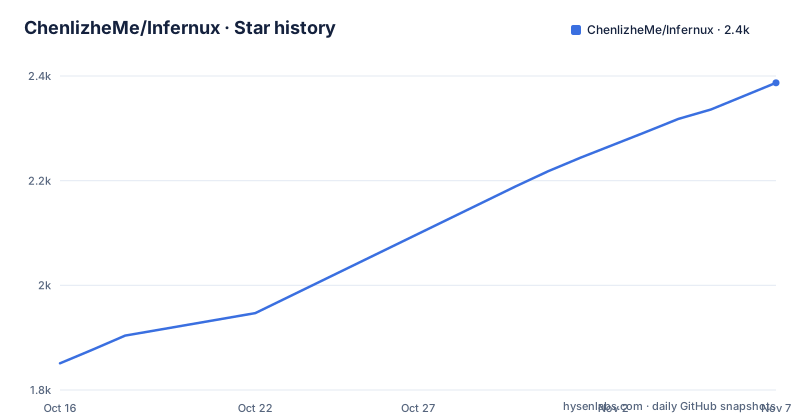
- ChenlizheMe/Infernux2,387 ★ · +536
| Repository | 2026-10-16 | 2026-11-07 |
|---|---|---|
| ChenlizheMe/Infernux | 1.9k | 2.4k |
536 Stars in the last 22 days, measured from the daily GitHub snapshot. Compare with other projects
Editorial analysis
The Python class is the component, and the Inspector reads its annotations
The whole programming model is visible in one example. A component is an ordinary Python class subclassing inx.InxComponent, with a typed field declared through inx.serialized_field and an update method taking delta_time:
import infernux as inx


class Spin(inx.InxComponent):
    speed: float = inx.serialized_field(default=90.0, range=(0.0, 360.0))

    def update(self, delta_time: float) -> None:
        self.transform.rotate(inx.Vector3(0.0, self.speed * delta_time, 0.0))
The field declaration is doing two jobs at once. It sets the default and it exposes the value to the editor, where the README says speed appears in the Inspector and can be tuned while the game runs. The range argument constrains what the Inspector offers.
What runs the frame loop is the C++ runtime underneath, and the division of labour is the design statement: Python is where you work, C++ is where it runs. Gameplay, editor tools, render pipelines and numerical code are all Python; the heavy lifting is a C++ runtime, a Vulkan renderer and Jolt physics.
Type hints are load-bearing rather than decorative, since pyproject.toml packages py.typed and .pyi stubs, and the project declares itself py-typed. That is what lets an editor tool read the class and build an inspector from it.
Installing through the Hub needs no native compiler
The supported path for using the engine is InfernuxHub, linked from the download page. You install the Hub, pick an engine version and create a project. The README states that the Hub manages Python environments and Android tools for you, and that no native compiler is needed.
That is the decision most people should make. The alternative is a source build that needs a full toolchain, and the README's Windows list is Visual Studio with the Desktop C++ workload, CMake 3.25 or newer, the Vulkan SDK and Python 3.13.
The Windows sequence uses CMake presets and a conda environment named infernux:
git clone --recurse-submodules https://github.com/ChenlizheMe/Infernux.git
cd Infernux
./scripts/setup/configure_development.ps1
conda activate infernux
cmake --preset windows-msvc-release
cmake --build --preset windows-msvc-release
cmake --build --preset windows-msvc-install-wheel
python packaging/launcher.py
The submodule flag is not optional, since the repository has .gitmodules and an external/ directory holding dependencies. The final launcher step is what starts the engine after the wheel is built.
There is a documented failure here worth reading. If configuration cannot create the selected generator, the fix is to install a CMake version that lists a compatible Visual Studio generator in cmake --help, or to set CMAKE_GENERATOR to one of the listed generators and configure again. Linux follows the same shape with scripts/setup/install_linux_dependencies.sh, scripts/setup/configure_development.sh and the linux-clang-release plus linux-clang-install-wheel presets.
Android and web get a Player but no editor
The platform table separates authoring targets from shipping targets, and the distinction is stark:
| Target | Editor | Player | Graphics | | --- |:---: |:---: |:--- | | Windows x64 | yes | yes | Vulkan | | Linux x86_64 | yes | yes | Vulkan | | Android arm64 / x86_64 | no | APK / AAB | Vulkan | | Web | no | HTML + WASM | WebGPU |
So Windows and Linux are the authoring platforms, and Android and the web are export targets reached from a project you build on the desktop. Android ships as an APK or an AAB, while the web target uses HTML + WASM and WebGPU rather than Vulkan.
Per-platform requirements and known limits are in SUPPORT.md rather than the README, which is the right place to look before committing to a target.
The build system reflects the split too. setup.py exists for a single reason, documented in its own comment: the wheel ships pre-built native extensions as.pyd,.dll or.dylib package data, so it must not be tagged py3-none-any. Overriding has_ext_modules() forces a platform wheel such as cp313-win_amd64. The same file refuses to build unless INFERNUX_STAGED_WHEEL_BUILD=1 is set, because wheels contain compiled native runtime files that cannot be produced from the source checkout alone.
The RenderStack you write in Python is what the native graph executes
The renderer is authorable rather than fixed. You describe a RenderStack in Python and the native RenderGraph runs it, with Forward, Forward+ and Deferred paths available, plus PBR, shadows, post-processing, GPU particle graphs, skinned animation, and both screen and world-space UI.
Writing that description in Python rather than in a material asset means the pipeline is version control friendly and diffable, which matters more than it sounds for a project that changes lighting often.
The rest of the feature list is a complete game loop rather than a rendering demo: multi-scene editing, FBX and Blender import with live source sync, Jolt rigid bodies and scene queries, audio, animation state machines and Timeline. Live source sync on import is the detail to note, since a re-export from Blender is reflected without a manual reimport step.
Hot reloading is described as transactional and explicitly covers instances that already exist, which is the harder case: adding a method to a running component behaves the way a developer expects rather than leaving orphaned objects.
Compute in the game is the part that exists, and models are the roadmap
The README is unusually careful to separate what is shipped from what is planned, and the 3N table does it in four rows. Only the first is available: Python authoring, batch world APIs and CPU/GPU compute, which the table says lets models and gameplay share one data path into the world.
Everything neural is marked planned. Deterministic stepping, snapshots and replay, for reproducible runs. Batched worlds and a tensor data plane, so many environments step side by side without glue code. And portable inference in the Player, so trained models ship inside the game on every target.
The features that do exist in this area are computational rather than machine-learning ones: batch NumPy access to world data, CPU and GPU JIT, and Taichi integration for numerical gameplay. The README calls that data path the one models will use later.
This is the single most important thing to understand about the project before adopting it. A search for an engine that runs neural networks inside a game will land here, and the answer is that the engine does not do that yet. The README's own warning block says the neural-network features are roadmap items rather than shipped features and that APIs still change between releases.
MIT, alpha, and versioned 0.4.2 with two Hub hotfixes the same day
The licence is MIT. The version in pyproject.toml is 0.4.2 and the classifier is Development Status:: 3 - Alpha, so the alpha label is not a marketing caveat but a packaging fact.
Python support is pinned tightly at >=3.13,<3.14. That is narrower than most engines and worth checking against what your studio already runs.
The runtime dependencies are ordinary and light: packaging, numpy, numba, llvmlite, watchdog, Pillow, imageio and av, with PySide6 behind the launcher extra. The build side is heavier, with pybind11 pinned to 3.1.0, cmake 3.25 or newer, Nuitka for a onefile build, and auditwheel plus patchelf listed for Linux. pytest-xdist is pinned to 3.8.0 for the test suite.
Release cadence is visible in the tag names as well as the dates. Infernux 0.4.2-v2 shipped on 2026-10-13, and two Hub tags shipped the same day: hub-v0.4.2-v3 for runtime installation and single-instance fixes, then hub-v0.4.2-v4 for Python installation and Windows permissions. The repository's last push was on 2026-10-16. A project moving fast enough to ship a permissions hotfix within hours is also a project whose APIs move, which is exactly what the warning says.
Assets keep a GUID from import to cooked Player
One design decision is worth pulling out because it affects your whole asset workflow. Assets keep a GUID identity from import through to the cooked Player, and Players load a packed asset index rather than your project folder.
That separation is what makes a shipped build inspectable and your project safe. A Player cannot reach back into your source tree, so a distributed build does not depend on where your Blender files or Python scripts happen to live, and a rename in the editor does not break a reference.
The plugin model is the other half of the extensibility story. InxPackage plugins carry components, tools, assets and platform exporters, and the editor itself is extended with dockable panels and menus written in Python. There is also an optional MCP plugin that lets agents drive the editor through the same command and undo paths a person uses, which is an unusual thing for an engine to ship and a useful one for anyone automating asset work.
Beyond the editor, repository layout separates the two languages: python/, cpp/, cmake/, scripts/, packaging/, external/, docs/, tests/ and environment.yml at the top level, with UpdateLog.md as the release history and SECURITY.md for reporting.
Editorial conclusion
Infernux suits an experimenter who wants to write a renderer, an editor panel or a numerical gameplay system in Python and needs that Python to reach real native code, because the batch world APIs and compute path are the parts that exist today. It is the wrong tool for a shipped title on a fixed date, for anyone needing Python older than 3.13, or for anyone adopting it specifically to run a trained model inside a game, since portable inference in the Player is still planned. Before building, read the warning in the README rather than the roadmaps, install InfernuxHub and follow the five-step start to a spinning cube, and keep the source build's requirement of a Visual Studio C++ workload, CMake 3.25 or newer and the Vulkan SDK in view if you intend to compile rather than install the Hub.
Frequently asked questions
How do I get started with Infernux without a compiler?
Install InfernuxHub from the project's download page, pick an engine version and create a project. The Hub manages Python environments and Android tools and needs no native compiler, then you follow the five-step start to a component that spins a cube.
Does Infernux run neural networks inside a game?
Not yet. The 3N table in the README marks portable inference in the Player, deterministic stepping, and a batched tensor data plane as planned. The available stage is Python authoring, batch world APIs and CPU/GPU compute, plus NumPy, CPU and GPU JIT and Taichi integration.
What are the system requirements for building Infernux from source?
Windows needs Visual Studio with the Desktop C++ workload, CMake 3.25 or newer, the Vulkan SDK and Python 3.13, configured through the windows-msvc-release and windows-msvc-install-wheel presets. Linux uses scripts/setup/install_linux_dependencies.sh and the linux-clang-release plus linux-clang-install-wheel presets. pyproject.toml requires Python >=3.13,<3.14.
Can I build Infernux games for Android or the web?
Yes, as export targets. The platform table shows Android arm64 and x86_64 shipping as APK or AAB over Vulkan, and web shipping as HTML plus WASM over WebGPU, but neither has an editor, so those projects are authored on Windows or Linux first.
How do I write a component with editable values in Infernux?
Subclass inx.InxComponent and declare fields with inx.serialized_field, giving a default and optionally a range. The README notes that such a field appears in the Inspector and can be tuned while the game runs, and that update methods take delta_time.
Official sources
Add this badge to your README
If you maintain this project, the badge below links readers to this analysis and shows its maintenance status from the daily GitHub snapshot. Paste the markdown into your README; add ?metric=license or ?metric=stars to the image URL for a different field.

[](https://hysenlabs.com/projects/chenlizheme-infernux)Star history chart for your README
[](https://hysenlabs.com/projects/chenlizheme-infernux)Was this useful?